'''
The following code is inspired by:
User raja_961, Autonomous Lane-Keeping Car Using Raspberry Pi and OpenCV.
Instructables. URL: https://www.instructables.com/Autonomous-Lane-Keeping-Car-Using-Raspberry-Pi-and/
User Zhenya Liu, Karthik Goli, BT7, Lei Xia, Lane-Keeping RC car.
Hackster.io. URL: https://www.hackster.io/team-6/lane-keeping-rc-car-ebdd08
Team P.R.N.T: Paulina Arizpe-Romo, Tomi Kuye, Renee Wrysinski, Noah Villa, P.R.N.T. car.
Hackster.io. URL: https://www.hackster.io/p-r-n-t/p-r-n-t-car-22c60e
'''

# Team: Anthony Zhang, Ruiyang Wu, Helena Wang, Jacqueline Chung

#import various packages
import cv2
import numpy as np
import matplotlib.pyplot as plt
import math
import time
import os
import RPi.GPIO as GPIO


# --- Pin definitions ---
SPEED_PIN = 20
STEERING_PIN = 21

# --- image capture sizes ---.
frame_width  = 160
frame_length = 120

# --- PWM freq ---
freq = 50

# --- PD constants ---
kp = 0.04
kd = 0.004

# --- Encoder thresholds ---
# These are interval between pulses in nanoseconds.
#   max_speed: shorter interval than this means car going TOO FAST, so slow down
#   min_speed: longer  interval than this means car going TOO SLOW, so speed up
max_speed = 750_000_000
min_speed = 900_000_000

SPEED_STEP = 0.0001

# --- Stop sign ---
# Fraction of the frame that must be red to count as a stop sign.
bound_perc = 25.0

# --- Encoder driver path ---
interval_loc = "/sys/module/encoder_driver/parameters/encoder_interval"

# --- State variables that must live outside main loop ---
lastTime  = 0
lastError = 0
current   = 7.6    # current throttle duty cycle
max_throttle = 7.7
min_throttle = 7.50   # don't let `current` fall below this
ctr = 0
last_turn   = 7.5
turn_smooth = 0.1    # higher val makes turn smoother but laggier
stop_cooldown_until = 0   # variables for red light stop
stop_count = 0

# --- Plotting buffers ---
errors      = []
derivatives = []
proportions = []
# for visualization
frames      = []
turns       = []
speeds      = []


# ====================== Computer vision functions ======================

def start_video():
    video = cv2.VideoCapture(0)
    #set frame resolutions
    video.set(cv2.CAP_PROP_FRAME_WIDTH,  frame_width)
    video.set(cv2.CAP_PROP_FRAME_HEIGHT, frame_length)
    #single frame buffer to minimize latency
    video.set(cv2.CAP_PROP_BUFFERSIZE, 1)
    return video

def convert_to_HSV(frame):
    #seperates color from brightness
    return cv2.cvtColor(frame, cv2.COLOR_BGR2HSV)

def detect_edges(hsv):
    #bounds for where blue can be detected in hsv space
    lower_blue = np.array([ 90,  50,   0], dtype="uint8")
    upper_blue = np.array([150, 255, 255], dtype="uint8")
    # 255 where pixels are blue, 0 elsewhere
    mask  = cv2.inRange(hsv, lower_blue, upper_blue)
    #canny edge detection on mask
    edges = cv2.Canny(mask, 50, 100)
    return edges

ROI_TOP_FRAC = 0.60   # 0.5 = bottom half. Higher val means cutoff closer to the car.

def region_of_interest(edges):
    #get dimensions of edges
    height, width = edges.shape
    mask = np.zeros_like(edges)
    top_y = int(height * ROI_TOP_FRAC)
    #rectangle covering lower portion of region, which is region that is kept
    polygon = np.array([[
        (0,     height),
        (0,     top_y),
        (width, top_y),
        (width, height),
    ]], np.int32)
    #fill polygon w/ white
    cv2.fillPoly(mask, polygon, 255)
    #keeps edges only inside polygon
    return cv2.bitwise_and(edges, mask)

def detect_line_segments(cropped_edges):
    #returns a list [x1,y1,x2,y2] segments
    return cv2.HoughLinesP(cropped_edges, 1, np.pi/180, 10, np.array([]), minLineLength=5, maxLineGap=0)

def average_slope_intercept(frame, line_segments):
    lane_lines = []
    #if no line segments found
    if line_segments is None:
        #for debugging
        print("  [asi] no segments")
        return lane_lines

    #split frame into left and right halves
    height, width, _ = frame.shape
    left_fit, right_fit = [], []
    #diagnostic counters for debugging
    n_total = 0; n_shallow = 0; n_left = 0; n_right = 0; n_dropped = 0

    # iterate thru all hough segments
    for line_segment in line_segments:
        for x1, y1, x2, y2 in line_segment:
            n_total += 1

            # Treat vertical segments as having very steep slope
            if x1 == x2:
                slope     = 1e6
                intercept = x1     # store x in intercept slot for make_points
            else:
                #normal slope-intercept form
                slope     = (y2 - y1) / (x2 - x1)
                intercept = y1 - slope * x1

            # near horizontal lane lines
            if abs(slope) < 0.2:
                n_shallow += 1
                continue

            # Classify by midpoint side, not strict endpoint regions.
            mid_x = (x1 + x2) / 2.0
            #left lane fit
            if mid_x < width / 2:
                left_fit.append((slope, intercept))
                n_left += 1
            #right lane fit
            else:
                right_fit.append((slope, intercept))
                n_right += 1

    #debug print
    print(f"  [asi] total={n_total} shallow={n_shallow} "
          f"L={n_left} R={n_right} dropped={n_dropped}")

    #convert averaged lines into endpoint coordinates
    if left_fit:
        lane_lines.append(make_points(frame, np.average(left_fit, axis=0)))
    if right_fit:
        lane_lines.append(make_points(frame, np.average(right_fit, axis=0)))
    return lane_lines

#helper function for average_slope_intercept
def make_points(frame, line):
    height, width, _ = frame.shape
    slope, intercept = line
    #bottom of img to halfway up the frame
    y1 = height
    y2 = int(y1 / 2)
    if abs(slope) > 1e3:        # vertical: same x at both endpoints
        x1 = x2 = int(intercept)
    else:
        #avoid division by zero on horizontal slope
        if slope == 0: slope = 0.1
        #solve for endpoints
        x1 = int((y1 - intercept) / slope)
        x2 = int((y2 - intercept) / slope)
    return [[x1, y1, x2, y2]]

def display_lines(frame, lines, line_color=(0, 255, 0), line_width=6):
    #blank frame
    line_image = np.zeros_like(frame)
    if lines is not None:
        #draw each lane line
        for line in lines:
            for x1, y1, x2, y2 in line:
                cv2.line(line_image, (x1, y1), (x2, y2), line_color, line_width)
    #overlay lane onto original frame
    return cv2.addWeighted(frame, 0.8, line_image, 1, 1)

def get_steering_angle(frame, lane_lines):
    height, width, _ = frame.shape
    if len(lane_lines) == 2:
        #if both lanes visible, find midpoint between them
        _, _, left_x2,  _ = lane_lines[0][0]
        _, _, right_x2, _ = lane_lines[1][0]
        mid = int(width / 2)
        #if pos offset, steer right. otherwise, steer left
        x_offset = (left_x2 + right_x2) / 2 - mid
        y_offset = int(height / 2)
    elif len(lane_lines) == 1:
        # follow the slope of the visible line.
        x1, _, x2, _ = lane_lines[0][0]
        x_offset = x2 - x1
        y_offset = int(height / 2)
    else:
        #no lanes, so drive straight
        x_offset = 0
        y_offset = int(height / 2)
    # convert calculated offsets into steering angle
    angle_to_mid_radian = math.atan(x_offset / y_offset)
    angle_to_mid_deg    = int(angle_to_mid_radian * 180.0 / math.pi)
    return angle_to_mid_deg + 90

def display_heading_line(frame, steering_angle, line_color=(0, 0, 255), line_width=5):
    #overlay canvas
    heading_image = np.zeros_like(frame)
    height, width, _ = frame.shape
    #convert steering angle to radians
    rad = steering_angle / 180.0 * math.pi

    x1 = int(width / 2); y1 = height
    x2 = int(x1 - height / 2 / math.tan(rad)); y2 = int(height / 2)
    #draw heading line
    cv2.line(heading_image, (x1, y1), (x2, y2), line_color, line_width)
    return cv2.addWeighted(frame, 0.8, heading_image, 1, 1)

def detect_red_pix(hsv):

    h, w = hsv.shape[:2]
    #convert percent threshold into pixel count
    bound = (h * w) * (bound_perc / 100.0)
    #need two ranges since red wraps around in hsv
    lower_red1 = np.array([  0,  50,  60], dtype="uint8")
    upper_red1 = np.array([ 10, 255, 255], dtype="uint8")
    lower_red2 = np.array([170,  50,  60], dtype="uint8")
    upper_red2 = np.array([180, 255, 255], dtype="uint8")
    #make masks for each range
    mask1 = cv2.inRange(hsv, lower_red1, upper_red1)
    mask2 = cv2.inRange(hsv, lower_red2, upper_red2)
    #combine masks
    mask  = cv2.bitwise_or(mask1, mask2)
    #count how many pixels of red there are
    num_red_px = cv2.countNonZero(mask)
    # Use this number to tune `bound_perc`:
    # print(f"red_px={num_red_px}  thresh={int(bound)}")
    return num_red_px >= bound


# ====================== Speed encoder ======================

def get_speed_change():
    #if encoder fails fsr, dont change speed
    try:
        with open(interval_loc, "r") as f:
            interval = int(f.readline())
    except Exception:
        return 0.0
    #if we are stalled, we want to increase speed
    if interval == 0:
        return SPEED_STEP
    #short interval, means fast, so slow down
    if   interval <= max_speed: return -SPEED_STEP
    #vice versa
    elif interval >= min_speed: return  SPEED_STEP
    #else, hold current speed
    else:                       return  0.0
# ====================== GPIO ======================

def GPIO_setup():
    #set up GPIO pins
    GPIO.setmode(GPIO.BCM)
    GPIO.setup(SPEED_PIN,    GPIO.OUT)
    GPIO.setup(STEERING_PIN, GPIO.OUT)

def calibrate_esc(pwm):
    #calibrate our esc before run, 7.3 is neutral for our esc
    pwm.ChangeDutyCycle(10);  time.sleep(2)
    pwm.ChangeDutyCycle(5);   time.sleep(2)
    pwm.ChangeDutyCycle(7.3); time.sleep(2)


# ====================== Main loop!! ======================

GPIO_setup()
#set PWM freq to be 50 Hz
pwm_speed = GPIO.PWM(SPEED_PIN,    freq)
pwm_steer = GPIO.PWM(STEERING_PIN, freq)
#start all PWM at neutral
pwm_speed.start(7.3)
pwm_steer.start(7.5)
#initial calibration
calibrate_esc(pwm_speed)

#start computer vision
video = start_video()
lastTime = time.time()

try:
    while True:
        # Drain any buffered frames so we always work on the freshest one
        for _ in range(2):
            video.grab()
        #decode most recently grabbed frame
        ret, frame = video.retrieve()
        #if decode failed, skip and try again in next loop
        if not ret or frame is None:
            continue

        frame = cv2.flip(frame, -1)
        #convert camera output to hsv
        hsv = convert_to_HSV(frame)

        # ---- Stop sign handling ----
        if detect_red_pix(hsv) and time.time() > stop_cooldown_until:
            stop_count += 1
            #second stop sign is end of course, so stop and exit loop
            if stop_count >= 2:
                print(f"Second stop sign  stopping permanently.")
                #reset back to neutral
                pwm_speed.ChangeDutyCycle(7.3)
                pwm_steer.ChangeDutyCycle(7.5)
                break
            #pause 5 seconds then continue on first red
            print(f"Stop sign #{stop_count}  pausing 5s")
            pwm_speed.ChangeDutyCycle(7.3)
            pwm_steer.ChangeDutyCycle(7.5)
            time.sleep(5)
            #makes sure red stop sign doesnt retrigger
            stop_cooldown_until = time.time() + 15
            #reset pd errors after pause
            lastTime  = time.time()
            lastError = 0

        # ---- Lane processing ----
        # Pipeline: HSV mask -> Canny -> ROI -> Hough -> averaged lanes

        edges          = detect_edges(hsv)
        roi            = region_of_interest(edges)
        line_segments  = detect_line_segments(roi)
        lane_lines     = average_slope_intercept(frame, line_segments)
        # How many lanes were found for debugging
        num_lines      = len(lane_lines)

        # Visualize lanes and heading direction for debugging
        lane_image     = display_lines(frame, lane_lines)
        steering_angle = get_steering_angle(frame, lane_lines)
        heading_image  = display_heading_line(lane_image, steering_angle)
        #save imgs for debugging
        cv2.imwrite("roi.jpg", roi)
        cv2.imwrite("blue_full.jpg", cv2.inRange(hsv, np.array([90,50,0]), np.array([150,255,255])))
        cv2.imwrite("heading_image.jpg", heading_image)

        #allows esc key to break loop
        if cv2.waitKey(1) == 27:
            break

        # ---- PD steering ----
        now = time.time()
        dt  = now - lastTime
        if dt <= 0:
            dt = 1e-3   # guard against the first frame and clock weirdness

        #how far heading is off from straight
        error        = steering_angle - 90
        base_turn    = 7.5
        #pd terms for PID!!
        proportional = kp * error
        derivative   = kd * (error - lastError) / dt
        turn         = base_turn + proportional + derivative

        # Servo safety clamp (centered at 7.5)
        turn         = base_turn + proportional + derivative
        # Servo safety clamp (centered at 7.5)
        turn = base_turn + proportional + derivative

        # Hard limits prevent servo from moving past its mechanical range
        turn = max(5.0, min(10.0, turn))
        pwm_steer.ChangeDutyCycle(turn)

        # ---- Speed update ----
        nl_raw = -1

        # Only update speed every 8 frames
        if ctr % 8 == 0:
            #read encoder interval and print for debug
            try:
                with open(interval_loc, "r") as f:
                    nl_raw = int(f.readline())
            except Exception:
                pass

            #closed-loop step towards target speed
            new_speed = current + get_speed_change()
            # make sure speed isnt too fast or slow
            new_speed = max(min_throttle, min(max_throttle, new_speed))

            pwm_speed.ChangeDutyCycle(new_speed)
            current = new_speed

            #print error for debugging
            print(f"f={ctr:4d} lines={num_lines} err={error:+6.1f} "
                f"turn={turn:5.2f} curr={current:5.3f} nl={nl_raw}")

        # ---- Logging ----
        #append everything so we can plot in the end
        errors.append(error)
        derivatives.append(derivative)
        proportions.append(proportional)
        #more plots
        turns.append(turn)
        speeds.append(current)
        frames.append(ctr)

        ctr += 1

        #update error for PID
        lastError = error
        lastTime  = now

        #brief sleep in between loop
        time.sleep(0.025)

finally:
    # stop the car's movements
    try:
        #reset everything to neutral
        pwm_speed.ChangeDutyCycle(7.3)
        pwm_steer.ChangeDutyCycle(7.5)
        #stop PWM signal
        pwm_speed.stop()
        pwm_steer.stop()
    except Exception:
        pass
    #release GPIOs
    GPIO.cleanup()
    #release camera
    video.release()
    #close OpenCV windows
    cv2.destroyAllWindows()

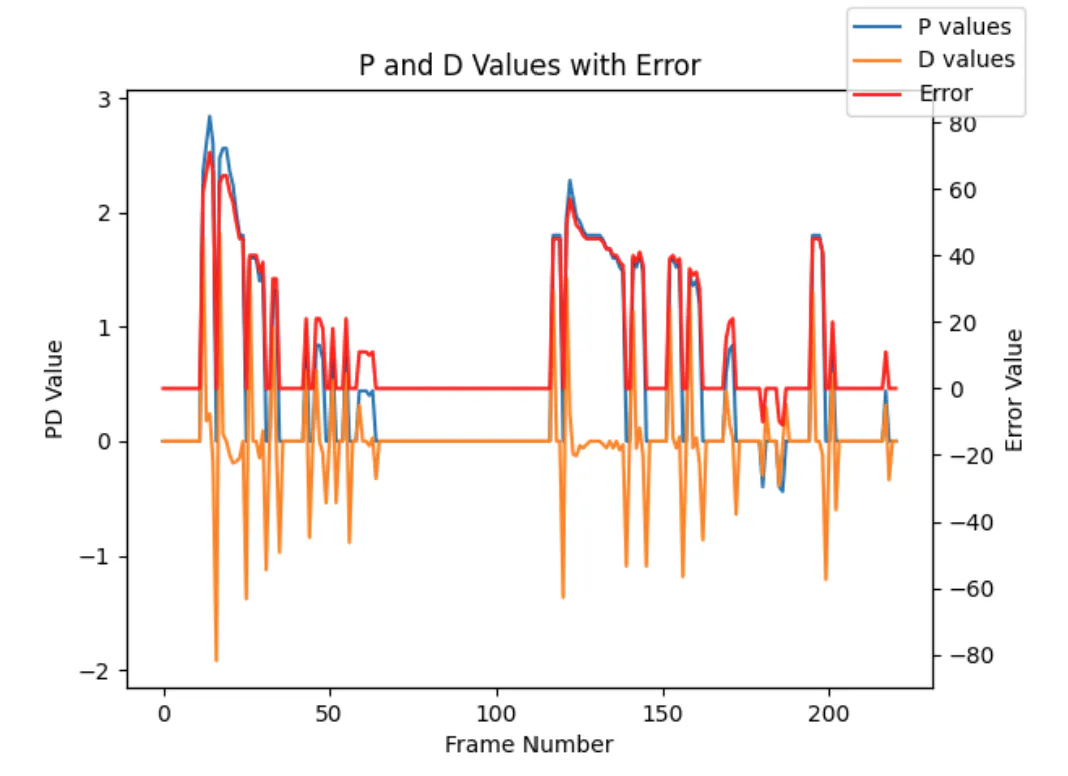
    # P / D / Error plot
    fig, ax1 = plt.subplots()
    t_ax = np.arange(len(proportions))
    ax1.plot(t_ax, proportions, label="P values")
    ax1.plot(t_ax, derivatives, label="D values")
    #share x axis but separate y axis
    ax2 = ax1.twinx()
    ax2.plot(t_ax, errors, label="Error", color='red')
    ax1.set_xlabel("Frame Number"); ax1.set_ylabel("PD Value")
    #error bound to 90 degrees
    ax2.set_ylim(-90, 90); ax2.set_ylabel("Error Value")
    plt.title("P and D Values with Error"); fig.legend()
    #save plot
    plt.savefig("PD_vals.png")

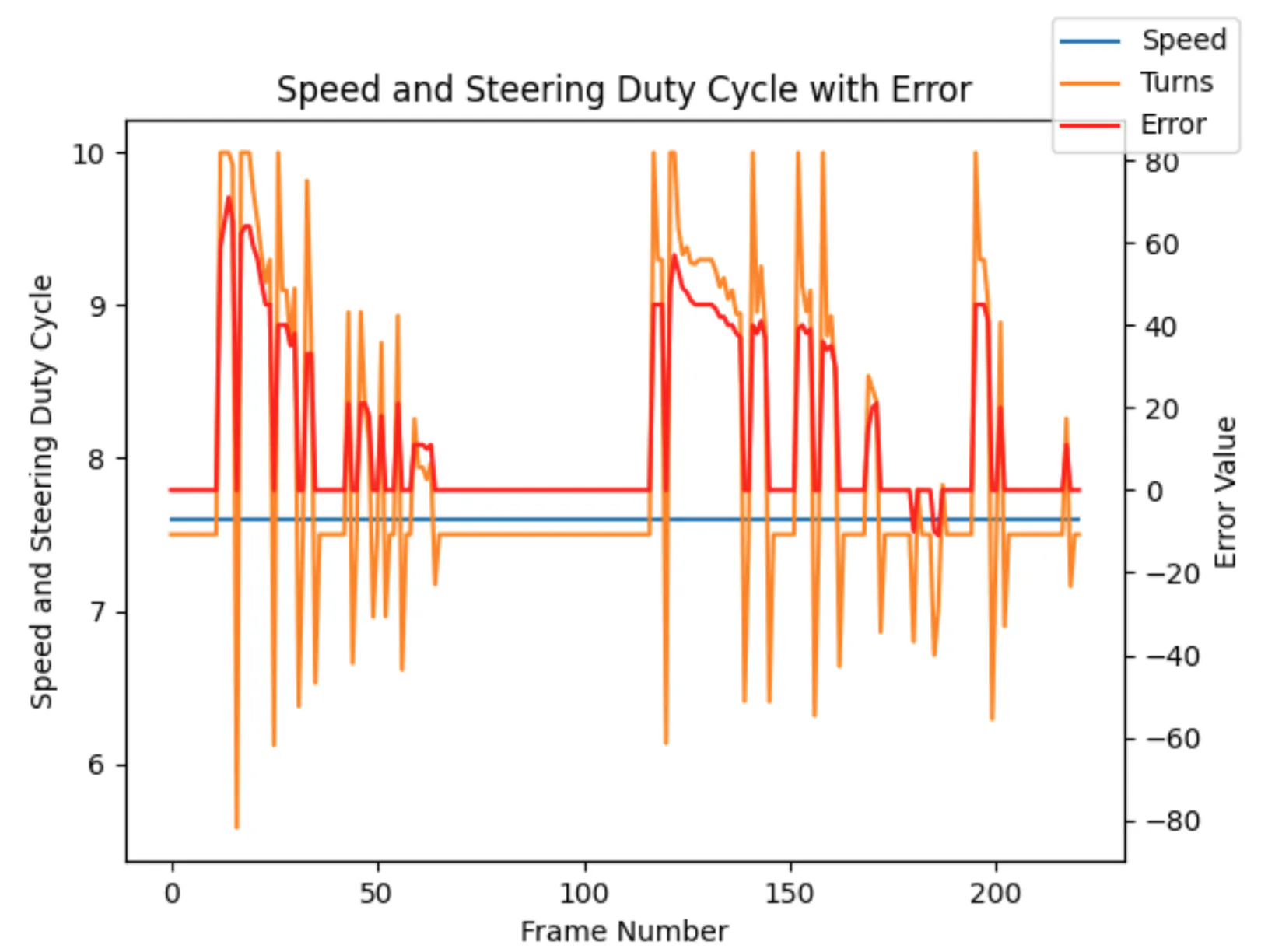
    # Speed / Turn / Error plot
    fig, ax1 = plt.subplots()
    t_ax = np.arange(len(speeds))
    ax1.plot(t_ax, speeds, label="Speed")
    ax1.plot(t_ax, turns,  label="Turns")
    #share x axis but separate y axis
    ax2 = ax1.twinx()
    ax2.plot(t_ax, errors, label="Error", color='red')
    ax1.set_xlabel("Frame Number")
    ax1.set_ylabel("Speed and Steering Duty Cycle")
    #bound errors to be 90 degrees
    ax2.set_ylim(-90, 90); ax2.set_ylabel("Error Value")
    plt.title("Speed and Steering Duty Cycle with Error"); fig.legend()
    #save plot
    plt.savefig("Movement_vals.png")






Comments