



Hardware components | ||||||
| × | 1 | ||||
| × | 3 | ||||
| × | 1 | ||||
| × | 3 | ||||
Software apps and online services | ||||||
 |
| |||||
Hand tools and fabrication machines | ||||||
| ||||||
| ||||||
My "What was at hand" (WWAH) CNC router project has finally come to its final phase.
I started this project 2 years ago, but then I got side-tracked by 3D-printing, so the CNC router project collected dust, until recently when I realized that I actually could use a router for various experimental projects I was working on. For example I wanted to make holographic lenses, but 3D-printing failed biggly. However those experiments may be a topic for an other article. In either case, I got motivated to finish my CNC router project.
Please notice, this project is using unconventional methods and materials, it may appear to some of you borderline-irresponsible, and/or dilettantish. Professional electricians should probably look away now, to lower the risk of heart attacks and/or spontaneous raptures.
The goal of this build was never to create the perfect router. Rather was the idea to build something that's doing the job by using only readily and locally available parts. Everything except for the 3 stepper motors, the discreet parts of the driver board and the ESP32 MCU was purchased in local hardware stores. The threaded spindles are threaded M8 bolts with M8 nuts to move the XYZ trays, directly from the shelf. For coupling I press-fitted some brass tubing onto the 3mm motor shafts, flattened the ends and stuck them into slits that I used to saw vertically into the threaded axis bolts / spindles.
The M8 nuts are held in place by 3D-printed parts while being also sandwiched between two aluminum plates that contain holes for two screws and the M8 axis spindle.
You will notice most of it consists of some white "ikeaoid" wooden boards. The reason why I chose to use it was kind of odd, but is key to understand the design. Namely I noticed that these boards, if one lies on-top of an other one, they slide on each-other like crazy. Bearings could barely do a better job. So the idea was born to use these slippery boards, rather than any bearings or rails at all.
Keep in mind that these aren't the cheap kind that has a plastic foil stuck on the surface and bends at the slightest change of humidity. This press-wood board is of extremely high quality. It is light and rigid, did not deform over various seasons stored in a cellar. The surface is very hard and resistant to abrasion - the type you see in expensive kitchen furniture.
If it wasn't for these very special features, I would never have chosen wood. Because normally wood is constantly deforming and may expand or contract up to 4%, just from a weather change that alters air humidity. But this board is different.
In that spirit the Z-axis is really just a board that sits in a vertical slot. Provided this Z-tray board is cut precisely parallel, a relatively high routing precision can be achieved. Particularly, there will be near-to-zero play at the tool's tip, and the size of if makes it quite stable and rigid - for a wooden construction.
For X and Y I diverted from my plan after I coincidentally stumbled over a couple of sliding-door rails from a disposed cabinet. While they slide very nicely, they are also flexing a lot, so I will combine them with the initial idea, because luckily their height is exactly double the thickness of the wooden board, allowing me to put two pieces of the wooden board vertically between X and Y, near the center where the tool is pushing down.
I have built some routers in the past, and the imperfect stability of the Z-axis-stand was always something that bothered me. So this time I thought I have to use something more radical: concrete. It is cheap and heavy and extremely rigid - it's literally as hard as rock.
The way I made the Z-axis stand: first I made a mold for the vertical plate on which the z-axis-module is mounted. I integrated the M5 mounting screws in the mold and planted some metal bolts where the horizontal beam was meant to be added.
I poured the concrete into the mold. The next day I carefully built an L-shaped mold on-top of the plate I made the day before (without to move or stress the latter - else the concrete wouldn't harden well). You can see that I kept the Z-axis-mounting-plate flat on the floor, then filled the L-shaped mold that had 2 bolts poking through both mold-walls near the end, meant as anchors in the next part, the actual foot. Two days later I carefully removed the molds and turned the part 90 degrees, fixated it so it would stand perfectly vertical. Then I used the first mold again, but now for the foot. I simply placed the part in the mold, added again some scrap steel enforcement and poured in the concrete. Close to the vertical column of the L-part I added some more concrete, resulting in a slight slope. And that was it.
Concrete should harden undisturbed for 30 days. Esp. during the first week it should not be shaken, moved, stressed or looked at in weird ways - else it may become crumbly. However, silly as I am I forgot to add an indentation for the motor mount on the z-axis-mounting-plate, which I realized on day 3. So I chiseled off a pocket, and oh my goodness, it felt already like granite. More often than not the gravel stones would break apart, rather than to just pop out of the concrete. That little pocket took my about two hours to chisel. Notice hardening concrete should also not dry too fast, hence in the winter one should make it wet every two days or so, for the first 1 to 2 weeks. You will see how it sucks up the water, indicating it is still hardening. Probably needless to say, it should also not freeze during month 1.
I finally ended up using 4 washers on every screw between the concrete stand and the z-axis-module, hence the gap there.
On the backside of the Z-stand I have temporarily mounted a board that provides plenty space for the ATX power supply and the driver board. While this CNC has a poor workspace-to-footprint ratio compared to designs with the X-tray mounted to the Z-axis, I do actually save some space here.
XYZ axis operation is working, all the way from windows over WiFi, ESP32, driverboard, motor and coupling to the axis.
Still to do:Axis spindle end bearings. These are very simple substitutes at the moment, causing unnecessary problems, but are meant to be replaced by something decent ASAP.
Connect Z-stand and XY group firmly. I will have to make a custom steel collar that is tightened around the Z-stand with screws, while being firmly attached to the X-base board.
Install the end-switches. I have made ready 6 very simple end switches. They will signal to the MCU if an axis tray has reached the near or far end of a spindle. All 6 switches are connected in series and closed by default. A 3.3 Volt source via a 2K resistor goes through this series, to a GPIO that will detect when any switch is opened (= 0 Volt). It is then up to the MCU to remember what it did just before, and therefor know (example given) it hit the near X-axis switch because the last thing it did was it traveled left on the X axis.
The stop-switches I made are extremely simple, and once again I utilized some sheet metal from a potato chips roll - it's almost an obsession it seems. But I guess they'll do the job. On the picture you see them not yet bent into "default closed state", but that's just a little push with the scissors or a small screwdriver near the bottom of the electrodes.
Once the end switches are mounted and connected, I can "home" the router, and based on that start doing some real stuff, like heightmap-based carvings.
On the software side I find things are also quite fascinating. Coding in Arduino IDE for the "DOIT ESP32 Devboard 1.0" is fun, currently I have implemented some simple commands like moveX300, setSpeed25. However I plan to upload whole heightmaps so the ESP32 MCU can then process them and finish a job without further commands from windows. Further down the line g-code interpretation is on the agenda.
As the compiler to create apps that communicate with the ESP32 from windows over WiFi/TCP, I chose Blitz3D. Even tho it's a BASIC language, it's perfectly capable of doing the job. I already successfully use TCP streams, but Blitz3D also offers a whole 3D engine, that I worked with for decades, so I am quite familiar with it, and many things, like generating a heightmap from a 3D model, can be directly coded in Blitz3D. So for me personally it's the perfect choice. You can find it for free on itch.io, by BlitzResearch / Mark Sibly (RIP).
; OpenTCPStream/CloseTCPStream Example
; http://192.168.4.1
TCPTimeouts 1000000,0 ; max wait for data in stream,  max wait for connection accept, in ms
Print "Connecting..."
tcp=OpenTCPStream( "192.168.4.1",80 )
If Not tcp Print "Connection failed.":WaitKey:End
Print "Connected! Sending request..."
; X: -= right, += left
; Y: -= approach,  += depart
; Z: -= down,   += up
WriteLine tcp,"GET http://192.168.4.1 /moveZ-240/ HTTP/1.1"
WriteLine tcp,Chr$(10)
If Eof(tcp) Print "GET failed.":WaitKey:End
Print "Request sent! Waiting for reply..."
While Not Eof(tcp)
Print ReadLine$( tcp )
Delay 1
Wend
If Eof(tcp)=1 Then Print "Success!" Else Print "Error!"
Delay 200
CloseTCPStream tcp
Delay 200
WaitKey()
End
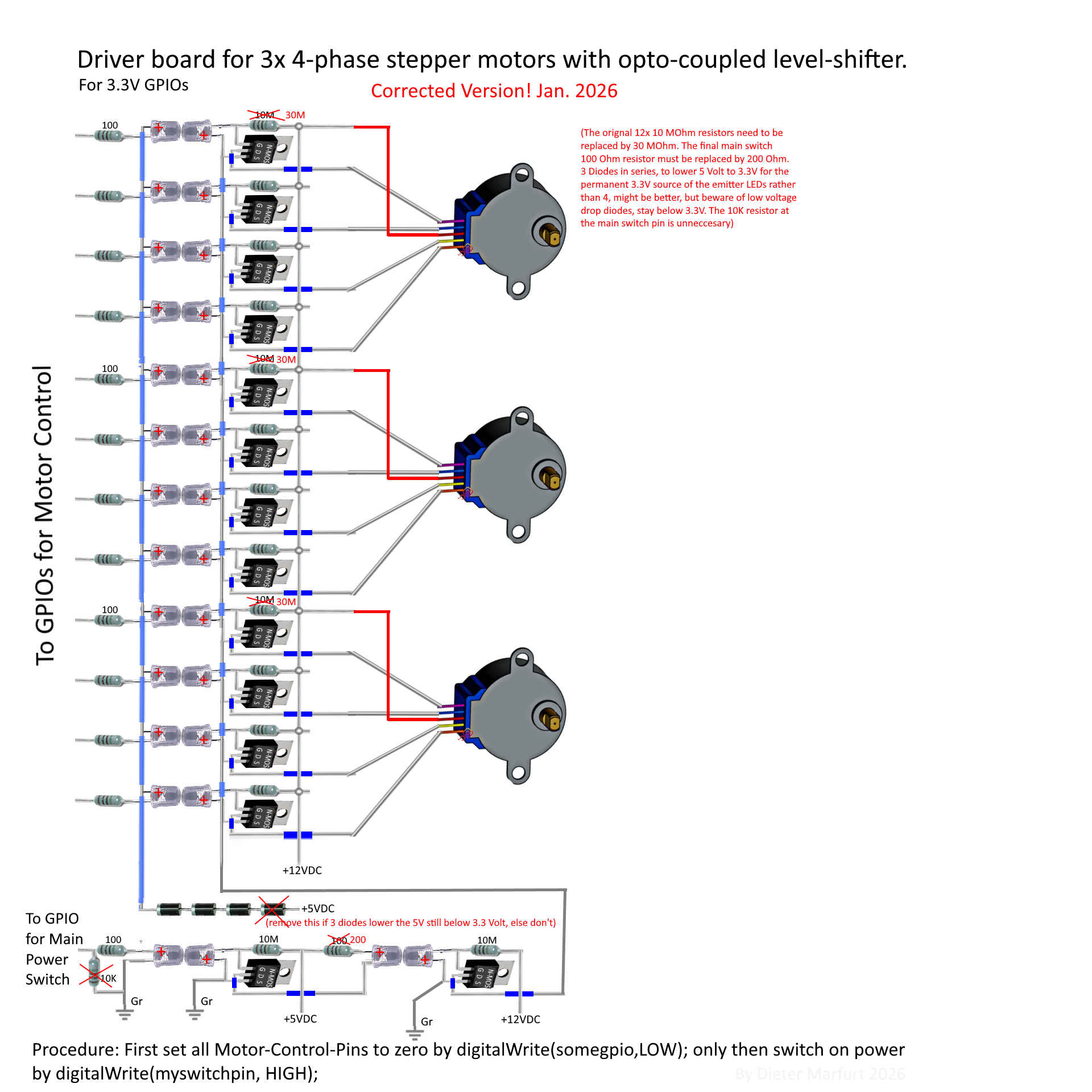
The driver board is based on the schematic I released in my article about the 3.3V to 12V optocoupled level-shifter ( https://www.hackster.io/mr-dee67/1-dollar-opto-coupled-logic-level-shifter-4b0ff6 ). It uses 2 LEDs as an opto-coupler, one as an emitter and one as a sensor, which is quite unconventional, and it was only feasible for me because I had a whole bag of LEDs lying around, and only about 3 light-dependent resistors. Again the WWAH-philosophy was followed. Keep in mind that such exotic approaches often cause problems which common solutions don't face. In this case, as mentioned in the opto-coupler project, it seems the speed is quite limited, although adding some capacitors may help.
As can be seen, the driver board has no PCB. That was achievable thanks to the 3 rails 12V, 3.3V and ground that act as stabilizing helpers. Additionally the case holds things in place due to compartmentalized LED-coupling units. A covering lid is planned, containing a fan for cooling, as well as a compartment for the ESP32. Currently there is a hole in the case underneath every MOSFET, so that should work nicely, in case heat becomes an issue, esp. when I replace these motors by stronger ones, which I most likely will do the sooner or later.
ConclusionOther than it was a fun build so far, I can only conclude that updates will follow. For now I guess I deserve a break.


Comments