



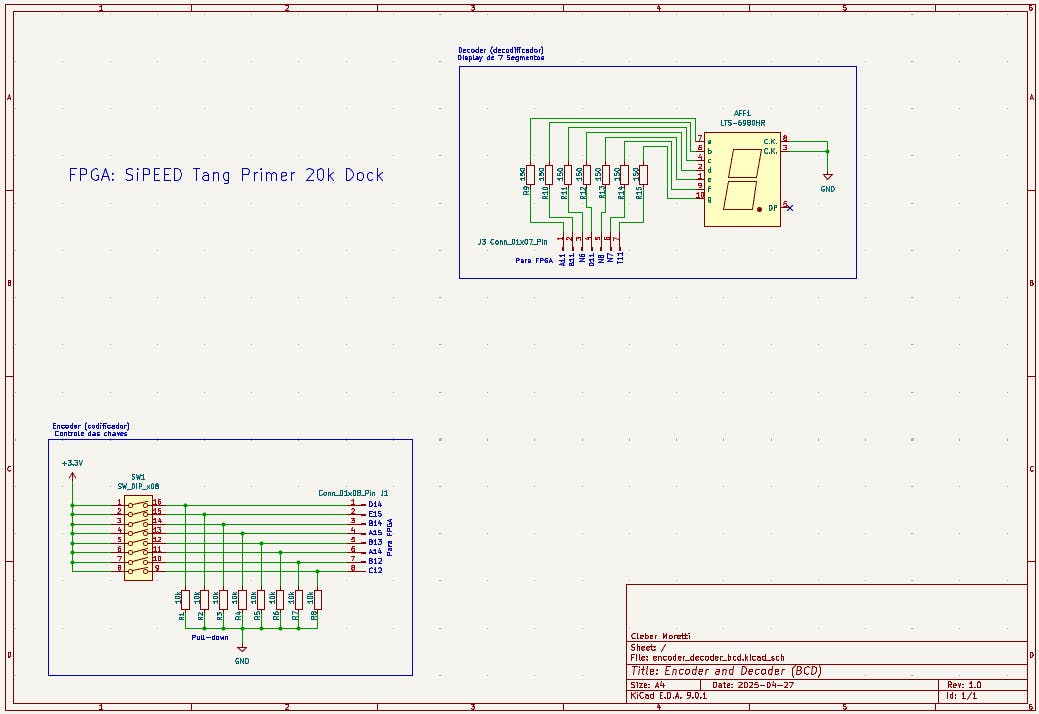
This project, strongly inspired by the "cistern" example from the book Eletrônica Digital, Verilog e FPGA, implements a BCD (Binary-Coded Decimal) decoder in Verilog for FPGA. It reads DIP switch input and drives a common-cathode 7-segment display, showing digits 0–8 or ‘E’ for invalid input combinations.
The developed system operates based on two fundamental truth tables that define the entire behavior of the circuit.
The first table establishes the relationship between the DIP switch key combinations and the corresponding decimal values, while the second table determines how these values should be displayed on the 7-segment display.
Outputs from Table 1:
D3 = HGFEDCBA
D2 = H’GFEDCBA + H’G’FEDCBA + H’G’F’EDCBA + H’G’F’E’DCBA
D1 = H’GFEDCBA + H’G’FEDCBA + H’G’F’E’D’CBA + H’G’F’E’D’C’BA
D0 = H’GFEDCBA + H’G’F’EDCBA + H’G’F’E’D’CBA + H’G’F’E’D’C’B’A
These tables serve as essential references both for the Verilog code implementation and for the practical verification of the circuit.
How It Works- Read DIP switch input
- Convert the binary input to decimal (BCD)
- Map decimal to 7-segment encoding
- Display the output on the 7-segment display
- Show ‘E’ when invalid combinations are detected
- Modular Verilog code structure
- Full BCD decoding (0–8)
- Error detection for invalid inputs
- Clear FPGA pin mapping
- Hands-on learning for beginners in FPGA development
- Support for multiple 7-segment displays
- Dynamic brightness control using PWM
- Support for 4-bit binary input (0–15)
- Add testbench for simulation
During development, I encountered some practical issues that may occur with any beginner:
Incorrect use of reserved pins:During signal mapping, an SPI-dedicated pin was incorrectly assigned to the display LEDs, triggering a ‘cannot be placed according to constraint’ synthesis error. The issue was resolved by reassigning the connection to an available GPIO pin, following the Dock’s pinout documentation.
Reversed wiring on the display:One of the segment wires was connected incorrectly, causing incorrect numbers to be displayed. After reviewing the segment order (a–g), I corrected the connections, and the display started working correctly.
Source CodeFull source code available on GitHub.


Comments