


Hardware components | ||||||
 |
| × | 1 | |||
| × | 1 | ||||
| × | 1 | ||||
 |
| × | 1 | |||
| × | 1 | ||||
 |
| × | 2 | |||
 |
| × | 1 | |||
 |
| × | 1 | |||
| × | 1 | ||||
Software apps and online services | ||||||
| ||||||
 |
| |||||
Hand tools and fabrication machines | ||||||
 |
| |||||
 |
| |||||
Chess is likely the most popular board game and has been for decades. As technology progressed, the way we played and looked at chess changed. Not only are we able to play online with millions of people but also against computers whose capabilities have long surpassed humans. Chess engines have also become a learning tool to analyze our gameplay move-by-move.
None of that reaches an over-the-board game, though. Once a physical match ends, the moves are gone unless someone wrote them down by hand. Tempo brings engine analysis, automatic recording, and bot play to a real chess clock, with a computer built into the clock itself that watches the board and remembers every move.
This project is my entry for the Invent the Future with Arduino UNO Q and App Lab contest. Thanks to Hackster and Qualcomm for providing the UNO Q used to build it.
What It Does(Video below shows everything described in this section.)
Playing on Tempo feels like playing on any chess clock. You make your move and press the paddle. The difference is before the game you connect your phone to the clock using a QR code and keep it on a stand with the camera pointed at the chessboard. The clock uses this camera feed to record all your moves automatically. Or you could just say your moves out loud and the phone uses speech recognition to enter your moves automatically in the clock. As a fallback, you could also enter the move directly on the clock.
When the game ends, you can:
- Review the game, with each move classified (blunder, mistake, best, etc.)
- Save and share the PGN file, or open directly in Chess.com or Lichess
You can also play against Tempo itself where it displays a move for you to play on the physical board, with configurable difficulty levels.
There's plenty more this hardware could do (see the What's Next section), but with a hard deadline, these were the features I prioritized.
How It Works - Overview of the ArchitectureTempo runs entirely on the UNO Q's two brains, split by what each is good at:
- The MPU (Qualcomm Dragonwing QRB2210, running Linux) handles all of the game logic and does most of the heavy lifting completely on-device: - Stockfish engine for the post-game reviews (move classification)- MAIA neural network for human-like bot play with configurable strength- Computer-vision pipeline that reads the board from the camera feed- Local web server to handle the camera feed & host the game log
- The MCU (STM32) handles the physical side such driving the TFT display and reading the buttons/keypad. It communicates with the Linux side via RPC (Remote Procedure Call).
The clear division of labor and prebuilt building blocks (Bricks) in the Arduino App Lab makes the development easier to manage.
Now, let's start with the detailed tutorial from start to finish, starting with the hardware and then going into software.
Assembling the ElectronicsHardware assembly was mostly straightforward, aside from some soldering.
The brain is the Arduino UNO Q.
For the display, I chose a 2.4" TFT display shield (Arduino UNO compatible) that goes directly onto the UNO Q since the pin layout is the same. I didn't use the touch screen capabilities as in my testing it was difficult to get a accurate input to small touch targets and also distracting. The display I used was a parallel one and didn't support SPI, which simply meant that all my GPIO pins were utilised by the shield.
Due to this lack of GPIO, I used the MCP23017 GPIO expander to get 16 extra pins for the inputs. It connects to the UNO Q via I2C, specifically, it has a 4-pin 2mm JST and the Arduino has a 4-pin 1mm JST (aka Qwiic). I had to solder these 2 connectors cables together. I soldered male header pins on the board to make further connections easy.
Note: If you buy a MCP23017 from somewhere else, make sure to check the connector. For example, the Adafruit one has a 4-pin 1mm JST connector. Although, they ususallycome with the cable so maybe a notconcern after all.
For the navigation in the clock ui, I used a 4x4 Membrane Switch Keypad that has 16 buttons out of which I wanted just 7 for up, down, left, right, select, back and play/pause. So I pasted a printed overlay (see attachments for pdf) on it with some tape. The keypad has a 8-pin female connector housing that connects directly to pins B0-B7 on the MCP23017,
For the paddle, I used 2 pushbuttons, that I soldered on a small pieces of double-sided perfboard (cut to 10mm by 17mm). I stripped and soldered one end of jumper cables to join the buttons on the perfboard, and the other end is a female jumper that connects directly to pins A0, A1 and A2, A3 on the MCP23017.
Putting everything together, this is how everything looks. The pins/connectors make it very modular and easy to assemble/disassemble. Also the connections can be made to any pins that makes the wires not be tangled/stressed and pins can be later set in code.
Assembling in a 3D Printed CasingI used Tinkercad to design the casing of the clock in 3 parts, and printed it in PLA through a local vendor.
The front panel has a slot for the UNO Q + display shield to slide in, with a hole for the Qwiic cable. It also has slit for the ribbon of the keypad to pass through.
The body has slots for the pushbuttons to be placed and wires to come from beneath. The side wall also has an opening for the USB port.
The paddle has a cylindrical axle that goes into the holes into the front panel and body and has a protrusion that aligns with the pushbuttons.
To complete the assembly, start by placing the pushbuttons in the body. Slide the UNO Q + display shield and pass the keypad ribbon through the slit in the front panel. Join everything with the MCP23017 as explained in the previous section.
Join the 3 sections together (I used glue). You'll notice a gap at the bottom. That is for keeping a power bank to power the UNO Q.
The keypad has a sticky pad on the bottom so peel it off and paste it on the front panel. Cut and paste the printed overlay on the keypad (I used tape).
With that the hardware part is complete. Now let's move to software.
Setting Up the ProjectFollow this guide to set up your UNO Q for the first time (only till the Hello World Example) and then get familiar with the App Lab and understanding what Apps are. I also recommend playing around on your own if this is your first time using the App Lab.
Power up your Arduino UNO Q (I used a power bank). The display should light up with just a white screen. Create a new App with a name and optionally an emoji logo. Verify that the folder structure as shown.
As I said in the architecture overview, our software is running on both the Linux MPU (in Python) and on the MCU (in C++). For the web interface, we'll use HTML, CSS and JavaScript.
In the following sections we'll build all the software components we'll need one by one and then integrate them together.
Note: For explanation, I'll showonly portions of code relevant to that section, so you can follow along as it is being built from scratch. The full code files can be found in the attachments section below and in this Github repo. I have tried adding enough comments to explain what's going on in the code, feel free to ask a LLM if you want deeper explanation of the code.
Interfacing Buttons & KeypadWe'll start with interfacing the keypad and the 2 push buttons via the MCP23017.
It is always a good practice to have separate files for separate responsibilities in the code. We'll create a ButtonManager class in the button_manager.h and button_manager.cpp file in the sketch directory.
Reminder that the code below may not be complete for the sake of explanation. For the full implementation, refer to the Code section at the bottom of the page.
Detecting a press works in two passes. First, the two paddle buttons are checked directly. Then, if neither paddle was pressed, the code drives all 4 keypad columns low at once and checks whether any row reads low. Read this if you haven't used a 4x4 keypad before. Only if something is pressed does it bother narrowing down which column, one at a time.
The ButtonManager class provides a constructor, methods begin() & isClicked() and a readable variable lastClickedButton. Since we constructs from macros and returns an integer for all buttons in the keypad, it's very easy to plug and play without thinking too much about it.
button_manager.h
#include <Arduino.h>
#include <Wire.h>

#define MCP23017_I2C_ADDR 0x20

// Pin numbers below refer to the MCP23017's own 16 GPIO pins:
//   0-7  = port A pins GPA0-GPA7
//   8-15 = port B pins GPB0-GPB7

// 4x4 matrix keypad
#define PIN_ROW1  15  // GPB7
#define PIN_ROW2  14  // GPB6
#define PIN_ROW3  13  // GPB5
#define PIN_ROW4  12  // GPB4
#define PIN_COL1  11  // GPB3
#define PIN_COL2  10  // GPB2
#define PIN_COL3   9  // GPB1
#define PIN_COL4   8  // GPB0

// 2 paddle push buttons
// OUT is permanently set to LOW
// IN is pulled up & read to detect a press.
#define PIN_BTN1_OUT 0  // GPA0
#define PIN_BTN1_IN  1  // GPA1
#define PIN_BTN2_OUT 2  // GPA2
#define PIN_BTN2_IN  3  // GPA3

/**
 * Scans a 4x4 matrix keypad plus 2 discrete paddle buttons,
 * and reports which one (if any) is currently pressed.
 *
 * Region numbering returned in lastClickedButton / by isClicked():
 *   nothing pressed: 0
 *   row 1:  1,  2,  3,  4
 *   row 2:  5,  6,  7,  8
 *   row 3:  9, 10, 11, 12
 *   row 4: 13, 14, 15, 16
 *   paddle button 1: 17
 *   paddle button 2: 18
 */
class ButtonManager {
public:
  // Convenience constructor: uses default configuration from the macros above
  explicit ButtonManager(TwoWire &wire);

  // Configures every pin's direction/pull-up on the MCP23017. Call once from setup().
  void begin();

  // Returns true if any button is currently pressed, and updates lastClickedButton.
  bool isClicked();

  // Result of the most recent isClicked() call: 0-18, as described above.
  int lastClickedButton = 0;
};
button_manager.cpp
#include "button_manager.h"

void ButtonManager::begin() {
  // paddle buttons: one pin held permanently LOW, the other read w/ pull-up
  configureOutput(_btn1Out);
  writePin(_btn1Out, false);
  configureInputPullup(_btn1In);

  configureOutput(_btn2Out);
  writePin(_btn2Out, false);
  configureInputPullup(_btn2In);

  // keypad rows: inputs with pull-up
  for (int i = 0; i < 4; i++) {
    configureInputPullup(_rowPins[i]);
  }
  // keypad columns: outputs
  for (int i = 0; i < 4; i++) {
    configureOutput(_colPins[i]);
  }

  setColumnsIdle();
}

bool ButtonManager::isClicked() {
  // discrete paddle buttons (fastest path, checked first)
  if (!readPin(_btn1In)) { // LOW = pressed
    lastClickedButton = 17;
    return true;
  }
  if (!readPin(_btn2In)) {
    lastClickedButton = 18;
    return true;
  }

  // matrix keypad: drive ALL columns LOW to detect *any* press
  for (int i = 0; i < 4; i++) {
    writePin(_colPins[i], false);
  }
  delayMicroseconds(ALL_COL_SETTLE_US); // let the bus/capacitance settle

  int activeRow = -1;
  for (int i = 0; i < 4; i++) {
    if (!readPin(_rowPins[i])) { // LOW = this row's key is pressed
      activeRow = i;
      break;
    }
  }

  // nothing pressed
  if (activeRow == -1) {
    setColumnsIdle();
    lastClickedButton = 0;
    return false;
  }

  // identify which column: test c1..c3, c4 is implied if none hit
  int activeCol = 3; // default: must be column 4 if columns 1-3 don't show it
  for (int col = 0; col < 3; col++) {
    for (int i = 0; i < 4; i++) {
      writePin(_colPins[i], i != col); // this column LOW, all others HIGH
    }
    delayMicroseconds(COL_SETTLE_US); // settle before reading

    if (!readPin(_rowPins[activeRow])) {
      activeCol = col;
      break; // found it - stop scanning further columns
    }
  }

  setColumnsIdle(); // restore idle state for next call

  lastClickedButton = activeRow * 4 + activeCol + 1; // 1-16
  return true;
}
Example usage:The sketch.ino (entry point for the MCU) initialises the ButtonManager object and polls isClicked() in the loop(). Once a click is detected it uses the Bridge API to communicate the button id to main.py that prints it to the console.
sketch.ino
#include <Arduino_RouterBridge.h>
#include <Wire.h>
#include "ButtonManager.h"

ButtonManager Buttons(Wire1);

void setup() {
  Bridge.begin();
  Buttons.begin();
}

void loop() {
  if (Buttons.isClicked()) {
    Bridge.notify("button_click", Buttons.lastClickedButton);
    delay(250); // Debounce delay for buttons
  }

  delay(20); // polling 50 times a second
}
main.py
import time
from arduino.app_utils import App, Bridge


def print_button_id(id=0):
    print("Button clicked with id:", id)

Bridge.provide("button_click", print_button_id)


def loop(): time.sleep(10)
App.run(user_loop=loop)We'll create a DisplayManager namespace (just a choice since no state to track) in the display_manager.h and display_manager.cpp file in the sketch directory.
To interface with the display shield, we'll need the GFX Library for Arduino by Moon On Our Nation. Install this sketch library via the App Lab.
I mocked up all the screens (in Figma) that I wanted and made them separate functions that I can call from the python script using the Bridge API. The library provides several methods to print text, draw rectangles, lines, circles, etc. I just use them to get my desired UI based on the parameters. Also there are limitations on what you can pass directly via the Bridge API so I sticked to strings, integers and booleans, or vectors of them.
Further, I thought the default font wasn't bold enough so I found this font named Jersey 20 and manually (check sketch/bitmaps/font.txt, then some find-replace magic) made a bitmap for the characters 0-9 and colon(:), in 2 sizes (20px and 40px high). This allowed me show the "HH:MM:ss" with maximum space utilization and readability.
I also made bitmaps of the move classification icons from Chess.com which can be found on their brand resources page. I scaled and cropped these to 26x24 and used a python script to get the bitmaps. You can find all files in the extras folder in the full code.
The font (both big/small) and the icons stay in the sketch/bitmaps folder. I've pasted small portions of those for understanding purpose. To display these I just append these bitmaps to a display buffer, and then print that.
display_manager.h
#include <vector>

namespace DisplayManager {
  void begin();
  void cleanScreen();
  void drawListMenu(String title, std::vector<String> items, int activeIndex, int scroll, bool firstDraw);
  void drawQRCode(String hexData, String url);
  void drawChessClock(int time1, int time2, int activePlayer, bool firstDraw); // only the time
  void drawMovesOnClock(std::vector<String> moveList, int movesFrom, int menuState, String commentary, bool firstDraw);
  void drawManualMoveMenu(std::vector<int> coordinates, int menuState, bool firstDraw, String manual_input_promote);
  void drawAnalysisLoading();
  void drawGameReview(std::vector<String> array_for_ui, int focus_mode, int evalBar, bool firstDraw);
}
display_manager.cpp
#include <stdio.h>
#include <vector>
#include <Arduino.h>
#include <Arduino_GFX_Library.h> // this is the one we installed
#include "display_manager.h"
#include "bitmaps/digits_big_font.h"
#include "bitmaps/digits_small_font.h"
#include "bitmaps/icon_bitmaps.h"

// TFT Pin Definitions
#define TFT_CS  A3
#define TFT_DC  A2
#define TFT_WR  A1
#define TFT_RD  A0
#define TFT_RST A4

// Initialize the data bus and display
Arduino_DataBus *bus = new Arduino_SWPAR8(
    TFT_DC, TFT_CS, TFT_WR, TFT_RD,
    8, 9, 2, 3, 4, 5, 6, 7);

Arduino_GFX *tft = new Arduino_ILI9341(bus, TFT_RST, 1 /* landscape rotation */);

// bitmaps for the "H:MM:SS" of each player (40px high)
static uint16_t Player1Clock[7000];
static uint16_t Player2Clock[7000];


// Move classification lookup table
struct MoveClassInfo {
  const char*     name;
  uint16_t        color;
  const uint16_t* bitmap;
  const char*     sentence;
};

static const MoveClassInfo MOVE_CLASS_TABLE[] = {
  { "Great",       REVIEW_GREAT,       BITMAP_GREAT,       " is great"         },
  { "Best",        REVIEW_BEST,        BITMAP_BEST,        " is best"          },
  { "Excellent",   REVIEW_EXCELLENT,   BITMAP_EXCELLENT,   " is excellent"     },
  { "Good",        REVIEW_GOOD,        BITMAP_GOOD,        " is good"          },
  { "Inaccuracy",  REVIEW_INACCURACY,  BITMAP_INACCURACY,  " is an inaccuracy" },
  { "Mistake",     REVIEW_MISTAKE,     BITMAP_MISTAKE,     " is a mistake"     },
  { "Miss",        REVIEW_MISS,        BITMAP_MISS,        " is a miss"        },
  { "Blunder",     REVIEW_BLUNDER,     BITMAP_BLUNDER,     " is a blunder"     },
};


namespace DisplayManager {

  // Call this once in your sketch.ino setup()
  void begin() {
    tft->begin();
    tft->fillScreen(BLACK);
  }

  // shorthand to clean screen to black
  void cleanScreen() {
    tft->fillScreen(BLACK);
  }

  // Displays the time in (HH:)MM:SS format
  void drawChessClock(int time1, int time2, int activePlayer, bool firstDraw) { // Inputs in total seconds

    if (firstDraw) { // to erase the previous screen and draw static elements
      tft->fillScreen(BLACK);
      tft->drawLine(0, 65, 320, 65, LIGHTGREY);  // Draws a horizontal white line
      tft->drawLine(160, 0, 160, 65, LIGHTGREY); // Draws a horizontal white line
    }

    // Generate the text for both players
    String player1Text = generateTextFromTime(time1);
    String player2Text = generateTextFromTime(time2);

    // use the global player clock bitmaps to draw the text
    generateBitmapFromText(player1Text, Player1Clock, true);
    generateBitmapFromText(player2Text, Player2Clock, false);

    tft->setRotation(4);// this is needed for my implementation of bitmap drawing

    // Draw player 1's and 2's clock
    tft->draw16bitRGBBitmap(190, 10, Player1Clock, 40, 150);
    tft->draw16bitRGBBitmap(190, 161, Player2Clock, 40, 150);

    tft->setRotation(1); // reset rotation
  }
}
digits_small_font.h
#include <Arduino.h>

#define BLACK 0x0000
#define WHITE 0xFFFF

const uint16_t BITMAP_SMALL_0[] PROGMEM = {
    BLACK, BLACK, BLACK, WHITE, WHITE, WHITE, WHITE, WHITE, WHITE, WHITE, WHITE, WHITE, WHITE, WHITE, WHITE, WHITE, WHITE, BLACK, BLACK, BLACK,
    BLACK, WHITE, WHITE, WHITE, WHITE, WHITE, WHITE, WHITE, WHITE, WHITE, WHITE, WHITE, WHITE, WHITE, WHITE, WHITE, WHITE, WHITE, WHITE, BLACK,
    BLACK, WHITE, WHITE, WHITE, WHITE, WHITE, WHITE, WHITE, WHITE, WHITE, WHITE, WHITE, WHITE, WHITE, WHITE, WHITE, WHITE, WHITE, WHITE, BLACK,
    WHITE, WHITE, WHITE, WHITE, WHITE, WHITE, WHITE, WHITE, WHITE, WHITE, WHITE, WHITE, WHITE, WHITE, WHITE, WHITE, WHITE, WHITE, WHITE, WHITE,
    WHITE, WHITE, WHITE, WHITE, WHITE, BLACK, BLACK, BLACK, BLACK, BLACK, BLACK, BLACK, BLACK, BLACK, BLACK, WHITE, WHITE, WHITE, WHITE, WHITE,
    WHITE, WHITE, WHITE, WHITE, BLACK, BLACK, BLACK, BLACK, BLACK, BLACK, BLACK, BLACK, BLACK, BLACK, BLACK, BLACK, WHITE, WHITE, WHITE, WHITE,
    WHITE, WHITE, WHITE, WHITE, BLACK, BLACK, BLACK, BLACK, BLACK, BLACK, BLACK, BLACK, BLACK, BLACK, BLACK, BLACK, WHITE, WHITE, WHITE, WHITE,
    WHITE, WHITE, WHITE, WHITE, WHITE, BLACK, BLACK, BLACK, BLACK, BLACK, BLACK, BLACK, BLACK, BLACK, BLACK, WHITE, WHITE, WHITE, WHITE, WHITE,
    WHITE, WHITE, WHITE, WHITE, WHITE, WHITE, WHITE, WHITE, WHITE, WHITE, WHITE, WHITE, WHITE, WHITE, WHITE, WHITE, WHITE, WHITE, WHITE, WHITE,
    BLACK, WHITE, WHITE, WHITE, WHITE, WHITE, WHITE, WHITE, WHITE, WHITE, WHITE, WHITE, WHITE, WHITE, WHITE, WHITE, WHITE, WHITE, WHITE, BLACK,
    BLACK, WHITE, WHITE, WHITE, WHITE, WHITE, WHITE, WHITE, WHITE, WHITE, WHITE, WHITE, WHITE, WHITE, WHITE, WHITE, WHITE, WHITE, WHITE, BLACK,
    BLACK, BLACK, BLACK, WHITE, WHITE, WHITE, WHITE, WHITE, WHITE, WHITE, WHITE, WHITE, WHITE, WHITE, WHITE, WHITE, WHITE, BLACK, BLACK, BLACK
};


// ... BITMAP_SMALL_1 to BITMAP_SMALL_9 ...


const uint16_t BITMAP_SMALL_COLON[] PROGMEM = {
    BLACK, WHITE, WHITE, WHITE, BLACK, BLACK, BLACK, BLACK, BLACK, BLACK, BLACK, BLACK, BLACK, WHITE, WHITE, WHITE, BLACK, BLACK, BLACK, BLACK,
    BLACK, WHITE, WHITE, WHITE, BLACK, BLACK, BLACK, BLACK, BLACK, BLACK, BLACK, BLACK, BLACK, WHITE, WHITE, WHITE, BLACK, BLACK, BLACK, BLACK,
    BLACK, WHITE, WHITE, WHITE, BLACK, BLACK, BLACK, BLACK, BLACK, BLACK, BLACK, BLACK, BLACK, WHITE, WHITE, WHITE, BLACK, BLACK, BLACK, BLACK
};

// Stores the width for digits 0-9, and index 10 is for the colon ':'
const uint8_t DIGITS_SMALL_WIDTHS[11] = { 12, 7, 13, 13, 12, 13, 13, 12, 13, 13, 3 };

// Create an array that holds the pointers to your bitmaps
const uint16_t* const DIGITS_SMALL[] PROGMEM = {
    BITMAP_SMALL_0,
    BITMAP_SMALL_1,
    BITMAP_SMALL_2,
    BITMAP_SMALL_3,
    BITMAP_SMALL_4,
    BITMAP_SMALL_5,
    BITMAP_SMALL_6,
    BITMAP_SMALL_7,
    BITMAP_SMALL_8,
    BITMAP_SMALL_9,
    BITMAP_SMALL_COLON
};
digits_big_font.h
#include <Arduino.h>

#define BLACK 0x0000
#define WHITE 0xFFFF

const uint16_t BITMAP_BIG_0[] PROGMEM = {...};


// BITMAP_BIG_1 to BITMAP_BIG_COLON ...

// Stores the width for digits 0-9, and index 10 is for the colon
const uint8_t DIGITS_BIG_WIDTHS[11] = { 24, 14, 26, 26, 24, 26, 26, 24, 26, 26, 6 };


// Create an array that holds the pointers to your bitmaps
const uint16_t* const DIGITS_BIG[] PROGMEM = {
    BITMAP_BIG_0,
    BITMAP_BIG_1,
    BITMAP_BIG_2,
    BITMAP_BIG_3,
    BITMAP_BIG_4,
    BITMAP_BIG_5,
    BITMAP_BIG_6,
    BITMAP_BIG_7,
    BITMAP_BIG_8,
    BITMAP_BIG_9,
    BITMAP_BIG_COLON
};
icon_bitmaps.h
#include <Arduino.h>

// Source file: best.png (26x24 pixels)
const uint16_t BITMAP_BEST[] PROGMEM = {
  0x85a9, 0x85a9, 0x85a9, 0x85a9, 0x85a9, 0x85a9, 0x85a9, 0x85a9, 0x85a9, 0x85a9, 0x85a9, 0x85a9, 0xefbc, 0xf7de, 0x85a9, 0x85a9,
  0x85a9, 0x85a9, 0x85a9, 0x85a9, 0x85a9, 0x85a9, 0x85a9, 0x85a9, 0x85a9, 0x85a9, 0x85a9, 0x85a9, 0x85a9, 0x85a9, 0x85a9, 0x85a9,
  0x85a9, 0x85a9, 0x85a9, 0x85a9, 0x85a9, 0xae70, 0xffff, 0xffff, 0xb691, 0x85a9, 0x85a9, 0x85a9, 0x85a9, 0x85a9, 0x85a9, 0x85a9,
  0x85a9, 0x85a9, 0x85a9, 0x85a9, 0x85a9, 0x85a9, 0x85a9, 0x85a9, 0x85a9, 0x85a9, 0x85a9, 0x85a9, 0x85a9, 0x85a9, 0x85a9, 0xdf58,
  0xffff, 0xffff, 0xd737, 0x85a9, 0x85a9, 0x85a9, 0x85a9, 0x85a9, 0x85a9, 0x85a9, 0x85a9, 0x85a9, 0x85a9, 0x85a9, 0x85a9, 0x85a9,
  0x85a9, 0x85a9, 0x85a9, 0x85a9, 0x85a9, 0x85a9, 0x85a9, 0x85a9, 0x8dca, 0xf7de, 0xffff, 0xffff, 0xffff, 0x95ec, 0x85a9, 0x85a9,
  0x85a9, 0x85a9, 0x85a9, 0x85a9, 0x85a9, 0x85a9, 0x85a9, 0x85a9, 0x85a9, 0x85a9, 0x85a9, 0x85a9, 0x85a9, 0x85a9, 0x85a9, 0x85a9,
  0x85a9, 0x85a9, 0xbeb3, 0xffff, 0xffff, 0xffff, 0xffff, 0xbeb3, 0x85a9, 0x85a9, 0x85a9, 0x85a9, 0x85a9, 0x85a9, 0x85a9, 0x85a9,
  0x85a9, 0x85a9, 0x85a9, 0x85a9, 0x85a9, 0x85a9, 0x85a9, 0x85a9, 0x85a9, 0x85a9, 0x85a9, 0x85a9, 0xe79b, 0xffff, 0xffff, 0xffff,
  0xffff, 0xf7de, 0x85a9, 0x85a9, 0x85a9, 0x85a9, 0x85a9, 0x85a9, 0x85a9, 0x85a9, 0x85a9, 0x85a9, 0x85a9, 0x85a9, 0x85a9, 0x85a9,
  0x85a9, 0x85a9, 0x85a9, 0x85a9, 0x85a9, 0x9e2e, 0xffff, 0xffff, 0xffff, 0xffff, 0xffff, 0xffff, 0x95ec, 0x85a9, 0x85a9, 0x85a9,
  0x85a9, 0x85a9, 0x85a9, 0x85a9, 0x85a9, 0x85a9, 0x85a9, 0x8dca, 0xae70, 0xae71, 0xbeb3, 0xbeb3, 0xc6f5, 0xcef6, 0xd737, 0xe79b,
  0xffff, 0xffff, 0xffff, 0xffff, 0xffff, 0xffff, 0xe79b, 0xd737, 0xd737, 0xc6f5, 0xc6d4, 0xbeb3, 0xb691, 0xae70, 0x8deb, 0x85a9,
  0x85a9, 0xdf58, 0xffff, 0xffff, 0xffff, 0xffff, 0xffff, 0xffff, 0xffff, 0xffff, 0xffff, 0xffff, 0xffff, 0xffff, 0xffff, 0xffff,
  0xffff, 0xffff, 0xffff, 0xffff, 0xffff, 0xffff, 0xffff, 0xffff, 0xdf58, 0x85a9, 0x85a9, 0x850d, 0xffff, 0xffff, 0xffff, 0xffff,
  0xffff, 0xffff, 0xffff, 0xffff, 0xffff, 0xffff, 0xffff, 0xffff, 0xffff, 0xffff, 0xffff, 0xffff, 0xffff, 0xffff, 0xffff, 0xffff,
  0xffff, 0xf7be, 0x954e, 0x85a9, 0x85a9, 0x74e8, 0x63c9, 0xe75c, 0xffff, 0xffff, 0xffff, 0xffff, 0xffff, 0xffff, 0xffff, 0xffff,
  0xffff, 0xffff, 0xffff, 0xffff, 0xffff, 0xffff, 0xffff, 0xffff, 0xffff, 0xffff, 0xdf1a, 0x5ba8, 0x6cc8, 0x85a9, 0x85a9, 0x85a9,
  0x7528, 0x5387, 0xd6b9, 0xffff, 0xffff, 0xffff, 0xffff, 0xffff, 0xffff, 0xffff, 0xffff, 0xffff, 0xffff, 0xffff, 0xffff, 0xffff,
  0xffff, 0xffff, 0xffff, 0xceb9, 0x5ba7, 0x7528, 0x85a9, 0x85a9, 0x85a9, 0x85a9, 0x85a9, 0x7d89, 0x5385, 0xadb4, 0xffff, 0xffff,
  0xffff, 0xffff, 0xffff, 0xffff, 0xffff, 0xffff, 0xffff, 0xffff, 0xffff, 0xffff, 0xffff, 0xffff, 0xadb4, 0x5be7, 0x7d89, 0x85a9,
  0x85a9, 0x85a9, 0x85a9, 0x85a9, 0x85a9, 0x85a9, 0x85a9, 0x5c06, 0x9510, 0xffff, 0xffff, 0xffff, 0xffff, 0xffff, 0xffff, 0xffff,
  0xffff, 0xffff, 0xffff, 0xffff, 0xf7be, 0x8cce, 0x5c06, 0x7d89, 0x85a9, 0x85a9, 0x85a9, 0x85a9, 0x85a9, 0x85a9, 0x85a9, 0x85a9,
  0x85a9, 0x85a9, 0x6467, 0xe75c, 0xffff, 0xffff, 0xffff, 0xffff, 0xffff, 0xffff, 0xffff, 0xffff, 0xffff, 0xffff, 0xf7be, 0x6ca7,
  0x85a9, 0x85a9, 0x85a9, 0x85a9, 0x85a9, 0x85a9, 0x85a9, 0x85a9, 0x85a9, 0x85a9, 0x85a9, 0x85a9, 0x8dcb, 0xffff, 0xffff, 0xffff,
  0xffff, 0xffff, 0xffff, 0xffff, 0xffff, 0xffff, 0xffff, 0xffff, 0xffff, 0x95ec, 0x85a9, 0x85a9, 0x85a9, 0x85a9, 0x85a9, 0x85a9,
  0x85a9, 0x85a9, 0x85a9, 0x85a9, 0x85a9, 0x85a9, 0xb691, 0xffff, 0xffff, 0xffff, 0xffff, 0xffff, 0xffff, 0xffff, 0xffff, 0xffff,
  0xffff, 0xffff, 0xffff, 0xb692, 0x85a9, 0x85a9, 0x85a9, 0x85a9, 0x85a9, 0x85a9, 0x85a9, 0x85a9, 0x85a9, 0x85a9, 0x85a9, 0x85a9,
  0xdf58, 0xffff, 0xffff, 0xffff, 0xffff, 0xffff, 0xffff, 0xffff, 0xffff, 0xffff, 0xffff, 0xffff, 0xffff, 0xd737, 0x85a9, 0x85a9,
  0x85a9, 0x85a9, 0x85a9, 0x85a9, 0x85a9, 0x85a9, 0x85a9, 0x85a9, 0x85a9, 0x85a9, 0xefbd, 0xffff, 0xffff, 0xffff, 0xffff, 0xf7be,
  0x9510, 0x9510, 0xffff, 0xffff, 0xffff, 0xffff, 0xffff, 0xf7de, 0x85a9, 0x85a9, 0x85a9, 0x85a9, 0x85a9, 0x85a9, 0x85a9, 0x85a9,
  0x85a9, 0x85a9, 0x85a9, 0x9e2d, 0xffff, 0xffff, 0xffff, 0xffff, 0xceb9, 0x63e9, 0x6467, 0x6467, 0x63c9, 0xdf1a, 0xffff, 0xffff,
  0xffff, 0xffff, 0x95ec, 0x85a9, 0x85a9, 0x85a9, 0x85a9, 0x85a9, 0x85a9, 0x85a9, 0x85a9, 0x85a9, 0x85a9, 0xbeb3, 0xffff, 0xffff,
  0xf7be, 0x9510, 0x5bc7, 0x7528, 0x85a9, 0x85a9, 0x7528, 0x4b65, 0x9510, 0xffff, 0xffff, 0xffff, 0xbeb3, 0x85a9, 0x85a9, 0x85a9,
  0x85a9, 0x85a9, 0x85a9, 0x85a9, 0x85a9, 0x85a9, 0x85a9, 0xcef6, 0xffff, 0xceb9, 0x5ba8, 0x6467, 0x7d89, 0x85a9, 0x85a9, 0x85a9,
  0x85a9, 0x85a9, 0x6467, 0x4b46, 0xc677, 0xffff, 0xd737, 0x85a9, 0x85a9, 0x85a9, 0x85a9, 0x85a9, 0x85a9, 0x85a9, 0x85a9, 0x85a9,
  0x85a9, 0x5c06, 0x6c0b, 0x5385, 0x7d48, 0x85a9, 0x85a9, 0x85a9, 0x85a9, 0x85a9, 0x85a9, 0x85a9, 0x85a9, 0x7d48, 0x53a6, 0x742c,
  0x6428, 0x85a9, 0x85a9, 0x85a9, 0x85a9, 0x85a9, 0x85a9, 0x85a9, 0x85a9, 0x85a9, 0x85a9, 0x85a9, 0x7508, 0x85a9, 0x85a9, 0x85a9,
  0x85a9, 0x85a9, 0x85a9, 0x85a9, 0x85a9, 0x85a9, 0x85a9, 0x85a9, 0x85a9, 0x6cc8, 0x7d89, 0x85a9, 0x85a9, 0x85a9, 0x85a9, 0x85a9,
};

// ... BITMAPS for other icons ...
Example UsageThe sketch.ino exposes all display commands via the Bridge. The main.py calls this functions with arguments to execute it. Here we used the last section's example and displayed the button id as seconds on the display.
sketch.ino
#include <Arduino_RouterBridge.h>
#include <Wire.h>
#include "button_manager.h"
#include "display_manager.h"

ButtonManager Buttons(Wire1);

// put your setup code here, to run once:
void setup() {
  Bridge.begin();
  Buttons.begin();
  DisplayManager::begin();

  // Register display commands
  Bridge.provide_safe("drawListMenu", DisplayManager::drawListMenu);
  Bridge.provide_safe("drawQRCode", DisplayManager::drawQRCode);
  Bridge.provide_safe("drawChessClock", DisplayManager::drawChessClock);
  Bridge.provide_safe("drawMovesOnClock", DisplayManager::drawMovesOnClock);
  Bridge.provide_safe("drawManualMoveMenu", DisplayManager::drawManualMoveMenu);
  Bridge.provide_safe("drawAnalysisLoading", DisplayManager::drawAnalysisLoading);
  Bridge.provide_safe("drawGameReview", DisplayManager::drawGameReview);
}

// put your main code here, to run repeatedly:
void loop() {
  if (Buttons.isClicked()) {
    Bridge.notify("button_click", Buttons.lastClickedButton);
    delay(250); // Debounce delay for buttons
  }

  delay(20); // polling 50 times a second
}
main.py
import time
from arduino.app_utils import App, Bridge


def print_button_id(id=0):
    print("Button clicked with id:", id)
    Bridge.notify("drawChessClock", id, 3678, 1, True)

Bridge.provide("button_click", print_button_id)


def loop(): time.sleep(10)
App.run(user_loop=loop)
With this, the C++ (MCU) portion of the software is complete. Now we'll move to MPU where the majority of logic resides.
Game ReviewGame review basically gives a classification to each move. To do this we use the Stockfish chess engine to get the position evaluation, more specifically the centipawn advantage. When we use it calculate the win probability using a logistic function as used by Lichess.org.
Win% = 50 + 50 * (2 / (1 + exp(-0.00368208 * centipawns)) - 1)Then we look at the delta of this win% before and after the move. This delta is what helps us do the classification.
I also made it so that it can run on a separate thread so that it doesn't block the main thread.
To get it running we need to install the python-chess library by adding it to python/requirements.txt.
python-chessWe also need to install the stockfish binary by running the following commands in the terminal of UNO Q.
sudo apt update
sudo apt install stockfish
which stockfish
This will output a path to the binary, something like /usr/games/stockfish. To move this to our app container and make it executable, run the following command using the correct path and app name.
mkdir ~/ArduinoApps/tempo/engines/
cp /usr/games/stockfish ~/ArduinoApps/tempo/engines/
chmod +x ~/ArduinoApps/tempo/engines/stockfish
We make a new file python/move_analysis.py to hold all the analysis logic.
import math
import copy
import threading
import chess
import chess.engine
from dataclasses import dataclass
from typing import Optional, List

@dataclass
class MoveAnalysis:
    played_move: str
    played_move_eval: int
    played_move_eval_string: str
    played_move_classification: str

    best_move: str
    best_move_eval: int
    best_move_eval_string: str
    best_move_classification: str

    def __str__(self) -> str:
        lines = [
            "--- Move Analysis ---",
            f"Played: {self.played_move} ({self.played_move_eval_string}) [{self.played_move_classification}]",
            f"Best:   {self.best_move} ({self.best_move_eval_string}) [{self.best_move_classification}]",
        ]

        return "\n".join(lines)


class ChessAnalysis:
    def __init__(
        self,
        board: chess.Board,
        engine_path: str,
        time_limit: Optional[float] = None,
        depth_limit: Optional[int] = 15
    ):
        """
        Initializes the background analysis. Returns immediately without lagging the main thread.

        :param board: chess.Board object containing the played game history in its move_stack.
        :param engine_path: Path to the stockfish executable.
        :param time_limit: Max time (in seconds) the engine spends per evaluation.
        :param depth_limit: Max depth the engine searches per evaluation.
        """
        # Create a deep copy of the board so that if the main thread modifies
        # the original board, it doesn't corrupt our background analysis.
        self.board = board.copy()
        self.engine_path = engine_path

        # Ensure at least one limit is set so the engine doesn't hang indefinitely
        if time_limit is None and depth_limit is None:
            depth_limit = 15

        self.limit = chess.engine.Limit(time=time_limit, depth=depth_limit)

        # Concurrency safeguards
        self._analysis: List[MoveAnalysis] = []
        self._lock = threading.Lock()
        self._is_complete = False

        # Start the analysis in a background daemon thread
        # Daemon=True ensures the thread will automatically die if the main script finishes early.
        self._thread = threading.Thread(target=self._run_analysis_thread, daemon=True)
        self._thread.start()

    def getAnalysisSoFar(self) -> List[MoveAnalysis]:
        """
        Safely retrieves the moves analyzed up to this exact moment.
        Passes a deep copy by value to prevent concurrency issues.
        """
        with self._lock:
            # copy.deepcopy ensures the main thread cannot accidentally modify
            # the internal dictionaries/objects being used by the background thread.
            return copy.deepcopy(self._analysis)

    def is_complete(self) -> bool:
        """Helper method to check if the background analysis has finished."""
        with self._lock:
            return self._is_complete

    def _run_analysis_thread(self):
        """
        The internal loop that runs completely in the background.
        It spins up its own engine instance to avoid cross-thread pipe corruption.
        """
        engine = None
        try:
            engine = chess.engine.SimpleEngine.popen_uci(self.engine_path)

            # Optimized for edge devices like your quad-core ARM MPU
            engine.configure({"Threads": 4, "Hash": 64})

            moves_to_analyze = list(self.board.move_stack)
            current_board = self.board.root()

            for move in moves_to_analyze:
                turn = current_board.turn

                # 1. Evaluate current position with MultiPV=1 to find the best move
                info = engine.analyse(current_board, self.limit, multipv=1)

                if isinstance(info, dict):
                    info = [info]

                best_move = info[0].get("pv", [None])[0]
                best_score = info[0].get("score")

                # --- NEW: Generate SAN strings before pushing the move ---
                played_move_san = current_board.san(move)
                best_move_san = current_board.san(best_move) if best_move else ""
                # ---------------------------------------------------------

                # 2. Push the played move and evaluate the resulting position
                current_board.push(move)

                if move == best_move:
                    played_score = best_score
                else:
                    played_info = engine.analyse(current_board, self.limit)
                    played_score = played_info.get("score")

                # 3. Process the evaluations and safely append to the list
                new_move_analysis = self._create_move_analysis(
                    move=move,
                    played_move_san=played_move_san, # Pass new parameter
                    turn=turn,
                    played_score=played_score,
                    best_move=best_move,
                    best_move_san=best_move_san,     # Pass new parameter
                    best_score=best_score
                )

                # Acquire the lock just long enough to append to the array safely
                with self._lock:
                    self._analysis.append(new_move_analysis)

        except Exception as e:
            print(f"\n[Background Analysis Error]: {e}")

        finally:
            if engine is not None:
                engine.quit()
            with self._lock:
                self._is_complete = True

    def _create_move_analysis(
        self,
        move: chess.Move,
        played_move_san: str,  # NEW parameter
        turn: chess.Color,
        played_score: chess.engine.PovScore,
        best_move: chess.Move,
        best_move_san: str,    # NEW parameter
        best_score: chess.engine.PovScore
    ) -> MoveAnalysis:

        win_pct_best = self._calc_win_pct(best_score, turn)
        win_pct_played = self._calc_win_pct(played_score, turn)

        is_best_played = (move == best_move)
        played_class = ""
        best_class = "Best"

        # Classify Played Move
        if is_best_played:
            played_class = best_class
        else:
            reduction = win_pct_best - win_pct_played
            if reduction > 20:
                played_class = "Blunder"
            elif reduction > 10:
                played_class = "Mistake"
            elif reduction > 5:
                played_class = "Inaccuracy"
            elif reduction > 2:
                played_class = "Good"
            else:
                played_class = "Excellent"

        return MoveAnalysis(
            played_move=played_move_san,  # Replaced move.uci()
            played_move_eval=self._get_cp_white(played_score),
            played_move_eval_string=self._format_eval_string(played_score),
            played_move_classification=played_class,

            best_move=best_move_san,      # Replaced best_move.uci()
            best_move_eval=self._get_cp_white(best_score),
            best_move_eval_string=self._format_eval_string(best_score),
            best_move_classification=best_class
        )

    @staticmethod
    def _calc_win_pct(score: chess.engine.PovScore, turn: chess.Color) -> float:
        pov_score = score.pov(turn)
        cp = pov_score.score(mate_score=10000)
        if cp is None:
            return 50.0
        return 50 + 50 * (2 / (1 + math.exp(-0.00368208 * cp)) - 1)

    @staticmethod
    def _get_cp_white(score: chess.engine.PovScore) -> int:
        val = score.white().score(mate_score=10000)
        return val if val is not None else 0

    @staticmethod
    def _format_eval_string(score: chess.engine.PovScore) -> str:
        white_score = score.white()
        if white_score.is_mate():
            mate_moves = white_score.mate()
            if mate_moves > 0:
                return f"+M{mate_moves}"
            else:
                return f"-M{abs(mate_moves)}"

        cp = white_score.score()
        if cp is None:
            return "0.00"

        if cp > 0:
            return f"+{cp / 100:.2f}"
        elif cp < 0:
            return f"{cp / 100:.2f}"
        return "+0.00"
Example UsageWe only need the python for this. We'll use the python-chess library and play a bunch of moves and review them with our analysis logic. (Note: In this example, we are not taking full advantage of the threading complete as we are waiting for all moves to finish before printing)
main.py
import time
import chess
import os
from arduino.app_utils import App
from chess_analysis import ChessAnalysis

APP_ROOT = os.path.abspath(os.path.join(os.path.dirname(__file__), ".."))
STOCKFISH_PATH = os.path.join(APP_ROOT, "engines", "stockfish")

# Play out a short game
board = chess.Board()
board.push_san("e4")
board.push_san("e5")
board.push_san("Qh5")
board.push_san("Nc6")
board.push_san("Bc4")
board.push_san("Nf6")
board.push_san("Qxf7")  # Scholar's mate

# Kick off background analysis (returns immediately)
analysis = ChessAnalysis(
    board=board,
    engine_path=STOCKFISH_PATH,  # path to your Stockfish binary
    depth_limit=15,
)

# Poll until the background thread finishes
while not analysis.is_complete():
    print("Analyzing...")
    time.sleep(5)

# Grab the final results and print each move's analysis
results = analysis.getAnalysisSoFar()
for move_analysis in results:
    print(move_analysis)
    print()

App.run(user_loop=loop)To simulate playing against a bot with configurable difficulty that also feels like a human, I decided to use the MAIA 3 neural network. Specifically, I'll run a 5 million parameter model available at Huggingface for speed.
First we download the model. Run this on terminal.
cd ~/ArduinoApps/tempo/engines/
wget https://huggingface.co/UofTCSSLab/Maia3-5M/resolve/main/maia3-5m.pt
Then we add some more libraries in the requirements.txt.
--extra-index-url https://download.pytorch.org/whl/cpu
torch==2.13.0+cpu
python-chess
https://github.com/CSSLab/maia3/archive/refs/heads/main.zip
Now we are ready to use it. Since it has a small code footprint, I included the entire thing in the example in one file.
Example Usage
main.py
import time
import chess
import os
from arduino.app_utils import App
from chess_analysis import ChessAnalysis
import chess
import chess.engine
import sys

APP_ROOT = os.path.abspath(os.path.join(os.path.dirname(__file__), ".."))
MODEL_PATH = os.path.join(APP_ROOT, "engines", "maia3-5m.pt")


board = chess.Board()

engine = chess.engine.SimpleEngine.popen_uci([
    sys.executable, "-m", "maia3.uci",
    "--model", "maia3-5m",
    "--checkpoint-path", "engines/maia3-5m.pt",
    "--elo", "1200",
    "--device", "cpu",
    "--no-use-amp"
], timeout=60.0)

# Human plays a move
human_move = chess.Move.from_uci("e2e4")
board.push(human_move)

# Maia reacts to the new position
result = engine.play(board, chess.engine.Limit(nodes=1))
maia_move = result.move
print("Maia plays:", board.san(maia_move))  # e.g. "e5"

engine.quit()

def loop(): time.sleep(10)
App.run(user_loop=loop)We'll use the WebUI - HTML brick to host a web interface over the local network. Bricks in App Lab are modular software blocks that provide common functionalities in a plug and play form. The WebUI - HTML brick will allow us to serve HTML/CSS/JS webpages and also APIs. They come with usage examples and documentation which you can read through to get more familiar.
Adding the brick should create a folder named assets in the root of the project. By default files in this folder are being served. Add a file assets/index.html even if empty as this is needed for webui to not give any errors. Add a file assets/libs/socket.io.min.js whose source code is available here. This is to establish a live connection between the UNO Q and the phone.
Add another file assets/libs/arduino.js to serve as an abstraction of the connection process. This code is provided by Arduino itself in the example usages but note a difference in the constructor below. I used window.location.protocol instead of the provided http. This is necessary because, sensors like microphone and camera (which we'll use later) only run on https.
// SPDX-FileCopyrightText: Copyright (C) Arduino s.r.l. and/or its affiliated companies
//
// SPDX-License-Identifier: MPL-2.0

class WebUI {
  #socket;

  constructor(options = {}) {
    this.#socket = io(`${window.location.protocol}//${window.location.host}`, options);
  }

  /**
   * Called when the websocket connects to the server.
   * @param {() => void} callback - Called once when the connection is established.
   */
  on_connect(callback) {
    this.#socket.on('connect', callback);
  }

  /**
   * Called when the websocket disconnects from the server.
   * @param {() => void} callback - Called once when the connection is lost.
   */
  on_disconnect(callback) {
    this.#socket.on('disconnect', callback);
  }

  /**
   * Registers a callback for a specific event message from the board.
   * @param {string} eventName - The name of the event to listen for (e.g., 'led_status_update').
   * @param {(data: any) => void} callback - Callback invoked when the event is received.
   */
  on_message(eventName, callback) {
    this.#socket.on(eventName, callback);
  }

  /**
   * Sends a message to the board for a specific event.
   * @param {string} eventName - The name of the event to send (e.g., 'toggle_led').
   * @param {*} [data] - The data to send with the event. If omitted, an empty object is sent.
   */
  send_message(eventName, data) {
    this.#socket.emit(eventName, data ?? {});
  }
}
Now we build our web application. Most simple webpages are made of 3 files.
- HTML for the layout and skeleton of the webpage.
- CSS for styling the webpage, handling color, animations, etc.
- JavaScript for all the logic and handling of user interactions.
So we create a folder assets/speech and then create a file corresponding to these 3 tasks (see below).
The clock can send a message to the connected phone using the webui brick and the phone can invoke a function to get the spoken text. We use the Web SpeechRecognition API to capture the spoken text. On mobile, this is currently only supported by Chrome Android. The user has to say the move out loud in a format similar to UCI but more human friendly. See the detailed logic for more clarity:
- Normal moves: "e2e4" (start square, end square) [a-h][1-8][a-h][1-8]
- Castling: "long castle" [long/short/king side/queen side] [castle/castling] OR [castle/castling] [long/short/king side/queen side]
- Promotion: "e7e8 queen" [a-h][2/7][a-h][1/8] <random words (0-2 words)> [queen/knight/rook/bishop]
Apart from this there is bit of normalization and validation logic and tricks to get more accurate detection. If a valid move is detected it is sent back to the clock. The page ui is just to provide visual feedback to the user about the state of recording.
speech/app.js
"use strict";

/* =========================================================
   Wake Lock API
   ========================================================= */
let wakeLock = null;

async function requestWakeLock() {
  if ('wakeLock' in navigator) {
    try {
      if (wakeLock !== null) return;
      wakeLock = await navigator.wakeLock.request('screen');
      wakeLock.addEventListener('release', () => {
        wakeLock = null;
      });
    } catch (err) {
      // Browser may deny lock without a direct user gesture; fail silently.
    }
  }
}

document.addEventListener('visibilitychange', () => {
  if (document.visibilityState === 'visible') {
    requestWakeLock();
  }
});

/* =========================================================
   WebUI bridge
   ========================================================= */
let ui;
try {
  ui = new WebUI();
  ui.on_connect(() => {});
  ui.on_message("get_spoken_move", (payload) => {
    try { getSpokenMove(payload); }
    catch (error) {}
  });
} catch (err) {
  console.warn("[speak] WebUI bridge not found — running in standalone mode.", err);
}

function sendSpokenMove(move) {
  if (ui && typeof ui.send_message === "function") {
    ui.send_message("spoken_move", { annotated_move: move });
  }
}

/* =========================================================
   Grammar / parsing helpers
   ========================================================= */

const PHASE_TIMEOUT_MS = 8000;
const SPEECH_LANG = "en-US";

const SQUARE_RE = /[a-h][1-8]/g;

const NUMBER_WORDS = {
  one: "1", two: "2", three: "3", four: "4",
  five: "5", six: "6", seven: "7", eight: "8",
};

const CASTLE_STARTISH_RE = /\b(long|short|king|queen|castle|castling|casting)\b/;
const LONG_SIDE_RE = /\blong\b|\bqueenside\b|\bqueen\s*side\b/;
const SHORT_SIDE_RE = /\bshort\b|\bkingside\b|\bking\s*side\b/;
const CASTLE_KEYWORD_RE = /\b(castle|castling|casting)\b/;

const PROMO_PIECES = {
  queen: "q",
  rook: "r",
  castle: "r",
  castling: "r",
  knight: "n",
  night: "n",
  horse: "n",
  bishop: "b",
};

function normalizeTranscript(raw) {
  let t = (raw || "").toLowerCase();
  t = t.replace(/[^a-z0-9\s]/g, " ");
  t = t.replace(/\s+/g, " ").trim();
  for (const word in NUMBER_WORDS) {
    t = t.replace(new RegExp("\\b" + word + "\\b", "g"), NUMBER_WORDS[word]);
  }
  return t;
}

function compactOf(normalized) {
  return normalized.replace(/\s+/g, "");
}

function extractSquares(compact) {
  const m = compact.match(SQUARE_RE);
  return m || [];
}

function isPotentialPromotion(start, end, color) {
  const expectedStartRank = color === "white" ? "7" : "2";
  const expectedEndRank = color === "white" ? "8" : "1";
  if (start[1] !== expectedStartRank || end[1] !== expectedEndRank) return false;
  const fileDiff = Math.abs(start.charCodeAt(0) - end.charCodeAt(0));
  return fileDiff <= 1;
}

function castleUci(color, isLong) {
  if (color === "white") return isLong ? "e1c1" : "e1g1";
  return isLong ? "e8c8" : "e8g8";
}

function findPromotionPiece(normalized) {
  let best = null;
  for (const word in PROMO_PIECES) {
    const re = new RegExp("\\b" + word + "\\b", "g");
    let m;
    while ((m = re.exec(normalized)) !== null) {
      if (!best || m.index >= best.index) best = { index: m.index, letter: PROMO_PIECES[word] };
    }
  }
  return best ? best.letter : null;
}

function scoreTranscript(normalized) {
  const compact = compactOf(normalized);
  let score = extractSquares(compact).length * 3;
  if (CASTLE_KEYWORD_RE.test(normalized)) score += 2;
  if (LONG_SIDE_RE.test(normalized) || SHORT_SIDE_RE.test(normalized)) score += 2;
  if (findPromotionPiece(normalized)) score += 1;
  return score;
}

function pickBestAlternative(result) {
  let best = result[0] ? result[0].transcript : "";
  let bestScore = -1;
  const n = Math.min(result.length, 10);
  for (let i = 0; i < n; i++) {
    const alt = result[i].transcript;
    const s = scoreTranscript(normalizeTranscript(alt));
    if (s > bestScore) {
      bestScore = s;
      best = alt;
    }
  }
  return best;
}

/* =========================================================
   getSpokenMove — the state machine
   ========================================================= */

const FORCE_MANUAL_RESTART = false;
let activeSession = null;

function getSpokenMove(color) {
  requestWakeLock(); // Request wake lock upon activation

  const normalizedColor = (color || "").toLowerCase() === "black" ? "black" : "white";
  const SpeechRecognitionCtor = window.SpeechRecognition || window.webkitSpeechRecognition;

  if (!SpeechRecognitionCtor) {
    onUnsupported();
    return;
  }

  if (activeSession) {
    activeSession.cancel(() => startSession(normalizedColor, SpeechRecognitionCtor));
  } else {
    startSession(normalizedColor, SpeechRecognitionCtor);
  }
}

function startSession(normalizedColor, SpeechRecognitionCtor) {
  const session = {};
  activeSession = session;

  const recognition = new SpeechRecognitionCtor();
  recognition.lang = SPEECH_LANG;
  recognition.continuous = true;
  recognition.interimResults = true;
  try { recognition.maxAlternatives = 5; } catch (e) {}

  let settled = false;
  let cancelled = false;
  let phase = "seeking-start";
  let phaseTimer = null;
  const resultParts = [];

  // Variables to track and fix Mobile Chrome's accumulation bug
  let lastRawFull = "";
  let mobileStutterFlag = false;

  function armTimer(ms) {
    if (phaseTimer) clearTimeout(phaseTimer);
    phaseTimer = setTimeout(onTimeout, ms);
    onPhaseArmed(ms);
  }

  function disarmTimer() {
    if (phaseTimer) { clearTimeout(phaseTimer); phaseTimer = null; }
  }

  function detachHandlers() {
    recognition.onresult = null;
    recognition.onerror = null;
    recognition.onstart = null;
  }

  function stopRecognitionQuiet() {
    recognition.onend = null;
    detachHandlers();
    try { recognition.stop(); } catch (e) {}
  }

  function finish(uciMove) {
    if (settled) return;
    settled = true;
    disarmTimer();
    stopRecognitionQuiet();
    onMoveDetected(uciMove);
    sendSpokenMove(uciMove);
    if (activeSession === session) activeSession = null;
  }

  function onTimeout() {
    if (settled) return;
    settled = true;
    disarmTimer();
    stopRecognitionQuiet();
    onGaveUp();
    if (activeSession === session) activeSession = null;
  }

  session.cancel = function (afterCancelled) {
    if (cancelled) { if (afterCancelled) afterCancelled(); return; }
    cancelled = true;

    if (settled) {
      if (afterCancelled) afterCancelled();
      return;
    }
    settled = true;
    disarmTimer();
    detachHandlers();
    if (activeSession === session) activeSession = null;
    onSessionSuperseded();

    let handedOff = false;
    const handOff = () => {
      if (handedOff) return;
      handedOff = true;
      if (afterCancelled) afterCancelled();
    };
    recognition.onend = handOff;
    try {
      recognition.abort();
    } catch (e) {
      handOff();
      return;
    }
    setTimeout(handOff, 300);
  };

  function processTranscript(normalized, compact) {
    if (settled) return;

    if (phase === "seeking-start") {
      const squares = extractSquares(compact);
      const firstWord = normalized.split(" ")[0] || "";
      const looksLikeSquareStart = squares.length > 0 || /^[a-h][1-8]?$/.test(firstWord);
      const looksLikeCastleStart = CASTLE_STARTISH_RE.test(normalized);

      if (looksLikeSquareStart) {
        phase = "completing-normal";
        armTimer(PHASE_TIMEOUT_MS);
        onPhaseChange(phase, normalizedColor);
      } else if (looksLikeCastleStart) {
        phase = "completing-castle";
        armTimer(PHASE_TIMEOUT_MS);
        onPhaseChange(phase, normalizedColor);
      } else {
        return;
      }
    }

    if (phase === "completing-castle") {
      const isLong = LONG_SIDE_RE.test(normalized);
      const isShort = SHORT_SIDE_RE.test(normalized);
      const hasKeyword = CASTLE_KEYWORD_RE.test(normalized);
      if ((isLong || isShort) && hasKeyword) {
        finish(castleUci(normalizedColor, isLong));
      }
      return;
    }

    if (phase === "completing-normal") {
      const squares = extractSquares(compact);
      if (squares.length < 2) return;
      const start = squares[squares.length - 2];
      const end = squares[squares.length - 1];

      if (!isPotentialPromotion(start, end, normalizedColor)) {
        finish(start + end);
        return;
      }
      phase = "seeking-promotion";
      armTimer(PHASE_TIMEOUT_MS);
      onPhaseChange(phase, normalizedColor, start + end);
    }

    if (phase === "seeking-promotion") {
      const squares = extractSquares(compact);
      if (squares.length < 2) return;
      const start = squares[squares.length - 2];
      const end = squares[squares.length - 1];
      const pieceLetter = findPromotionPiece(normalized);
      if (pieceLetter) finish(start + end + pieceLetter);
    }
  }

  recognition.onstart = () => {
    onListeningStarted(normalizedColor);
    armTimer(PHASE_TIMEOUT_MS);
  };

  recognition.onresult = (event) => {
    for (let i = event.resultIndex; i < event.results.length; i++) {
      resultParts[i] = pickBestAlternative(event.results[i]);
    }

    // Replace multiple spaces to ensure clean arithmetic for our stutter fix
    const rawFull = resultParts.join(" ").replace(/\s+/g, " ").trim();
    if (!rawFull || rawFull === lastRawFull) return;

    let correctedRaw = rawFull;

    // 1. Identify the accumulation bug by checking for a duplicated prefix
    if (!mobileStutterFlag && lastRawFull) {
      const doublePrefix = lastRawFull + " " + lastRawFull;
      if (rawFull.startsWith(doublePrefix + " ") || rawFull === doublePrefix) {
        mobileStutterFlag = true;
      }
    }

    // 2. If flagged, extract only the newest segment mathematically
    if (mobileStutterFlag && lastRawFull) {
      if (rawFull.startsWith(lastRawFull + " ")) {
        correctedRaw = rawFull.substring(lastRawFull.length).trim();
      } else if (rawFull === lastRawFull) {
        correctedRaw = "";
      } else {
        mobileStutterFlag = false; // Stutter pattern broke, revert
      }
    }

    lastRawFull = rawFull;
    if (!correctedRaw) return;

    onTranscriptUpdate(correctedRaw);
    const normalized = normalizeTranscript(correctedRaw);
    processTranscript(normalized, compactOf(normalized));
  };

  recognition.onerror = (event) => {
    if (settled) return;
    settled = true;
    disarmTimer();
    stopRecognitionQuiet();
    onRecognitionError(event.error);
    if (activeSession === session) activeSession = null;
  };

  recognition.onend = () => {
    if (!settled) onTimeout();
  };

  attemptStart(recognition, normalizedColor, false);
  return session;
}

function attemptStart(recognition, color, isRetry) {
  if (FORCE_MANUAL_RESTART) {
    offerManualStart(recognition, color);
    return;
  }
  try {
    recognition.start();
  } catch (e) {
    if (!isRetry) {
      setTimeout(() => attemptStart(recognition, color, true), 150);
    } else {
      offerManualStart(recognition, color);
    }
  }
}

function offerManualStart(recognition, color) {
  setSidePill(color);
  setMicState("tap-needed");
  setStatus("Tap the mic to start listening");
  hideResultLine();
  stopPhaseVisual();
  pendingManualStart = () => {
    pendingManualStart = null;
    try {
      recognition.start();
    } catch (e) {
      setMicState("error");
      setStatus("Mic error");
      showResultLine("error", "Couldn't start the microphone — reload and try again.");
    }
  };
}

let pendingManualStart = null;

/* =========================================================
   UI wiring
   ========================================================= */

const els = {};

function cacheEls() {
  [
    "side-pill", "mic-ring", "mic-tap-btn", "status-caption", "phase-bar-fill",
    "transcript-text", "result-line", "result-icon", "result-text",
    "permission-banner", "permission-title", "permission-hint", "permission-retry-btn",
    "unsupported-banner", "error-banner", "error-banner-text", "error-banner-close",
    "test-white-btn", "test-black-btn",
  ].forEach((id) => { els[id] = document.getElementById(id); });
}

function setMicState(state) {
  if (!els["mic-ring"]) return;
  els["mic-ring"].className = "mic-ring is-" + state;
}

function setStatus(text) {
  if (els["status-caption"]) els["status-caption"].textContent = text;
}

function setTranscript(text) {
  if (els["transcript-text"]) els["transcript-text"].textContent = text && text.length ? text : "—";
}

function armPhaseVisual(durationMs) {
  const el = els["phase-bar-fill"];
  if (!el) return;
  el.style.transition = "none";
  el.style.width = "100%";
  void el.offsetWidth;
  el.style.transition = `width ${durationMs}ms linear`;
  el.style.width = "0%";
}

function stopPhaseVisual() {
  const el = els["phase-bar-fill"];
  if (!el) return;
  el.style.transition = "none";
  el.style.width = "0%";
}

function setSidePill(color) {
  const pill = els["side-pill"];
  if (!pill) return;
  const isWhite = color !== "black";
  pill.textContent = isWhite ? "White to move" : "Black to move";
  pill.className = "side-pill " + (isWhite ? "is-white" : "is-black");
}

function showResultLine(kind, text) {
  const line = els["result-line"];
  if (!line) return;
  line.classList.remove("hidden");
  line.className = "result-line result-line--" + kind;
  const icon = { success: "✓", timeout: "…", error: "!" }[kind] || "";
  if (els["result-icon"]) els["result-icon"].textContent = icon;
  if (els["result-text"]) els["result-text"].textContent = text;
}

function hideResultLine() {
  if (els["result-line"]) {
    els["result-line"].classList.add("hidden");
    els["result-line"].className = "result-line hidden";
  }
}

function flashErrorBanner(text) {
  if (!els["error-banner"]) return;
  els["error-banner-text"].textContent = text;
  els["error-banner"].classList.remove("hidden");
}

/* ---- session lifecycle callbacks called from getSpokenMove ---- */

function onListeningStarted(color) {
  setSidePill(color);
  hideResultLine();
  setTranscript("");
  setStatus("Listening for a move…");
  setMicState("listening");
}

function onPhaseArmed(ms) {
  armPhaseVisual(ms);
}

function onPhaseChange(phase, color, partialMove) {
  setMicState("heard");
  if (phase === "completing-normal") {
    setStatus("Heard the start of a move — go on…");
  } else if (phase === "completing-castle") {
    setStatus("Heard \u201Ccastle\u201D — which side?");
  } else if (phase === "seeking-promotion") {
    setStatus(`${partialMove.toUpperCase()} reaches the back rank — which piece?`);
  }
}

function onTranscriptUpdate(text) {
  setTranscript(text);
}

function onMoveDetected(uciMove) {
  setMicState("success");
  stopPhaseVisual();
  setStatus("Move confirmed");
  showResultLine("success", `Move: ${uciMove}`);
}

function onSessionSuperseded() {
  setMicState("switching");
  setStatus("Switching…");
  stopPhaseVisual();
  hideResultLine();
}

function onGaveUp() {
  setMicState("timeout");
  stopPhaseVisual();
  setStatus("No move heard");
  showResultLine("timeout", "Didn't catch a move in time — try again");
}

function onRecognitionError(errorCode) {
  setMicState("error");
  stopPhaseVisual();
  const messages = {
    "not-allowed": "Microphone access is blocked. Enable it in your browser settings.",
    "no-speech": "Didn't hear anything.",
    "audio-capture": "No microphone was found.",
    "network": "Speech recognition needs a network connection.",
  };
  const text = messages[errorCode] || `Speech recognition error: ${errorCode}`;
  setStatus("Mic error");
  showResultLine("error", text);
  if (errorCode === "not-allowed" || errorCode === "audio-capture") {
    showPermissionBanner(errorCode);
  }
}

function onUnsupported() {
  if (els["unsupported-banner"]) els["unsupported-banner"].classList.remove("hidden");
  setStatus("Voice input unavailable");
}

/* =========================================================
   Page init — mic permission priming + browser support check
   ========================================================= */

function browserSupportsSpeech() {
  return !!(window.SpeechRecognition || window.webkitSpeechRecognition);
}

function showPermissionBanner(reason) {
  if (!els["permission-banner"]) return;
  if (reason === "audio-capture") {
    els["permission-title"].textContent = "No microphone found";
    els["permission-hint"].textContent = "Connect a microphone, then try again.";
  } else {
    els["permission-title"].textContent = "Allow microphone access";
    els["permission-hint"].textContent = "Tempo listens for spoken moves like \u201Ce2 e4\u201D or \u201Clong castle.\u201D Grant microphone access to use voice input.";
  }
  els["permission-banner"].classList.remove("hidden");
}

function hidePermissionBanner() {
  if (els["permission-banner"]) els["permission-banner"].classList.add("hidden");
}

async function primeMicPermission() {
  if (!browserSupportsSpeech()) {
    onUnsupported();
    return;
  }
  if (!navigator.mediaDevices || !navigator.mediaDevices.getUserMedia) {
    return;
  }
  try {
    const stream = await navigator.mediaDevices.getUserMedia({ audio: true });
    stream.getTracks().forEach((t) => t.stop());
    hidePermissionBanner();
  } catch (err) {
    showPermissionBanner("not-allowed");
  }
}

function initPage() {
  cacheEls();
  requestWakeLock(); // Initialize wake lock
  setSidePill("white");
  hideResultLine();
  setMicState("idle");
  setStatus("Waiting to listen…");

  if (els["permission-retry-btn"]) {
    els["permission-retry-btn"].addEventListener("click", primeMicPermission);
  }
  if (els["mic-tap-btn"]) {
    els["mic-tap-btn"].addEventListener("click", () => {
      if (pendingManualStart) pendingManualStart();
    });
  }
  if (els["error-banner-close"]) {
    els["error-banner-close"].addEventListener("click", () => els["error-banner"].classList.add("hidden"));
  }

  if (els["test-white-btn"]) els["test-white-btn"].addEventListener("click", () => getSpokenMove("white"));
  if (els["test-black-btn"]) els["test-black-btn"].addEventListener("click", () => getSpokenMove("black"));

  primeMicPermission();
}

if (document.readyState === "loading") {
  document.addEventListener("DOMContentLoaded", initPage);
} else {
  initPage();
}
Example usageWe'll start the webui to serve the webpage and trigger the speech recognition of pressing of the paddle. If detected successfully, it should print the move. Note: If using for the first time, your browser may show a warning about the site being not safe. You'll have to find an option like Advanced followed by Continue Anyways.
main.py
import time
from arduino.app_utils import App, Bridge
from arduino.app_bricks.web_ui import WebUI

PADDLE_P1 = 17
PADDLE_P2 = 18

# if any of the paddle button is pressed, send trigger speech input
def handle_button_click(id=0):
    if id == PADDLE_P1 or id == PADDLE_P2:
        if webui is not None:
            webui.send_message("get_spoken_move", "white")

Bridge.provide("button_click", handle_button_click)

# print the returned move
def handleSpokenMove(sender, data):
    print(sender, data.get("annotated_move", ""))

# Start the WebUI
webui = WebUI(use_tls=True) # use_tls as https is required
webui.on_connect(lambda sid: print(f"{sid} has connected!"))
webui.on_disconnect(lambda sid: print(f"{sid} has disconnected!"))
webui.on_message("spoken_move", lambda sender, data: handleSpokenMove(sender, data))

print("Open at", webui.url + "/speech")

def loop(): time.sleep(10)
App.run(user_loop=loop)To capture an image of the board and process it to get a chess move out of it, we need to use a webpage to get the image and computer vision on the MPU to process it.
The webpage (assets/index.html, assets/app.js, assets/style.css) opens the camera and has a UI to drag 4 points to the corners of the chessboard. When the paddle is pressed, the clock requests a capture through a message. The phone sends the raw frame along with the coordinates of the bounding quadrilateral.
In the clock, the received data along with relevant game state, is passed to the computer vision logic is kept in python/board_parser.py, which provides a boardParser(prev_board_state, move_color, board_image_data) function.
We warp this into a flat, top-down 640×640 image, split it into 64 tiles, and pull two numbers out of each: how much edge detail it has, and how much its brightness varies.
- A blank square has low edge details and low brightness variance
- An occupied square has greater edge details, and brightness variance depends on whether the color of piece and square are same or different.
Rather than hardcoding thresholds (which breaks the moment lighting changes), each frame calibrates its own tiny classifier on the fly. Since we already know what the board should look like before the move, that known state becomes the training data fit to that exact photo's lighting on every run.
Then we use the classification scores to calculate the probability of all the legal chess moves that could have happened (we know these due to the prev_board_state and move_color passed to the function). Then we pick the most probable one and return that.
python/board_parser.py
import base64
import math

import cv2
import numpy as np
import chess


# ---------------------------------------------------------------------------
# Tunables
# ---------------------------------------------------------------------------
WARP_SIZE = 640
CANNY_LOW, CANNY_HIGH = 100, 200
MARGIN_LEFT, MARGIN_TOP, MARGIN_RIGHT, MARGIN_BOTTOM = 0.10, 0.10, 0.10, 0.20
MAX_OUTLIERS_REMOVED = 4
FEATURE_STD_FLOOR = 1e-3   # prevents singular/overconfident Gaussians

CLASS_BLANK, CLASS_WHITE, CLASS_BLACK = 0, 1, 2


# ---------------------------------------------------------------------------
# Image handling
# ---------------------------------------------------------------------------
def _decode_image(board_image_b64):
    try:
        raw = base64.b64decode(board_image_b64, validate=False)
        arr = np.frombuffer(raw, dtype=np.uint8)
        img = cv2.imdecode(arr, cv2.IMREAD_COLOR)
        return img
    except Exception:
        return None


def _warp_board(img, quadrilateral, size=WARP_SIZE):
    if len(quadrilateral) != 8:
        return None
    src_pts = np.array(quadrilateral, dtype="float32").reshape(4, 2)
    # quadrilateral order is [A(top-left), B(top-right), C(bottom-right), D(bottom-left)]
    dst_pts = np.array(
        [[0, 0], [size - 1, 0], [size - 1, size - 1], [0, size - 1]],
        dtype="float32",
    )
    matrix = cv2.getPerspectiveTransform(src_pts, dst_pts)
    return cv2.warpPerspective(img, matrix, (size, size))


def _tile_features(gray_warped, grid=8):
    """(64, 2) array of [edge_mean, brightness_var], row-major (i then j)."""
    s = gray_warped.shape[0] // grid
    m_l, m_t = int(s * MARGIN_LEFT), int(s * MARGIN_TOP)
    m_r, m_b = int(s * MARGIN_RIGHT), int(s * MARGIN_BOTTOM)

    feats = np.zeros((grid * grid, 2), dtype=np.float64)
    idx = 0
    for i in range(grid):
        for j in range(grid):
            tile = gray_warped[i * s:(i + 1) * s, j * s:(j + 1) * s]
            edges = cv2.Canny(tile, CANNY_LOW, CANNY_HIGH)

            roi_edges = edges[m_t:s - m_b, m_l:s - m_r]
            roi_gray = tile[m_t:s - m_b, m_l:s - m_r]

            feats[idx, 0] = float(np.mean(roi_edges))
            feats[idx, 1] = float(np.var(roi_gray))
            idx += 1
    return feats


def _normalize(feats):
    out = np.zeros_like(feats)
    for c in range(feats.shape[1]):
        col = feats[:, c]
        lo, hi = col.min(), col.max()
        rng = hi - lo if hi > lo else 1e-6
        out[:, c] = (col - lo) / rng
    return out


# ---------------------------------------------------------------------------
# Grid <-> chess-square geometry
# ---------------------------------------------------------------------------
def _build_square_maps(white_side):
    """
    (i, j) are warped-grid indices: i=0 top row .. 7 bottom row,
    j=0 left col .. 7 right col.
    """
    ws = str(white_side).strip().lower()
    if ws not in ("left", "right"):
        raise ValueError("white_side must be 'left' or 'right'")

    rank_of_j = (lambda j: j) if ws == "left" else (lambda j: 7 - j)

    rank_idx_at_j0 = rank_of_j(0)
    required_file_parity = 1 - (rank_idx_at_j0 % 2)  # square(file,rank) is light iff sum is odd

    file_of_i_a = lambda i: 7 - i   # bottom row (i=7) -> file 'a'
    file_of_i_b = lambda i: i       # bottom row (i=7) -> file 'h'
    file_of_i = file_of_i_a if file_of_i_a(7) % 2 == required_file_parity else file_of_i_b

    ij_to_square, square_to_ij = {}, {}
    for i in range(8):
        for j in range(8):
            sq = chess.square(file_of_i(i), rank_of_j(j))
            ij_to_square[(i, j)] = sq
            square_to_ij[sq] = (i, j)
    return ij_to_square, square_to_ij


def _piece_class(piece):
    if piece is None:
        return CLASS_BLANK
    return CLASS_WHITE if piece.color == chess.WHITE else CLASS_BLACK


def _true_classes_from_board(board, square_to_ij):
    classes = np.zeros(64, dtype=np.int64)
    for sq, (i, j) in square_to_ij.items():
        classes[i * 8 + j] = _piece_class(board.piece_at(sq))
    return classes


# ---------------------------------------------------------------------------
# Per-frame calibrated model
# ---------------------------------------------------------------------------
def _fit_class_model(feats_norm, true_classes):
    """
    Independent-Gaussian model per class over (edge, var), fit from
    prev_board_state's occupancy (treated as ground truth), after dropping
    up to MAX_OUTLIERS_REMOVED points that look mislabeled -- these are
    almost always exactly the squares the actual move touched.
    Returns {class: (mean(2,), std(2,), log_prior)}.
    """
    n = feats_norm.shape[0]

    def fit_stats(idx_subset, classes_subset):
        stats = {}
        for c in (CLASS_BLANK, CLASS_WHITE, CLASS_BLACK):
            pts = feats_norm[idx_subset][classes_subset == c]
            if len(pts) == 0:
                mean, std = np.array([0.5, 0.5]), np.array([0.5, 0.5])
            else:
                mean = pts.mean(axis=0)
                std = np.maximum(pts.std(axis=0), FEATURE_STD_FLOOR)
            stats[c] = (mean, std, len(pts))
        return stats

    all_idx = np.arange(n)
    rough = fit_stats(all_idx, true_classes)
    global_std = np.maximum(feats_norm.std(axis=0), FEATURE_STD_FLOOR)

    dist = np.zeros(n)
    for k in range(n):
        mean_c = rough[true_classes[k]][0]
        dist[k] = np.sqrt(np.sum(((feats_norm[k] - mean_c) / global_std) ** 2))

    removed = set()
    remaining_counts = {c: rough[c][2] for c in rough}
    for k in np.argsort(-dist):
        if len(removed) >= MAX_OUTLIERS_REMOVED:
            break
        c = true_classes[k]
        if remaining_counts[c] > 1:   # never strip a class down to zero examples
            removed.add(k)
            remaining_counts[c] -= 1

    keep_idx = np.array([k for k in range(n) if k not in removed])
    final = fit_stats(keep_idx, true_classes[keep_idx])

    total = sum(v[2] for v in final.values())
    model = {}
    for c, (mean, std, cnt) in final.items():
        prior = (cnt + 1e-3) / (total + 3e-3)
        model[c] = (mean, std, math.log(prior))
    return model


def _log_prob_matrix(feats_norm, model):
    """(64, 3): log posterior (up to an additive constant) per square/class."""
    out = np.zeros((feats_norm.shape[0], 3), dtype=np.float64)
    for c in (CLASS_BLANK, CLASS_WHITE, CLASS_BLACK):
        mean, std, log_prior = model[c]
        diff = (feats_norm - mean) / std
        log_lik = -0.5 * np.sum(diff ** 2, axis=1) - np.sum(np.log(std))
        out[:, c] = log_lik + log_prior
    return out


# ---------------------------------------------------------------------------
# Candidate generation / scoring
# ---------------------------------------------------------------------------
def _candidate_moves(board):
    return [
        m for m in board.legal_moves
        if m.promotion is None or m.promotion == chess.QUEEN
    ]


def _score_candidate(move, prev_board, prev_map, square_to_ij, log_probs, baseline_score):
    """baseline_score + delta over only the squares this move actually changes."""
    board_copy = prev_board.copy(stack=False)
    board_copy.push(move)
    new_map = board_copy.piece_map()

    score = baseline_score
    for sq in set(prev_map.keys()) | set(new_map.keys()):
        old_c = _piece_class(prev_map.get(sq))
        new_c = _piece_class(new_map.get(sq))
        if old_c == new_c:
            continue
        i, j = square_to_ij[sq]
        idx = i * 8 + j
        score += log_probs[idx, new_c] - log_probs[idx, old_c]
    return score


# ---------------------------------------------------------------------------
# Main entry point
# ---------------------------------------------------------------------------
def boardParser(prev_board_state, move_color, board_image_data):
    """
    Returns the most likely move (UCI string) made from prev_board_state to
    the photographed board_image, or None if it can't be determined reliably.
    """
    if "annotated_move" in board_image_data and board_image_data["annotated_move"] is not None:
        return board_image_data["annotated_move"]

    try:
        board_image = board_image_data.get("board_image")
        quadrilateral = board_image_data.get("quadrilateral")
        white_side = board_image_data.get("white_side")

        color = str(move_color).strip().lower()
        if color not in ("white", "black"):
            return None
        expected_turn = chess.WHITE if color == "white" else chess.BLACK
        if prev_board_state.turn != expected_turn or prev_board_state.is_game_over():
            return None

        img = _decode_image(board_image)
        if img is None:
            return None
        warped = _warp_board(img, quadrilateral)
        if warped is None:
            return None
        gray = cv2.cvtColor(warped, cv2.COLOR_BGR2GRAY)

        feats = _normalize(_tile_features(gray))

        _, square_to_ij = _build_square_maps(white_side)

        true_classes = _true_classes_from_board(prev_board_state, square_to_ij)
        model = _fit_class_model(feats, true_classes)
        log_probs = _log_prob_matrix(feats, model)
        baseline_score = log_probs[np.arange(64), true_classes].sum()

        candidates = _candidate_moves(prev_board_state)
        if not candidates:
            return None

        prev_map = prev_board_state.piece_map()
        best_move, best_score = None, -math.inf
        for move in candidates:
            score = _score_candidate(
                move, prev_board_state, prev_map, square_to_ij, log_probs, baseline_score
            )
            if score > best_score:
                best_score, best_move = score, move

        return best_move.uci() if best_move is not None else None

    except Exception:
        return None
assets/app.js
"use strict";

// Initialize UI
const ui = new WebUI();
ui.on_connect(onUIConnected);

ui.on_message("get_board_image", (payload) => {
  // Handle the click event from the Python backend
  console.log("Web click triggered from Python backend");
  // You can add any additional logic here, such as simulating a button click or updating the UI

  try {
    captureImage(); // Call the captureImage function to simulate a click
  }
  catch (error) {
    console.error("Error triggering captureImage:", error);
  }

})

// Called when the websocket connection is established.
function onUIConnected() {}


function sendBoardImage(board_image, white_side, quadrilateral) {
  ui.send_message("captured_image", { board_image, white_side, quadrilateral });
}


/* ---------------------------------------------------------
    Element refs
--------------------------------------------------------- */
const video       = document.getElementById('video');
const cameraView  = document.getElementById('camera-view');
const cameraStatus= document.getElementById('camera-status');
const overlay     = document.getElementById('overlay');
const captureBtn  = document.getElementById('captureBtn');
const banner      = document.getElementById('orientation-banner');
const fsBtn       = document.getElementById('fsBtn');
const errorBanner = document.getElementById('error-banner');
const errorText   = document.getElementById('error-text');
const errorClose  = document.getElementById('errorClose');
const thumb       = document.getElementById('thumb');
const thumbImg    = document.getElementById('thumbImg');
const thumbSize   = document.getElementById('thumbSize');
const flipBtn     = document.getElementById('flipBtn');
const sideLabelLeft  = document.getElementById('sideLabelLeft');
const sideLabelRight = document.getElementById('sideLabelRight');

const MAX_W = 1000;
const MAX_H = 750;
const MIN_SELECTION_PX = 20; // guard against a degenerate (near-zero-area) quad

let stream = null;
let wakeLock = null;
let cameraStarting = false;

/* ---------------------------------------------------------
    Which physical side of the image white sits on. Drives the
    white_side argument sent to sendBoardImage.
--------------------------------------------------------- */
let whiteSide = 'left';

function renderSideToggle() {
  const leftIsWhite = whiteSide === 'left';
  sideLabelLeft.textContent = leftIsWhite ? 'White' : 'Black';
  sideLabelRight.textContent = leftIsWhite ? 'Black' : 'White';
  sideLabelLeft.classList.toggle('is-white', leftIsWhite);
  sideLabelLeft.classList.toggle('is-black', !leftIsWhite);
  sideLabelRight.classList.toggle('is-white', !leftIsWhite);
  sideLabelRight.classList.toggle('is-black', leftIsWhite);
}

flipBtn.addEventListener('click', () => {
  whiteSide = whiteSide === 'left' ? 'right' : 'left';
  renderSideToggle();
});

/* ---------------------------------------------------------
    Quad state — points are stored NORMALIZED (0..1) against
    the actual video frame, not screen pixels. This keeps the
    selection correct across resizes/rotations and maps
    directly onto source-pixel coordinates at capture time.
--------------------------------------------------------- */
let points = [
  { u: 0.15, v: 0.15 }, // top-left
  { u: 0.85, v: 0.15 }, // top-right
  { u: 0.85, v: 0.85 }, // bottom-right
  { u: 0.15, v: 0.85 }  // bottom-left
];

let renderBounds = { offsetX: 0, offsetY: 0, renderWidth: 0, renderHeight: 0 };
let activeDrag = null;

/* ---------------------------------------------------------
    Build overlay SVG (polygon + 4 draggable dots)
--------------------------------------------------------- */
const svgNS = 'http://www.w3.org/2000/svg';

const polygon = document.createElementNS(svgNS, 'polygon');
polygon.setAttribute('class', 'quad-polygon');
overlay.appendChild(polygon);

const dotEls = points.map((_, i) => {
  const g = document.createElementNS(svgNS, 'g');
  g.setAttribute('class', 'dot-group');
  g.dataset.index = String(i);

  const hit = document.createElementNS(svgNS, 'circle');
  hit.setAttribute('class', 'dot-hit');
  hit.setAttribute('r', '30');

  const dot = document.createElementNS(svgNS, 'circle');
  dot.setAttribute('class', 'dot-visible');
  dot.setAttribute('r', '10');

  const cross = document.createElementNS(svgNS, 'g');
  cross.setAttribute('class', 'dot-cross');
  const l1 = document.createElementNS(svgNS, 'line');
  l1.setAttribute('x1', '-5'); l1.setAttribute('y1', '0');
  l1.setAttribute('x2', '5');  l1.setAttribute('y2', '0');
  const l2 = document.createElementNS(svgNS, 'line');
  l2.setAttribute('x1', '0'); l2.setAttribute('y1', '-5');
  l2.setAttribute('x2', '0'); l2.setAttribute('y2', '5');
  cross.appendChild(l1);
  cross.appendChild(l2);

  g.appendChild(hit);
  g.appendChild(dot);
  g.appendChild(cross);
  overlay.appendChild(g);

  g.addEventListener('pointerdown', onPointerDown);
  return g;
});

function onPointerDown(e) {
  e.preventDefault();
  const idx = Number(e.currentTarget.dataset.index);
  activeDrag = { idx, pointerId: e.pointerId };
  e.currentTarget.classList.add('dragging');
  try { e.currentTarget.setPointerCapture(e.pointerId); } catch (_) {}
  window.addEventListener('pointermove', onPointerMove);
  window.addEventListener('pointerup', onPointerUp);
  window.addEventListener('pointercancel', onPointerUp);
}

let dragRafPending = false;

function onPointerMove(e) {
  if (!activeDrag || e.pointerId !== activeDrag.pointerId) return;
  e.preventDefault();
  const rect = cameraView.getBoundingClientRect();
  const x = e.clientX - rect.left;
  const y = e.clientY - rect.top;
  const { offsetX, offsetY, renderWidth, renderHeight } = renderBounds;
  if (renderWidth <= 0 || renderHeight <= 0) return;

  let u = (x - offsetX) / renderWidth;
  let v = (y - offsetY) / renderHeight;
  u = Math.min(1, Math.max(0, u));
  v = Math.min(1, Math.max(0, v));

  points[activeDrag.idx].u = u;
  points[activeDrag.idx].v = v;

  // Coalesce rapid pointermove events into one repaint per frame
  if (!dragRafPending) {
    dragRafPending = true;
    requestAnimationFrame(() => {
      dragRafPending = false;
      updateOverlay();
    });
  }
}

function onPointerUp(e) {
  if (activeDrag && e.pointerId === activeDrag.pointerId) {
    dotEls[activeDrag.idx].classList.remove('dragging');
    activeDrag = null;
  }
  window.removeEventListener('pointermove', onPointerMove);
  window.removeEventListener('pointerup', onPointerUp);
  window.removeEventListener('pointercancel', onPointerUp);
}

/* ---------------------------------------------------------
    Map video-intrinsic size -> displayed (object-fit:contain)
    rectangle inside #camera-view, so overlay coordinates line
    up exactly with the source frame.
--------------------------------------------------------- */
function computeRenderBounds() {
  const vw = video.videoWidth, vh = video.videoHeight;
  const cw = cameraView.clientWidth, ch = cameraView.clientHeight;
  if (!vw || !vh || !cw || !ch) return;

  const videoAspect = vw / vh;
  const containerAspect = cw / ch;
  let renderWidth, renderHeight, offsetX, offsetY;

  if (videoAspect > containerAspect) {
    renderWidth = cw;
    renderHeight = cw / videoAspect;
    offsetX = 0;
    offsetY = 0; // flush top — leftover space sits below, toward the controls bar
  } else {
    renderHeight = ch;
    renderWidth = ch * videoAspect;
    offsetY = 0;
    offsetX = (cw - renderWidth) / 2;
  }

  renderBounds = { offsetX, offsetY, renderWidth, renderHeight };
  overlay.setAttribute('viewBox', `0 0 ${cw} ${ch}`);
  overlay.setAttribute('width', String(cw));
  overlay.setAttribute('height', String(ch));
}

function updateOverlay() {
  const { offsetX, offsetY, renderWidth, renderHeight } = renderBounds;
  const pts = points.map(p => ({
    x: offsetX + p.u * renderWidth,
    y: offsetY + p.v * renderHeight
  }));
  polygon.setAttribute('points', pts.map(p => `${p.x},${p.y}`).join(' '));
  dotEls.forEach((g, i) => {
    g.setAttribute('transform', `translate(${pts[i].x}, ${pts[i].y})`);
  });
}

function onResize() {
  computeRenderBounds();
  updateOverlay();
}

const resizeObserver = new ResizeObserver(onResize);
resizeObserver.observe(cameraView);
window.addEventListener('resize', onResize);
window.addEventListener('orientationchange', () => setTimeout(onResize, 60));

/* ---------------------------------------------------------
    Full screen + portrait gating
--------------------------------------------------------- */
function isPortrait() {
  if (screen.orientation && screen.orientation.type) {
    return screen.orientation.type.indexOf('portrait') === 0;
  }
  return window.innerHeight >= window.innerWidth;
}

function isFullscreen() {
  return !!(document.fullscreenElement || document.webkitFullscreenElement) ||
    (window.matchMedia && window.matchMedia('(display-mode: fullscreen)').matches) ||
    window.navigator.standalone === true;
}

function checkDisplayState() {
  if (isFullscreen() && isPortrait()) {
    banner.classList.add('hidden');
    if (!stream && !cameraStarting) startCamera();
    requestWakeLock();
  } else {
    banner.classList.remove('hidden');
  }
}

async function enterFullscreenAndLock() {
  try {
    const el = document.documentElement;
    if (!isFullscreen()) {
      if (el.requestFullscreen) await el.requestFullscreen();
      else if (el.webkitRequestFullscreen) el.webkitRequestFullscreen();
    }
  } catch (err) {
    console.warn('Fullscreen request failed', err);
  }
  try {
    if (screen.orientation && screen.orientation.lock) {
      await screen.orientation.lock('portrait');
    }
  } catch (err) {
    console.warn('Orientation lock failed (not supported on this browser)', err);
  }
  requestWakeLock();
  if (!stream && !cameraStarting) startCamera();
  checkDisplayState();
}

fsBtn.addEventListener('click', enterFullscreenAndLock);
document.addEventListener('fullscreenchange', checkDisplayState);
document.addEventListener('webkitfullscreenchange', checkDisplayState);
window.addEventListener('resize', checkDisplayState);
if (screen.orientation) {
  screen.orientation.addEventListener('change', checkDisplayState);
}

/* ---------------------------------------------------------
    Screen Wake Lock (keep screen awake while app is used)
--------------------------------------------------------- */
async function requestWakeLock() {
  if (!('wakeLock' in navigator) || wakeLock) return;
  try {
    wakeLock = await navigator.wakeLock.request('screen');
    wakeLock.addEventListener('release', () => { wakeLock = null; });
  } catch (err) {
    console.warn('Wake lock error', err);
  }
}
document.addEventListener('visibilitychange', () => {
  if (document.visibilityState === 'visible' && isFullscreen() && isPortrait()) {
    requestWakeLock();
  }
});

/* ---------------------------------------------------------
    Camera
    Ask for the widest native frame (many phones' true sensor
    ratio is 4:3 — 16:9 modes are usually a crop of that), then
    let CSS object-fit:contain show the whole frame untouched.
--------------------------------------------------------- */
async function startCamera() {
  if (cameraStarting || stream) return;
  cameraStarting = true;

  if (!window.isSecureContext) {
    showError('Camera access requires HTTPS (or localhost). Serve this file over a secure origin.');
    cameraStarting = false;
    return;
  }
  if (!navigator.mediaDevices || !navigator.mediaDevices.getUserMedia) {
    showError('Camera API is not supported in this browser.');
    cameraStarting = false;
    return;
  }

  try {
    stream = await navigator.mediaDevices.getUserMedia({
      audio: false,
      video: {
        facingMode: { ideal: 'environment' },
        width: { ideal: 1280 },
        height: { ideal: 960 },
        aspectRatio: { ideal: 4 / 3 }
      }
    });
    video.srcObject = stream;
    await video.play().catch(() => {});
  } catch (err) {
    showError('Camera access failed: ' + (err && err.message ? err.message : err));
  } finally {
    cameraStarting = false;
  }
}

video.addEventListener('loadedmetadata', () => {
  computeRenderBounds();
  updateOverlay();
});
video.addEventListener('playing', () => {
  cameraStatus.classList.add('hidden');
  captureBtn.disabled = false;
  computeRenderBounds();
  updateOverlay();
});

function stopCamera() {
  if (stream) {
    stream.getTracks().forEach(t => t.stop());
    stream = null;
  }
}
window.addEventListener('pagehide', stopCamera);

/* ---------------------------------------------------------
    Error banner helpers
--------------------------------------------------------- */
function showError(msg) {
  errorText.textContent = msg;
  errorBanner.classList.remove('hidden');
}
errorClose.addEventListener('click', () => errorBanner.classList.add('hidden'));

/* ---------------------------------------------------------
    Capture: grayscale the FULL frame (not cropped to the quad),
    scale the quad's normalized points into that output image's
    pixel space, and hand everything to sendBoardImage.
--------------------------------------------------------- */
function base64ByteSize(dataUrl) {
  const base64 = dataUrl.split(',')[1] || '';
  let padding = 0;
  if (base64.endsWith('==')) padding = 2;
  else if (base64.endsWith('=')) padding = 1;
  return Math.floor(base64.length * 3 / 4) - padding;
}

function captureImage() {
  if (!video.videoWidth || !video.videoHeight) {
    showError('Camera is not ready yet — try again in a moment.');
    return;
  }

  const vw = video.videoWidth, vh = video.videoHeight;

  // Sanity-check the quad isn't degenerate before sending it downstream
  const us = points.map(p => p.u);
  const vs = points.map(p => p.v);
  const minU = Math.min(...us), maxU = Math.max(...us);
  const minV = Math.min(...vs), maxV = Math.max(...vs);
  if ((maxU - minU) * vw < MIN_SELECTION_PX || (maxV - minV) * vh < MIN_SELECTION_PX) {
    alert('The selected corners are too close together. Drag them apart and try again.');
    return;
  }

  // Cap output resolution to 1000x750 without upscaling smaller frames
  const scale = Math.min(MAX_W / vw, MAX_H / vh, 1);
  const dw = Math.max(1, Math.round(vw * scale));
  const dh = Math.max(1, Math.round(vh * scale));

  const canvas = document.createElement('canvas');
  canvas.width = dw;
  canvas.height = dh;
  const ctx = canvas.getContext('2d', { willReadFrequently: true });

  // Draw the entire frame, scaled — nothing is cropped out
  ctx.drawImage(video, 0, 0, vw, vh, 0, 0, dw, dh);

  // Grayscale (0-255) via standard luminance weights
  const imageData = ctx.getImageData(0, 0, dw, dh);
  const d = imageData.data;
  for (let i = 0; i < d.length; i += 4) {
    const gray = (0.299 * d[i] + 0.587 * d[i + 1] + 0.114 * d[i + 2]) | 0;
    d[i] = gray; d[i + 1] = gray; d[i + 2] = gray;
  }
  ctx.putImageData(imageData, 0, 0);

  const dataUrl = canvas.toDataURL('image/jpeg', 0.8);
  const rawBase64 = dataUrl.split(',')[1] || '';
  const bytes = base64ByteSize(dataUrl);
  const kb = (bytes / 1024).toFixed(1);

  thumbImg.src = dataUrl;
  thumbSize.textContent = `${dw}\u00d7${dh} \u00b7 ${kb} KB`;
  thumb.classList.remove('hidden');

  // Quad points, normalized against the video frame, mapped into the
  // *output* image's pixel space (which is just a uniform scale of the
  // full frame, so this mapping is direct — no crop offset to account for)
  const quadrilateral = points.flatMap(p => [
    Math.round(p.u * dw),
    Math.round(p.v * dh)
  ]);

  sendBoardImage(rawBase64, whiteSide, quadrilateral);
}

captureBtn.addEventListener('click', captureImage);

/* ---------------------------------------------------------
    Init
--------------------------------------------------------- */
computeRenderBounds();
updateOverlay();
renderSideToggle();
checkDisplayState();To get all the games recorded and available in an accessible format, we'll make a dashboard webpage that will list all games played on the clocks, allow filtering, exporting PGNs and opening in other apps like Chess.com or Lichess.org.
So to store the games that stays in the UNO Q even after powering off, we'll use the Database - SQL brick. We'll abstract the common data access patterns (add, delete, get, etc) in a class ChessDB in python/db_handler.py.
To make these operations available to the webpage, we'll expose it via API endpoints with the WebUI brick. We'll create a file python/api.py to give us a register_api_routes(webui, chess_db) function to handle this for us.
To make the webpage, again we'll create a new folder assets/dashboard and the index.html, app.js and style.css within it. This page will use the API endpoints to display the game log and other functionalities like managing player profiles. We also need images in this image which we'll store in assets/images.
python/db_handler.py
from arduino.app_bricks.dbstorage_sqlstore import SQLStore

class ChessDB:
    def __init__(self, db_name="chess_tracker.db"):
        """
        Initializes the SQLStore client, establishes the database connection,
        and sets up the necessary schemas.
        """
        # Instantiate a new class to open (or create) the database[cite: 1, 2]
        self.db = SQLStore(db_name)

        # Open the SQLite database connection[cite: 3]
        self.db.start()

        self._initialize_tables()
        self._seed_default_players()

    def _initialize_tables(self):
        """Creates the players and games tables if they don't exist."""
        # Players Schema
        players_columns = {
            "name": "TEXT PRIMARY KEY"
        }
        self.db.create_table("players", players_columns)

        # Games Schema
        games_columns = {
            "id": "INTEGER PRIMARY KEY",
            "white_player": "TEXT",
            "black_player": "TEXT",
            "timing_controls": "TEXT",
            "time_of_match": "TEXT", # Can store ISO 8601 string format
            "result": "TEXT",
            "moves": "TEXT",
            "pgn": "TEXT"
        }
        self.db.create_table("games", games_columns)

    def _seed_default_players(self):
        """Seeds the default profiles if the players table is empty."""
        # The read method returns an empty list if the table doesn't exist or is empty[cite: 3]
        existing_players = self.db.read("players")

        if not existing_players:
            default_profiles = ["Guest", "Computer", "Profile 1", "Profile 2"]
            for profile in default_profiles:
                # Store data in the specified table[cite: 3]
                self.db.store("players", {"name": profile})

    def save_game(self, game_state):
        """
        Saves a game to the database.
        game_state should be a dictionary containing game information.
        """
        data = {
            "white_player": game_state.get("white_player", "Guest"),
            "black_player": game_state.get("black_player", "Guest"),
            "timing_controls": game_state.get("timing_controls", "10|0"),
            "time_of_match": game_state.get("time_of_match", ""),
            "result": game_state.get("result", "*"),
            "moves": game_state.get("moves", ""),
            "pgn": game_state.get("pgn", "")
        }
        # Insert new data in a table[cite: 1, 2]
        self.db.store("games", data)

    def get_player_list(self):
        """
        Returns an array of all player names except 'Computer',
        with 'Guest' as the first entry and the rest sorted alphabetically.
        """
        # Get data from the specified table with flexible filtering options
        # Supported clauses include WHERE and ORDER BY
        players = self.db.read(
            "players",
            condition="name != 'Computer'",
            order_by="name ASC"
        )

        # The read method returns a list of dictionaries representing the rows
        names = [player["name"] for player in players]

        # Since 'Guest' is guaranteed to be in the list, we can remove it
        # from its alphabetical position and insert it at index 0.
        if "Guest" in names:
            names.remove("Guest")
            names.insert(0, "Guest")

        return names

    def add_player(self, player_name):
        """
        Adds a new player to the players table if they do not already exist.
        """
        # Check if player exists to avoid primary key constraint violations
        existing = self.db.read("players", condition=f"name = '{player_name}'")

        if not existing:
            self.db.store("players", {"name": player_name})
            return True
        return False

    def remove_player(self, player_name):
        """
        Removes a player from the table. 'Guest' cannot be deleted.
        Replaces the deleted player's name with 'Guest' in all associated games.
        """
        if player_name == "Guest":
            return False

        # Update data or records in the specified table[cite: 3]
        # Replace white_player occurrences
        self.db.update(
            "games",
            {"white_player": "Guest"},
            condition=f"white_player = '{player_name}'"
        )

        # Replace black_player occurrences
        self.db.update(
            "games",
            {"black_player": "Guest"},
            condition=f"black_player = '{player_name}'"
        )

        # Delete data from the specified table[cite: 3]
        self.db.delete("players", condition=f"name = '{player_name}'")
        return True

    def query_games(self, player_name, sort_order):
        """
        Returns an array of games based on search parameters.
        query dict supports:
            - 'player_name': match exact name
            - 'sort': 'latest' (default) or 'oldest'
        """
        condition_clause = None
        if len(player_name) > 0:
            # Flexible filtering using the WHERE clause[cite: 1]
            condition_clause = f"white_player = '{player_name}' OR black_player = '{player_name}'"

        # Determine sort order
        order_clause = "id DESC" # Default to latest
        if sort_order == "oldest":
            order_clause = "id ASC"

        return self.db.read(
            "games",
            condition=condition_clause,
            order_by=order_clause
        )

    def delete_game(self, game_id):
        """Deletes a specific game by its ID."""
        self.db.delete("games", condition=f"id = {game_id}")

    def close(self):
        """Closes the database connection safely."""
        # Close the SQLite database connection[cite: 3]
        self.db.stop()
python/api.py
# SPDX-FileCopyrightText: Copyright (C) Arduino s.r.l. and/or its affiliated companies
#
# SPDX-License-Identifier: MPL-2.0
"""
API endpoints for the Match Log page (dashboard).

Registers routes on `webui` that the front end calls under /api/...
All handlers catch DBStorageSQLStoreError (and anything unexpected) and
re-raise as a clean, user-facing error message so the web UI can surface
`payload.error` to the person using the clock.
"""

from arduino.app_utils import Logger
from arduino.app_bricks.dbstorage_sqlstore import DBStorageSQLStoreError

logger = Logger("ChessAPI")


class ApiError(Exception):
    """Raised for bad requests (as opposed to unexpected server errors)."""
    pass


def _handle(fn, *args, **kwargs):
    """Run a ChessDB call, translating errors into a JSON-friendly shape."""
    try:
        return fn(*args, **kwargs)
    except ApiError as e:
        logger.warning(f"API rejected request: {e}")
        return {"error": str(e)}
    except DBStorageSQLStoreError as e:
        logger.error(f"Database error: {e}")
        return {"error": "The clock's storage had a problem. Please try again."}
    except Exception as e:  # noqa: BLE001 - last line of defense for the API layer
        logger.error(f"Unexpected error: {e}")
        return {"error": "Something went wrong on the clock."}


# ---------------------------------------------------------------------------
# Players
# ---------------------------------------------------------------------------

def get_players(chess_db):
    return _handle(chess_db.get_player_list)


def add_player(chess_db, player_name: str = ""):
    def run():
        name = (player_name or "").strip()
        if not name:
            raise ApiError("Player name can't be empty.")
        if len(name) > 40:
            raise ApiError("Player name is too long.")
        return chess_db.add_player(name)

    return _handle(run)


def remove_player(chess_db, player_name: str = ""):
    def run():
        name = (player_name or "").strip()
        if not name:
            raise ApiError("Player name can't be empty.")
        return chess_db.remove_player(name)

    return _handle(run)


# ---------------------------------------------------------------------------
# Games
# ---------------------------------------------------------------------------

def get_games(chess_db, player_name: str = "", sort_order: str = "latest"):
    def run():
        order = sort_order if sort_order in ("latest", "oldest") else "latest"
        return chess_db.query_games(player_name or "", order)

    return _handle(run)


def delete_game(chess_db, game_id: str = ""):
    def run():
        if game_id in (None, ""):
            raise ApiError("Missing game id.")
        try:
            gid = int(game_id)
        except (TypeError, ValueError):
            raise ApiError("Invalid game id.")
        chess_db.delete_game(gid)
        return True

    return _handle(run)


# ---------------------------------------------------------------------------
# Route registration
# ---------------------------------------------------------------------------

def register_api_routes(webui, chess_db):
    """Call this once during app startup, e.g. `register_routes(webui)`."""
    webui.expose_api("GET", "/api/players", lambda: get_players(chess_db))
    webui.expose_api("POST", "/api/players", lambda player_name="": add_player(chess_db, player_name))
    webui.expose_api("DELETE", "/api/players", lambda player_name="": remove_player(chess_db, player_name))

    webui.expose_api("GET", "/api/games",
        lambda player_name="", sort_order="latest": get_games(chess_db, player_name, sort_order)
    )
    webui.expose_api("DELETE", "/api/games", lambda game_id="": delete_game(chess_db, game_id))
dashboard/app.js
/* ---------------------------------------------------------
   Match Log — Smart Chess Clock
   Talks to the on-device API exposed by api.py
--------------------------------------------------------- */

(() => {
  "use strict";

  const API_BASE = "/api";

  const state = {
    profiles: [],
    allGames: [],
    filteredGames: [],
    pagedGames: [],
    sortOrder: "latest",
    searchTerm: "",
    currentPage: 1,
    pageSize: 10,
  };

  let searchDebounceTimer = null;
  let pendingConfirmAction = null;

  // ---------- DOM refs ----------
  const el = {
    profileList: document.getElementById("profileList"),
    profileError: document.getElementById("profileError"),
    toggleAddProfile: document.getElementById("toggleAddProfile"),
    addProfileForm: document.getElementById("addProfileForm"),
    newProfileName: document.getElementById("newProfileName"),
    cancelAddProfile: document.getElementById("cancelAddProfile"),

    searchPlayer: document.getElementById("searchPlayer"),
    segmentedBtns: Array.from(document.querySelectorAll(".segmented__btn")),
    refreshGames: document.getElementById("refreshGames"),
    exportCsv: document.getElementById("exportCsv"),

    gamesError: document.getElementById("gamesError"),
    gamesLoading: document.getElementById("gamesLoading"),
    gamesEmpty: document.getElementById("gamesEmpty"),
    gamesEmptyHint: document.getElementById("gamesEmptyHint"),
    gamesTable: document.getElementById("gamesTable"),
    gamesTableBody: document.getElementById("gamesTableBody"),
    gamesMobileTable: document.getElementById("gamesMobileTable"),
    gamesMobileBody: document.getElementById("gamesMobileBody"),
    gameCount: document.getElementById("gameCount"),

    paginationControls: document.getElementById("paginationControls"),
    pageSize: document.getElementById("pageSize"),
    prevPage: document.getElementById("prevPage"),
    nextPage: document.getElementById("nextPage"),
    pageInfo: document.getElementById("pageInfo"),

    confirmModal: document.getElementById("confirmModal"),
    confirmTitle: document.getElementById("confirmTitle"),
    confirmBody: document.getElementById("confirmBody"),
    confirmOk: document.getElementById("confirmOk"),
    confirmCancel: document.getElementById("confirmCancel"),
    toast: document.getElementById("toast"),

    gameActionsModal: document.getElementById("gameActionsModal"),
    gameActionsSubtitle: document.getElementById("gameActionsSubtitle"),
    gameActionsClose: document.getElementById("gameActionsClose"),
    actionChesscom: document.getElementById("actionChesscom"),
    actionLichess: document.getElementById("actionLichess"),
    actionDownload: document.getElementById("actionDownload"),
    actionCopy: document.getElementById("actionCopy"),
    actionDelete: document.getElementById("actionDelete"),
  };

  let activeMenuGame = null;

  // ---------- API helpers ----------
  async function apiRequest(method, path, { query, body } = {}) {
    let url = `${API_BASE}${path}`;
    if (query) {
      const qs = new URLSearchParams();
      Object.entries(query).forEach(([k, v]) => {
        if (v !== undefined && v !== null && v !== "") qs.set(k, v);
      });
      const qsString = qs.toString();
      if (qsString) url += `?${qsString}`;
    }

    let response;
    try {
      response = await fetch(url, {
        method,
        headers: body ? { "Content-Type": "application/json" } : undefined,
        body: body ? JSON.stringify(body) : undefined,
      });
    } catch (networkErr) {
      throw new Error(
        "Can't reach the clock. Check that you're on the same network.",
      );
    }

    let payload = null;
    const text = await response.text();
    if (text) {
      try {
        payload = JSON.parse(text);
      } catch {
        payload = text;
      }
    }

    if (!response.ok) {
      const message =
        (payload &&
          typeof payload === "object" &&
          (payload.error || payload.message)) ||
        `Request failed (${response.status})`;
      throw new Error(message);
    }
    return payload;
  }

  // ---------- Formatting helpers ----------
  function formatDate(rawDate) {
    if (!rawDate) return { label: "—", mobileLabel: "—", isToday: false, time: 0 };
    if (String(rawDate).trim().toLowerCase() === "today")
      return { label: "Today", mobileLabel: "Today", isToday: true, time: Date.now() };
    const parsed = new Date(rawDate);
    if (Number.isNaN(parsed.getTime()))
      return { label: String(rawDate), mobileLabel: String(rawDate), isToday: false, time: 0 };

    const label = parsed.toLocaleString(undefined, {
      year: "numeric",
      month: "short",
      day: "numeric",
      hour: "numeric",
      minute: "2-digit",
    });

    const diffMs = Date.now() - parsed.getTime();
    const diffHours = diffMs / (1000 * 60 * 60);

    let mobileLabel = "";
    if (diffHours < 12) {
       mobileLabel = parsed.toLocaleTimeString(undefined, { hour: "numeric", minute: "2-digit" });
    } else {
       mobileLabel = parsed.toLocaleDateString(undefined, { year: "numeric", month: "short", day: "numeric" });
    }

    return { label, mobileLabel, isToday: false, time: parsed.getTime() };
  }

  function parseScores(result) {
    const r = (result || "").trim();
    if (r === "1-0" || r.includes("White")) return { white: "1", black: "0" };
    if (r === "0-1" || r.includes("Black")) return { white: "0", black: "1" };
    return { white: "½", black: "½" };
  }

    function resultBadge(result, whitePlayer, blackPlayer) {
    const r = (result || "").trim();
    if (r === "1-0")
      return {
        text: `1–0`,
        cls: "result-badge--white",
        title: `${whitePlayer} won`,
      };
    if (r === "0-1")
      return {
        text: `0–1`,
        cls: "result-badge--black",
        title: `${blackPlayer} won`,
      };
    if (r === "1/2-1/2" || r === "½-½" || r === "0.5-0.5")
      return { text: "½–½", cls: "result-badge--draw", title: "Draw" };
    return {
      text: r || "*",
      cls: "result-badge--unknown",
      title: "In progress or unrecorded",
    };
  }

  function escapeHtml(value) {
    const div = document.createElement("div");
    div.textContent = value ?? "";
    return div.innerHTML;
  }

  function showToast(message, isError = false) {
    el.toast.textContent = message;
    el.toast.classList.toggle("toast--error", isError);
    el.toast.hidden = false;
    clearTimeout(showToast._timer);
    showToast._timer = setTimeout(() => (el.toast.hidden = true), 3200);
  }

  // ---------- Confirm modal ----------
  function openConfirm(title, body, onConfirm) {
    el.confirmTitle.textContent = title;
    el.confirmBody.textContent = body;
    pendingConfirmAction = onConfirm;
    el.confirmModal.hidden = false;
    el.confirmOk.focus();
  }
  function closeConfirm() {
    el.confirmModal.hidden = true;
    pendingConfirmAction = null;
  }
  el.confirmCancel.addEventListener("click", closeConfirm);
  el.confirmModal.addEventListener("click", (e) => {
    if (e.target === el.confirmModal) closeConfirm();
  });
  el.confirmOk.addEventListener("click", async () => {
    const action = pendingConfirmAction;
    closeConfirm();
    if (action) await action();
  });
  document.addEventListener("keydown", (e) => {
    if (e.key === "Escape" && !el.confirmModal.hidden) closeConfirm();
  });

  // ---------- Game actions menu (3-dot dialog) ----------
  function openGameActions(id) {
    const game = state.allGames.find((g) => String(g.id) === String(id));
    if (!game) return;
    activeMenuGame = game;

    const white = game.white_player || "Guest";
    const black = game.black_player || "Guest";
    const pgn = game.pgn || "";

    el.gameActionsSubtitle.textContent = `${white} vs ${black}`;
    el.actionChesscom.href = `https://www.chess.com/analysis?pgn=${encodeURIComponent(pgn)}`;
    el.actionLichess.href = `https://lichess.org/paste?pgn=${encodeURIComponent(pgn)}`;

    el.gameActionsModal.hidden = false;
  }
  function closeGameActions() {
    el.gameActionsModal.hidden = true;
    activeMenuGame = null;
  }
  el.gameActionsClose.addEventListener("click", closeGameActions);
  el.gameActionsModal.addEventListener("click", (e) => {
    if (e.target === el.gameActionsModal) closeGameActions();
  });
  document.addEventListener("keydown", (e) => {
    if (e.key === "Escape" && !el.gameActionsModal.hidden) closeGameActions();
  });

  el.actionDownload.addEventListener("click", () => {
    if (!activeMenuGame) return;
    const white = activeMenuGame.white_player || "Guest";
    const black = activeMenuGame.black_player || "Guest";
    const pgn = activeMenuGame.pgn || "";
    const blob = new Blob([pgn], { type: "application/x-chess-pgn" });
    const url = URL.createObjectURL(blob);
    const a = document.createElement("a");
    a.href = url;
    a.download = `${white}_vs_${black}.pgn`.replace(/\s+/g, "_");
    a.click();
    URL.revokeObjectURL(url);
    closeGameActions();
  });

  el.actionCopy.addEventListener("click", async () => {
    if (!activeMenuGame) return;
    const pgn = activeMenuGame.pgn || "";
    try {
      await navigator.clipboard.writeText(pgn);
      showToast("PGN copied to clipboard");
    } catch (err) {
      showToast("Couldn't copy PGN", true);
    }
    closeGameActions();
  });

  el.actionDelete.addEventListener("click", () => {
    if (!activeMenuGame) return;
    const id = activeMenuGame.id;
    const label = `${activeMenuGame.white_player || "Guest"} vs ${activeMenuGame.black_player || "Guest"}`;
    closeGameActions();
    confirmDeleteGame(id, label);
  });

  // ---------- Profiles ----------
  async function loadProfiles() {
    el.profileError.hidden = true;
    try {
      const players = await apiRequest("GET", "/players");
      state.profiles = Array.isArray(players) ? players : [];
      renderProfiles();
    } catch (err) {
      el.profileList.innerHTML = "";
      el.profileError.textContent = `Couldn't load profiles — ${err.message}`;
      el.profileError.hidden = false;
    }
  }

  function renderProfiles() {
    el.profileList.innerHTML = "";
    if (state.profiles.length === 0) {
      const li = document.createElement("li");
      li.className = "empty-state__hint";
      li.textContent = "No profiles yet.";
      el.profileList.appendChild(li);
      return;
    }
    state.profiles.forEach((name) => {
      const isGuest = name === "Guest";
      const li = document.createElement("li");
      li.className = `profile-chip${isGuest ? " profile-chip--guest" : ""}`;
      li.innerHTML = `<span>${escapeHtml(name)}</span><button type="button" class="profile-chip__remove" aria-label="Remove ${escapeHtml(name)}" ${isGuest ? 'disabled title="Guest can\'t be removed"' : ""}>×</button>`;
      if (!isGuest) {
        li.querySelector(".profile-chip__remove").addEventListener(
          "click",
          () => {
            openConfirm(
              "Remove profile?",
              `${name} will be removed. Their past games stay in the log, reassigned to Guest.`,
              () => removeProfile(name),
            );
          },
        );
      }
      el.profileList.appendChild(li);
    });
  }

  async function addProfile(name) {
    const trimmed = name.trim();
    if (!trimmed) {
      el.profileError.textContent = "Enter a player name first.";
      el.profileError.hidden = false;
      return;
    }
    el.profileError.hidden = true;
    try {
      const created = await apiRequest("POST", "/players", {
        body: { player_name: trimmed },
        query: { player_name: trimmed },
      });
      if (created === false) {
        el.profileError.textContent = `${trimmed} already exists.`;
        el.profileError.hidden = false;
        return;
      }
      el.newProfileName.value = "";
      el.addProfileForm.hidden = true;
      await loadProfiles();
      showToast(`Added ${trimmed}`);
    } catch (err) {
      el.profileError.textContent = `Couldn't add profile — ${err.message}`;
      el.profileError.hidden = false;
    }
  }

  async function removeProfile(name) {
    try {
      const removed = await apiRequest("DELETE", "/players", {
        query: { player_name: name },
      });
      if (removed === false) {
        showToast(`Guest can't be removed`, true);
        return;
      }
      await loadProfiles();
      await fetchGames(); // Refetch data
      showToast(`Removed ${name}`);
    } catch (err) {
      showToast(`Couldn't remove ${name} — ${err.message}`, true);
    }
  }

  // ---------- Games Fetching & State ----------
  async function fetchGames() {
    el.gamesError.hidden = true;
    el.gamesEmpty.hidden = true;
    el.gamesTable.hidden = true;
    el.gamesMobileTable.hidden = true;
    el.paginationControls.hidden = true;
    el.gamesLoading.hidden = false;

    try {
      const games = await apiRequest("GET", "/games"); // Fetch all
      state.allGames = Array.isArray(games) ? games : [];
      processGames();
    } catch (err) {
      el.gamesError.textContent = `Couldn't load games — ${err.message}`;
      el.gamesError.hidden = false;
      el.gameCount.textContent = "";
      el.gamesLoading.hidden = true;
    }
  }

  function processGames() {
    let result = state.allGames;

    // Filter by Substring (Local)
    if (state.searchTerm) {
      const term = state.searchTerm.toLowerCase();
      result = result.filter(
        (g) =>
          (g.white_player && g.white_player.toLowerCase().includes(term)) ||
          (g.black_player && g.black_player.toLowerCase().includes(term)),
      );
    }

    // Sort by Date then ID (Local)
    result.sort((a, b) => {
      const timeA = formatDate(a.time_of_match).time;
      const timeB = formatDate(b.time_of_match).time;
      if (timeA !== timeB) {
        return state.sortOrder === "latest" ? timeB - timeA : timeA - timeB;
      }
      return state.sortOrder === "latest" ? b.id - a.id : a.id - b.id;
    });

    state.filteredGames = result;

    // Pagination
    const totalPages = Math.max(1, Math.ceil(result.length / state.pageSize));
    if (state.currentPage > totalPages) state.currentPage = totalPages;

    const start = (state.currentPage - 1) * state.pageSize;
    const end = start + state.pageSize;
    state.pagedGames = result.slice(start, end);

    renderGames();
  }

  function renderGames() {
    el.gamesLoading.hidden = true;

    const total = state.filteredGames.length;
    el.gameCount.textContent = total
      ? `${total} game${total === 1 ? "" : "s"}`
      : "";

    if (total === 0) {
      el.gamesEmptyHint.textContent = state.searchTerm
        ? `No games found for "${state.searchTerm}".`
        : "Play a game on the clock — it will show up here.";
      el.gamesEmpty.hidden = false;
      el.gamesTable.hidden = true;
      el.gamesMobileTable.hidden = true;
      el.paginationControls.hidden = true;
      return;
    }

    el.gamesEmpty.hidden = true;
    el.gamesTable.hidden = false;
    el.gamesMobileTable.hidden = false;
    el.paginationControls.hidden = false;

    el.pageInfo.textContent = `Page ${state.currentPage} of ${Math.ceil(total / state.pageSize)}`;
    el.prevPage.disabled = state.currentPage === 1;
    el.nextPage.disabled =
      state.currentPage === Math.ceil(total / state.pageSize);

    renderGamesTable(state.pagedGames);
    renderGamesCards(state.pagedGames);
  }

  function renderGamesTable(games) {
    el.gamesTableBody.innerHTML = games.map(rowMarkup).join("");
    el.gamesTableBody.querySelectorAll("[data-menu-id]").forEach((btn) => {
      btn.addEventListener("click", () => openGameActions(btn.dataset.menuId));
    });
  }

  function kebabMarkup(id) {
    return `
      <button class="icon-btn icon-btn--menu" data-menu-id="${id}" aria-label="Game options" title="Game options">
        <svg viewBox="0 0 20 20" fill="none">
          <circle cx="10" cy="4.5" r="1.5" fill="currentColor"/>
          <circle cx="10" cy="10" r="1.5" fill="currentColor"/>
          <circle cx="10" cy="15.5" r="1.5" fill="currentColor"/>
        </svg>
      </button>
    `;
  }

  function rowMarkup(game) {
    const id = game.id;
    const white = game.white_player || "Guest";
    const black = game.black_player || "Guest";
    const badge = resultBadge(game.result, white, black);
    const date = formatDate(game.time_of_match);
    const timing = game.timing_controls || "—";
    const resultStr = (game.result || "").trim() || "*";

    return `
      <tr>
        <td>
          <div class="players-cell">
            <span class="piece" aria-hidden="true">⚪</span>
            <span>${escapeHtml(white)}</span>
            <span class="vs">vs</span>
            <span class="piece" aria-hidden="true">⚫</span>
            <span>${escapeHtml(black)}</span>
          </div>
        </td>
        <td><span class="result-badge ${badge.cls}" title="${escapeHtml(badge.title)}">${badge.text}</span></td>
        <td class="timing-cell">${escapeHtml(timing)}</td>
        <td class="date-cell${date.isToday ? " date-cell--today" : ""}">${escapeHtml(date.label)}</td>
        <td>
          <div class="row-actions">
            ${kebabMarkup(id)}
          </div>
        </td>
      </tr>
    `;
  }

  function renderGamesCards(games) {
    el.gamesMobileBody.innerHTML = games.map(cardMarkup).join("");
    el.gamesMobileBody.querySelectorAll("[data-menu-id]").forEach((btn) => {
      btn.addEventListener("click", () => openGameActions(btn.dataset.menuId));
    });
  }

  function cardMarkup(game) {
    const id = game.id;
    const white = game.white_player || "Guest";
    const black = game.black_player || "Guest";
    const scores = parseScores(game.result);
    const date = formatDate(game.time_of_match);
    const timing = game.timing_controls || "—";

    return `
      <tr>
        <td class="mobile-col--players">
          <div class="mobile-player"><span class="piece" aria-hidden="true">⚪</span><span class="name">${escapeHtml(white)}</span></div>
          <div class="mobile-player"><span class="piece" aria-hidden="true">⚫</span><span class="name">${escapeHtml(black)}</span></div>
        </td>
        <td class="mobile-col--scores">
          <div>${escapeHtml(scores.white)}</div>
          <div>${escapeHtml(scores.black)}</div>
        </td>
        <td class="mobile-col--meta">
          <div class="timing">${escapeHtml(timing)}</div>
          <div class="date">${escapeHtml(date.mobileLabel)}</div>
        </td>
        <td class="mobile-col--actions">
          ${kebabMarkup(id)}
        </td>
      </tr>
    `;
  }

  function confirmDeleteGame(id, label) {
    openConfirm(
      "Delete this game?",
      `The game (${label}) will be permanently removed.`,
      () => deleteGame(id),
    );
  }

  async function deleteGame(id) {
    try {
      await apiRequest("DELETE", "/games", { query: { game_id: id } });
      state.allGames = state.allGames.filter(
        (g) => String(g.id) !== String(id),
      );
      processGames();
      showToast(`Deleted game successfully`);
    } catch (err) {
      showToast(`Couldn't delete game — ${err.message}`, true);
    }
  }
  function exportCsv() {
    if (!state.filteredGames.length) return;

    // Dynamically get all keys, but filter out the "moves" column
    const headers = Object.keys(state.filteredGames[0]).filter(
      (key) => key !== "moves",
    );

    const rows = state.filteredGames.map((game) => {
      return headers
        .map((header) => {
          let val = game[header];

          if (val === null || val === undefined) {
            val = "";
          }

          val = String(val).replace(/"/g, '""');
          return `"${val}"`;
        })
        .join(",");
    });

    const csvContent = [headers.join(","), ...rows].join("\n");
    const blob = new Blob([csvContent], { type: "text/csv;charset=utf-8;" });
    const url = URL.createObjectURL(blob);
    const a = document.createElement("a");

    a.href = url;
    a.download = "match_log.csv";
    a.click();
    URL.revokeObjectURL(url);
  }

  // ---------- Event wiring ----------
  el.toggleAddProfile.addEventListener("click", () => {
    el.addProfileForm.hidden = !el.addProfileForm.hidden;
    if (!el.addProfileForm.hidden) el.newProfileName.focus();
  });

  el.cancelAddProfile.addEventListener("click", () => {
    el.addProfileForm.hidden = true;
    el.newProfileName.value = "";
    el.profileError.hidden = true;
  });

  el.addProfileForm.addEventListener("submit", (e) => {
    e.preventDefault();
    addProfile(el.newProfileName.value);
  });

  el.searchPlayer.addEventListener("input", () => {
    clearTimeout(searchDebounceTimer);
    searchDebounceTimer = setTimeout(() => {
      state.searchTerm = el.searchPlayer.value.trim();
      state.currentPage = 1;
      processGames(); // Local sort/filter
    }, 150);
  });

  el.segmentedBtns.forEach((btn) => {
    btn.addEventListener("click", () => {
      el.segmentedBtns.forEach((b) => b.classList.remove("is-active"));
      btn.classList.add("is-active");
      state.sortOrder = btn.dataset.sort;
      processGames(); // Local sort
    });
  });

  el.pageSize.addEventListener("change", (e) => {
    state.pageSize = parseInt(e.target.value, 10);
    state.currentPage = 1;
    processGames();
  });

  el.prevPage.addEventListener("click", () => {
    if (state.currentPage > 1) {
      state.currentPage--;
      processGames();
    }
  });

  el.nextPage.addEventListener("click", () => {
    state.currentPage++;
    processGames();
  });

  el.refreshGames.addEventListener("click", () => fetchGames());
  el.exportCsv.addEventListener("click", exportCsv);

  // ---------- Init ----------
  loadProfiles();
  fetchGames();
})()
Example UsageWe'll setup a minimum example for this with an empty chess log, as chess logic is yet to be implemented. The profile management should work correctly.
main.py
import time
from arduino.app_utils import App, Bridge
from arduino.app_bricks.web_ui import WebUI
from api import register_api_routes
from db_handler import ChessDB

chess_db = ChessDB()

# Start the WebUI
webui = WebUI(use_tls=True) # use_tls as https is required
webui.on_connect(lambda sid: print(f"{sid} has connected!"))
webui.on_disconnect(lambda sid: print(f"{sid} has disconnected!"))
print("Open at", webui.url + "/dashboard")

register_api_routes(webui, chess_db)

def loop(): time.sleep(10)
App.run(user_loop=loop)Now that we have all the individual components, it's time to integrate them together and implement the user flow and game logic.
In main.py, I abstract the game state in the ScreenManager class that holds all important data and manages what is shown on screen. It passes button click events to the screens and has a tick() function that invokes several times a second to update the redraw the screen and update game state.
The individual screens (pages) in the UI are inherited from a base class called BaseScreen. This serves as a blueprint for more complex screens like the ClockScreen and ListMenuScreen. These classes hold the logic for user interaction for that screen and share state via the ScreenManager.
There's a lot of stuff in this project and in various languages, so if you are curious about a certain implementation in this file or any other, feel free to use a LLM to understand it.
main.py
from arduino.app_utils import App, Bridge
from arduino.app_bricks.web_ui import WebUI
import time
import qrcode
import random
import chess
import chess.pgn
from db_handler import ChessDB
import sys
import os
import math
import threading
from chess_analysis import ChessAnalysis
from board_parser import boardParser
from api import register_api_routes
chess_db = ChessDB()
APP_ROOT = os.path.abspath(os.path.join(os.path.dirname(__file__), ".."))
MODEL_PATH = os.path.join(APP_ROOT, "engines", "maia3-5m.pt")
STOCKFISH_PATH = os.path.join(APP_ROOT, "engines", "stockfish")
board_image_data = None # Global variable to hold the latest board image data from the phone
# Global Hardware Button Mapping
BTN_UP = 2
BTN_LEFT = 5
BTN_SELECT = 6
BTN_RIGHT = 7
BTN_DOWN = 10
BTN_BACK = 13
BTN_PAUSE = 15
BTN_P1 = 17
BTN_P2 = 18
# Manual-input promotion picker (manual_input_mode == 3)
PROMOTION_PIECES = ["Queen", "Rook", "Bishop", "Knight"]
PROMOTION_UCI_SUFFIX = {"Queen": "q", "Rook": "r", "Bishop": "b", "Knight": "n"}
class MoveManager:
def __init__(self):
self.move_list = []
self.is_clean = True # Track if any moves were missed
self.is_waiting = False # True when waiting for a placeholder "..." to be filled
self.moves_to_display = []
self.move_number_to_display_from = 1
self.rows_visible = 4
def make_move(self):
"""Called when a clock is pressed, signifying a turn has ended."""
# If the previous turn's move was never entered, mark the sequence as unclean.
if len(self.move_list) > 0 and self.move_list[-1] == "...":
self.move_list[-1] = "?"
self.is_clean = False
self.move_list.append("...")
self.is_waiting = True
# Calculate pagination for the UI display
if len(self.move_list) % 2 == 0:
self.moves_to_display = self.move_list[(-2 * self.rows_visible):]
self.move_number_to_display_from = (len(self.move_list) // 2) - self.rows_visible + 1
else:
self.moves_to_display = self.move_list[(-2 * self.rows_visible + 1):]
self.move_number_to_display_from = (len(self.move_list) // 2) - self.rows_visible + 2
self.move_number_to_display_from = int(max(1, self.move_number_to_display_from))
def write_latest_move(self, move):
"""Overwrites the most recent slot with a recorded move."""
if len(self.move_list) > 0:
self.move_list[-1] = move
self.is_waiting = False
self.moves_to_display = self.move_list[(-len(self.moves_to_display)):]
class BaseScreen:
def __init__(self, manager):
self.manager = manager
def enter(self):
"""Called when this screen becomes active. Used to trigger C++ drawing."""
pass
def handle_input(self, button_id):
"""Called when a hardware button is tapped."""
pass
def tick(self, dt):
"""Called periodically to update the screen or perform background tasks."""
pass
class ScreenManager:
def __init__(self):
self.current_screen = None
self.context = {} # Shared memory across screens
def switch_to(self, next_screen_class):
if self.current_screen and hasattr(self.current_screen, 'exit'):
self.current_screen.exit()
self.current_screen = next_screen_class(self)
self.current_screen.enter()
def on_button_click(self, button_id):
if self.current_screen:
self.current_screen.handle_input(button_id)
def tick(self, dt):
if self.current_screen:
self.current_screen.tick(dt)
class ListMenuScreen(BaseScreen):
"""A reusable template for any screen that displays a scrolling list."""
def __init__(self, manager, title, items):
super().__init__(manager)
self.title = title
self.items = items
self.active_item = 0
self.visible_rows = 6
self.visible_chars = 24
self.scroll = 0
def _draw_menu(self, is_initial):
listItemsText = []
for i, item in enumerate(self.items):
isActiveItem = (i == self.active_item)
if item["type"] == "Button":
listItemsText.append(item["label"])
elif item["type"] == "OptionPicker":
label = item["label"]
option = item["options"][item["active_index"]]
spaceInBetween = self.visible_chars - len(label) - len(option) - 2
leftIcon = "<" if isActiveItem else " "
rightIcon = ">" if isActiveItem else " "
listItemsText.append(f"{label}{' ' * spaceInBetween}{leftIcon}{option}{rightIcon}")
Bridge.notify("drawListMenu", self.title, listItemsText, self.active_item, self.scroll, is_initial)
def enter(self):
self._draw_menu(True)
def update(self):
self._draw_menu(False)
def handle_input(self, button_id):
if button_id == BTN_UP:
self.active_item = max(0, self.active_item - 1)
if self.active_item < self.scroll:
self.scroll = self.active_item
self.update()
elif button_id == BTN_DOWN:
self.active_item = min(len(self.items) - 1, self.active_item + 1)
if self.active_item >= self.scroll + self.visible_rows:
self.scroll = self.active_item - (self.visible_rows - 1)
self.update()
elif button_id == BTN_LEFT and self.items[self.active_item]["type"] == "OptionPicker":
num_options = len(self.items[self.active_item]["options"])
self.items[self.active_item]["active_index"] = (self.items[self.active_item]["active_index"] - 1 + num_options) % num_options
self.update()
elif button_id == BTN_RIGHT and self.items[self.active_item]["type"] == "OptionPicker":
num_options = len(self.items[self.active_item]["options"])
self.items[self.active_item]["active_index"] = (self.items[self.active_item]["active_index"] + 1) % num_options
self.update()
elif button_id == BTN_SELECT and self.items[self.active_item]["type"] == "Button":
self.on_select()
elif button_id == BTN_BACK:
self.on_back()
def on_select(self):
pass
def on_back(self):
pass
class HomeModeScreen(ListMenuScreen):
def __init__(self, manager):
items = [
{"type": "Button", "label": "Play vs Human"},
{"type": "Button", "label": "Play vs Bot"},
{"type": "Button", "label": "Connect with QR"}
# {"type": "Button", "label": "Settings"}
]
super().__init__(manager, title="TEMPO - Smart Chess Clock", items=items)
def on_select(self):
mode_choice = self.items[self.active_item]["label"]
self.manager.context['game_mode'] = mode_choice
if mode_choice == "Play vs Human":
self.manager.switch_to(PlayVsHumanSetupScreen)
elif mode_choice == "Play vs Bot":
self.manager.switch_to(PlayVsBotSetupScreen)
elif mode_choice == "Connect with QR":
self.manager.switch_to(QRCodeScreen)
class PlayVsHumanSetupScreen(ListMenuScreen):
def __init__(self, manager):
items = [{
"type": "OptionPicker", "label": "Player 1",
"options": chess_db.get_player_list(), "active_index": 0
}, {
"type": "OptionPicker", "label": "Player 2",
"options": chess_db.get_player_list(), "active_index": 0
}, {
"type": "OptionPicker", "label": "P1 Color",
"options": ["White", "Black", "Random"], "active_index": 0
}, {
"type": "OptionPicker", "label": "Initial Time",
"options": ["Untimed", "1 min", "3 min", "5 min", "10 min", "15 min", "30 min", "60 min", "90 min", "120 min"],
"_times_in_min": [-1, 1, 3, 5, 10, 15, 30, 60, 90, 120], "active_index": 4
}, {
"type": "OptionPicker", "label": "Bonus Time",
"options": ["0 sec", "1 sec", "2 sec", "3 sec", "5 sec", "10 sec", "15 sec", "20 sec", "30 sec", "60 sec"],
"_times_in_sec": [0, 1, 2, 3, 5, 10, 15, 20, 30, 60], "active_index": 0
}, {
"type": "Button", "label": "Continue"
}]
super().__init__(manager, title="Play vs Human Setup", items=items)
def on_back(self):
self.manager.switch_to(HomeModeScreen)
def on_select(self):
self.manager.context['Player1'] = self.items[0]['options'][self.items[0]['active_index']]
self.manager.context['Player2'] = self.items[1]['options'][self.items[1]['active_index']]
p1_color = self.items[2]['options'][self.items[2]['active_index']]
if p1_color == "Random":
p1_color = random.choice(["White", "Black"])
self.manager.context['Player1Color'] = p1_color
self.manager.context['InitialTime'] = self.items[3]['_times_in_min'][self.items[3]['active_index']]
self.manager.context['BonusTime'] = self.items[4]['_times_in_sec'][self.items[4]['active_index']]
if self.items[self.active_item]["label"] == "Continue":
self.manager.switch_to(ChessClockScreen)
class PlayVsBotSetupScreen(ListMenuScreen):
def __init__(self, manager):
items = [{
"type": "OptionPicker", "label": "Player 1",
"options": chess_db.get_player_list(), "active_index": 0
}, {
"type": "OptionPicker", "label": "Bot (P2) Rating",
"options": ["600", "800", "1000", "1200", "1400", "1600", "1800", "2000", "2200", "2400", "2600"],
"active_index": 0
}, {
"type": "OptionPicker", "label": "P1 Color",
"options": ["White", "Black", "Random"], "active_index": 0
}, {
"type": "OptionPicker", "label": "Initial Time",
"options": ["Untimed", "1 min", "3 min", "5 min", "10 min", "15 min", "30 min", "60 min", "90 min", "120 min"],
"_times_in_min": [-1, 1, 3, 5, 10, 15, 30, 60, 90, 120], "active_index": 4
}, {
"type": "OptionPicker", "label": "Bonus Time",
"options": ["0 sec", "1 sec", "2 sec", "3 sec", "5 sec", "10 sec", "15 sec", "20 sec", "30 sec", "60 sec"],
"_times_in_sec": [0, 1, 2, 3, 5, 10, 15, 20, 30, 60], "active_index": 0
}, {
"type": "Button", "label": "Continue"
}]
super().__init__(manager, title="Play vs Bot Setup", items=items)
def on_back(self):
self.manager.switch_to(HomeModeScreen)
def on_select(self):
self.manager.context['Player1'] = self.items[0]['options'][self.items[0]['active_index']]
self.manager.context['BotRating'] = self.items[1]['options'][self.items[1]['active_index']]
p1_color = self.items[2]['options'][self.items[2]['active_index']]
if p1_color == "Random":
p1_color = random.choice(["White", "Black"])
self.manager.context['Player1Color'] = p1_color
self.manager.context['InitialTime'] = self.items[3]['_times_in_min'][self.items[3]['active_index']]
self.manager.context['BonusTime'] = self.items[4]['_times_in_sec'][self.items[4]['active_index']]
if self.items[self.active_item]["label"] == "Continue":
self.manager.switch_to(PlayVsBotClockScreen)
def propogate_old_coors(arr):
"""Helper to shift selection logic in the manual edit UI."""
arr[4] = arr[0]
arr[5] = arr[1]
arr[6] = arr[2]
arr[7] = arr[3]
class ClockScreen(BaseScreen):
"""Parent class sharing duplicated logic for both PvP and PvE clock screens."""
def __init__(self, manager):
super().__init__(manager)
def enter(self):
ctx = self.manager.context
self.board = chess.Board()
# Capture the current local time when the game/clock screen is entered
self.game_start_time = time.localtime()
self.initial_time = float(ctx['InitialTime']) * 60 if ctx['InitialTime'] != -1 else -1
self.bonus_time = float(ctx['BonusTime']) if self.initial_time != -1 else 0
self.player1_time = self.initial_time
self.player2_time = self.initial_time
self.human_is_white = (ctx.get("Player1Color", "White") == "White")
self.active_player = 1 if self.human_is_white else 2
self.is_clock_ticking = False
self.game_started = False
self.is_game_over = False
self.editMode = False
self.manual_input_mode = 1
self.manual_input_coors = [2, 2, 3, 3, 2, 2, 3, 3]
self.manual_input_promote = "" # "" unless manual_input_mode == 3 (promotion picker)
self.clock_menu_state = -1
self.commentary = ""
self.last_drawn_p1 = -999
self.last_drawn_p2 = -999
self.move_manager = MoveManager()
self.on_enter_setup()
self._force_initial_draw()
def _force_initial_draw(self):
p1_display, p2_display = self.get_time_displays()
Bridge.notify("drawChessClock", p1_display, p2_display, self.active_player, True)
Bridge.notify(
"drawMovesOnClock",
self.move_manager.moves_to_display,
self.move_manager.move_number_to_display_from,
self.clock_menu_state,
self.commentary,
True
)
def _is_reediting_latest_slot(self):
"""True if the latest move-list slot already holds a finalized move
(as opposed to a fresh "..." placeholder waiting to be filled).
When True, self.board is already advanced one ply past that move, so
any code that needs to inspect or validate against the position
*before* it must pop first (and restore/re-push as appropriate).
"""
return not self.move_manager.is_waiting and len(self.board.move_stack) > 0
def _is_promotion_move(self, start_sq, end_sq):
"""True if start_sq holds a pawn moving to that pawn's own back rank."""
popped_move = None
# Rewind the board if we are re-editing an existing move
if self._is_reediting_latest_slot():
popped_move = self.board.pop()
start_square = chess.parse_square(start_sq)
piece = self.board.piece_at(start_square)
# Restore the board state immediately after checking the piece
if popped_move:
self.board.push(popped_move)
if piece is None or piece.piece_type != chess.PAWN:
return False
end_rank = chess.square_rank(chess.parse_square(end_sq))
return end_rank == (7 if piece.color == chess.WHITE else 0)
def process_board_image(self, board_image_data):
# Re-edit fix: if the latest slot already holds a finalized move, self.board
# is already advanced past it. boardParser needs the position BEFORE that
# move (and whose move it was) to correctly diff the camera image - so
# temporarily rewind, snapshot, then restore. process_move() below does
# its own pop/validate/push for the actual re-commit.
popped_move = None
is_reedit = self._is_reediting_latest_slot()
if is_reedit:
popped_move = self.board.pop()
prev_board_state = self.board.copy()
move_color = "White" if self.board.turn == chess.WHITE else "Black"
if is_reedit:
self.board.push(popped_move) # restore; process_move() will pop it again itself
processed_move = boardParser(prev_board_state, move_color, board_image_data)
if processed_move is not None:
self.process_move(processed_move)
def process_move(self, uci_move_str, auto_fill=False):
"""Processes and validates moves. Includes robust handling for re-editing logic."""
try:
move = chess.Move.from_uci(uci_move_str)
popped_move = None
# Re-edit fix: If this move slot was already populated, we must temporarily
# un-do the old move on the board to validate the new one properly.
if self._is_reediting_latest_slot():
popped_move = self.board.pop()
if move in self.board.legal_moves:
san_move = self.board.san(move)
self.board.push(move)
self.move_manager.write_latest_move(san_move)
self.post_move_hook(san_move, auto_fill)
else:
# If the re-edited move is invalid, restore the board back to its previous state
if popped_move:
self.board.push(popped_move)
if not auto_fill:
self.commentary = "Invalid move played!"
except ValueError:
if not auto_fill:
self.commentary = "Move parse error!"
def tick(self, dt):
global board_image_data
if board_image_data is not None:
if len(self.move_manager.move_list) > 0 and self.move_manager.is_clean:
self.process_board_image(board_image_data)
edit_mode_toggled = self.editMode
self.editMode = False # Camera auto-overrides and exits manual edit mode
self.manual_input_promote = ""
Bridge.notify(
"drawMovesOnClock", self.move_manager.moves_to_display,
self.move_manager.move_number_to_display_from,
self.clock_menu_state, self.commentary, edit_mode_toggled
)
board_image_data = None
self.pre_tick_hook()
if not self.is_clock_ticking or self.is_game_over:
return
self.update_times(dt)
p1_display, p2_display = self.get_time_displays()
# Gate to only draw when integer seconds change
if p1_display != self.last_drawn_p1 or p2_display != self.last_drawn_p2:
self.last_drawn_p1 = p1_display
self.last_drawn_p2 = p2_display
Bridge.notify("drawChessClock", p1_display, p2_display, self.active_player, False)
def handle_input(self, button_id):
edit_mode_toggled = False
if self.game_started and (button_id == BTN_P1 or button_id == BTN_P2):
player_color = self.manager.context.get("Player1Color", "White")
if button_id == BTN_P2: player_color = "Black" if player_color == "White" else "White"
triggerWebClick(player_color) # Notify the web UI that a clock button was pressed
# Clock Presses safely exit edit mode if left open
if button_id == BTN_P1 and self.is_clock_ticking and self.active_player == 1:
if self.editMode:
self.editMode = False
self.manual_input_promote = ""
edit_mode_toggled = True
if not self.on_p1_press(): return
elif button_id == BTN_P2 and self.is_clock_ticking and self.active_player == 2:
if self.editMode:
self.editMode = False
self.manual_input_promote = ""
edit_mode_toggled = True
if not self.on_p2_press(): return
elif button_id == BTN_BACK and self.editMode and self.manual_input_mode == 3:
# Step back from the promotion picker to re-pick the destination square,
# rather than discarding the whole edit.
self.manual_input_mode = 2
self.manual_input_promote = ""
elif button_id == BTN_BACK and self.editMode:
self.editMode = False
self.manual_input_promote = ""
edit_mode_toggled = True
elif button_id == BTN_PAUSE:
self.is_clock_ticking = not self.is_clock_ticking
self.clock_menu_state = -1 if self.is_clock_ticking else 0
self.game_started = True
elif button_id == BTN_DOWN and self.clock_menu_state == 0 and not self.editMode:
self.clock_menu_state = 2
elif button_id == BTN_UP and self.clock_menu_state != 0 and not self.editMode:
self.clock_menu_state = 0
elif button_id == BTN_LEFT and self.clock_menu_state in [2, 3] and not self.editMode:
self.clock_menu_state -= 1
elif button_id == BTN_RIGHT and self.clock_menu_state in [1, 2] and not self.editMode:
self.clock_menu_state += 1
elif button_id == BTN_SELECT and self.clock_menu_state in [1, 2, 3] and not self.editMode:
self.end_game(["?", "White Wins", "Draw", "Black Wins"][self.clock_menu_state])
return
elif button_id == BTN_SELECT and self.clock_menu_state in [-1, 0] and not self.editMode:
# GATE: Manual edits are strictly barred if the game is already unclean
if self.move_manager.is_clean and len(self.move_manager.move_list) > 0:
self.editMode = True
self.manual_input_mode = 1
self.manual_input_coors = self.get_default_coors()
self.manual_input_promote = ""
edit_mode_toggled = True
elif button_id == BTN_SELECT and self.editMode and self.manual_input_mode == 1:
self.manual_input_mode = 2
# --- Promotion picker (manual_input_mode == 3): cycle piece choice ---
elif button_id == BTN_LEFT and self.editMode and self.manual_input_mode == 3:
idx = PROMOTION_PIECES.index(self.manual_input_promote)
self.manual_input_promote = PROMOTION_PIECES[(idx - 1) % len(PROMOTION_PIECES)]
elif button_id == BTN_RIGHT and self.editMode and self.manual_input_mode == 3:
idx = PROMOTION_PIECES.index(self.manual_input_promote)
self.manual_input_promote = PROMOTION_PIECES[(idx + 1) % len(PROMOTION_PIECES)]
elif button_id in (BTN_UP, BTN_DOWN) and self.editMode and self.manual_input_mode == 3:
# No up/down behavior defined for the promotion picker - swallow the
# press so it doesn't fall through and move squares underneath it.
return
elif button_id == BTN_DOWN and self.editMode and self.manual_input_mode in (1, 2):
propogate_old_coors(self.manual_input_coors)
idx = 1 if self.manual_input_mode == 1 else 3
self.manual_input_coors[idx] = (self.manual_input_coors[idx] + 7) % 8
elif button_id == BTN_UP and self.editMode and self.manual_input_mode in (1, 2):
propogate_old_coors(self.manual_input_coors)
idx = 1 if self.manual_input_mode == 1 else 3
self.manual_input_coors[idx] = (self.manual_input_coors[idx] + 1) % 8
elif button_id == BTN_LEFT and self.editMode and self.manual_input_mode in (1, 2):
propogate_old_coors(self.manual_input_coors)
idx = 0 if self.manual_input_mode == 1 else 2
self.manual_input_coors[idx] = (self.manual_input_coors[idx] + 7) % 8
elif button_id == BTN_RIGHT and self.editMode and self.manual_input_mode in (1, 2):
propogate_old_coors(self.manual_input_coors)
idx = 0 if self.manual_input_mode == 1 else 2
self.manual_input_coors[idx] = (self.manual_input_coors[idx] + 1) % 8
elif button_id == BTN_SELECT and self.editMode and self.manual_input_mode == 2:
if not self.move_manager.is_clean:
self.editMode = False
edit_mode_toggled = True
else:
files, ranks = "abcdefgh", "12345678"
start_sq = files[self.manual_input_coors[0]] + ranks[self.manual_input_coors[1]]
end_sq = files[self.manual_input_coors[2]] + ranks[self.manual_input_coors[3]]
if self._is_promotion_move(start_sq, end_sq):
# Don't finalize yet - ask which piece to promote to first.
self.manual_input_mode = 3
self.manual_input_promote = "Queen"
else:
self.editMode = False
edit_mode_toggled = True
self.process_move(start_sq + end_sq)
elif button_id == BTN_SELECT and self.editMode and self.manual_input_mode == 3:
self.editMode = False
edit_mode_toggled = True
if self.move_manager.is_clean:
files, ranks = "abcdefgh", "12345678"
start_sq = files[self.manual_input_coors[0]] + ranks[self.manual_input_coors[1]]
end_sq = files[self.manual_input_coors[2]] + ranks[self.manual_input_coors[3]]
promo_suffix = PROMOTION_UCI_SUFFIX[self.manual_input_promote]
self.process_move(start_sq + end_sq + promo_suffix)
self.manual_input_promote = ""
else:
return
if self.editMode:
Bridge.notify(
"drawManualMoveMenu", self.manual_input_coors, self.manual_input_mode,
edit_mode_toggled, self.manual_input_promote
)
else:
Bridge.notify(
"drawMovesOnClock", self.move_manager.moves_to_display,
self.move_manager.move_number_to_display_from,
self.clock_menu_state, self.commentary, edit_mode_toggled
)
def generate_pgn(self, result_string):
game = chess.pgn.Game()
white_player, black_player = self.get_player_names()
pgn_result = "*"
if result_string in ["White Wins", "White wins"]: pgn_result = "1-0"
elif result_string == "Black Wins": pgn_result = "0-1"
elif result_string == "Draw": pgn_result = "1/2-1/2"
# Standard Seven Tag Roster + additional requested fields
game.headers["Event"] = "Smart Chess Clock Game"
game.headers["Site"] = "?"
game.headers["Date"] = time.strftime("%Y.%m.%d", getattr(self, 'game_start_time', time.localtime()))
game.headers["Round"] = "-"
game.headers["White"] = white_player
game.headers["Black"] = black_player
game.headers["Result"] = pgn_result
# New Tags added as requested
game.headers["Time"] = time.strftime("%H:%M:%S", getattr(self, 'game_start_time', time.localtime()))
if self.initial_time == -1:
game.headers["TimeControl"] = "-"
else:
game.headers["TimeControl"] = f"{int(self.initial_time)}+{int(self.bonus_time)}"
game.headers["Annotator"] = "Smart Chess Clock"
node = game
for move in self.board.move_stack:
node = node.add_variation(move)
return str(game)
def end_game(self, result_string):
ctx = self.manager.context
white_player, black_player = self.get_player_names()
# Format the start time as an ISO 8601 string
start_time_struct = getattr(self, 'game_start_time', time.localtime())
iso_time_string = time.strftime("%Y-%m-%dT%H:%M:%S%z", start_time_struct)
chess_db.save_game({
"white_player": white_player,
"black_player": black_player,
"timing_controls": f"{ctx['InitialTime']}+{ctx['BonusTime']}" if ctx['InitialTime'] != -1 else "Untimed",
"time_of_match": iso_time_string,
"result": result_string,
"moves": " ".join(self.move_manager.move_list),
"pgn": self.generate_pgn(result_string)
})
ctx["result_string"] = result_string
ctx["chess_board"] = self.board
self.manager.switch_to(GameOverScreen)
# Hooks to be implemented by subclasses
def on_enter_setup(self): pass
def pre_tick_hook(self): pass
def update_times(self, dt): pass
def get_time_displays(self): return 0, 0
def on_p1_press(self): return True
def on_p2_press(self): return True
def post_move_hook(self, san_move, auto_fill): pass
def get_default_coors(self): return [2, 2, 3, 3, 2, 2, 3, 3]
def get_player_names(self): return "White", "Black"
class ChessClockScreen(ClockScreen):
def on_enter_setup(self):
ctx = self.manager.context
self.commentary = "Player 1 plays White" if ctx["Player1Color"] == "White" else "Player 2 plays White"
def update_times(self, dt):
if self.active_player == 1 and self.initial_time != -1:
self.player1_time -= dt
if self.player1_time <= 0:
self.player1_time = 0
self.active_player = 0
ctx = self.manager.context
self.end_game("White Wins" if ctx['Player1Color'] == "Black" else "Black Wins")
elif self.active_player == 2 and self.initial_time != -1:
self.player2_time -= dt
if self.player2_time <= 0:
self.player2_time = 0
self.active_player = 0
ctx = self.manager.context
self.end_game("White Wins" if ctx['Player1Color'] == "White" else "Black Wins")
def get_time_displays(self):
return math.ceil(self.player1_time), math.ceil(self.player2_time)
def on_p1_press(self):
self.player1_time += self.bonus_time
self.active_player = 2
ctx = self.manager.context
self.commentary = "Black's turn" if ctx['Player1Color'] == "White" else "White's turn"
self.clock_menu_state = -1
self.move_manager.make_move()
return True
def on_p2_press(self):
self.player2_time += self.bonus_time
self.active_player = 1
ctx = self.manager.context
self.commentary = "Black's turn" if ctx['Player1Color'] == "Black" else "White's turn"
self.clock_menu_state = -1
self.move_manager.make_move()
return True
def post_move_hook(self, san_move, auto_fill):
if self.board.is_checkmate():
self.commentary = "Checkmate!"
elif self.board.is_stalemate():
self.commentary = "Stalemate - Draw!"
elif self.board.is_insufficient_material():
self.commentary = "Draw (Insuff. Material)"
elif self.board.is_check():
self.commentary = "Check!"
else:
self.commentary = "White's turn" if self.board.turn == chess.WHITE else "Black's turn"
def get_player_names(self):
ctx = self.manager.context
p1 = ctx['Player1']
p2 = ctx['Player2']
return (p1, p2) if ctx['Player1Color'] == "White" else (p2, p1)
class PlayVsBotClockScreen(ClockScreen):
def on_enter_setup(self):
ctx = self.manager.context
self.bot_rating = ctx.get('BotRating', "1000")
self.expected_bot_move_uci = None
self.bot_calc_finished = False
color_str = "White" if self.human_is_white else "Black"
self.commentary = f"Human plays {color_str} vs MAIA ({self.bot_rating})"
self.engine = None
if not self.human_is_white:
self.commentary = "Bot is calculating..."
self.calculate_bot_move()
def exit(self):
if getattr(self, 'engine', None) is not None:
self.engine.quit()
def calculate_bot_move(self):
threading.Thread(target=self._thread_calc_move, daemon=True).start()
def _thread_calc_move(self):
if self.engine is None:
try:
self.engine = chess.engine.SimpleEngine.popen_uci([
sys.executable, "-m", "maia3.uci",
"--model", "maia3-5m", "--checkpoint-path", MODEL_PATH,
"--elo", str(self.bot_rating), "--device", "cpu", "--no-use-amp"
], timeout=60.0)
except Exception as e:
print(f"Engine failed to start: {e}")
self.engine = None
try:
if self.engine:
result = self.engine.play(self.board, chess.engine.Limit(nodes=1))
bot_move = result.move
else:
bot_move = random.choice(list(self.board.legal_moves)) if list(self.board.legal_moves) else None
if bot_move:
self.expected_bot_move_uci = bot_move.uci()
san_move = self.board.san(bot_move)
self.commentary = f"Bot recommends: {san_move}"
else:
self.expected_bot_move_uci = None
except Exception as e:
print(f"Maia-3 execution error: {e}")
self.expected_bot_move_uci = None
finally:
self.bot_calc_finished = True
def pre_tick_hook(self):
if getattr(self, 'bot_calc_finished', False):
self.bot_calc_finished = False
Bridge.notify(
"drawMovesOnClock",
self.move_manager.moves_to_display,
self.move_manager.move_number_to_display_from,
self.clock_menu_state,
self.commentary,
False
)
def update_times(self, dt):
if self.active_player == 1 and self.initial_time != -1:
self.player1_time -= dt
if self.player1_time <= 0:
self.player1_time = 0
self.active_player = 0
self.end_game("Black Wins" if self.human_is_white else "White Wins")
def get_time_displays(self):
return math.ceil(self.player1_time), -1
def on_p1_press(self):
self.player1_time += self.bonus_time
self.active_player = 2
self.clock_menu_state = -1
self.move_manager.make_move()
return True
def on_p2_press(self):
# Ignore empty button taps if bot isn't ready
if not self.expected_bot_move_uci:
return False
self.active_player = 1
self.clock_menu_state = -1
self.move_manager.make_move()
self.auto_fill_if_bot()
return True
def auto_fill_if_bot(self):
# Safety: auto_fill only acts on entirely empty slots (is_waiting state implicit)
if len(self.move_manager.move_list) > 0 and self.move_manager.move_list[-1] == "...":
is_bot_turn = (self.board.turn == chess.WHITE and not self.human_is_white) or \
(self.board.turn == chess.BLACK and self.human_is_white)
if is_bot_turn and self.expected_bot_move_uci:
self.process_move(self.expected_bot_move_uci, auto_fill=True)
def post_move_hook(self, san_move, auto_fill):
self.expected_bot_move_uci = None
if self.board.is_checkmate():
self.commentary = "Checkmate!"
elif self.board.is_stalemate():
self.commentary = "Stalemate - Draw!"
elif self.board.is_insufficient_material():
self.commentary = "Draw (Insufficient Material)"
elif self.board.is_check():
self.commentary = "Check!"
else:
is_bot_turn_now = (self.board.turn == chess.WHITE and not self.human_is_white) or \
(self.board.turn == chess.BLACK and self.human_is_white)
if is_bot_turn_now:
self.commentary = "Bot is calculating..."
self.calculate_bot_move()
else:
self.commentary = "Your turn"
def get_default_coors(self):
if len(self.move_manager.move_list) > 0 and self.move_manager.move_list[-1] == "...":
is_bot_turn = (self.board.turn == chess.WHITE and not self.human_is_white) or \
(self.board.turn == chess.BLACK and self.human_is_white)
if is_bot_turn and self.expected_bot_move_uci:
f_map, r_map = {'a':0,'b':1,'c':2,'d':3,'e':4,'f':5,'g':6,'h':7}, {'1':0,'2':1,'3':2,'4':3,'5':4,'6':5,'7':6,'8':7}
u = self.expected_bot_move_uci
return [f_map[u[0]], r_map[u[1]], f_map[u[2]], r_map[u[3]], f_map[u[0]], r_map[u[1]], f_map[u[2]], r_map[u[3]]]
return super().get_default_coors()
def get_player_names(self):
ctx = self.manager.context
p1 = ctx['Player1']
bot = f"MAIA-{self.bot_rating}"
return (p1, bot) if self.human_is_white else (bot, p1)
class GameOverScreen(ListMenuScreen):
def __init__(self, manager):
items = [
{"type": "Button", "label": "Run Game Review"},
{"type": "Button", "label": "Back to Main Menu"}
]
ctx = manager.context
if len(ctx["chess_board"].move_stack) == 0:
items = [item for item in items if item["label"] != "Run Game Review"]
super().__init__(manager, title=ctx["result_string"], items=items)
def on_select(self):
mode_choice = self.items[self.active_item]["label"]
self.manager.context['game_mode'] = mode_choice
if mode_choice == "Run Game Review":
self.manager.switch_to(GameReviewScreen)
elif mode_choice == "Back to Main Menu":
self.manager.switch_to(HomeModeScreen)
class GameReviewScreen(BaseScreen):
def __init__(self, manager):
super().__init__(manager)
self.analyser = None
self.loading = False
def enter(self):
ctx = self.manager.context
self.loading = True
self.current_turn = 1
self.number_of_turns = len(ctx["chess_board"].move_stack)
print(self.number_of_turns, "total moves for review")
self.focus_mode = 0 # 0=white, 1=black
Bridge.notify("drawAnalysisLoading")
self.analyser = ChessAnalysis(
board=ctx["chess_board"],
engine_path=STOCKFISH_PATH,
depth_limit=14
)
def tick(self, dt):
if getattr(self, 'loading', False) and self.analyser is not None:
current_progress = self.analyser.getAnalysisSoFar()
progress_should_be_till = min(self.current_turn + 1, self.number_of_turns)
if progress_should_be_till <= len(current_progress):
self.loading = False
self.drawGameReview(True)
def handle_input(self, button_id):
if button_id == BTN_LEFT and self.focus_mode == 1 and not self.loading:
self.focus_mode = 0
self.current_turn -= 1
elif button_id == BTN_RIGHT and self.focus_mode == 0 and not self.loading:
if self.current_turn + 1 > self.number_of_turns: return
self.focus_mode = 1
self.current_turn += 1
elif button_id == BTN_LEFT and self.focus_mode == 0 and not self.loading:
if self.current_turn > 1:
self.current_turn -= 1
self.focus_mode = 1
else: return
elif button_id == BTN_RIGHT and self.focus_mode == 1 and not self.loading:
if self.current_turn + 1 > self.number_of_turns: return
self.current_turn += 1
self.focus_mode = 0
current_progress = self.analyser.getAnalysisSoFar()
progress_should_be_till = min(self.current_turn + 1, self.number_of_turns)
if (progress_should_be_till > len(current_progress)):
self.loading = True
Bridge.notify("drawAnalysisLoading")
return
elif button_id == BTN_BACK and not self.loading:
self.manager.switch_to(HomeModeScreen)
return
else:
return
self.drawGameReview(False)
def drawGameReview(self, isRedraw):
current_progress = self.analyser.getAnalysisSoFar()
white_turn_number = self.current_turn if (self.current_turn % 2) else self.current_turn - 1
white_analysis = current_progress[white_turn_number - 1]
move_number_str = str((self.current_turn + 1) // 2) + "."
array_for_ui = [
move_number_str,
white_analysis.played_move,
white_analysis.played_move_eval_string,
white_analysis.played_move_classification,
white_analysis.best_move,
white_analysis.best_move_eval_string,
white_analysis.best_move_classification
]
black_turn_number = white_turn_number + 1
if black_turn_number <= self.number_of_turns:
black_analysis = current_progress[black_turn_number - 1]
array_for_ui.extend([
black_analysis.played_move,
black_analysis.played_move_eval_string,
black_analysis.played_move_classification,
black_analysis.best_move,
black_analysis.best_move_eval_string,
black_analysis.best_move_classification
])
centipawns = current_progress[self.current_turn - 1].played_move_eval
win_perc = 50 + 50 * (2 / (1 + math.exp(-0.00368208 * centipawns)) - 1)
evalBar = round(320 * win_perc / 100)
Bridge.notify("drawGameReview", array_for_ui, self.focus_mode, evalBar, isRedraw)
def get_qr_hex_string(flatlist):
packed = bytearray(79)
for i in range(625):
if flatlist[i]:
byte_index = i // 8
bit_index = i % 8
packed[byte_index] |= (1 << bit_index)
print(packed.hex().upper())
return packed.hex().upper()
class QRCodeScreen(BaseScreen):
def __init__(self, manager):
super().__init__(manager)
def enter(self):
global webui
qr = qrcode.QRCode(version=2, border=4)
qr.add_data(webui.url)
qr.make(fit=False)
bitmap_array = qr.modules
flat_list = [int(item) for row in bitmap_array for item in row]
print("QR DRAW FROM PY", len(flat_list), flat_list[:10])
Bridge.notify("drawQRCode", get_qr_hex_string(flat_list), webui.url[8:])
print("QR DRAW FROM PY DONE")
def handle_input(self, button_id):
if button_id == BTN_SELECT or button_id == BTN_BACK:
print("back home")
self.manager.switch_to(HomeModeScreen)
last_time = 0
def setup():
global last_time
print("Initializing Chess Engine Logic...")
global ui_manager
ui_manager = ScreenManager()
Bridge.provide("button_click", ui_manager.on_button_click)
ui_manager.switch_to(HomeModeScreen)
last_time = time.monotonic()
def loop():
global last_time
current_time = time.monotonic()
dt = current_time - last_time
last_time = current_time
ui_manager.tick(dt)
time.sleep(0.05)
def handleWebInput(sender, data):
global board_image_data
board_image_data = data
print(
sender,
data.get("board_image", "No board image")[:20] + "..." + data.get("board_image", "No board image")[-20:],
data.get("white_side", "No white side info"),
data.get("quadrilateral", "No quadrilateral info")
)
# Start the App Lab application
setup()
webui = WebUI(use_tls=True)
webui.on_connect(lambda sid: print(f"{sid} has connected!"))
webui.on_disconnect(lambda sid: print(f"{sid} has disconnected!"))
webui.on_message("board_image", lambda sender, data: handleWebInput(sender, data))
webui.on_message("spoken_move", lambda sender, data: handleWebInput(sender, data))
def triggerWebClick(color):
print(color)
if webui is not None:
webui.send_message("get_board_image", {})
webui.send_message("get_spoken_move", color)
register_api_routes(webui, chess_db)
App.run(user_loop=loop)There are some things that could be done differently, and some thing that can be added. Here are some of them:
- Use an inbuilt microphone, so that I can work without connecting a phone
- Ability to play with a person online, using an interface similar to bot play
- Improve accuracy of the computer vision pipeline
- Find pattern in game log & give personalized advice in natural language
Thanks for reading through!✌️


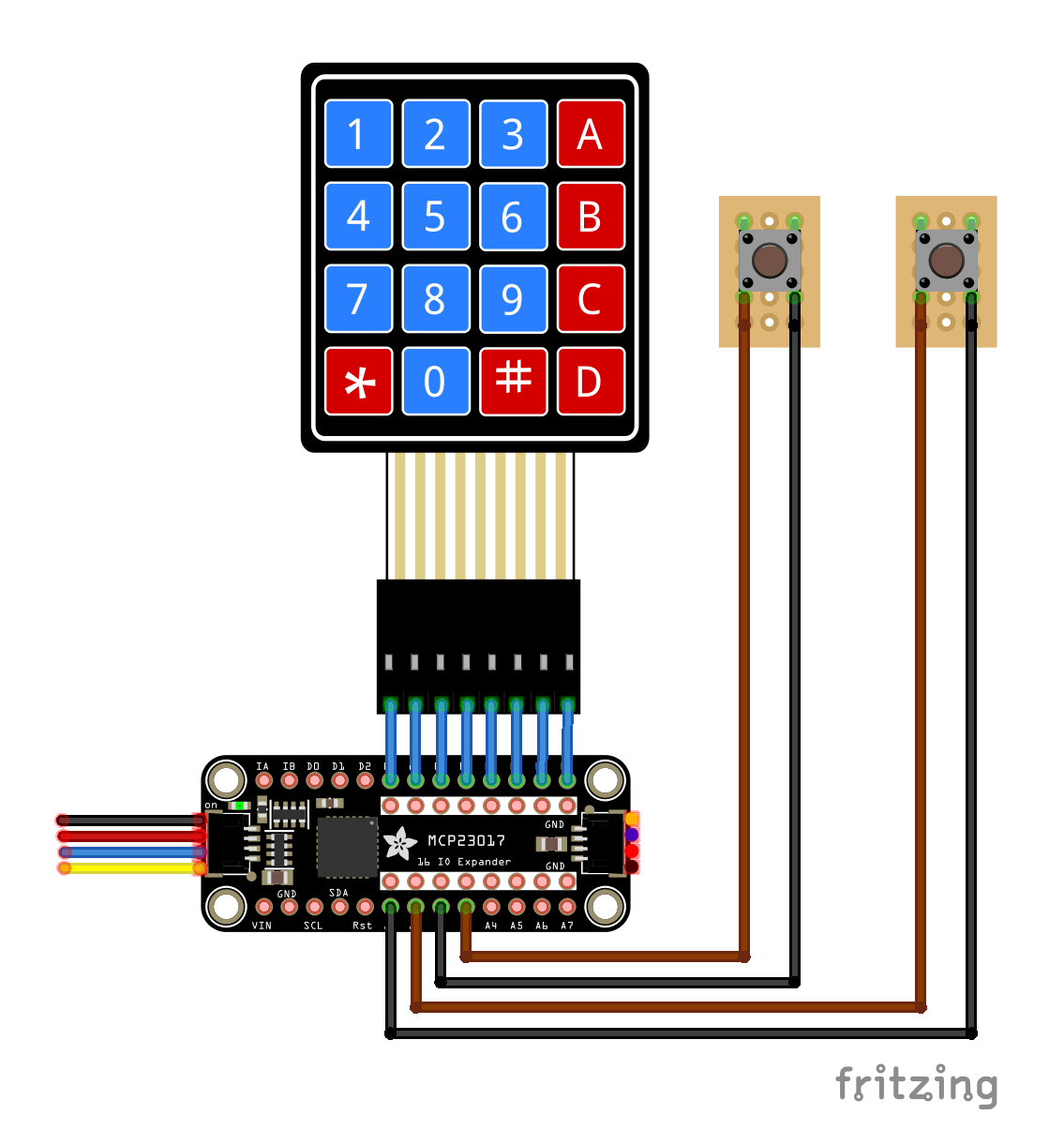
Comments