


Hardware components | ||||||
 |
| × | 1 | |||
 |
| × | 1 | |||
 |
| × | 1 | |||
 |
| × | 1 | |||
Software apps and online services | ||||||
 |
| |||||
A Child Presence Detection (CPD) device is a system designed to detect whether a child has been left inside a vehicle after the driver exits. Its purpose is to help prevent hot car deaths and other injuries that can occur when children are unintentionally left behind in parked vehicles.
What is it used for?CPD systems monitor the vehicle's interior—particularly the rear seats—to determine whether a child or other occupant remains inside after the vehicle is turned off. If someone is detected, the system can:
- Sound an alarm inside or outside the vehicle.
- Display a warning on the dashboard or infotainment screen.
- Send a notification to the driver's smartphone.
- In some vehicles, contact emergency services or a designated contact if the driver does not respond.
The primary reason is to prevent heatstroke and fatalities.
Even on a mild day:
- The temperature inside a parked car can rise rapidly.
- Young children overheat much faster than adults because their bodies regulate temperature less effectively.
- Caregivers can unintentionally forget a sleeping child due to changes in routine, stress, fatigue, or distractions—a phenomenon studied in cognitive psychology.
CPD systems provide a final safety check to reduce the chance of a tragic oversight.
Prototype ProjectThis project demonstrates a simple CPD prototype using a Seeed Wio Terminal and an Infineon S2GO RADAR BGT60LTR11AIP Shield2Go. Rather than relying on weight sensors or cameras, the prototype uses a low-power radar sensor capable of detecting the presence of a person inside the vehicle. The Wio Terminal monitors vehicle movement using its onboard accelerometer and, once the vehicle has remained stationary for a predefined period, activates the radar sensor to determine whether someone is still inside. If presence is detected, the system generates both local and wireless alerts.
Although intended for educational and prototyping purposes, the project demonstrates the fundamental operating principle used by many modern automotive Child Presence Detection systems.
Hardware ComponentsSeeed Wio TerminalThe Wio Terminal serves as the main controller for the system. It is based on the ATSAMD51 microcontroller and integrates several peripherals that make it well suited for rapid prototyping.
The project uses the Wio Terminal for:
- Reading vehicle motion from the onboard LIS3DHTR accelerometer
- Displaying system status on the integrated TFT display
- Driving the built-in buzzer for audible alarms
- Broadcasting BLE iBeacon messages indicating normal or alarm status
- Processing the CPD state machine
The Infineon BGT60LTR11AIP is a compact 60 GHz radar presence sensor capable of detecting human presence using microwave radar technology. Unlike optical sensors, radar operation is unaffected by lighting conditions and can detect small movements even when a person is seated or partially covered.
In this prototype, the radar provides a digital Target Detect (TD) output which is monitored by the Wio Terminal. When presence is confirmed after the vehicle has stopped, the system enters the alarm state.
System OperationThe prototype operates as a simple four-state finite state machine.
1. MonitoringImmediately after power-up, the Wio Terminal continuously measures acceleration using its onboard LIS3DHTR accelerometer. Vehicle vibration and movement indicate that the vehicle is still in operation.
2. StoppedWhen acceleration remains below a configurable threshold for a sustained period, the system confirms that the vehicle has stopped. A configurable delay is then applied before presence detection begins, preventing false alarms during normal passenger exit.
3. CheckingAfter the delay expires, the Wio Terminal polls the radar sensor. Multiple consecutive detections are required before presence is confirmed, providing basic debounce filtering and improving reliability.
4. AlarmIf the radar detects an occupant, the prototype enters the alarm state. During this state the system:
- Displays an alarm message on the TFT display
- Activates the built-in buzzer
- Broadcasts a BLE iBeacon indicating an alarm condition
The alarm remains active until any button on the Wio Terminal is pressed, after which the system returns to the Monitoring state.
Debug log example (w/ comments):
# Device initialization ...

Init radar ...
Init accelerometer ...
Accelerometer: OK
Init BLE...
BLE: OK
Beacon raw data (25 bytes):
  4C 0 2 15 4D 6F C8 8B BE 75 66 98 DA 48 68 66
  A3 6E C7 8E 0 1 0 0 0
Device ready.

# Device entering monitoring state ...

[3s] MON accel=1.045 radar=clear accelOk=Y errs=0
[4s] MON accel=1.029 radar=MOTION accelOk=Y errs=0
[5s] MON accel=1.252 radar=MOTION accelOk=Y errs=0
[6s] MON accel=0.768 radar=MOTION accelOk=Y errs=0
[7s] MON accel=1.770 radar=MOTION accelOk=Y errs=0
[8s] MON accel=0.576 radar=MOTION accelOk=Y errs=0
[9s] MON accel=1.255 radar=MOTION accelOk=Y errs=0
[10s] MON accel=0.702 radar=MOTION accelOk=Y errs=0
[11s] MON accel=1.225 radar=MOTION accelOk=Y errs=0
[12s] MON accel=1.311 radar=MOTION accelOk=Y errs=0
[13s] MON accel=1.058 radar=MOTION accelOk=Y errs=0
[14s] MON accel=1.183 radar=MOTION accelOk=Y errs=0
[15s] MON accel=1.003 radar=MOTION accelOk=Y errs=0

# Vehicle stopped moving ...

[16s] MON accel=0.955 radar=MOTION accelOk=Y errs=0
[17s] MON accel=0.964 radar=MOTION accelOk=Y errs=0
[18s] MON accel=0.971 radar=MOTION accelOk=Y errs=0
[19s] MON accel=0.955 radar=clear accelOk=Y errs=0
[20s] MON accel=0.959 radar=clear accelOk=Y errs=0
[21s] MON accel=0.964 radar=clear accelOk=Y errs=0
[22s] MON accel=0.985 radar=clear accelOk=Y errs=0
[23s] MON accel=0.939 radar=clear accelOk=Y errs=0
[24s] MON accel=0.958 radar=clear accelOk=Y errs=0
[25s] MON accel=0.967 radar=clear accelOk=Y errs=0
[26s] MON accel=0.983 radar=clear accelOk=Y errs=0
[27s] MON accel=0.968 radar=clear accelOk=Y errs=0
[28s] MON accel=0.967 radar=clear accelOk=Y errs=0
[29s] MON accel=0.965 radar=clear accelOk=Y errs=0
[30s] MON accel=0.975 radar=clear accelOk=Y errs=0
[31s] MON accel=0.910 radar=clear accelOk=Y errs=0
[32s] MON accel=0.970 radar=clear accelOk=Y errs=0
[33s] MON accel=0.961 radar=MOTION accelOk=Y errs=0
[34s] MON accel=0.960 radar=clear accelOk=Y errs=0
[35s] MON accel=0.956 radar=MOTION accelOk=Y errs=0
[36s] MON accel=0.966 radar=MOTION accelOk=Y errs=0
[37s] MON accel=0.970 radar=clear accelOk=Y errs=0
[38s] MON accel=0.978 radar=clear accelOk=Y errs=0
[39s] MON accel=0.934 radar=MOTION accelOk=Y errs=0
[40s] MON accel=0.966 radar=MOTION accelOk=Y errs=0
[41s] MON accel=0.961 radar=clear accelOk=Y errs=0
[42s] MON accel=0.985 radar=clear accelOk=Y errs=0
[43s] MON accel=0.977 radar=MOTION accelOk=Y errs=0
[44s] MON accel=0.962 radar=MOTION accelOk=Y errs=0

# Vehicle stop assumed after STOP_CONFIRM_MS millis (30000 = 30 s) ...

[45s] STP accel=0.963 radar=clear accelOk=Y errs=0
[46s] STP accel=0.979 radar=clear accelOk=Y errs=0
[47s] STP accel=0.973 radar=clear accelOk=Y errs=0
[48s] STP accel=0.985 radar=clear accelOk=Y errs=0
[49s] STP accel=0.964 radar=clear accelOk=Y errs=0
[50s] STP accel=0.983 radar=clear accelOk=Y errs=0
[51s] STP accel=0.958 radar=MOTION accelOk=Y errs=0
[52s] STP accel=0.967 radar=MOTION accelOk=Y errs=0
[53s] STP accel=0.951 radar=MOTION accelOk=Y errs=0
[54s] STP accel=0.966 radar=MOTION accelOk=Y errs=0
[55s] STP accel=0.969 radar=MOTION accelOk=Y errs=0
[56s] STP accel=0.955 radar=MOTION accelOk=Y errs=0
[57s] STP accel=0.979 radar=MOTION accelOk=Y errs=0
[58s] STP accel=0.952 radar=clear accelOk=Y errs=0
[59s] STP accel=0.972 radar=clear accelOk=Y errs=0
[60s] STP accel=0.981 radar=clear accelOk=Y errs=0
[61s] STP accel=0.978 radar=clear accelOk=Y errs=0
[62s] STP accel=0.955 radar=clear accelOk=Y errs=0
[63s] STP accel=0.969 radar=clear accelOk=Y errs=0
[64s] STP accel=0.962 radar=clear accelOk=Y errs=0
[65s] STP accel=0.975 radar=clear accelOk=Y errs=0
[66s] STP accel=0.961 radar=clear accelOk=Y errs=0
[67s] STP accel=0.965 radar=clear accelOk=Y errs=0
[68s] STP accel=0.953 radar=clear accelOk=Y errs=0
[69s] STP accel=0.958 radar=clear accelOk=Y errs=0
[70s] STP accel=0.971 radar=clear accelOk=Y errs=0
[71s] STP accel=0.966 radar=clear accelOk=Y errs=0
[72s] STP accel=0.963 radar=clear accelOk=Y errs=0
[73s] STP accel=0.970 radar=clear accelOk=Y errs=0
[74s] STP accel=0.935 radar=clear accelOk=Y errs=0

# After PRESENCE_DELAY_MS millis - assuming passengers have left the vehicle ...

[75s] CHK accel=0.967 radar=clear accelOk=Y errs=0
[76s] CHK accel=0.960 radar=clear accelOk=Y errs=0
[77s] CHK accel=0.967 radar=clear accelOk=Y errs=0
[78s] CHK accel=0.985 radar=clear accelOk=Y errs=0
[79s] CHK accel=0.972 radar=clear accelOk=Y errs=0
[80s] CHK accel=0.974 radar=clear accelOk=Y errs=0
[81s] CHK accel=0.951 radar=clear accelOk=Y errs=0
[82s] CHK accel=0.979 radar=clear accelOk=Y errs=0
[83s] CHK accel=0.978 radar=clear accelOk=Y errs=0
[84s] CHK accel=0.980 radar=clear accelOk=Y errs=0

# Motion detected ...

Beacon TX: major=1 minor=1 data=[4C 0 2 15 4D 6F C8 8B BE 75 66 98 DA 48 68 66 A3 6E C7 8E 0 1 0 1 C5]
BLE advertising started
[85s] ALM accel=0.954 radar=clear accelOk=Y errs=0
[86s] ALM accel=1.005 radar=MOTION accelOk=Y errs=0
[87s] ALM accel=0.988 radar=MOTION accelOk=Y errs=0
[88s] ALM accel=1.003 radar=clear accelOk=Y errs=0
[89s] ALM accel=0.956 radar=MOTION accelOk=Y errs=0
[90s] ALM accel=0.953 radar=MOTION accelOk=Y errs=0
[91s] ALM accel=0.943 radar=MOTION accelOk=Y errs=0
[92s] ALM accel=1.014 radar=MOTION accelOk=Y errs=0
[93s] ALM accel=0.983 radar=clear accelOk=Y errs=0
[94s] ALM accel=1.005 radar=clear accelOk=Y errs=0
[95s] ALM accel=0.972 radar=clear accelOk=Y errs=0
[96s] ALM accel=0.970 radar=clear accelOk=Y errs=0
[97s] ALM accel=0.987 radar=clear accelOk=Y errs=0
[98s] ALM accel=0.954 radar=clear accelOk=Y errs=0
[99s] ALM accel=0.981 radar=clear accelOk=Y errs=0
[100s] ALM accel=0.937 radar=MOTION accelOk=Y errs=0
[101s] ALM accel=1.001 radar=clear accelOk=Y errs=0
[102s] ALM accel=0.964 radar=clear accelOk=Y errs=0
[103s] ALM accel=1.010 radar=clear accelOk=Y errs=0
[104s] ALM accel=0.977 radar=clear accelOk=Y errs=0
[105s] ALM accel=0.979 radar=clear accelOk=Y errs=0

# Device has been reset manually ...

BTN: reset
BLE advertising stopped
[106s] MON accel=0.949 radar=MOTION accelOk=Y errs=0
[107s] MON accel=0.963 radar=MOTION accelOk=Y errs=0
[108s] MON accel=0.972 radar=clear accelOk=Y errs=0
[109s] MON accel=0.962 radar=clear accelOk=Y errs=0
[110s] MON accel=0.966 radar=clear accelOk=Y errs=0
[111s] MON accel=0.981 radar=clear accelOk=Y errs=0
[112s] MON accel=0.983 radar=clear accelOk=Y errs=0
[113s] MON accel=0.983 radar=clear accelOk=Y errs=0
[114s] MON accel=0.976 radar=clear accelOk=Y errs=0
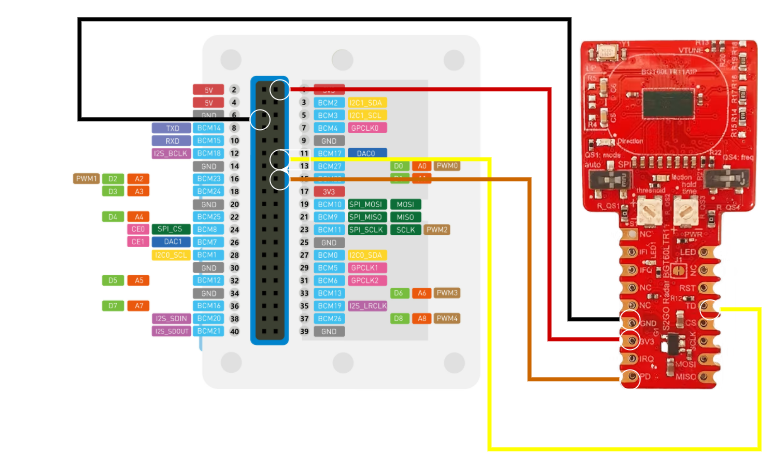
[115s] MON accel=0.991 radar=MOTION accelOk=Y errs=0Connect the Infineon S2GO BGT60LTR11AIP radar module to the Seeed Wio Terminal as follows:
- Connect the VIN pin of the radar module to the 3.3 V pin on the Wio Terminal.
- Connect the GND pin of the radar module to one of the GND pins on the Wio Terminal.
- Connect the TD (Target Detect) pin of the radar module to GPIO0 (Pin 13) on the Wio Terminal. This pin is used to detect when the radar senses a target. The signal is active LOW.
- Connect the PD (Phase Detect) pin of the radar module to GPIO1 (Pin 15) on the Wio Terminal. This signal is currently unused by the software but is connected for future expansion.
- Connect the Wio Terminal to your computer using a USB-C cable. This connection provides both power and the programming interface.
The Wio Terminal is powered and programmed via its USB-C connector.
The project is developed using the Arduino framework.
Install Board Support- Open the Arduino IDE.
- Navigate to File → Preferences.
- Add the Seeed board manager URL:
https://files.seeedstudio.com/arduino/package_seeeduino_boards_index.json- Open Boards Manager.
- Install Seeed SAMD Boards.
- Select Seeed Wio Terminal as the target board.
Install the following libraries using the Arduino Library Manager:
- Seeed_Arduino_rpcUnified
- Seeed_Arduino_rpcBLE
- Grove-3-Axis-Digital-Accelerometer-2g-to-16g-LIS3DHTR
- Open the project sketch in the Arduino IDE or the VS Code Arduino extension.
- Select the correct COM port.
- Compile the project.
- Upload it to the Wio Terminal.
- Open the Serial Monitor at 115200 baud to observe sensor readings and state transitions.
A typical demonstration of the prototype proceeds as follows:
- Power the Wio Terminal via USB-C.
- The device starts in the Monitoring state and displays the current status.
- Move or gently shake the device to simulate vehicle motion.
- Place the device on a stable surface to simulate the vehicle coming to a stop.
- After the configured stop confirmation time and presence detection delay have elapsed, position a person or object within the radar's detection range.
- The radar reports a target, causing the system to enter the Alarm state.
- The TFT display changes to an alarm indication, the buzzer sounds, and the BLE beacon advertises the alarm condition.
- Press any button on the Wio Terminal to reset the system and return to the Monitoring state.
Several parameters near the beginning of the source code allow the system to be adjusted for different applications:
- STOP_CONFIRM_MS – time required to confirm that the vehicle has stopped.
- PRESENCE_DELAY_MS – waiting period before radar monitoring begins.
- SENSOR_READ_MS – accelerometer sampling interval.
- STOP_THRESHOLD and ACCEL_REST_MAG – movement thresholds used to determine whether the vehicle is stationary.
- RADAR_DEBOUNCE – number of consecutive radar detections required before triggering an alarm.
This project is intended solely as an educational prototype demonstrating the principles of Child Presence Detection using radar sensing. It is not a certified automotive safety device and must not be relied upon as a replacement for commercial CPD systems or for real-world vehicle safety applications.


Comments