



Hardware components | ||||||
 |
| × | 1 | |||
| × | 1 | ||||
| × | 1 | ||||
Software apps and online services | ||||||
| ||||||
| ||||||
| ||||||
The myCobot 280 is one of the smallest and lightest 6-axis desktop collaborative robotic arms available. Weighing roughly 850 g, it offers a 280 mm working radius (reach), a 250 g payload capacity, and ± 0.5 mm repeatability.(myCobot 280 Specifications).
To celebrate Elephant Robotics' 10th anniversary this year, the myCobot 280 X Edition was released. It features an exclusive recolored design while maintaining the exact same technical specifications as the classic model, and the package comes with a special commemorative medal and sticker.
What makes the myCobot 280 particularly friendly for hackers and researchers is its open software ecosystem (myCobot 280 GitBook Documentation). Across its M5Stack, Raspberry Pi, Jetson Nano, and Arduino hardware variants, Elephant Robotics provides comprehensive SDK support:
- Python (pymycobot): A clean serial API (pymycobot on GitHub) that lets you read and command individual joint angles (send_angles), Cartesian coordinates (send_coords), servo torque (release_all_servos), and real-time command refresh modes (set_fresh_mode) over USB serial at 115200 baud.
- ROS1 & ROS2: Full URDF models, MoveIt motion planning, and RViz simulation packages.
- Visual & Embedded SDKs: myBlockly drag-and-drop puzzle programming alongside C++, C#, and Arduino libraries.
When you want to teleoperate a desktop robotic arm in real time, you typically rely on one of three standard interfaces:
- 1. Desktop GUI Sliders & Teach Pendants: Clicking buttons or dragging joint sliders in myStudio or ROS RViz—precise for single-axis testing, but clunky when trying to coordinate fluid multi-axis motion.
- 2. Manual Drag-and-Teach: Releasing the servos to physically move the arm by hand and recording waypoints, which works for repetitive playback but not live remote control.
- 3. Gamepads, Joysticks, or VR Controllers: Mapping dual analog thumbsticks on an Xbox/PlayStation controller, a 6-DOF 3D SpaceMouse, or a VR hand controller to robot joints.
While gamepads and joysticks work well, they require dedicated external hardware and occupy both of your hands. What if you could control the robot arm hands-free using a sensor you are already wearing?
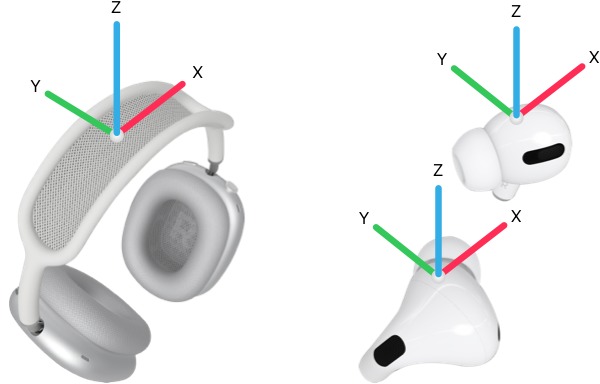
Enter Apple AirPods Pro: An IMU in Your EarsInside every pair of Apple AirPods Pro(as well as AirPods 3/4, AirPods Max, and Beats Fit Pro) sits an Inertial Measurement Unit (IMU) combining accelerometers and three-axis gyroscopes. Apple built these motion sensors into the earbuds to power Personalized Spatial Audio—tracking how your head turns relative to your screen so audio stays anchored in space.
- Web Axis Diagram Reference:Apple Developer CMHeadphoneMotionManager Axis Diagram Because that IMU continuously calculates 3D orientation, your AirPods are effectively a wireless, zero-weight head-pose tracker. However, there is an important platform catch:
- Native Support on macOS (and iOS/iPadOS): Apple provides an official API called CMHeadphoneMotionManager inside the native CoreMotion framework. With just a few lines of Swift on a Mac, you can subscribe to ~25 Hz fused device-motion updates.
- Why Windows (and Linux) Is Tricky: Over standard Bluetooth on Windows, AirPods pair purely as a classic audio sink/hands-free device. Apple transmits the high-rate IMU telemetry over a proprietary Bluetooth L2CAP channel using the undocumented Apple Accessory Protocol (AAP). Because Apple does not ship a CoreMotion driver or expose a standard Windows HID sensor interface for AirPods, Windows cannot natively read AirPods motion sensors out of the box.
On macOS, reading live head orientation in Swift (headtrack/main.swift) takes just a single callback with CMHeadphoneMotionManager:
let mgr = CMHeadphoneMotionManager()
guard mgr.isDeviceMotionAvailable else { exit(1) }

let deg = 180.0 / Double.pi
mgr.startDeviceMotionUpdates(to: .main) { motion, error in
    guard error == nil, let m = motion else { return }
    let a = m.attitude
    let q = a.quaternion
    emit(String(format:
        "{\"t\":%.4f,\"pitch\":%.4f,\"roll\":%.4f,\"yaw\":%.4f," +
        "\"qx\":%.5f,\"qy\":%.5f,\"qz\":%.5f,\"qw\":%.5f}",
        m.timestamp, a.pitch * deg, a.roll * deg, a.yaw * deg,
        q.x, q.y, q.z, q.w))
}Although pymycobot offers send_coords() for Cartesian (X, Y, Z, Rx, Ry, Rz) control, inverse kinematics on the myCobot 280 runs on the arm's internal microcontroller—which adds latency and can flip unpredictably near kinematic singularities.
Instead, bridge.py operates directly in joint space using send_angles(). When initializing MyCobot280, enabling set_fresh_mode(1) ensures the arm always acts immediately on the newest angle command rather than queuing up a laggy serial backlog:
from pymycobot import MyCobot280
# Head axis -> (axis_name, mycobot_joint_index, scale)
AXIS_MAP = [("yaw", 0, 1.0), ("pitch", 1, 1.0), ("roll", 4, 1.0)]
JOINT_LIMITS = [(-160, 160), (-130, 130), (-145, 145), (-140, 140), (-160, 160), (-175, 175)]
class Arm:
    def __init__(self, live, speed):
        self.live = live
        self.speed = speed
        if live:
            self.mc = MyCobot280("/dev/cu.usbserial-5AE20107941", 115200, timeout=0.3)
            time.sleep(1.5)
            self.mc.set_fresh_mode(1)   # always pursue the newest target immediately

    def send(self, target):
        if self.live:
            self.mc.send_angles([round(v, 2) for v in target], self.speed)
Each head rotation axis drives a natural counterpart on the arm while joints J3, J4, and J6 hold their posture:
While pitch and roll are anchored to gravity via the accelerometer and stay accurate indefinitely, AirPods do not have a magnetometer. Without a magnetic north reference, the yaw (heading) axis slowly drifts over several minutes.
To prevent yaw drift or sudden startup jumps from jerking the robot, bridge.py implements a virtual clutch (SPACE bar) alongside a 300 ms packet watchdog (STALE_S = 0.3) and a 3.0°/tick slew-rate limiter (30°/s max speed):
def engage(self):
    if not self.head.fresh():
        return
    # Snapshot both baselines so engaging never jumps and zeroes out accumulated yaw drift
    self.head_base = dict(self.head.pose)
    self.arm_base = self.arm.angles()
    self.target = list(self.arm_base)
    self.engaged = True

def step(self):
    if not self.engaged or not self.head.fresh():
        self.engaged = False   # auto-disengage if AirPods disconnect or go in the case
        return

    pose = self.head.pose
    desired = list(self.arm_base)
    for axis, joint, scale in AXIS_MAP:
        delta = pose[axis] - self.head_base[axis]
        if axis == "yaw":       # shortest-arc wraparound at +/-180 deg
            delta = (delta + 180.0) % 360.0 - 180.0
        delta = clamp(delta * self.gain * scale, -MAX_EXCURSION, MAX_EXCURSION)
        lo, hi = JOINT_LIMITS[joint]
        desired[joint] = clamp(self.arm_base[joint] + delta, lo, hi)

    # Slew-rate limit (3 deg/tick @ 10 Hz = 30 deg/s ceiling) so a head jerk cannot jerk the arm
    for i in range(6):
        step = clamp(desired[i] - self.target[i], -MAX_STEP_DEG, MAX_STEP_DEG)
        self.target[i] += step

    self.arm.send(self.target)
Whenever yaw creeps during a long session—or if you want to ratchet-index the arm further in one direction—you simply press SPACE to disengage, recenter your head comfortably, and press SPACE again (or press c while engaged) to capture a fresh zero baseline.
Interested on the product ?Click to find out more details on myCobot 280 X Edition M5
Share your innovative Elephant Robotics projects with our community and join our User Case Initiative today: https://www.elephantrobotics.com/en/call-for-user-cases-en/



Comments