


Hardware components | ||||||
 |
| × | 1 | |||
Software apps and online services | ||||||
 |
| |||||
1. Introduction & Overview
SilentVoice is a lightweight edge-AI prototype I built to help bridge communication gaps during medical emergencies. Right now it's trained on 7 words to help someone convey critical needs — "help", "water", "pain", "doctor", "breathe", "yes", and "no" — just by mouthing the word in front of a camera, no sound needed.
No special hardware is needed — any regular phone camera or laptop webcam works fine, since the model only tracks mouth landmarks and doesn't need high resolution or depth data.
Instead of using heavy cloud-based vision models that need huge datasets and expensive GPUs, I built this using a simple landmark-coordinate tracking pipeline that runs locally with Flask, MediaPipe, and a lightweight TensorFlow Lite model made for edge devices.
2. System Architecture
I split the project into three main parts:
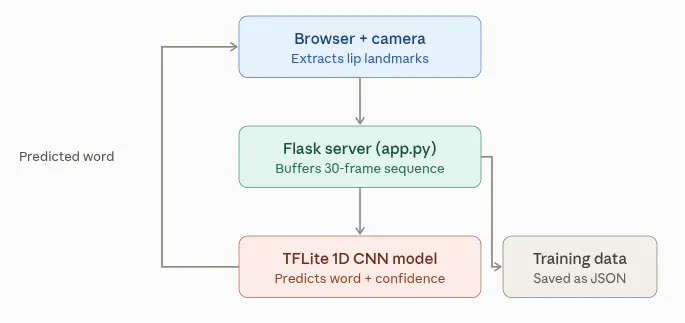
- Frontend (Browser + MediaPipe): Captures live video frames from a phone, pulls out 40 specific mouth landmarks (which gives 80 X and Y coordinate values per frame), and groups them into windows of 30 frames each.
Landmark detection runs entirely in the browser using MediaPipe's Face Mesh model, so raw video is never sent to the server — only the extracted coordinates are transmitted, which also keeps bandwidth and latency low.
- Backend Server (app.py): A Flask app that handles incoming HTTP/WebSocket connections, serves the UI, saves the recorded sample data, and runs model inference.
- Machine Learning Model (train.py & lrw_model.tflite): A custom 1D Convolutional Neural Network I trained on coordinate sequences to classify mouth movements into the 7 vocabulary words. I've included a pretrained lrw_model.tflite (~197 KB) in the repo, trained on 98 self-recorded samples across the 7 words.
2.1 Why Landmarks Instead of Raw Video
I chose to track coordinates instead of feeding raw video frames into the model for a few reasons — it's much lighter on compute (80 floats per frame vs. a full image), it's privacy-friendly since no actual video leaves the browser, and it generalizes better across different lighting conditions and camera qualities.
3. Project Setup & Installation Guide
Here's how to set up and run the project from scratch:
Step 1: Environment Setup
Go to the project folder and create + activate a Python virtual environment:
python3 -m venv lip_env
source lip_env/bin/activate
Step 2: Install Dependencies
Install all the Python packages needed for the backend, deep learning, and data handling:
pip install flask flask-socketio tensorflow numpy mediapipe opencv-python scikit-learn4. Data Collection Phase
Before training the model, I recorded real training samples using the app's Training Mode:
Run the backend server:
python3 app.pyOpen the app in your browser (or expose it using Cloudflare so you can access it on mobile).
Use Training Mode to record a bunch of samples (roughly 10–20 per word) across the 7 vocabulary words: help, water, pain, doctor, breathe, yes, and no.
The app automatically saves these recordings as 30-frame coordinate sequences in JSON format inside a training_data/ folder.
The pretrained model I included was trained on these sample counts: help (17), water (20), pain (16), doctor (11), breathe (12), yes (10), no (12) — 98 real samples total.
A few things that helped improve sample quality: keeping consistent lighting, framing the mouth clearly in the camera view, and recording samples at slightly different head angles/distances so the model doesn't overfit to one exact position.
5. Model Training (train.py)
Once I had the raw samples collected, I needed to process, augment, and train the neural network.
Why a 1D CNN?
While building this, I found that flattening the frames destroys the temporal motion data, and standard LSTM models throw TensorListReserve errors when you try exporting them to TensorFlow Lite. So I switched to a 1D Convolutional Neural Network (1D CNN) instead, since it reads the 30-frame sequence smoothly, handles Gaussian noise augmentation well, and exports cleanly to TFLite without issues.
I split the 98 real samples into train/validation sets before augmenting them (so near-duplicate noisy copies don't leak between the two), then expanded each side with 20 Gaussian-noise variations. The model trains for 40 epochs and reaches around 45% training accuracy. Validation accuracy jumps around in the 10–40% range because the validation set is really small (~2 samples per class) — since this is just a proof-of-concept trained on limited data, adding more recorded samples per word should directly improve both accuracy and stability.
This project is meant as a proof of concept, not a production-ready system — the accuracy numbers reflect the small dataset size (98 samples across 7 classes), not a limitation of the 1D CNN approach itself. With a larger, more diverse dataset (different people, lighting, angles), accuracy would scale up significantly.
Run the training script:
python3 train.py(This reads the JSON samples, augments them, trains the model for 40 epochs, and outputs your compiled lrw_model.tflite file.)
6. Running the Application & Live Testing
Step 1: Start the Flask Server
Make sure your model file is in the project directory, then start the server:
python3 app.pyStep 2: Set Up Cloudflare Tunneling (For Mobile Access)
Since mobile browsers need a secure HTTPS connection to access the camera, I expose the local server using Cloudflare Tunnels (no router setup needed). Open a new terminal and run:
./cloudflared tunnel --url http://localhost:5000Copy the public HTTPS link it gives you.
Step 3: Live Testing
Open the Cloudflare URL on your phone's browser, switch to Live Test Mode, look at the camera, and mouth out your words. The backend processes the coordinate sequences through lrw_model.tflite and shows the predicted word with a confidence score in real time.
7. Limitations & Future Work
Current limitations: the model is trained on my own mouth shape and speaking style, so accuracy may drop for other users. The 7-word vocabulary is intentionally small for this prototype. Planned improvements: expanding the vocabulary, collecting samples from multiple people to improve generalization, and possibly adding a mobile app wrapper (instead of relying on Cloudflare tunneling) for easier real-world deployment.


Comments