



Hardware components | ||||||
| × | 1 | ||||
| × | 1 | ||||
 |
| × | 1 | |||
 |
| × | 1 | |||
 |
| × | 1 | |||
Software apps and online services | ||||||
 |
| |||||
| ||||||
Hand tools and fabrication machines | ||||||
 |
| |||||
 |
| |||||
 |
| |||||
Tip: You may be confused about the sensor on the desk lamp in the image, but don't worry, we won't use it in the following text.That was just something I forgot to remove when I was doing the development.0) The Story
I recently got a seriously novel LED strip: only 1mm wide, and flexible enough to bend freely. It doesn’t feel like a “strip” anymore—it feels like a material you can literally draw light with.
I kept thinking: what project is worthy of something this thin and bendable?While browsing MakerWorld, I got the idea: a desk lamp—not a “dev-board demo” lamp, but something you’d actually keep on your desk and use every day.
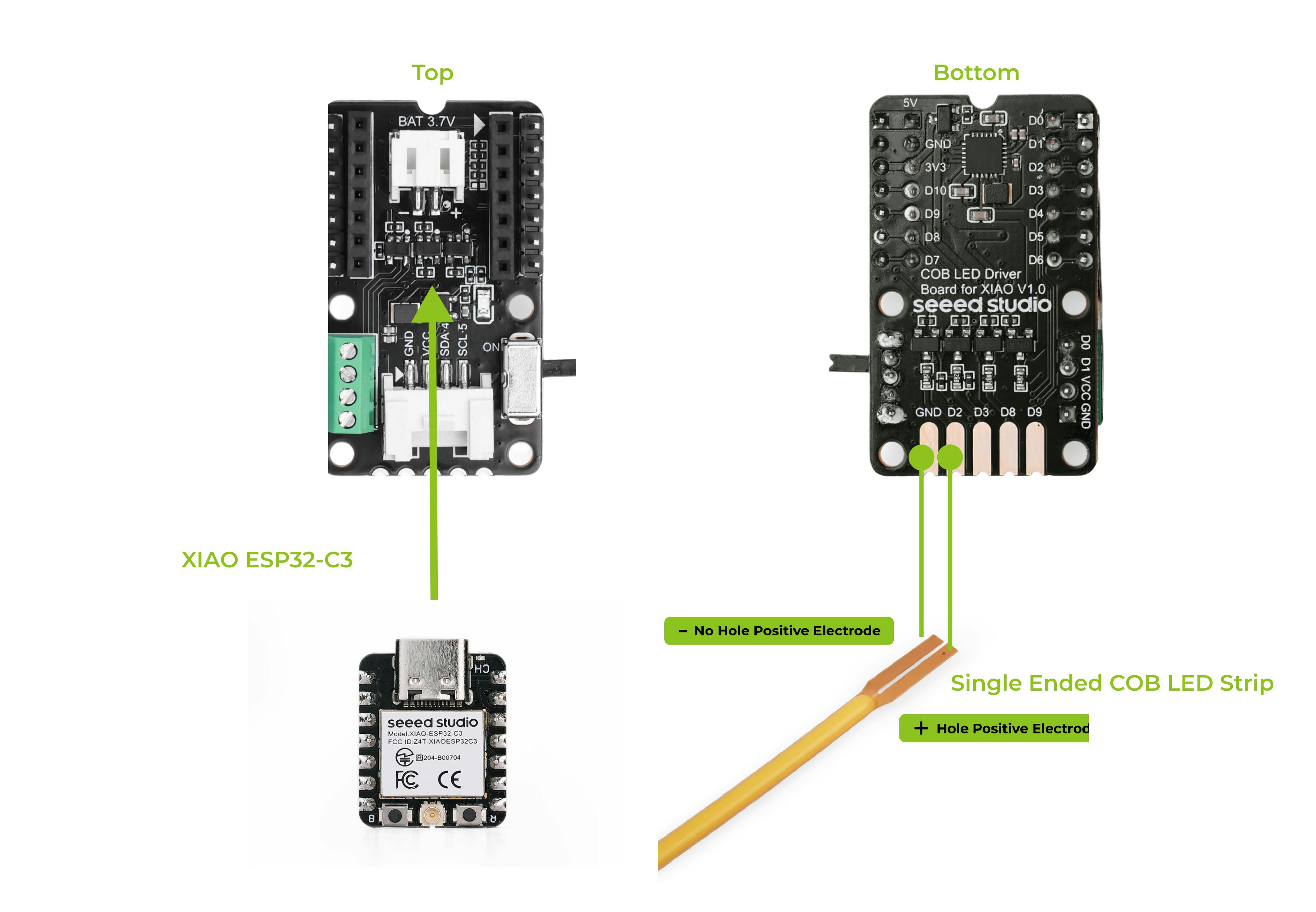
Then reality hit: to drive a COB strip like this, proper current limiting is non-negotiable, or you risk burning it. And I also wanted advanced features: remote control, automation, scenes. So I picked the Seeed XIAO ESP32-C3 and paired it with Seeed’s COB LED Driver Board, which makes power + wiring + driving feel plug-and-stable.
But simply turning on a strip is boring. I flashed ESPHome, integrated everything into Home Assistant, and added a Seeed mmWave presence sensor for truly smart behavior:
Walk up → lights on
- Walk up → lights on
- Sit still → stays on (no awkward PIR dropout)
- Leave for a while → smooth fade out and off
Here’s exactly how I built it.
1) What you’ll buildA product-like desk lamp
- Flexible 1mm COB strip for ambient/outline light (dimmable, smooth fades)
- (Optional) a COB panel/bar for main lighting (brighter, more “real lamp”)
- mmWave presence for reliable on/off without “stillness dropout”
- ESPHome + Home Assistant for remote control, automations, and scenes
- XIAO ESP32-C3 (or other XIAO ESP32 variants)
- Seeed Studio COB LED Driver Board for XIAO
- 1mm flexible COB LED strip (3V version, per your spec)
- (Optional) COB panel/bar for main light
- XIAO 60GHz mmWave Human Fall Detection Sensor-MR60FDA2
- 5V power adapter (1A+ recommended depending on load)
- Wires, diffuser/channel (highly recommended), mounting materials
- Start with low brightness + short tests on first power-up.
- Current limiting and heat are real—COB can run hot even if it looks fine.
- Flexible ≠ indestructible—use a gentle bend radius and avoid repeated sharp bends.
This is where a flexible 1mm COB strip shines:
- wrap it around an edge for a “halo”
- route it along an arm so the light feels drawn
- form a gentle glowing curve for minimal desk ambience
My approach is to use gravity to let the LED strip hang naturally, which is very convenient, haha
5) Step 2 — WiringCore idea:
- COB Driver Board drives the lighting safely
- XIAO ESP32-C3 runs ESPHome
Recommended order:
- power first (stable 5V)
- connect strip to a PWM channel (for dimming/fades)
- optional panel on a high-power channel (as main light)
- mmWave last (This device can be powered independently; it's essentially a standalone unit)
Also, don't forget to prepare a 3.7V lithium battery.6) Step 3 — Mechanical
Special thanks to Xinyu for the valuable contribution to the 3D printing work.
The original design demonstrates remarkable creativity and practical value. For those interested in viewing the original design, the demonstration video and the author's homepage are available via the links provided below.
Finally, you just need to stick the back of the driver board with double-sided foam tape to the cover.
This step only writes ESPHome for the XIAO ESP32-C3 (Light Control); the MR60FDA2 (mmWave) does not require you to write YAML. After connecting it via HA's plug-and-play process, you can simply link it in HA automation.
esphome:
  name: smart-desk-light
  friendly_name: Smart Desk Light

esp32:
  board: seeed_xiao_esp32c3
  framework:
    type: arduino

logger:

api:
ota:

wifi:
  ssid: !secret wifi_ssid
  password: !secret wifi_password
  ap:
    ssid: "smart-desk-light-fallback"
    password: "12345678"

captive_portal:

# -------------------- PWM Output (Active-Low) --------------------
output:
  - platform: ledc
    id: pwm_output
    pin: 4
    frequency: 1000Hz
    inverted: true

# -------------------- Light Entity for Home Assistant --------------------
light:
  - platform: monochromatic
    id: light_strip
    name: "Light Strip"
    output: pwm_output
    restore_mode: ALWAYS_OFF
    default_transition_length: 1s
Now, you can take a preliminary look at the desktop desk lamp's effect.
MR60FDA2 ships with pre-flashed ESPHome and plug-and-play HA integration; once on the same network it shows up as a discovered device and can be configured directly.
MR60FDA2 Fall detection Sensor with Home Assistant | Seeed Studio Wiki
- First, click on Settings in your HA main interface, then find the Automation Configuration feature.
- Secondly, set up the first automation, which is to turn on the COB LED desk lamp when a human is detected.
- Finally, set up the logic to turn off the COB desk lamp when no one is detected.
The best part isn’t “I made another lamp.” It’s that theflexible 1mm COB strip finally landed in a project that matches its uniqueness: you don’t compromise the design for the strip—the strip adapts to your design.
With the COB LED driver board + XIAO + ESPHome + HA + mmWave presence, it becomes a genuinely usable desk lighting system.


Comments