



Hardware components | ||||||
 |
| × | 1 | |||
 |
| × | 5 | |||
| × | 1 | ||||
| × | 1 | ||||
| × | 1 | ||||
 |
| × | 1 | |||
| × | 1 | ||||
 |
| × | 1 | |||
 |
| × | 20 | |||
 |
| × | 4 | |||
| × | 1 | ||||
Software apps and online services | ||||||
| ||||||
| ||||||
Hand tools and fabrication machines | ||||||
 |
| |||||
A white cane is an extraordinary tool, and nothing here replaces it. But a cane is a contact sensor: it finds what is already at your feet, in an arc of about one metre, and it finds almost nothing above waist height. The two hazards that send people to the emergency room are exactly the ones a cane misses: an open cupboard door or a low sign at head height, and a step down that you meet at walking speed.
The commercial answer to this exists. Devices like WeWALK and OrCam MyEye are genuinely good, and they cost between 1, 000 and 4, 000 euro, often on top of a subscription. Most of them also assume a smartphone in the loop and, for anything involving recognition, a data connection.
EchoGuide asks a narrower question: how much useful spatial information can you deliver for the price of a dinner out, with no network at all, using hardware anyone can buy and reprint?
This project has two jobs that pull in opposite directions.
The first job is hard real time and safety critical. Five ultrasonic sensors have to be fired in sequence, their echoes timed to the microsecond, the result classified, and a tone rendered on a speaker. If this stalls for half a second while somebody is walking, the device is worse than useless: it is misleading. This work belongs on a microcontroller with nothing else to do.
The second job is soft, connected and disposable. A carer, an orientation and mobility instructor, or the developer needs to see what the device is doing right now, from a phone on the same Wi-Fi. That means a network stack, a web server and a websocket. This work belongs on Linux.
The UNO Q has both, on one board, talking to each other over Bridge: an STM32U585 Cortex-M33 for the real-time core, and a quad-core Qualcomm Dragonwing QRB2210 running Debian for the Linux side.
The split is not cosmetic, and it is the architectural point of the whole project:
If the Linux side dies, the wearer notices nothing. Wi-Fi drops, the dashboard crashes, Debian goes down entirely: the sensing loop, the classification and the alerts all keep running on the STM32, because they never left it. The Linux side is strictly a supervision layer that consumes events. It cannot block the safety path because it is not on the safety path.
That is a property you cannot get from a classic UNO, and you would get it from a Raspberry Pi only by bolting a second microcontroller onto it. Here it comes for free, on one board, in one IDE.
3. How it worksFive HC-SR04 sensors feed the STM32 core, which fires them in sequence, finds the nearest object, detects whether it is approaching, classifies the urgency and renders a tone pattern through a PAM8403 amplifier into a speaker. Every cycle is then pushed over Bridge to the Linux side, where the web_ui Brick relays it to any browser on the same Wi-Fi over Socket.IO.
One cycle takes roughly 150 to 200 ms. Most of that is the sensors themselves: each HC-SR04 gets a 20 ms echo timeout, which caps the useful range at about 3.4 m and, more importantly, bounds the worst case of the loop so it can never hang on a silent sensor.
The sensor fanFive sensors, each mounted on a different face of the enclosure, cover the volume a cane cannot reach:
- LEFT, aimed 35 degrees to the left: walls, doorframes, people passing.
- CENTER, straight ahead: the main obstacle beam.
- RIGHT, aimed 35 degrees to the right: symmetric to LEFT.
- DOWN, forward and down: steps down, kerbs, drops.
- UP, forward and up: open cupboards, low signs, branches.
The device is worn on the chest rather than mounted on the cane, for two reasons. The beams need to originate roughly at the height of the hazards they are looking for, and the IMU needs to see the movement of the body, not the movement of a stick.
4. The audio languageThis is the part that took the most thinking, and it ended up being the part where less is more.
The obvious design is speech: "obstacle on your left, two metres". We deliberately did not do that, and not only because of a hardware constraint. A spoken sentence takes two seconds. In two seconds at walking pace you have covered more than two metres, which is to say the sentence has finished describing a world that no longer exists. Worse, it occupies the wearer's hearing, which for a blind person is the primary channel for everything else: traffic, voices, the echo of a corridor.
So alerts are tonal, and the pattern itself carries the meaning.
Direction, on the horizontal axis, is carried by the number of pulses. Same pitch, so the tones stay easy to tell apart from ambient sound:
- center: 1 pulse at 1100 Hz
- left: 2 pulses at 1100 Hz
- right: 3 pulses at 1100 Hz
Direction, on the vertical axis, is carried by pitch, which maps onto an intuition everybody already has:
- up: 1 pulse at 1800 Hz, high pitch for an overhead hazard
- down: 1 pulse at 400 Hz, low pitch for a step or a drop
Urgency is carried by tempo, exactly like a parking sensor:
- ATTENTION, under 150 cm: 90 ms pulses, pattern repeats every 900 ms
- CRITICAL, under 50 cm: 45 ms pulses, pattern repeats every 350 ms
Approach doubles the rate. If the same sensor reports a distance at least 8 cm shorter than it did on the previous cycle, the obstacle is closing in and the repeat interval is halved. A parked car and a car rolling towards you are at the same distance for one instant; they should not sound the same.
The whole language is five patterns and one tempo rule. It takes about thirty seconds to learn, it is language independent, and it fits in the gaps between the sounds of the real world instead of covering them.
5. Bill of materialsPrices are what we actually paid where we bought the part, and current market price where the part came out of a drawer. The Arduino UNO Q was supplied free through the contest, so it is listed at its official store price. Full details are in the Components section of this project.
Electronics
- 1x Arduino UNO Q 4GB (ABX00173), STM32U585 plus Qualcomm QRB2210: 82.90 euro
- 5x HC-SR04 ultrasonic sensor, 2 to 400 cm, 5V: 1.20 each, 6.00 total
- 1x MPU-9250 / MPU-6500 IMU module, 9-axis, I2C, GY-9250 breakout: 1.23
- 1x PAM8403 amplifier module (HW-104), 2 x 3W class-D: 0.52
- 1x Speaker 2W 8 ohm, 40 mm: 0.35
- 1x Electrolytic capacitor 10 uF, DC block between D12 and the amplifier: 0.05
- 1x USB-C powerbank 5000 mAh, any 5V / 2A bank: 9.90
- 1x Mini breadboard 170 points, prototype wiring: 1.80
- 20x Dupont jumper wires, female-male for sensors, male-male for the rest: 2.00
Enclosure
- 114 g PLA filament, shell plus lid, printed flat: 2.85
- 4x M3 x 10 screws, optional, the lid also holds by friction fit: 0.20
Totals
- Full build, board at list price: 107.80 euro
- Full build, excluding the board: 24.90 euro
- Full build on the UNO Q 2GB variant, sufficient for the current feature set: about 85 euro
Two honest notes on this. First, on board choice: as EchoGuide stands today, Linux only has to run a small web server, and the 2GB variant covers that comfortably, which puts a cost-driven build under 100 euro. The 4GB variant earns its price once the roadmap in section 11 lands. A scanning LIDAR replacing the ultrasonic fan means continuous point-cloud processing rather than five integers per cycle; speech output means a synthesis engine resident in memory; and the obvious extension after that, classifying what an obstacle actually is rather than just how far away it is, means an inference model alongside everything else. Those run on the Linux side, concurrently, and that is precisely the 4GB use case. The cheaper board is the right call for a device frozen at today's feature set, and the wrong call for one that is meant to grow.
Second, everything except the board is under 25 euro, which is the number that matters for anyone who wants to reproduce this: the marginal cost of turning a UNO Q you already own into a spatial assistant is the price of two coffees. For reference, the commercial devices in this space start at roughly 1, 000 euro and go past 4, 000.
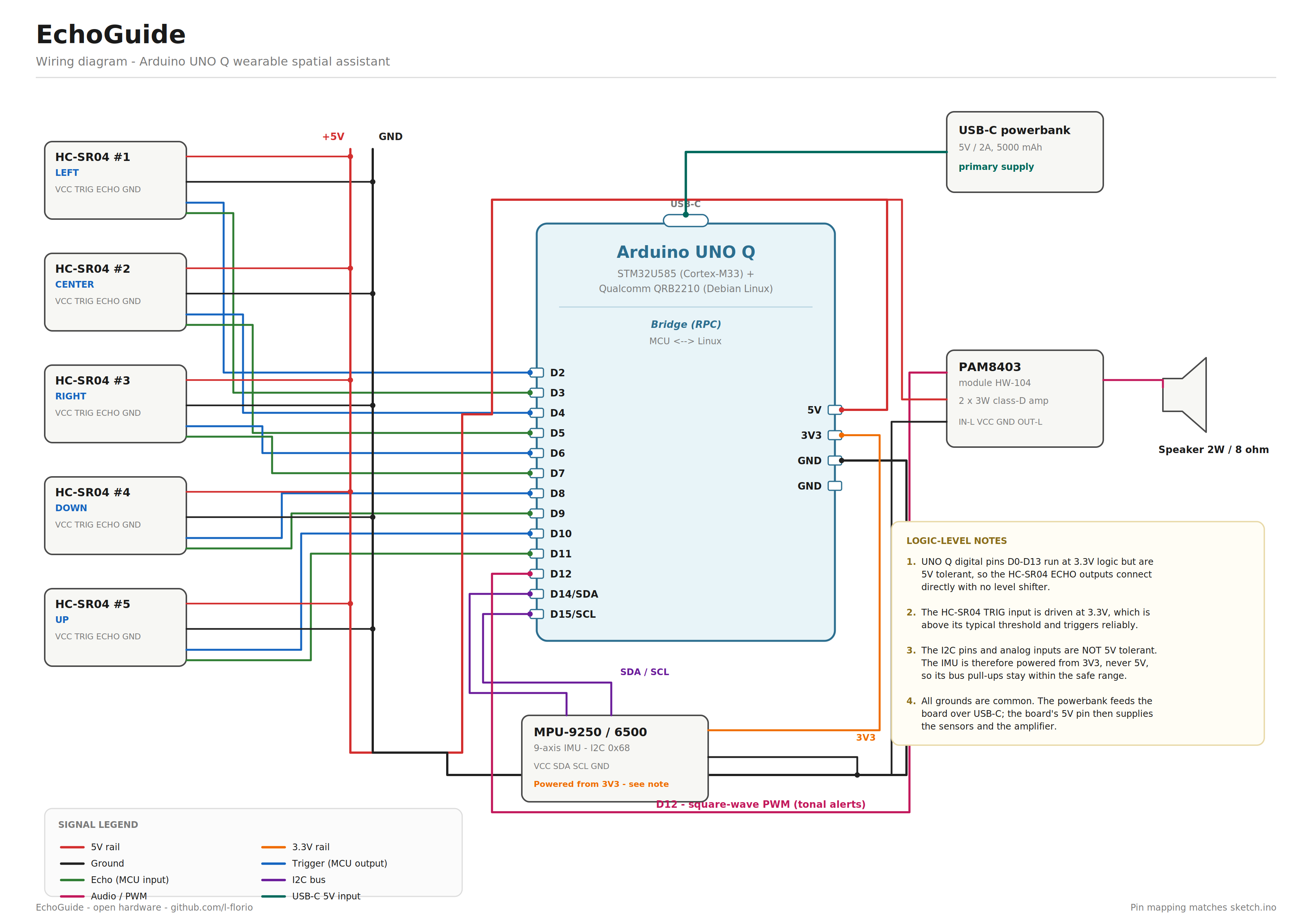
6. WiringPin map
- LEFT trig / echo: D2 / D3
- CENTER trig / echo: D4 / D5
- RIGHT trig / echo: D6 / D7
- DOWN trig / echo: D8 / D9
- UP trig / echo: D10 / D11
- Audio out: D12, through a 10 uF series capacitor into PAM8403 IN-L
- IMU SDA / SCL: D14 / D15, I2C, MPU at address 0x68
- HC-SR04 power: 5V, all five sensors
- PAM8403 power: 5V
- IMU power: 3V3, see the warning below
- Board power: USB-C, from the powerbank
The UNO Q is not a classic UNO, and this catches people out.
Digital pins D0 to D13 run at 3.3V logic but are 5V tolerant. This is why the five HC-SR04 ECHO outputs, which swing to 5V, connect straight to the board with no level shifter, and why the 3.3V TRIG output still drives the sensors reliably: it sits above their trigger threshold.
The I2C pins and the analog inputs are not 5V tolerant. Anything above roughly 3.6V on them can permanently damage the microcontroller. So the IMU is powered from 3V3, never from 5V, which keeps its bus pull-ups inside the safe range.
We learned this the direct way. The IMU was originally wired to 5V and simply never answered on the bus. Moving it to 3V3 is a ten second change, and it is the first thing to check if your own build reports a missing IMU.
7. The enclosureThe case was modelled in Blender and driven entirely through scripted geometry via the Python API, which made it parametric in practice: every sensor hole, pad and post is derived from a handful of constants at the top of the script, so changing the wall thickness or the sensor diameter is a one line edit and a re-run.
Final exterior dimensions are about 94 x 113 x 30 mm. It prints in two parts, both laid flat, in PLA. Total 114 g.
Design decisions worth stealing:
- Straight sensor holes, tilted internal pads. The obvious way to aim a sensor at 35 degrees is to cut the hole at 35 degrees. We tried, and tilted boolean cuts turned into a reliable source of non-manifold geometry and slicer errors. The robust solution is a straight cylindrical hole through the wall plus an internal support pad tilted to the target angle: the sensor sits on the pad and aims where you want, and every boolean stays trivial.
- Side-access channels. The lateral sensors are inserted from inside before the lid goes on, and the lid arms then close the channel behind them. This avoids any press fit through a blind hole.
- No text on the lid. An earlier revision had a raised label and a direction arrow. Removing them lets the lid print upside down with no support at all on the visible face.
- Friction fit plus optional screws. The lid holds on its own. Four screw posts with counterbored holes are there for anyone who wants the wearable version to survive being dropped.
- Belt loop hooks moulded into the side walls, so the device rides on a strap or a belt without a separate clip.
Print settings we used: 0.2 mm layers, 2.4 mm walls, 25 percent zigzag infill, supports everywhere with a 25 to 30 degree overhang threshold, no brim. Both STL files and the Blender source are attached.
8. SoftwareThe project is a single Arduino App Lab application with three moving parts.
8.1 The sketch, on the STM32The sketch owns everything that matters. Sensors are fired one at a time, with an 8 ms gap between them. That gap is not padding: fired back to back, one sensor picks up the tail of its neighbour's burst and reports a phantom object.
Approach detection is deliberately the simplest thing that works: same sensor, clearly shorter reading than last cycle. With a cycle around 175 ms, a threshold of 8 cm corresponds to roughly 0.5 m/s of closing speed, which is well under walking pace and therefore sensitive without firing on sensor jitter.
Tones are bit-banged by toggling the pin directly, because the UNO Q has no analog audio output and the PWM available through the Arduino Core on Zephyr is not fast enough to act as a carrier for sampled audio.
Alerts are rate limited with millis() rather than played on every cycle. This was a real bug in the first working version: at 50 cm the device produced a continuous unbroken tone, which conveys nothing at all. Patterns now repeat on an interval, and that interval is what encodes urgency.
The IMU degrades gracefully instead of taking the device down with it. Wire.setTimeout() bounds any I2C stall, and a missing IMU sets a flag that makes the accelerometer read return a neutral 1.0 g. Fall detection switches off, everything else keeps working, and the wearer is told about it at boot by a long low beep instead of a short high one. A device for a blind user should never fail silently, and should never need a screen to report its own state.
8.2 The Linux appThe Python side is deliberately thin, because everything important already happened. It receives each event over Bridge and relays it to the browser as a Socket.IO message.
8.3 The dashboardThe web_ui Brick serves a single page. It mirrors what the wearer hears: the background colour is the urgency tier, and the readouts show direction, distance, the exact tone pattern being played, and whether the obstacle is closing in.
A trap worth documenting, because it cost hours and the failure mode is silent. The natural thing to write in your HTML is a script tag pointing at /socket.io/socket.io.js. That path is served automatically by the Node.js implementation of Socket.IO. It is NOT served by the Python backend behind the web_ui Brick, so the request 404s, io is left undefined, the very next line throws, and the script dies. The symptom is a page that loads its CSS perfectly and then never updates, which looks like a data problem and is actually a missing library. The Brick ships a local copy at libs/socket.io.min.js. Use that instead.
9. Build it yourself- Print the case. Both STLs flat, PLA, settings in section 7. About 114 g.
- Flash the firmware. Open the app in Arduino App Lab, connect the UNO Q, run it. On boot you get one short high beep if the IMU answered, one long low beep if it did not. Both are valid states.
- Wire the sensors. Five HC-SR04 with female-male jumpers, TRIG and ECHO per the pin map, VCC to 5V, GND to ground. Check the pairs twice: a swapped TRIG and ECHO gives you a sensor that never reads, not an error.
- Wire the audio. D12 through the 10 uF capacitor into the PAM8403 IN-L, amplifier VCC to 5V, OUT-L to the speaker. The capacitor blocks the DC component of the square wave.
- Wire the IMU. SDA to D14, SCL to D15, and VCC to 3V3, for the reason in section 6.
- Test on the bench before closing the case. Open the Serial Monitor and pass your hand in front of each sensor. You should see the direction change and the distance drop, and hear a different pattern for each of the five. This is the moment to fix a swapped pair, not after everything is mounted.
- Mount the sensors. Each one drops into its hole from inside and rests on its tilted pad. Lateral ones go in before the lid.
- Close and connect. Lid on, powerbank into the USB-C port, and open the dashboard from any device on the same Wi-Fi.
The rest of this project is a fair account of where it actually stands. A build report that only lists successes is not much use to the next person.
Working and demonstrated:
- Five-sensor ultrasonic fan, reliable across the sensors' rated range
- Directional tone patterns, distinguishable by ear across all five directions
- Three urgency tiers with tempo-encoded escalation
- Approach detection, with the alert rate doubling on a closing obstacle
- Live dashboard over Wi-Fi, updating in real time through Bridge and Socket.IO
- Graceful degradation when the IMU is absent, announced audibly at boot
- Printed enclosure, all five sensors mounted, worn on the chest
Present but not fully validated:
Fall detection. The code path is there: a magnitude threshold on the accelerometer, an alert tone, and an event to the dashboard. A single threshold is however the wrong detector, and we know it. The right one is a three-phase pattern: free fall under 0.5 g for at least 80 ms, then an impact over 2.5 g inside a 500 ms window, then an orientation change over 45 degrees. Only the sequence should fire. Sitting down abruptly has the impact without the free fall; a single threshold cannot tell them apart. Implemented and calibrated, this is the next commit.
Not implemented:
- Speech output. Storing short WAV clips in the 2 MB of STM32 flash is entirely feasible: at 8 kHz 8-bit mono, ten half-second clips fit in 40 kB. The blocker is playback. Sampled audio over PWM needs a carrier well above the audio band with the duty cycle updated at exactly 8 kHz, and the Arduino Core on Zephyr does not expose that guarantee on this board. The clean route is the UNO Media Carrier, which brings out analog audio on the J-MISC connector.
- Caregiver notification. The fall event reaches the dashboard but does not leave the device. Adding it means either a network dependency or a GSM module, and neither belongs in the version that has to work in a tunnel.
Known limitations of the approach itself:
- Ultrasound does not see glass reliably, nor soft absorbent surfaces, nor anything at a shallow angle to the beam. This is physics, not a bug, and it is the strongest argument for the LIDAR migration below.
- Five beams is a coarse picture. There are gaps between them, and a thin vertical object such as a pole can sit in one.
- The wiring is currently on a mini breadboard inside the case. It is reliable enough for demonstration and testing, but a wearable device should be soldered.
Solid-state LIDAR instead of the ultrasonic fan. This is the interesting one. A single small time-of-flight module with a scanning field replaces all five HC-SR04 and their fifteen wires, gives finer angular resolution instead of five discrete beams, sees glass, and is not fooled by soft surfaces. It also shrinks the enclosure substantially, since most of the current volume exists to hold sensors apart at fixed angles. Cost goes up modestly. Everything above the sensor layer, the classification, the tone language, the Bridge protocol, is unchanged: the firmware would swap the sensor read for a driver and keep the rest.
Soldered wiring and a LiPo. A 3000 mAh cell with a boost converter to 5V replaces the powerbank, and the whole thing gets thinner.
Three-phase fall detection, as described above.
Speech as an optional verbose mode through the UNO Media Carrier, for a first-time user still learning the tone language, with the tonal mode remaining the default.
Real user testing. Everything here was tested by a sighted developer with his eyes closed, which is a legitimate way to find bugs and an illegitimate way to claim a device works for blind users. The tone language in particular needs to be evaluated by people who navigate by sound every day, because they are the ones who will notice if it steps on something they were already listening to. This is the single most important thing missing from the project.
12. Sustainability and costThe device is printed in PLA, which is plant derived and industrially compostable, and the case prints without supports on any visible face, which cuts waste. Every electronic component is a commodity part available from dozens of suppliers, and the design is single-board, so there is no custom PCB to fabricate.
The wider point is repairability. Every part is a through-hole module on jumper wires or, in the production version, a socketed module. A failed sensor is a 1.20 euro replacement that anybody can swap, not a warranty return on a 2, 000 euro sealed device. For assistive technology, which people depend on daily and often cannot afford to have out of service, that is not a minor property.
13. FilesFirmware, Linux app, dashboard, wiring diagram, STL files and the Blender source are all in the GitHub repository linked in the Code section, and attached to this project. All of it is open. Take it, print it, improve it.


Comments