



Hardware components | ||||||
 |
| × | 1 | |||
 |
| × | 1 | |||
| × | 1 | ||||
 |
| × | 1 | |||
 |
| × | 1 | |||
| × | 1 | ||||
| × | 1 | ||||
| × | 1 | ||||
 |
| × | 5 | |||
 |
| × | 2 | |||
 |
| × | 5 | |||
 |
| × | 4 | |||
 |
| × | 1 | |||
Software apps and online services | ||||||
| ||||||
 |
| |||||
 |
| |||||
Hand tools and fabrication machines | ||||||
 |
| |||||
I am going to build HomeMind, a unified, privacy-first smart home hub built on the Arduino UNO Q that combines AI voice control, environmental monitoring, and intelligent security into a single, cohesive system. Unlike fragmented smart home setups that rely on multiple devices and cloud services, HomeMind is a self-contained solution where the UNO Q's dual-processor architecture (Linux application core + real-time microcontroller) handles everything—from listening to voice commands and recognizing faces to controlling lights, monitoring air quality, and detecting intrusions—all without sending data to the cloud.
The Solution / How this Project works?HomeMind leverages the UNO Q's unique dual-core architecture to distribute tasks intelligently:
The two cores communicate through a serial bridge, allowing the Linux core to send commands and receive real-time sensor data from the microcontroller.
Main Features:- Local Voice Control – Wake word detection ("Hey Arduino") and offline speech-to-text processing for natural language commands like "Set the temperature to 22 degrees" or "Turn on the light or turn off the light."
- AI-Powered Security – PIR sensors trigger immediate camera capture; face recognition identifies family members vs. strangers; instant alerts via Telegram with photo evidence.
- Environmental Monitoring & Climate Control – Continuous tracking of temperature, humidity, and air quality; sends alerts via Telegram
- Intelligent Automation & Learning – System learns user temperature preferences over time; supports complex routines like "Good night" (arms security, dims lights, lowers temperature) and "I'm home" (disarms security, turns on entryway lights).
It's User Interaction & AI Interface by using a USB Microphone to capture voice commands for AI wake-word detection to turn on or off light.
The Wake Word Detection triggers an LED matrix animation and turns the light on and off whenever the keyword "Hey Arduino, turn on the light" or "Hey Arduino, turn off the light" is detected through a microphone.
In this part of the project, we need to use Network Mode, as it requires a USB-C® hub (to connect the microphone).
Bricks Used
- keyword_spotting - This Brick is designed to detect sound patterns, triggering an event in case of a match.
This part of the project uses the keyword_spotting Brick, which is designed to detect specified keywords. A custom-trained model is used particularly for identifying "Hey Arduino, Turn on/off light".
The Brick monitors the audio continuously, and when it detects the keyword, it calls the microcontroller to activate an animation on the LED matrix and have the relay trigger the light on or off, using the Bridge tool.
- Click on the bricks
- Go to AI Models
- Then choose "Train new AI model"
- Sign in or create your Arduino account
- Choose "Start to Train your AI model"
- Arduino® UNO Q or Arduino VENTUNO Q
- USB-C® hub (only for UNO Q)
- USB microphone (or headset)
- A power supply (5 V, 3 A) for the USB hub (e.g., a phone charger) (only for UNO Q)
- Arduino App Lab
- Connect an USB-C® hub to the board
- Connect a USB microphone or headset to the USB-C® hub.
- Power the USB-C hub from a 5V power source (e.g. phone charger).
sketch.ino:
#include <Arduino_LED_Matrix.h>
#include <Arduino_RouterBridge.h>
#include "heart_frames.h"

const int LIGHT_RELAY_PIN = 7;  // wired to relay module's IN/signal pin

Arduino_LED_Matrix matrix;

void setup() {
  matrix.begin();
  matrix.clear();
  matrix.loadFrame(HeartStatic);

  pinMode(LIGHT_RELAY_PIN, OUTPUT);
  digitalWrite(LIGHT_RELAY_PIN, HIGH);  // HIGH = relay off (active-LOW module)

  Bridge.begin();
  Bridge.provide("light_on", light_on);
  Bridge.provide("light_off", light_off);
}

void loop() {}

void light_on() {
  digitalWrite(LIGHT_RELAY_PIN, LOW);   // LOW = relay on (active-LOW module)
  matrix.loadSequence(HeartAnim);
  matrix.playSequence();
  delay(500);
  matrix.loadFrame(HeartStatic);        // solid heart = light is on
}

void light_off() {
  digitalWrite(LIGHT_RELAY_PIN, HIGH);  // HIGH = relay off (active-LOW module)
  matrix.loadSequence(HeartAnim);
  matrix.playSequence();
  delay(500);
  matrix.clear();                       // blank = light is off
}
Python code (main.py):
from arduino.app_utils import *
from arduino.app_bricks.keyword_spotting import KeywordSpotting

spotter = KeywordSpotting()

def turn_on():
    print("turn_on triggered")
    Bridge.call("light_on")
    print("turn_on: Bridge.call finished")

def turn_off():
    print("turn_off triggered")
    Bridge.call("light_off")
    print("turn_off: Bridge.call finished")

spotter.on_detect("hey_arduino_turn_on_light", turn_on)
spotter.on_detect("hey_arduino_turn_off_light", turn_off)

App.run()A PIR-triggered, AI-powered security camera built on the Arduino UNO Q — detects motion, recognizes faces, classifies Family vs. Stranger, saves face snapshots, and sends Telegram alerts.
This is a minimal, standalone security camera project. It has no WebUI dependency and no Telegram polling — it simply watches, thinks, and alerts.
🎯 OverviewAI Security Camera turns the Arduino UNO Q into a smart, autonomous security device:
- A PIR sensor (D8) watches for motion.
- When motion is detected, the camera activates face detection.
- A detected face triggers image classification (
familyvs.stranger). - If the person is a stranger, the face is cropped, saved as a snapshot, and a Telegram photo alert is sent.
- If the person is family, the system silently resets — no snapshot, no alert.
Everything runs locally on the UNO Q — the only external call is the Telegram Bot API for alerts.
✨ Features🚨 Motion Detection
- PIR sensor on D8 with 50 ms hardware debounce
- LED on D3 illuminates on motion
- Bridge exposes
get_pir_stateandcheck_motion
👁️ Face Detection
- USB camera (640×480)
VideoObjectDetectionbrick with configurable confidence- Bounding box retrieval via
on_detect_all
🧠 Family / Stranger Classification
- ImageClassification brick
- Threshold: 80% confidence
- Handles both
0.98and98.0confidence formats - Only one classification per motion event
📸 Stranger Face Snapshot
- Face-cropped image with 40% padding
- Saved to
stranger_snapshots/as JPEG (quality 95) - Filename:
stranger_face_YYYYMMDD_HHMMSS_CONFpct.jpg
📱 Telegram Alert
- Sends the cropped face photo + caption
- Includes confidence % and local timestamp
- Gracefully skips if not configured
🛡️ Concurrency Safety
- Thread-safe with classification_lock and face_data_lock
- Prevents duplicate classifications from rapid face detections
- Cooldown between classifications (5 s)
┌─────────────────────┐
│   PIR D8 Motion?    │
└──────────┬──────────┘
           │ YES
           ▼
┌─────────────────────┐
│  Enable Face Detect │
└──────────┬──────────┘
           │ Face found
           ▼
┌─────────────────────┐
│  Capture Frame      │
└──────────┬──────────┘
           ▼
┌─────────────────────┐
│  Classify           │
│  Family / Stranger  │
└──────────┬──────────┘
           │
     ┌─────┴─────┐
     ▼           ▼
  FAMILY     STRANGER
     │           │
     ▼           ▼
  Reset      Crop Face
             Save Snapshot
Send Telegram- Arduino UNO Q
- PIR motion sensor
- USB webcam
- LED
- Resistor (10 KΩ for LED)
- Jumper wires
- Breadboard
Wire the hardware
Connect the PIR sensor to D8, the LED to D3 (with 10 kΩ resistor to GND), and plug in a USB webcam.
💻 Software Requirements- Arduino App Lab (or Arduino IDE)
All tunable constants live at the top of main.py:
Camera & AI
CAMERA_WIDTH  = 640
CAMERA_HEIGHT = 480

FACE_CONFIDENCE          = 0.60   # Face detection threshold
CLASSIFICATION_THRESHOLD = 0.80   # Family/Stranger confidence
CLASSIFICATION_COOLDOWN  = 5.0    # Seconds between classifications
ONE_RESULT_PER_MOTION    = True   # Classify only once per PIR event
FACE_PADDING_X           = 0.40   # Face crop padding (horizontal)
FACE_PADDING_Y           = 0.40   # Face crop padding (vertical)
Storage & Time
SNAPSHOT_FOLDER = "stranger_snapshots"
TIMEZONE        = ZoneInfo("America/New_York")
Telegram
BOT_TOKEN = "YOUR_BOT_TOKEN"
CHAT_ID   = "YOUR_CHAT_ID"
MCU (sketch.ino)
#define PIR_PIN 8
#define LED_PIN 3

unsigned long debounce_delay = 50; // ms- Telegram Bot
- Video Object Detection
- Image Classification
==================================================
🚨 PIR MOTION DETECTED
==================================================
Motion detected on D8.
👁️ Face detection is now active.
Waiting for a face...

==================================================
👤 FACE DETECTED
==================================================
Time: January 15, 2025 at 02:23:11 PM EST
Face detected after PIR motion.
➡️ Capturing image for classification...

----------------------------------------
📷 CAPTURING CAMERA IMAGE
----------------------------------------
✅ Image captured.
Image size: 640 x 480
Using face box: (180, 120, 420, 400)
Face detection confidence: 87.42%

🧠 Running Family/Stranger classification...
✅ Classification completed.

========================================
CLASSIFICATION RESULTS
========================================
family: 12.30%
stranger: 91.05%

========================================
FINAL DECISION
========================================
Family confidence: 12.30%
Stranger confidence: 91.05%

🚨 STRANGER DETECTED
Stranger confidence: 91.05%

----------------------------------------
📸 PREPARING STRANGER FACE SNAPSHOT
----------------------------------------
📐 FACE BOUNDING BOX
Original box: (180, 120, 420, 400)
Face size: 240 x 280
Camera size: 640 x 480
Crop box: (84, 8, 516, 480)

📸 STRANGER FACE SNAPSHOT SAVED
File: stranger_snapshots/stranger_face_20250115_142311_91pct.jpg

----------------------------------------
📱 SENDING STRANGER ALERT TO TELEGRAM
----------------------------------------
✅ Telegram stranger alert sent successfully.A wake-word-activated, on-device voice assistant for the Arduino UNO Q
HomeMind is a fully local edge AI assistant that listens for a wake word, transcribes your speech, reasons about your request with an on-device LLM, and controls real hardware — all without sending your voice to the cloud for wake detection. It features a live status dashboard and a gorgeous animated LED Matrix that reflects the assistant's current state.
OverviewHomeMind turns an Arduino UNO Q into a privacy-friendly voice assistant that:
- Listens locally for the wake phrase "Hey Homeor Hey Arduino" using on-device keyword spotting
- Transcribes your command via Cloud ASR
- Reasons about your intent using an on-device Large Language Model
- Controls hardware — HVAC relay, RGB lights, security arming — through the Modulino module
- Visualizes its internal state on the UNO Q's built-in LED Matrix
- Reports everything live to a browser dashboard
┌───────────────────────────────────────────────────────────────┐
│                       ARDUINO UNO Q                           │
│                                                               │
│  ┌─────────────────┐          ┌───────────────────────────┐   │
│  │  MCU (Sketch)   │◄────────►│  Python Runtime (Linux)   │   │
│  │                 │  Bridge  │                           │   │
│  │  • LED Matrix   │          │  • KeywordSpotting        │   │
│  │  • Modulino     │          │  • CloudASR               │   │
│  │    Thermo       │          │  • LargeLanguageModel     │   │
│  │  • Modulino     │          │  • WebUI (SocketIO)       │   │
│  │    Pixels       │          │  • Microphone (ALSA)      │   │
│  │  • Modulino     │          │                           │   │
│  │    Latch Relay  │          │                           │   │
│  └─────────────────┘          └───────────────────────────┘   │
│          ▲                              ▲                     │
│     Hardware & LEDs                     │ WebSocket           │
└─────────────────────────────────────────┼─────────────────────┘
                                          │
                                     ┌────┴────┐
                                     │ Browser │
                                     │ Client  │
└─────────┘- Arduino App Lab
https://github.com/williaml12/Local-Edge-AI-Voice-Assistant
Phase 4 - ⚡ HomeMindA unified smart home monitoring, AI security, and climate intelligence system built on the Arduino UNO Q.
HomeMind combines real-time environmental sensing, motion & door detection, AI-powered face recognition, outdoor air quality & weather intelligence, an LED matrix display, Telegram alerts, and a live web dashboard — all running on a single Arduino UNO Q board.
🎯 OverviewHomeMind turns an Arduino UNO Q into a full home intelligence hub that:
- Tracks indoor temperature, humidity, heat index, dew point, and absolute humidity
- Detects motion and door state in real time
- Uses AI face recognition to distinguish Family from Strangers
- Fetches outdoor AQI and weather forecasts for your city
- Stores all sensor data in a time-series database for historical charts (live / 1h / 1d views)
- Sends rich Telegram alerts with snapshots, weather, and comfort reports
- Provides a modern, responsive web dashboard with live camera, charts, and event log
The system continuously monitors:
When motion is detected, the camera captures a frame, locates a face, and classifies the person as Family or Stranger. Strangers trigger snapshot saves and Telegram photo alerts. AQI and weather are rendered as animated frames on the LED matrix every 5 minutes.
✨ Features🌡️ Environmental Monitoring
- DHT11 temperature (°C / °F) and humidity
- Heat Index using the full Rothfusz regression (with NWS humidity adjustments)
- Dew Point via the Magnus formula
- Absolute Humidity (g/m³)
- Comfort trend detection (📈 Rising / 📉 Falling / ➡️ Stable)
- Hourly averaged comfort reports
🌫️ Outdoor Climate
- Air Quality Index (AQI) from the World Air Quality Project API
- Weather forecast (sunny / cloudy / rainy / snowy / foggy) via
WeatherForecast - AQI and weather categories rendered on the built-in LED Matrix on the UNO Q
🚨 Security Monitoring
PIR motion detection with LED + buzzer indication
- PIR motion detection with LED + buzzer indication
- Door open/close detection with LED + buzzer alarm (when armed)
- Real-time event log with severity levels (critical / warning / info)
- Push notifications from MCU → Python via Bridge
🤖 AI Face Recognition
- USB camera stream + face detection (VideoObjectDetection)
- Family vs. Stranger image classification (
ImageClassification) - Snapshot saving of strangers with padded face cropping
- Telegram photo alerts with confidence scores
- One classification per motion event (configurable)
🌐 Web Dashboard
- Live camera feed (embedded MJPEG stream)
- 8 climate metric cards (temp, humidity, heat index, dew point, absolute humidity, comfort, AQI, weather)
- Interactive charts with three time windows: Live / 1 Hour / 1 Day
- Real-time security event feed with images, severity colors, and confidence
- Arm / Disarm, Security LED, and Notifications toggles
- Fully responsive layout (desktop / tablet / mobile)
📱 Telegram Integration
- Remote status queries
- LED and buzzer control via chat
- Motion / door / stranger alerts
- Hourly comfort reports
- Non-blocking message queue with HTTP retries
🗄️ Data Persistence
- TimeSeriesStore for historical sensor samples
- CSV backup of sensor history
- JSON event log (last 50 events persisted across restarts)
- Stranger snapshot folder for image evidence
┌──────────────────────────────────────────────────────────────┐
│                      ARDUINO UNO Q                           │
│                                                              │
│  ┌────────────────┐         ┌─────────────────────────────┐  │
│  │   MCU (Sketch) │◄───────►│   Python Runtime (Linux)    │  │
│  │                │ Bridge  │                             │  │
│  │  • DHT11       │         │  • WebUI (Flask + SocketIO) │  │
│  │  • PIR         │         │  • Camera capture           │  │
│  │  • Door sensor │         │  • Face detection           │  │
│  │  • LEDs        │         │  • Image classification     │  │
│  │  • Buzzer      │         │  • AQI + Weather APIs       │  │
│  │  • LED Matrix  │         │  • TimeSeriesStore (DB)     │  │
│  │                │         │  • Telegram bot             │  │
│  └────────────────┘         └─────────────────────────────┘  │
│         ▲                              ▲                     │
│    Sensors & LEDs                      │ HTTP/WebSocket      │
└────────────────────────────────────────┼─────────────────────┘
                                         │
                                    ┌────┴────┐
                                    │ Browser │
                                    │  Client │
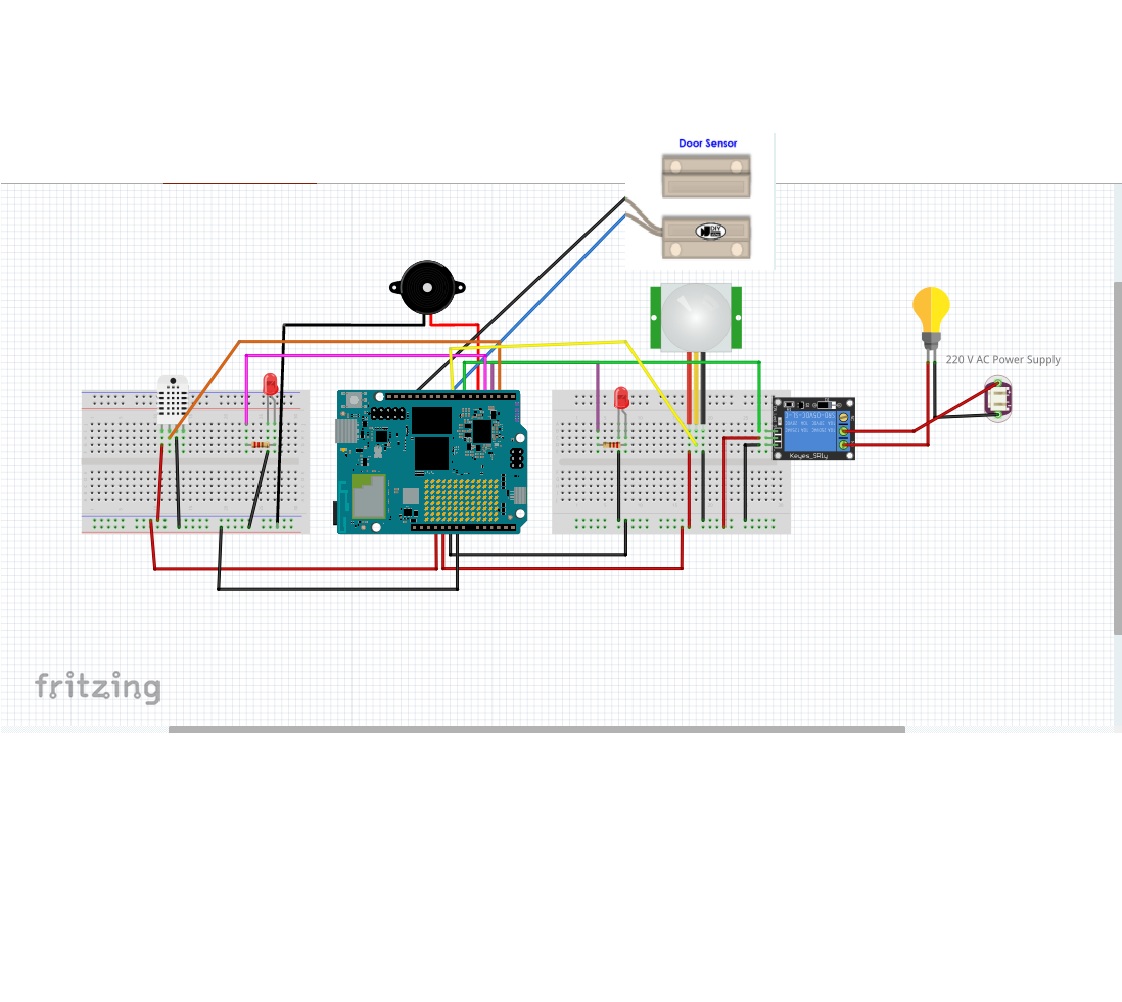
└─────────┘Door sensor logic:
HIGH= OPENLOW= CLOSED
Buzzer logic:
- Triggers when system is ARMED and door is OPEN
The buzzer will sound when:
- The system is ARMED AND the door is OPEN
- The buzzer stays OFF when the system is DISARMED or the door is CLOSED
Buzzer wiring:
- Positive (+) → Digital Pin D5 (or any available GPIO pin)
- Negative (-) → GND
⚠️ Note: If using an active buzzer, it beeps when powered. If using a passive buzzer, you need to use💻 Software Requirementstone()instead ofdigitalWrite().
- Arduino App Lab (or Arduino IDE)
- WebUI - HTML
- Database - Time Series
- Air Quality Monitoring
- Weather Forecast
- Video Object Detection (Used default AI models: Lightweight-Face-Detection)
- Image Classification (requires creating custom AI models)
- DHT sensor library
- Adafruit Unified Sensor
- Arduino_RouterBridge
⚡ HomeMind — because your home should think for itself.


Comments