Prajwal V
Published

Temperature monitor and SMS alert using bolt

A temperature monitor which when threshold limits is reached gives a warning on lcd and buzzer for onfield workers and send sms to owner

BeginnerFull instructions provided1 hour2,692
Temperature monitor and SMS alert using bolt

Things used in this project

Story

Read more

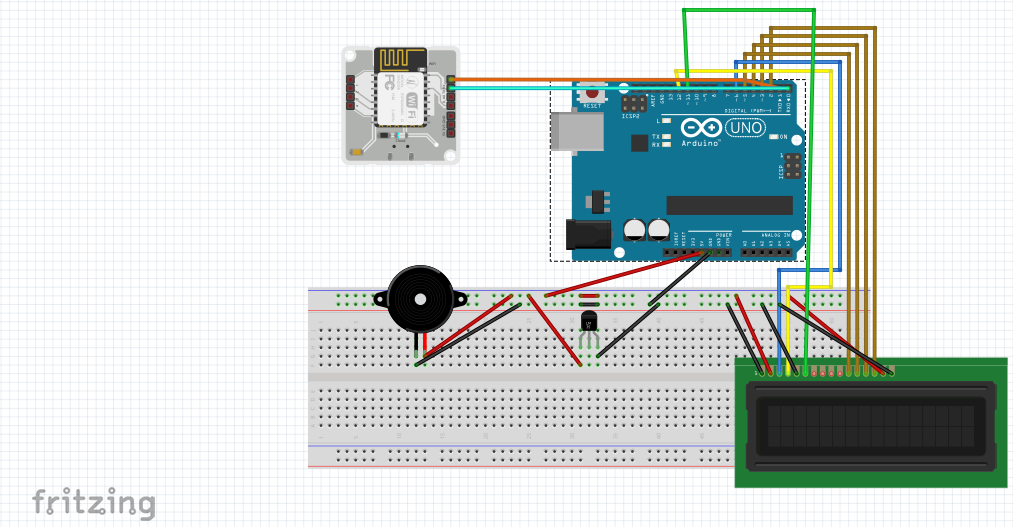
Schematics

circuit connection

Code

Arduino code

C#
upload it to arduino
#include<LiquidCrystal.h>

LiquidCrystal lcd(12,11,5,4,3,2);
const int con=75;
#define sensor A1          //sensor input pin
#define buzzer 7           //buzzer pin


void setup()
{
  pinMode(buzzer,OUTPUT);     //configure pin 7 as output
  analogWrite(9,con);         //adjust lcd contrast
  Serial.begin(9600);         //start serial communication
  lcd.begin(16,2);
  lcd.setCursor(0,0);
  lcd.print("    Digital    ");
  lcd.setCursor(0,1);
  lcd.print("  Thermometer   ");  //Desiplay starting message
  delay(4000);
  lcd.clear();                    //clear lcd
  
}

void loop()
{

     float reading=analogRead(sensor);     //read the value of sensor
     float temperature=reading*(5/1023.0)*100;   //convert the reading into celsius scale
     delay(1000);


    Serial.print(temperature);
    lcd.clear();
    lcd.setCursor(2,0);
    lcd.print("Temperature");
    lcd.setCursor(2,1);
    lcd.print("in C =");
    lcd.print(temperature);   //print the temperature
    
    
    delay(10000);             //delay of 10 seconds
    if(temperature>=30){      //check if temperature>30
      lcd.clear();
      lcd.setCursor(2,0);
      lcd.print("Warning");
      lcd.setCursor(0,1);
      lcd.print("Temp High");    //display warning message
      digitalWrite(buzzer,HIGH); //turn on the buzzer
      
    }
    if(temperature<=20){    //check if temperature<20
      lcd.clear();
      lcd.setCursor(4,0);
      lcd.print("Warning");
      lcd.setCursor(3,1);
      lcd.print("Temp Low");   //display warning message
      digitalWrite(buzzer,HIGH); // //turn on the buzzer
      }
}

bolt code

Python
write in python file and run it
SID = 'xxxxxxxxxxxxxxxxxxxxxxxxxxx'             #found in twilio account dashboard
AUTH_TOKEN = 'xxxxxxxxxxxxxxxxxxxxxxxxxx'       #found in twilio account dashboard 
FROM_NUMBER = 'xxxxxxxxxxxxx'                   #found in twilio account dashboard
TO_NUMBER = 'xxxxxxxxxxxxxxxxxxxx'              #enter your number
API_KEY = 'xxxxxxxxxxxxxxxxxxxxxxxxx'           #found in bolt cloud dashboard
DEVICE_ID = 'xxxxxxxxxxx'                       #found in bolt cloud dashboard


#save the above in a different file


import conf           #import the configurations saved in another file
from boltiot import Sms, Bolt       #import bolt and sms libraries
import json, time                   #import json and time

minimum_limit = 20        #minimum threshold limit
maximum_limit = 30        #maximum threshold limit


mybolt = Bolt(conf.API_KEY, conf.DEVICE_ID)
sms = Sms(conf.SID, conf.AUTH_TOKEN, conf.TO_NUMBER, conf.FROM_NUMBER)


while True: 
    print ("Reading sensor value")
    response = mybolt.serialRead('10') #recieve the data from arduino
    data = json.loads(response)        #convert the recieved data
    
    print("Sensor value is: " + str(data['value']))
    try: 
        sensor_value = float (data['value']) 
        if sensor_value > maximum_limit or sensor_value < minimum_limit:  #check if the value is within the range
            print("Making request to Twilio to send a SMS")
            response = sms.send_sms("The Current temperature sensor value is " +str(sensor_value)) #take the response sent from twilio
            print("Response received from Twilio is: " + str(response))    #print the response
            print("Status of SMS at Twilio is :" + str(response.status))     #print the status
    except Exception as e: 
        print ("Error occured: Below are the details")
        print (e)
    time.sleep(10)

Credits

Prajwal V
1 project • 1 follower

Comments