


Hardware components | ||||||
 |
| × | 1 | |||
 |
| × | 1 | |||
 |
| × | 1 | |||
 |
| × | 1 | |||
Software apps and online services | ||||||
 |
| |||||
 |
| |||||
Bolt is a fully integrated IoT platform for developers that helps them build IoT projects and products quickly and easily. It is a platform designed for Makers and Developers to build IoT projects. Bolt is one of the best ways to get started with IoT development and also to learn IoT.
So, here's a simple IoT-based project.
Please follow these steps carefully:
(NOTE: First you will need to register and login to the bolt IoT cloud and app.
For more info visit:https://docs.boltiot.com/docs)
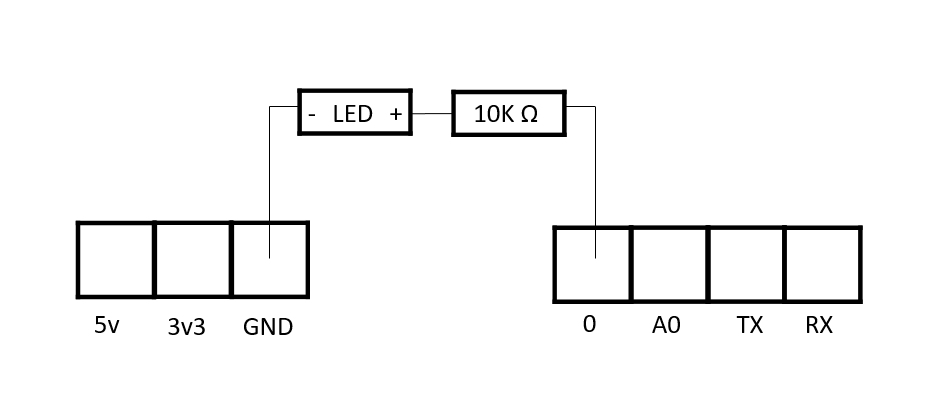
Here are the steps for making the hardware connections:
Step 1: Take one leg of the resistor and wrap it around the longer leg of the LED i.e positive leg.
Step 2: Insert the negative leg of the LED into the ground pin of the Bolt.
Step 3: Insert the other leg of the resistor in digital pin 0 of the Bolt.
Now we will create a product on bolt cloud and link it to the bolt device.
Here is the code for the product-
singleButton({name:"ON", action:"digitalWrite",
              pin:"0", value:"HIGH"})

singleButton({name:"OFF", action:"digitalWrite",
              pin:"0", value:"LOW"})
You can also check the code section for this.
For controlling the LED operation follow the following instruction-
Step 1: Download the boltiot app from play store/app store and sign I to your bolt cloud account.
Step 2: Now select your bolt device used in the above project.
Step 3: Now you can ON/OFF LED using boltIoT app:
This is one of the projects. Similarly, we can make a number of projects using bolt module.


Comments