tylerpeppy
Published © GPL3+

Internet Temperature Station

A fun project that allows you to monitor the temperature from anywhere in your home.

IntermediateFull instructions provided1,922
Internet Temperature Station

Things used in this project

Hardware components

Arduino Ethernet Rev. 3 without PoE
×1
Breadboard (generic)
×1
Jumper wires (generic)
×1
Temperature Sensor
Temperature Sensor
×1
Arduino UNO
Arduino UNO
×1
USB-A to B Cable
USB-A to B Cable
×1

Software apps and online services

Arduino IDE
Arduino IDE

Story

Read more

Schematics

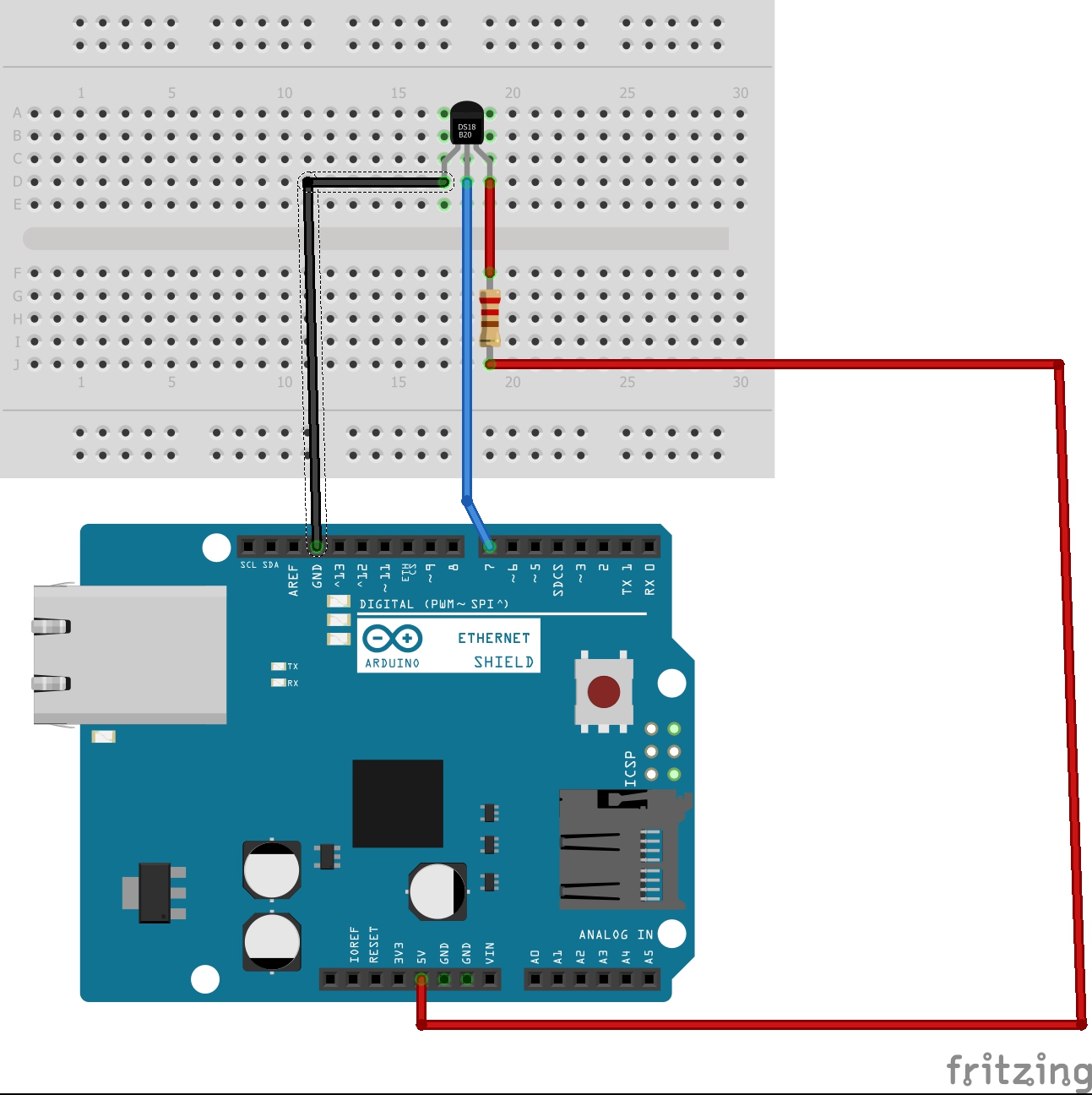
The schematic

Code

The code

Arduino
#include <SPI.h>
#include <Ethernet.h>
#include <OneWire.h>
#include <DallasTemperature.h>

#define ONE_WIRE_BUS 2
// Setup a oneWire instance to communicate with any OneWire devices (not just Maxim/Dallas temperature ICs)
OneWire oneWire(ONE_WIRE_BUS);
// Pass our oneWire reference to Dallas Temperature.
DallasTemperature sensors(&oneWire);
// MAC address for shield
byte mac[] = { 0xDE, 0xAD, 0xBE, 0xEF, 0xFE, 0xED};
EthernetServer server(80); // Using port 80

void setup(void) {
  sensors.begin();

  Ethernet.begin(mac); // Start the Ethernet shield
  server.begin();
  Serial.begin(9600); // Start serial communication
  Serial.println("Server address:"); // Print server address
  // (Arduino shield)
  Serial.println(Ethernet.localIP());
}
void loop(void) {
  sensors.begin();
  sensors.requestTemperatures(); // Send the command to get temperatures
  EthernetClient client = server.available();
  if (client) {
    boolean currentLineIsBlank = true;
    String buffer = "";
    while (client.connected()) {
      if (client.available()) {
        char c = client.read(); // Read from the Ethernet shield
        buffer += c; // Add character to string buffer
        // Client sent request, now waiting for response
        if (c == '\n' && currentLineIsBlank) {
          sensors.requestTemperatures(); // Send the command to get temperatures
          client.println("HTTP/1.1 200 OK"); // HTTP response
          client.println("Content-Type: text/html");
          client.println(); // HTML code
          client.print("<center><br><h1>Current room temperature: ");
          client.print(sensors.getTempCByIndex(0));
          client.print(" C </h1><br><br><br><FORM>");
          client.print("<P> <INPUT type=\"submit\" name=\"status\" value=\"Update temeprature\">");
          client.print("</FORM></center>");

          break;
        }
        if (c == '\n') {
          currentLineIsBlank = true;
          buffer = "";
        }
        else if (c == '\r') { // Command from webpage
          // Did the on button get pressed
          if (buffer.indexOf("GET /?status=Update temprature") >= 0)
             sensors.requestTemperatures(); // Send the command to get temperatures
         
        }
        else {
          currentLineIsBlank = false;
        }
      }
    }
    client.stop(); // End server
  }
}

Credits

tylerpeppy
2 projects • 42 followers
Love Arduino and IoT projects!

Comments