_Xhn3bbhMrF.gif?auto=format%2Ccompress&gifq=35&w=400&h=300&fit=min)


Hardware components | ||||||
| × | 1 | ||||
| × | 1 | ||||
 |
| × | 1 | |||
| × | 1 | ||||
| × | 1 | ||||
 |
| × | 1 | |||
 |
| × | 1 | |||
| × | 1 | ||||
Software apps and online services | ||||||
 |
| |||||
 |
| |||||
Transform a single XIAO Vision AI Camera or Grove Vision AI Module V2 into a real-time 3D pose tracker! YOLO detects your body key points and streams them over serial to Processing, rendering a mirror-mode 3D stickman that grows/shrinks as you move. Toggle cinematic camera with SPACE key!
Watch the video below for sample output:
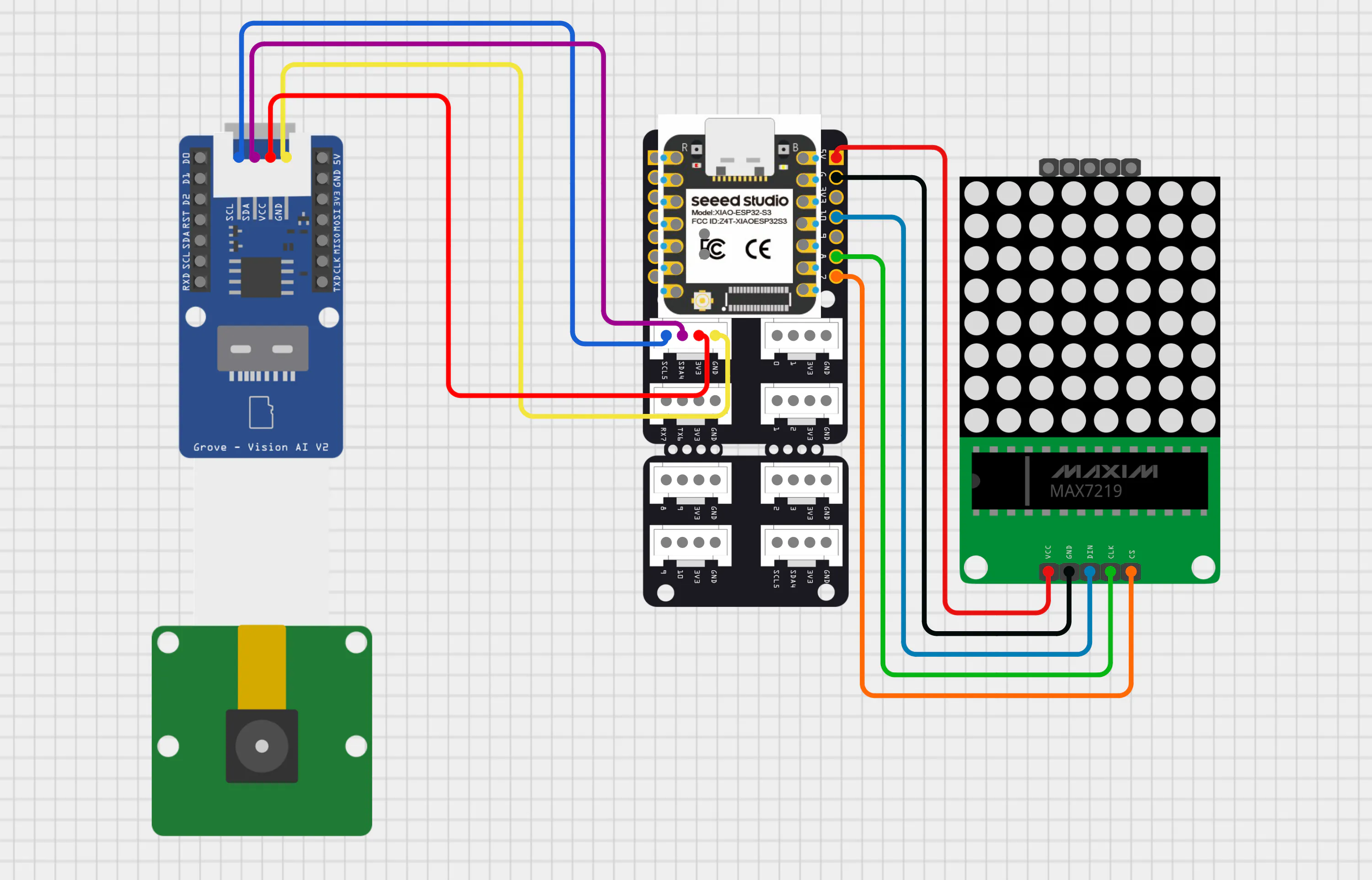
Optional: Add MAX7219 8x8 LED matrix for live pose display (requires XIAO Grove Shield + Grove Universal Cable).
Choose ONE of these two approaches (both use XIAO ESP32 S3 as the brain):
Option 1: XIAO Vision AI Camera
- XIAO Vision AI Camera
- XIAO ESP32 S3
I bought the XIAO Vision AI Camera because the cute 3D case looked adorable and it came complete with everything: Grove Vision AI Module V2 + XIAO ESP32 C3 + OV5647 camera module. This guide covers both approaches - the all-in-one kit (Option 1) and modular setup (Option 2).
Hardware Upgrade Note
The XIAO Vision AI Camera ships with XIAO ESP32 C3 (single-core, optimized for Bluetooth/WiFi) since it was primary designed for Home Assistant Integration. For optimal YOLO inference performance, replace with XIAO ESP32 S3:
- C3: Single-core RISC-V @ 160MHz (IoT + wireless focus)
- S3: Dual-core Xtensa LX7 @ 240MHz + AI acceleration (vector instructions for ML inference)
- S3 handles real-time pose detection + serial streaming without frame drops.
Swap XIAO ESP32 C3 with S3 as shown in image:
Option 2: Grove Vision AI Module V2
- Grove - Vision AI Module V2
- XIAO ESP32 S3
- OV5647 Camera ModuleUsing the same Grove Vision AI Module V2 from Option 1. Connect XIAO ESP32 S3 + OV5647 Camera Module to the Grove Vision AI Module V2.
Refer to images below for connections:
Requirements: Processing IDE + YOLO pose estimation model flashing.
Next steps: Install Processing IDE, then flash the YOLO v8 model to your device. We'll cover each step below.
Processing IDE Installation
Step 1: Click on the link below:
https://github.com/processing/processing4/releases/tag/processing-1307-4.4.7
Step 2: Refer the images below.
Note:
We're using Processing IDE version 4.4.7 in this guide because it includes the built-in serial library - no extra installations required for ESP32 communication. This keeps setup simple for beginners. However, you're free to use the latest version by downloading from the official Processing website and installing the Serial library.
Flashing YOLO Human Pose Detection Model into Grove Vision AI Module V2
Step 1: Click on the link below:
https://seeed-studio.github.io/SenseCraft-Web-Toolkit/#/setup/process
Step 2: Refer the images below.
Grove Vision AI V2 Control
AT Commands/Attention Commands are simple text instructions sent over serial to control the Grove Vision AI Module.
Seeed_Arduino_SSCMA Library simplifies this - wraps AT commands into easy Arduino functions. Compatible with latest firmware, perfect for quick integration without low-level serial hassle.
Open Arduino IDE and in Library Manager:
Pose Inference and Keypoint Serial Streaming
#include <Seeed_Arduino_SSCMA.h> // Library for Seeed SenseCAP AI module communication

SSCMA AI;  // Initialize the AI Inference engine object

void setup() {
  Serial.begin(115200);   // Initialize Serial for Processing communication
  AI.begin();             // Start the AI vision sensor (I2C by default)
}

void loop() {
  // Run AI pose detection continuously
  // Each time you want data from Grove Vision V2, call invoke()
  if (!AI.invoke(1, false, false)) {  // Invoke once, no filter, no image in reply

    // Iterate through detected persons
    for (int i = 0; i < AI.keypoints().size(); i++) {
      String keypointsStr = "";

      // Construct a data packet for all keypoints
      for (int j = 0; j < AI.keypoints()[i].points.size(); j++) {
        int x     = AI.keypoints()[i].points[j].x;
        int y     = AI.keypoints()[i].points[j].y;
        int conf  = AI.keypoints()[i].points[j].score;
        int label = j;

        // Format as [x,y,conf,label] for the Processing parser
        keypointsStr += "[" + String(x) + "," +
                             String(y) + "," +
                             String(conf) + "," +
                             String(label) + "],";
      }

      // Send the formatted string over Serial to the PC
      Serial.println(keypointsStr);
    }
  }

  // Small stability delay to prevent serial buffer overflow
  delay(100);
}
After selecting the correct COM port, upload the code to your board. Once the upload completes, open the Serial Monitor at 115200 baud. You will see a continuous stream of body joint keypoint data from the camera, with each packet representing all detected joints for a person.
We will break down these data streams so you can understand the meaning of each value in the sequence.
In the Arduino code, each detected body joint is packed and sent over Serial in the format: [x, y, confidencescore, label] for all 17 keypoints, concatenated into one line per frame.
These 17 labels correspond to:
- 0 – Nose
- 1 – Left eye
- 2 – Right eye
- 3 – Left ear
- 4 – Right ear
- 5 – Left shoulder
- 6 – Right shoulder
- 7 – Left elbow
- 8 – Right elbow
- 9 – Left wrist
- 10 – Right wrist
- 11 – Left hip
- 12 – Right hip
- 13 – Left knee
- 14 – Right knee
- 15 – Left ankle/foot
- 16 – Right ankle/foot
Let us consider this example line:
[102,29,95,0],[120,15,96,1],[83,18,93,2],[153,29,89,3],[69,44,53,4],[226,110,62,5],[61,135,94,6],[252,205,2,7],[50,234,22,8],[164,238,2,9],[21,234,9,10],[248,249,1,11],[157,252,2,12],[138,194,0,13],[98,168,1,14],[142,216,1,15],[244,165,1,16],Each group [x, y, confidence_score, label] describes one body joint in image coordinates:
[102,29,95,0] → Nose at (102,29), 95% confidence[120,15,96,1] → Left eye at (120,15), 96% confidence[83,18,93,2] → Right eye at (83,18), 93% confidence[153,29,89,3] → Left ear at (153,29), 89% confidence[69,44,53,4] → Right ear at (69,44), 53% confidence[226,110,62,5] → Left shoulder at (226,110), 62% confidence[61,135,94,6] → Right shoulder at (61,135), 94% confidence[252,205,2,7] → Left elbow at (252,205), 2% confidence[50,234,22,8] → Right elbow at (50,234), 22% confidence[164,238,2,9] → Left wrist at (164,238), 2% confidence[21,234,9,10] → Right wrist at (21,234), 9% confidence[248,249,1,11] → Left hip at (248,249), 1% confidence[157,252,2,12] → Right hip at (157,252), 2% confidence[138,194,0,13] → Left knee at (138,194), 0% confidence[98,168,1,14] → Right knee at (98,168), 1% confidence[142,216,1,15] → Left ankle/foot at (142,216), 1% confidence[244,165,1,16] → Right ankle/foot at (244,165), 1% confidence
Refer to the images below:
These coordinates and their labels indicate the body joints of the subject being tracked, not the viewer’s perspective.
Before proceeding further, keep in mind two important points:
- When running the Processing sketch, make sure the Arduino IDE (or Serial Monitor/Serial Plotter) is completely closed, otherwise the serial port will be locked, and Processing will not be able to receive the keypoint stream.
- For simplicity, the pose data treats the nose (label 0) as the representative point for the entire head region, effectively combining what could be separate head joints (eyes and ears, labels 1–4) into a single “head” keypoint in our visualization and later processing steps.
- Open the Processing IDE on your computer.
- Create a new sketch (File → New).
- Copy the provided Processing code.
- Paste the code into the new sketch window.
- Change the COM port value on line 7 to match the port your ESP32 is using.
// Import the Serial library to handle communication between Processing and ESP32
import processing.serial.*;

// Create a Serial object to manage the incoming data stream
Serial esp32Port;

// Change "COM12" to your port (check Arduino IDE or Device Manager)
final String ESP32_PORT = "COM12";
final int   ESP32_BAUD = 115200;

// Stores raw YOLO keypoint data: [x, y, confidence score, label] for each of 17(0-16) body joints/keypoints
float[][] yoloKeypoints = new float[17][3];

// Tracks which keypoints are currently detected (true) or missing (false)
boolean[] keypointValid = new boolean[17];

// Smoothed keypoint positions to reduce jitter in stickman movement
HashMap<String, PVector> smoothKeypoints = new HashMap<String, PVector>();
float keypointSmoothing = 0.1; // Lower = smoother but more lag, higher = more responsive

// Toggle for cinematic zoom mode (press SPACE to activate)
boolean cinematicMode = false;

// 3D camera position variables (smoothly interpolated)
float cameraX, cameraY, cameraZ; // Current camera pos
float targetCameraX, targetCameraY, targetCameraZ; // Target camera pos
float cameraSmoothing = 0.08; // Camera movement smoothness

// Room dimensions (3D environment size in units)
int roomSize = 400;
PFont displayFont; // Object used to render 2D/3D text on screen

// Standard YOLO pose model outputs 17 keypoints in this order:
final int NOSE = 0;
final int RIGHT_EYE = 2, LEFT_EYE = 1;
final int RIGHT_EAR = 4, LEFT_EAR = 3;
final int RIGHT_SHOULDER = 6, LEFT_SHOULDER = 5;
final int RIGHT_ELBOW = 8, LEFT_ELBOW = 7;
final int RIGHT_WRIST = 10, LEFT_WRIST = 9;
final int RIGHT_HIP = 12, LEFT_HIP = 11;
final int RIGHT_KNEE = 14, LEFT_KNEE = 13;
final int RIGHT_ANKLE = 16, LEFT_ANKLE = 15;

// When keypoints aren't detected, use this default standing pose
HashMap<String, PVector> staticPose = new HashMap<String, PVector>();

// YOLO input resolution, camera resolution
float camWidth = 192, camHeight = 192;

void setup() {
  // Create 1600x900 window with 3D rendering
  size(1600, 900, P3D);
  displayFont = createFont("Arial", 16); // Initialize UI font
  textFont(displayFont); // Set active font for the interface

  // Connect to ESP32 on specified COM port and BAUD rate
  esp32Port = new Serial(this, ESP32_PORT, ESP32_BAUD);
  esp32Port.bufferUntil('\n'); // Read data line by line

  // Initialize camera to normal position
  cameraX = 0;
  cameraY = -200;
  cameraZ = roomSize + 100;

  targetCameraX = 0;
  targetCameraY = -200;
  targetCameraZ = roomSize + 100;

  // Initialize all keypoints as invalid (not detected yet)
  for (int i = 0; i < 17; i++) {
    keypointValid[i] = false;
  }

  // Initialize static pose (normalized coordinates for fallback)
  initializeStaticPose();

  println("=== POSE ESTIMATION STICKMAN ===");
  println("Camera-based body tracking");
  println("Move closer = Bigger stickman");
  println("Move away = Smaller stickman");
  println("Press SPACE to toggle Cinematic mode/Normal mode");
}

// Runs 60 times per second
void draw() {

  // Clear screen with dark gray background
  background(20);

  // Smooth all YOLO keypoints
  smoothYOLOKeypoints();

  // Calculate stickman position from hip center
  PVector hipCenter = getHipCenter();

  // Calculate World position: Map camera X to room coordinates
  // (0 to 1 range maps to +200 to -200 in 3D room)
  float stickmanX = map(hipCenter.x, 0, 1, roomSize/2, -roomSize/2);

  // Calculate World depth: Map camera Y to room depth (forward/backward)
  float stickmanZ = map(hipCenter.y, 0, 1, roomSize/2, -roomSize/2);

  // Fixed floor height for the stickman
  float stickmanY = -90;

  // Determine character scale based on distance (shoulder width)
  float scale = calculateBodyScale();

  // Update Camera Logic
  if (cinematicMode) {
    // Cinematic Mode: Follow character movement and zoom in
    targetCameraX = stickmanX;
    targetCameraY = -150;
    targetCameraZ = stickmanZ + 250;
  } else {
    // Normal Mode: Wide shot from a fixed position
    targetCameraX = 0;
    targetCameraY = -200;
    targetCameraZ = roomSize + 100;
  }

  // Smooth the camera movement transition
  cameraX = lerp(cameraX, targetCameraX, cameraSmoothing);
  cameraY = lerp(cameraY, targetCameraY, cameraSmoothing);
  cameraZ = lerp(cameraZ, targetCameraZ, cameraSmoothing);

  // Apply 3D Camera transformation looking towards the stickman
  camera(cameraX, cameraY, cameraZ, stickmanX, stickmanY, stickmanZ, 0, 1, 0);

  // Scene Illumination
  lights();
  ambientLight(100, 100, 100);
  directionalLight(200, 200, 200, 0, -1, -0.5);

  // Draw floor grid and boundaries
  drawRoom3D();

  // Render the stickman skeleton at the calculated position
  drawAnimatedStickman(stickmanX, stickmanY, stickmanZ, scale);

  // Switch to 2D HUD overlay
  camera();
  hint(DISABLE_DEPTH_TEST);

  // Check critical keypoints for warning (Nose and Left Ankle and Right Ankle)
  boolean showWarning = false;
  if ((keypointValid[NOSE] && yoloKeypoints[NOSE][2] < 65) ||
      (!keypointValid[NOSE])) {
    showWarning = true;
  }

  if ((keypointValid[LEFT_ANKLE] && yoloKeypoints[LEFT_ANKLE][2] < 65) ||
      (!keypointValid[LEFT_ANKLE])) {
    showWarning = true;
  }

  if ((keypointValid[RIGHT_ANKLE] && yoloKeypoints[RIGHT_ANKLE][2] < 65) ||
      (!keypointValid[RIGHT_ANKLE])) {
    showWarning = true;
  }

  // Draw centered warning box
  if (showWarning) {
    fill(255, 0, 0, 200);
    noStroke();
    rect(width/2 - 350, height/2 - 60, 700, 120, 10);
    fill(255, 255, 0);
    textSize(24);
    textAlign(CENTER, CENTER);
    text("ADJUST POSITION OF CAMERA", width/2, height/2 - 20);
    text("RECENTRE YOURSELF IN CAMERA", width/2, height/2 + 20);
  }

  // Display info
  fill(255);
  textSize(16);
  textAlign(LEFT, TOP);
  text("POSE ESTIMATION", 20, 20);
  text("Valid Keypoints: " + countValidKeypoints() + "/13", 20, 45);
  text("Body Scale: " + nf(scale, 1, 2) + "x", 20, 70);
  text("Position: X=" + nf(stickmanX, 1, 0) + " Z=" + nf(stickmanZ, 1, 0), 20, 95);
  text("Camera: " + (cinematicMode ? "CINEMATIC (Press SPACE to exit)" : "NORMAL (Press SPACE for cinematic)"), 20, 120);

  // Exit 2D overlay mode and return to standard 3D rendering logic
  hint(ENABLE_DEPTH_TEST);

  // Checklist for 17 tracked keypoints
  int yPos = 145;
  textSize(12);
  textAlign(LEFT, TOP);

  String[] allKeypointNames = {
  "Nose",
  "Left Eye", "Right Eye",
  "Left Ear", "Right Ear",
  "Left Shoulder", "Right Shoulder",
  "Left Elbow", "Right Elbow",
  "Left Wrist", "Right Wrist",
  "Left Hip", "Right Hip",
  "Left Knee", "Right Knee",
  "Left Ankle", "Right Ankle"
  };

  for (int i = 0; i < 17; i++) {
    if (keypointValid[i] && yoloKeypoints[i][2] >= 65) {
      // Good confidence (≥65)
      fill(0, 255, 0);
      text(allKeypointNames[i] + " (" + int(yoloKeypoints[i][2]) + "%)", 20, yPos);
    } else if (keypointValid[i] && yoloKeypoints[i][2] < 65) {
      // Low confidence (<65)
      fill(255, 0, 0);
      text(allKeypointNames[i] + " (LOW: " + int(yoloKeypoints[i][2]) + "%)", 20, yPos);
    } else {
      // Not detected
      fill(255, 100, 100);
      text(allKeypointNames[i] + " (not detected)", 20, yPos);
    }
    yPos += 18;
  }
}

void keyPressed() {
  if (key == ' ') {
    // Toggle cinematic/normal camera mode
    cinematicMode = !cinematicMode;
    println("Camera mode: " + (cinematicMode ? "CINEMATIC" : "NORMAL"));
  }
}

void serialEvent(Serial port) {
  String in = port.readStringUntil('\n'); // Read incoming serial string
  if (in != null) {
    in = trim(in); // Remove whitespace

    // Format: [x,y,conf,label],[x,y,conf,label],...
    // Remove trailing comma if present
    if (in.endsWith(",")) {
      in = in.substring(0, in.length() - 1);
    }

    parseYOLOKeypoints(in); // Send cleaned string to parser
  }
}

// Parses incoming keypoint data
void parseYOLOKeypoints(String yoloData) {
  // Process raw serial string into tokens
  // Remove all brackets first
  String cleaned = yoloData.replace("[", "").replace("]", "");

  // Split by comma
  String[] tokens = split(cleaned, ',');

  // Reset all keypoints to invalid at start of each frame
  for (int i = 0; i < 17; i++) {
    keypointValid[i] = false;
  }

  int tokenIndex = 0;

  // Parse each keypoint (groups of 4 values: x, y, conf, label)
  while (tokenIndex + 3 < tokens.length) {
    try {
      float x = float(trim(tokens[tokenIndex]));
      float y = float(trim(tokens[tokenIndex + 1]));
      float conf = float(trim(tokens[tokenIndex + 2]));
      int label = int(trim(tokens[tokenIndex + 3]));

      // Store data directly into the index provided by the label
      if (label >= 0 && label < 17) {
        yoloKeypoints[label][0] = x;
        yoloKeypoints[label][1] = y;
        yoloKeypoints[label][2] = conf;
        keypointValid[label] = true;
      }

      tokenIndex += 4;  // Advance to next keypoint data group
    } catch (Exception e) {
      println("Error parsing keypoint at token " + tokenIndex);
      tokenIndex++;
    }
  }
}

void smoothYOLOKeypoints() {
  // Smooth each valid keypoint from yoloKeypoints array
  String[] keypointNames = {
    "nose", "lshoulder", "rshoulder", "lelbow", "relbow",
    "lwrist", "rwrist", "lhip", "rhip", "lknee",
    "rknee", "lankle", "rankle"
  };

  int[] indices = {
    NOSE, LEFT_SHOULDER, RIGHT_SHOULDER, LEFT_ELBOW, RIGHT_ELBOW,
    LEFT_WRIST, RIGHT_WRIST, LEFT_HIP, RIGHT_HIP, LEFT_KNEE,
    RIGHT_KNEE, LEFT_ANKLE, RIGHT_ANKLE
  };

  for (int i = 0; i < keypointNames.length; i++) {
    String kpName = keypointNames[i];
    int idx = indices[i];

    if (keypointValid[idx]) {
      // Create target from yoloKeypoints array
      PVector target = new PVector(yoloKeypoints[idx][0],
                                    yoloKeypoints[idx][1],
                                    yoloKeypoints[idx][2]);

      if (!smoothKeypoints.containsKey(kpName)) {
        // First time seeing this keypoint - initialize
        smoothKeypoints.put(kpName, target.copy());
      } else {
        // Move current point toward target by the smoothing factor
        PVector current = smoothKeypoints.get(kpName);
        current.x = lerp(current.x, target.x, keypointSmoothing);
        current.y = lerp(current.y, target.y, keypointSmoothing);
        current.z = lerp(current.z, target.z, keypointSmoothing);
      }
    }
  }
}

PVector getHipCenter() {
  // Calculate character anchor by averaging hip positions
  PVector rhip = getKeypointPosition("rhip", RIGHT_HIP);
  PVector lhip = getKeypointPosition("lhip", LEFT_HIP);

  return new PVector((rhip.x + lhip.x) / 2, (rhip.y + lhip.y) / 2, 0);
}

float calculateBodyScale() {
  // Use distance between shoulders to approximate scale (proximity to camera)
  PVector rshoulder = getKeypointPosition("rshoulder", RIGHT_SHOULDER);
  PVector lshoulder = getKeypointPosition("lshoulder", LEFT_SHOULDER);

  // Distance between shoulders in normalized space
  float shoulderWidth = abs(lshoulder.x - rshoulder.x);

  // Map to scale factor (typical shoulder width ~0.2-0.4 normalized)
  // Closer to camera = wider shoulders in pixels = larger scale
  float scale = map(shoulderWidth, 0.1, 0.5, 0.5, 2.5);
  return scale = constrain(scale, 0.5, 3.0); // Limit scale range
}

void initializeStaticPose() {
  // Static standing pose (normalized 0-1, centered at 0.5, 0.5)
  staticPose.put("nose", new PVector(0.5, 0.25, 1.0));
  staticPose.put("rshoulder", new PVector(0.4, 0.35, 1.0));
  staticPose.put("lshoulder", new PVector(0.6, 0.35, 1.0));
  staticPose.put("relbow", new PVector(0.35, 0.5, 1.0));
  staticPose.put("lelbow", new PVector(0.65, 0.5, 1.0));
  staticPose.put("rwrist", new PVector(0.33, 0.65, 1.0));
  staticPose.put("lwrist", new PVector(0.67, 0.65, 1.0));
  staticPose.put("rhip", new PVector(0.45, 0.6, 1.0));
  staticPose.put("lhip", new PVector(0.55, 0.6, 1.0));
  staticPose.put("rknee", new PVector(0.45, 0.8, 1.0));
  staticPose.put("lknee", new PVector(0.55, 0.8, 1.0));
  staticPose.put("rankle", new PVector(0.45, 0.95, 1.0));
  staticPose.put("lankle", new PVector(0.55, 0.95, 1.0));
}

PVector getKeypointPosition(String kpName, int yoloIndex) {
  // Return smoothed YOLO keypoint if valid, otherwise static pose
  if (keypointValid[yoloIndex] && smoothKeypoints.containsKey(kpName)) {
    PVector kp = smoothKeypoints.get(kpName);
    // Normalize absolute pixel coordinates
    return new PVector(kp.x / camWidth, kp.y / camHeight, kp.z);
  } else if (staticPose.containsKey(kpName)) {
    return staticPose.get(kpName).copy();
  }
  return new PVector(0.5, 0.5, 0);
}

int countValidKeypoints() {
  int count = 0;
  // List of the 13 essential joints required for a full skeleton
  int[] indices = {
    NOSE,
    LEFT_SHOULDER, RIGHT_SHOULDER,
    LEFT_ELBOW, RIGHT_ELBOW,
    LEFT_WRIST, RIGHT_WRIST,
    LEFT_HIP, RIGHT_HIP,
    LEFT_KNEE, RIGHT_KNEE,
    LEFT_ANKLE, RIGHT_ANKLE
  };
  for (int idx : indices) {
    if (keypointValid[idx]) count++;
  }
  return count;
}

void drawAnimatedStickman(float xPos, float yPos, float zPos, float bodyScale) {
  pushMatrix();
  translate(xPos, yPos, zPos);

  // Apply body-based scale (closer = bigger)
  scale(bodyScale);

  // Base scale for 3D space
  float scaleX = 150;
  float scaleY = 200;

  stroke(255, 100, 100);
  strokeWeight(3);
  fill(255, 180, 180);

  // Retrieve current joint PVectors
  PVector head      = getKeypointPosition("nose", NOSE);
  PVector lshoulder = getKeypointPosition("lshoulder", LEFT_SHOULDER);
  PVector rshoulder = getKeypointPosition("rshoulder", RIGHT_SHOULDER);
  PVector lelbow    = getKeypointPosition("lelbow", LEFT_ELBOW);
  PVector relbow    = getKeypointPosition("relbow", RIGHT_ELBOW);
  PVector lwrist    = getKeypointPosition("lwrist", LEFT_WRIST);
  PVector rwrist    = getKeypointPosition("rwrist", RIGHT_WRIST);
  PVector lhip      = getKeypointPosition("lhip", LEFT_HIP);
  PVector rhip      = getKeypointPosition("rhip", RIGHT_HIP);
  PVector lknee     = getKeypointPosition("lknee", LEFT_KNEE);
  PVector rknee     = getKeypointPosition("rknee", RIGHT_KNEE);
  PVector lankle    = getKeypointPosition("lankle", LEFT_ANKLE);
  PVector rankle    = getKeypointPosition("rankle", RIGHT_ANKLE);

  // POV MAPPING: Using (0.5 - pos.x) to invert local skeleton coordinates.
  // This ensures that user's physical left matches screen-left in mirror view.

  float hx = (0.5 - head.x) * scaleX;
  float hy = (head.y - 0.5) * scaleY;

  float rsx = (0.5 - rshoulder.x) * scaleX;
  float rsy = (rshoulder.y - 0.5) * scaleY;
  float lsx = (0.5 - lshoulder.x) * scaleX;
  float lsy = (lshoulder.y - 0.5) * scaleY;

  float rex = (0.5 - relbow.x) * scaleX;
  float rey = (relbow.y - 0.5) * scaleY;
  float lex = (0.5 - lelbow.x) * scaleX;
  float ley = (lelbow.y - 0.5) * scaleY;

  float rwx = (0.5 - rwrist.x) * scaleX;
  float rwy = (rwrist.y - 0.5) * scaleY;
  float lwx = (0.5 - lwrist.x) * scaleX;
  float lwy = (lwrist.y - 0.5) * scaleY;

  float rhx = (0.5 - rhip.x) * scaleX;
  float rhy = (rhip.y - 0.5) * scaleY;
  float lhx = (0.5 - lhip.x) * scaleX;
  float lhy = (lhip.y - 0.5) * scaleY;

  float rkx = (0.5 - rknee.x) * scaleX;
  float rky = (rknee.y - 0.5) * scaleY;
  float lkx = (0.5 - lknee.x) * scaleX;
  float lky = (lknee.y - 0.5) * scaleY;

  float rax = (0.5 - rankle.x) * scaleX;
  float ray = (rankle.y - 0.5) * scaleY;
  float lax = (0.5 - lankle.x) * scaleX;
  float lay = (lankle.y - 0.5) * scaleY;

  // Draw character head
  noStroke();
  pushMatrix();
  translate(hx, hy, 0);
  fill(255, 180, 180);
  sphere(12);
  popMatrix();

  // Calculate skeletal center points
  float neckX = (rsx + lsx) / 2;
  float neckY = (rsy + lsy) / 2;
  float spineX = (rhx + lhx) / 2;
  float spineY = (rhy + lhy) / 2;

  // Render limbs and torso
  stroke(255, 100, 100);
  strokeWeight(4);
  line(rsx, rsy, 0, lsx, lsy, 0); // Shoulder connector
  line(rhx, rhy, 0, lhx, lhy, 0); // Hip connector
  line(hx, hy, 0, neckX, neckY, 0); // Head to Neck connector
  line(neckX, neckY, 0, spineX, spineY, 0); // Spine

  // Render arms
  strokeWeight(3);
  line(rsx, rsy, 0, rex, rey, 0); // Right upper arm
  line(rex, rey, 0, rwx, rwy, 0); // Right forearm
  line(lsx, lsy, 0, lex, ley, 0); // Left upper arm
  line(lex, ley, 0, lwx, lwy, 0); // Left forearm

  // Render legs
  line(rhx, rhy, 0, rkx, rky, 0); // Right thigh
  line(rkx, rky, 0, rax, ray, 0); // Right shin
  line(lhx, lhy, 0, lkx, lky, 0); // Left thigh
  line(lkx, lky, 0, lax, lay, 0); // Left shin

  // Render joint spheres for visual feedback
  noStroke();

  // Shoulders
  fill(100, 255, 100);
  pushMatrix();
  translate(rsx, rsy, 0);
  sphere(6);
  popMatrix();
  pushMatrix();
  translate(lsx, lsy, 0);
  sphere(6);
  popMatrix();

  // Elbows
  fill(255, 255, 100);
  pushMatrix();
  translate(rex, rey, 0);
  sphere(6);
  popMatrix();
  pushMatrix();
  translate(lex, ley, 0);
  sphere(6);
  popMatrix();

  // Wrists
  fill(255, 150, 100);
  pushMatrix();
  translate(rwx, rwy, 0);
  sphere(6);
  popMatrix();
  pushMatrix();
  translate(lwx, lwy, 0);
  sphere(6);
  popMatrix();

  // Hips
  fill(100, 200, 255);
  pushMatrix();
  translate(rhx, rhy, 0);
  sphere(6);
  popMatrix();
  pushMatrix();
  translate(lhx, lhy, 0);
  sphere(6);
  popMatrix();

  // Knees
  fill(255, 100, 255);
  pushMatrix();
  translate(rkx, rky, 0);
  sphere(6);
  popMatrix();
  pushMatrix();
  translate(lkx, lky, 0);
  sphere(6);
  popMatrix();

  // Ankles
  fill(255, 200, 0);
  pushMatrix();
  translate(rax, ray, 0);
  sphere(6);
  popMatrix();
  pushMatrix();
  translate(lax, lay, 0);
  sphere(6);
  popMatrix();

  popMatrix();
}

void drawRoom3D() {
  // Draw simple floor grid
  stroke(80, 80, 120);
  strokeWeight(1);
  noFill();

  for (int gy = -roomSize; gy <= roomSize; gy += 50) {
    line(-roomSize, 0, gy, roomSize, 0, gy);
  }

  for (int gx = -roomSize; gx <= roomSize; gx += 50) {
    line(gx, 0, -roomSize, gx, 0, roomSize);
  }

  // Center axis markers
  stroke(100, 150, 255);
  strokeWeight(2);
  line(0, 0, -roomSize, 0, 0, roomSize);
  line(-roomSize, 0, 0, roomSize, 0, 0);

  // Draw room walls
  int wallHeight = 150;
  stroke(80, 120, 80);
  strokeWeight(2);
  noFill();

  // Back wall
  line(-roomSize, 0, -roomSize, roomSize, 0, -roomSize);
  line(-roomSize, 0, -roomSize, -roomSize, -wallHeight, -roomSize);
  line(roomSize, 0, -roomSize, roomSize, -wallHeight, -roomSize);
  line(-roomSize, -wallHeight, -roomSize, roomSize, -wallHeight, -roomSize);

  // Left wall
  line(-roomSize, 0, -roomSize, -roomSize, 0, roomSize);
  line(-roomSize, 0, -roomSize, -roomSize, -wallHeight, -roomSize);
  line(-roomSize, 0, roomSize, -roomSize, -wallHeight, roomSize);
  line(-roomSize, -wallHeight, -roomSize, -roomSize, -wallHeight, roomSize);

  // Right wall
  line(roomSize, 0, -roomSize, roomSize, 0, roomSize);
  line(roomSize, 0, -roomSize, roomSize, -wallHeight, -roomSize);
  line(roomSize, 0, roomSize, roomSize, -wallHeight, roomSize);
  line(roomSize, -wallHeight, -roomSize, roomSize, -wallHeight, roomSize);

  // Front wall
  line(-roomSize, 0, roomSize, roomSize, 0, roomSize);
  line(-roomSize, 0, roomSize, -roomSize, -wallHeight, roomSize);
  line(roomSize, 0, roomSize, roomSize, -wallHeight, roomSize);
  line(-roomSize, -wallHeight, roomSize, roomSize, -wallHeight, roomSize);

}
The code is pretty long, but don’t worry—every major part has been commented so you don’t have to read it line‑by‑line like a thriller script. Here’s a simple, high‑level overview of what the sketch is doing behind the scenes broken down into steps.
Refer to the images:
Running and Stopping the Processing sketch
To run the sketch:
Output Window:
Go through the images and their captions to see how to achieve the proper output on your screen.
Feel free to experiment a bit—move around, switch camera modes, and watch how the stickman reacts so you get a feel for the overall output logic and behaviour.
To stop the sketch:
In addition to the components used above, you will need a MAX7219 8×8 LED matrix module, a XIAO Grove Shield, and a Grove universal cable.
Using the circuit diagram below, connect all the components:
Attaching project photos so you can see the wiring and connections more clearly.
Body Joints on 8x8 LED Matrix
Pose Inference, Keypoint Serial Streaming and LED Matrix
Only the Arduino code you flash to the XIAO ESP32 S3 changes; everything else, including the Processing IDE sketch, remains exactly the same.
#include <Seeed_Arduino_SSCMA.h>  // Library for Seeed SenseCAP AI module communication
#include <Arduino.h>              // Standard Arduino core library

// XIAO ESP32-S3 + MAX7219 Wiring
#define DIN_PIN  D10  // MOSI (Data In) -> Connects to DIN on MAX7219
#define CS_PIN   D7   // Chip Select    -> Connects to CS on MAX7219
#define CLK_PIN  D8   // Serial Clock   -> Connects to CLK on MAX7219

// MAX7219 Internal Registers (Control Addresses)
#define REG_DECODE_MODE   0x09
#define REG_INTENSITY     0x0A
#define REG_SCAN_LIMIT    0x0B
#define REG_SHUTDOWN      0x0C
#define REG_DISPLAY_TEST  0x0F

SSCMA AI;  // Initialize the AI Inference engine object

/*
 * 8x8 MATRIX JOINT PATTERNS (PHYSICAL UI MAP)
 * ---------------------------------------------------------------------------
 * DESIGN LOGIC: "HARDWARE-LEVEL MIRRORING"
 * In the standard YOLOv8 dataset, ODD labels (5, 7, 9...) represent LEFT body
 * parts and EVEN labels starting from zero (0, 2, 4...) represent RIGHT body.
 * However, in these 64-bit HEX patterns, we have intentionally mapped ODD
 * labels to the RIGHT and EVEN labels to the LEFT side of LED grid.
 *
 * WHY IS THIS DONE?
 * 1. POINT OF VIEW (POV): When you stand in front of the camera and raise
 *    your physical LEFT hand, you expect the LED on the LEFT side of the
 *    matrix to light up.
 * 2. PERFORMANCE OPTIMIZATION:
 *    - In our PROCESSING code, we handle this using a mathematical formula
 *      (0.5 - pos.x) to flip the 3D world.
 *    - In this ARDUINO code, to save CPU cycles on the XIAO ESP32-S3, we avoid
 *      live math. Instead, the horizontal flip is "pre-baked" directly into
 *      these static bitmasks.
 *
 * Result: The LED Matrix behaves like a digital mirror, aligning perfectly
 *         with the user's perspective without any computational lag.
 * ---------------------------------------------------------------------------
 */

// 17 Joint Patterns (label 0-16)
const uint64_t JOINT_PATTERNS[17] = {
  0x0000000000003c3c,  // 0: Head (Nose)
  0x0000000000000000,  // 1: Right Eye  --> Not considering
  0x0000000000000000,  // 2: Left Eye   --> Not considering
  0x0000000000000000,  // 3: Right Ear  --> Not considering
  0x0000000000000000,  // 4: Left Ear   --> Not considering
  0x0000000000100000,  // 5: Right Shoulder
  0x0000000000080000,  // 6: Left Shoulder
  0x0000000060000000,  // 7: Right Elbow
  0x0000000006000000,  // 8: Left Elbow
  0x0000808000000000,  // 9: Right Wrist
  0x0000010100000000,  // 10: Left Wrist
  0x0000001000000000,  // 11: Right Hip
  0x0000000800000000,  // 12: Left Hip
  0x0020200000000000,  // 13: Right Knee/Leg
  0x0004040000000000,  // 14: Left Knee/Leg
  0x6000000000000000,  // 15: Right Foot/Ankle
  0x0600000000000000   // 16: Left Foot/Ankle
};

// Current display state for each joint (0=off, 1=on)
uint8_t jointActive[17] = {0};

// Timer variables for automatic display dimming/clearing when no person is detected
unsigned long lastUpdateTime = 0;
const unsigned long INACTIVITY_TIMEOUT = 5000;  // 5 seconds
bool displayClearedForTimeout = false;

void setup() {
  Serial.begin(115200);  // Initialize Serial for Processing communication

  AI.begin();            // Start the AI vision sensor, it defaults to using I2C (Wire)

  // Set MAX7219 control pins as outputs
  pinMode(DIN_PIN, OUTPUT);
  pinMode(CS_PIN, OUTPUT);
  pinMode(CLK_PIN, OUTPUT);

  // Setup MAX7219 display registers
  initMAX7219();
  clearDisplay();        // Ensure screen is blank on boot
  lastUpdateTime = millis();
}

void loop() {
  bool gotPoseThisFrame = false;

  // Run AI pose detection continuously
  // Every time to get the data value from Grove Vision V2, it is supposed to call the invoke function
  if (!AI.invoke(1, false, false)) {  // invoke once, no filter, not contain image
    // This function invokes the algorithm for a specified number of times and waits for the response and event.
    // The result can be filtered based on the difference from the previous result, and the event reply can be
    // configured to contain only the result data or include the image data as well.

    gotPoseThisFrame = true;

    // Iterate through detected person
    for (int i = 0; i < AI.keypoints().size(); i++) {
      String keypointsStr = "";

      // Construct a data packet for the 17 keypoints
      for (int j = 0; j < AI.keypoints()[i].points.size(); j++) {
        int x     = AI.keypoints()[i].points[j].x;
        int y     = AI.keypoints()[i].points[j].y;
        int conf  = AI.keypoints()[i].points[j].score;
        int label = j;

        // Format as [x,y,conf,label] for the Processing Parser
        keypointsStr += "[" + String(x) + "," + String(y) + "," +
                        String(conf) + "," + String(label) + "],";
      }

      // Send the formatted string over Serial to the PC
      Serial.println(keypointsStr);
    }

    // Process the pose data for the physical LED Matrix
    processPoseKeypoints();
    updateDisplayFromJoints();
    lastUpdateTime = millis();
    displayClearedForTimeout = false;
  }

  // Inactivity timeout: Clear the LED Matrix if no pose is detected for 5 seconds
  unsigned long now = millis();
  if (!gotPoseThisFrame && (now - lastUpdateTime >= INACTIVITY_TIMEOUT)) {
    if (!displayClearedForTimeout) {
      clearDisplay();
      displayClearedForTimeout = true;
    }
  }

  delay(100);  // Small stability delay to prevent serial buffer overflow
}

// Bit-banging Serial Data to the MAX7219
void sendByte(uint8_t data) {
  for (uint8_t i = 8; i > 0; i--) {
    digitalWrite(CLK_PIN, LOW);
    digitalWrite(DIN_PIN, (data & 0x80) ? HIGH : LOW);  // Send MSB first
    digitalWrite(CLK_PIN, HIGH);
    data <<= 1;
  }
}

// Send a command-data pair to a specific MAX7219 register
void sendCommand(uint8_t address, uint8_t data) {
  digitalWrite(CS_PIN, LOW);   // Select the device
  sendByte(address);           // Register address
  sendByte(data);              // Data value
  digitalWrite(CS_PIN, HIGH);  // Deselect the device to latch data
}

// Set up the MAX7219 hardware state
void initMAX7219() {
  sendCommand(REG_DECODE_MODE, 0x00);
  sendCommand(REG_INTENSITY,   0x00);
  sendCommand(REG_SCAN_LIMIT,  0x07);
  sendCommand(REG_SHUTDOWN,    0x01);
  sendCommand(REG_DISPLAY_TEST,0x00);
}

// Clear all 8 rows of the LED Matrix
void clearDisplay() {
  for (uint8_t i = 1; i <= 8; i++) {
    sendCommand(i, 0x00);
  }
}

// Write a 64-bit pattern to the 8x8 LED matrix
void displayPattern(uint64_t pattern) {
  for (uint8_t i = 0; i < 8; i++) {
    uint8_t row = (pattern >> (i * 8)) & 0xFF;  // Extract 8 bits for the current row
    sendCommand(i + 1, row);
  }
}

// Determine which joints should be lit based on AI confidence
void processPoseKeypoints() {
  // Default all joints OFF
  for (int i = 0; i < 17; i++) {
    jointActive[i] = 0;
  }

  // Iterate through detected keypoints
  for (int person = 0; person < AI.keypoints().size(); person++) {
    for (int j = 0; j < AI.keypoints()[person].points.size(); j++) {
      int label = j;
      int conf  = AI.keypoints()[person].points[j].score;

      // Threshold Check: Only light the joint if confidence is > 65%
      jointActive[label] = (conf > 65) ? 1 : 0;
    }
  }
}

// Merge all active joint patterns into a single 64-bit image and display it
void updateDisplayFromJoints() {
  uint64_t combinedPattern = 0;

  for (int i = 0; i < 17; i++) {
    if (jointActive[i]) {
      combinedPattern |= JOINT_PATTERNS[i];  // Combine bitmasks using OR logic
    }
  }

  displayPattern(combinedPattern);  // Push final image to hardware
}
The code is thoroughly commented, so users can understand the logic simply by reading through it line by line.
This project demonstrates a complete end‑to‑end pose‑driven interface using two devices: the XIAO Vision AI Camera / Grove Vision AI Module V2 for real‑time keypoint detection, and a PC running Processing to visualize those keypoints as a 3D stickman via serial streaming. The MAX7219 8x8 LED matrix section is an optional hardware extension that mirrors key joints on a physical display, turning the system into a tangible “pose mirror.” Most of the code is carefully documented, and every image is used purposefully to explain each stage of the build, so readers can follow along just by reading and matching with the visuals. If anything is unclear or you run into issues, please drop a comment below—responses will be provided as quickly and clearly as possible.


Comments