Toshika Verma
Published © GPL3+

AI-Assisted Driver Drowsiness Detection System Using RPI4

AI-Assisted Driver Drowsiness Detection System Using Raspberry Pi 4

IntermediateWork in progress2 days70
AI-Assisted Driver Drowsiness Detection System Using RPI4

Things used in this project

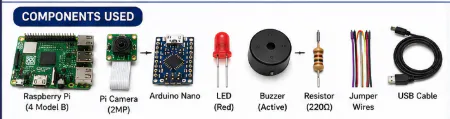
Hardware components

USB-A to Micro-USB Cable
×1
Arduino Nano R3
Arduino Nano R3
×1
Raspberry Pi 4 Model B
×1
5 mm LED: Red
5 mm LED: Red
×1
Resistor 220 ohm
Resistor 220 ohm
×1
Jumper wires (generic)
×1
Breadboard (generic)
×1
Camera Module
Raspberry Pi Camera Module
×1

Software apps and online services

Raspberry PI OS
Arduino IDE
Arduino IDE
OpenCV
OpenCV
VNC Viewer
OpenAI API

Story

Read more

Schematics

Schematics

Schematics

Schematics

Code

Code Used For this System Design

Python
from picamera2 import Picamera2
from openai import OpenAI

import cv2
import serial
import threading
import time
import os
import base64
import json

from datetime import datetime


# =====================================================
# SERIAL CONNECTION TO ARDUINO NANO
# =====================================================

arduino = serial.Serial(
    '/dev/ttyUSB0',
    9600,
    timeout=1
)

time.sleep(2)


# =====================================================
# OPENAI CLIENT
# =====================================================

client = OpenAI()


# =====================================================
# CAMERA SETTINGS
# =====================================================

FRAME_WIDTH = 640
FRAME_HEIGHT = 480

CAPTURE_INTERVAL = 0.5
AI_INTERVAL = 5.0

EYES_CLOSED_SECONDS = 2.0

DROWSY_CONFIDENCE_LIMIT = 0.6


# =====================================================
# OPENCV CASCADES
# =====================================================

face_cascade = cv2.CascadeClassifier(
    "/usr/share/opencv4/haarcascades/"
    "haarcascade_frontalface_default.xml"
)

eye_cascade = cv2.CascadeClassifier(
    "/usr/share/opencv4/haarcascades/"
    "haarcascade_eye.xml"
)


# =====================================================
# IMAGE SAVE FOLDER
# =====================================================

IMAGE_FOLDER = "drowsiness_frames"

os.makedirs(
    IMAGE_FOLDER,
    exist_ok=True
)


# =====================================================
# CAMERA INITIALIZATION
# =====================================================

picam2 = Picamera2()

config = picam2.create_preview_configuration(
    main={
        "size": (
            FRAME_WIDTH,
            FRAME_HEIGHT
        ),
        "format": "RGB888"
    }
)

picam2.configure(config)

picam2.start()

time.sleep(2)


# =====================================================
# GLOBAL VARIABLES
# =====================================================

eyes_closed_start = None

alert_active = False

last_ai_time = 0

lock = threading.Lock()


# =====================================================
# SEND COMMAND TO ARDUINO
# =====================================================

def send_to_arduino(message):

    arduino.write(
        (message + '\n').encode()
    )


# =====================================================
# ALERT ACTIVATION
# =====================================================

def activate_alert(reason):

    global alert_active

    with lock:

        if alert_active:
            return

        alert_active = True

    print("\n===================")
    print("DROWSINESS ALERT")
    print(reason)
    print("===================\n")

    send_to_arduino("DROWSY")

    time.sleep(3)

    send_to_arduino("SAFE")

    with lock:
        alert_active = False


# =====================================================
# SAVE FRAME
# =====================================================

def save_frame(frame):

    timestamp = datetime.now().strftime(
        "%Y%m%d_%H%M%S"
    )

    path = (
        f"{IMAGE_FOLDER}/"
        f"frame_{timestamp}.jpg"
    )

    bgr = cv2.cvtColor(
        frame,
        cv2.COLOR_RGB2BGR
    )

    cv2.imwrite(path, bgr)

    return path


# =====================================================
# ENCODE IMAGE
# =====================================================

def encode_image(image_path):

    with open(image_path, "rb") as image_file:

        return base64.b64encode(
            image_file.read()
        ).decode("utf-8")


# =====================================================
# LOCAL BACKUP DETECTION
# =====================================================

def local_detection(frame):

    global eyes_closed_start

    gray = cv2.cvtColor(
        frame,
        cv2.COLOR_RGB2GRAY
    )

    faces = face_cascade.detectMultiScale(
        gray,
        scaleFactor=1.2,
        minNeighbors=5,
        minSize=(80, 80)
    )

    if len(faces) == 0:

        print("No face detected")

        eyes_closed_start = None

        return False, "No face"

    largest_face = max(
        faces,
        key=lambda r: r[2] * r[3]
    )

    x, y, w, h = largest_face

    face_gray = gray[y:y+h, x:x+w]

    eyes = eye_cascade.detectMultiScale(
        face_gray,
        scaleFactor=1.1,
        minNeighbors=5,
        minSize=(20, 20)
    )

    print(
        f"Face detected | "
        f"Eyes found: {len(eyes)}"
    )

    if len(eyes) == 0:

        if eyes_closed_start is None:

            eyes_closed_start = time.time()

        elapsed = (
            time.time()
            - eyes_closed_start
        )

        print(
            f"Eyes closed for "
            f"{elapsed:.1f} sec"
        )

        if elapsed >= EYES_CLOSED_SECONDS:

            return True, (
                f"Eyes closed for "
                f"{elapsed:.1f} sec"
            )

    else:

        eyes_closed_start = None

    return False, "Normal"


# =====================================================
# AI DETECTION
# =====================================================

def ai_detection(image_path):

    base64_image = encode_image(
        image_path
    )

    prompt = """
Determine if the person appears drowsy.

Look for:
- closed eyes
- yawning
- sleepy face
- tired expression

Return JSON only:
{
 "drowsy": true or false,
 "confidence": 0.0 to 1.0,
 "reason": "short explanation"
}
"""

    response = client.responses.create(

        model="gpt-4.1-mini",

        input=[
            {
                "role": "user",
                "content": [

                    {
                        "type": "input_text",
                        "text": prompt
                    },

                    {
                        "type": "input_image",
                        "image_url":
                        f"data:image/jpeg;base64,{base64_image}"
                    }

                ]
            }
        ]
    )

    text = response.output_text.strip()

    print("AI response:", text)

    return json.loads(text)


# =====================================================
# AI THREAD
# =====================================================

def ai_thread(image_path):

    try:

        result = ai_detection(
            image_path
        )

        if (
            result["drowsy"]
            and
            result["confidence"]
            >= DROWSY_CONFIDENCE_LIMIT
        ):

            activate_alert(
                result["reason"]
            )

    except Exception as e:

        print("AI error:", e)

        print(
            "Using local backup detection"
        )


# =====================================================
# MAIN LOOP
# =====================================================

try:

    print("\n========================")
    print("System Started")
    print("========================\n")

    while True:

        start = time.time()

        frame = picam2.capture_array()

        drowsy, reason = local_detection(
            frame
        )

        if drowsy:

            threading.Thread(
                target=activate_alert,
                args=(reason,),
                daemon=True
            ).start()

        current = time.time()

        if (
            current - last_ai_time
            >= AI_INTERVAL
        ):

            last_ai_time = current

            image_path = save_frame(
                frame
            )

            threading.Thread(
                target=ai_thread,
                args=(image_path,),
                daemon=True
            ).start()

        elapsed = time.time() - start

        sleep_time = max(
            0,
            CAPTURE_INTERVAL - elapsed
        )

        time.sleep(sleep_time)

except KeyboardInterrupt:

    print("\nStopping system...")

finally:

    send_to_arduino("SAFE")

    picam2.stop()

    arduino.close()

    print("System stopped")

Arduino Code

C/C++
const int buzzerPin = 8;
const int ledPin = 9;

String cmd = "";

void setup() {

  pinMode(buzzerPin, OUTPUT);
  pinMode(ledPin, OUTPUT);

  digitalWrite(buzzerPin, LOW);
  digitalWrite(ledPin, LOW);

  Serial.begin(9600);
}

void loop() {

  if (Serial.available() > 0) {

    cmd = Serial.readStringUntil('\n');

    cmd.trim();

    if (cmd == "DROWSY") {

      digitalWrite(buzzerPin, HIGH);
      digitalWrite(ledPin, HIGH);
    }

    else if (cmd == "SAFE") {

      digitalWrite(buzzerPin, LOW);
      digitalWrite(ledPin, LOW);
    }
  }
}

Credits

Toshika Verma
1 project • 0 followers

Comments