While we were experimenting with our new Arduino kit, and exploring new ideas, we stumbled on this one. The lights outside our house had to be switched on every day at night, and more often than not we ended up forgetting to switch it off in the morning. A simple device with the Arduino can prevent wastage of energy even in devices like torches left on during the day and also be a convenient way to switch on the light without getting up from your table!!
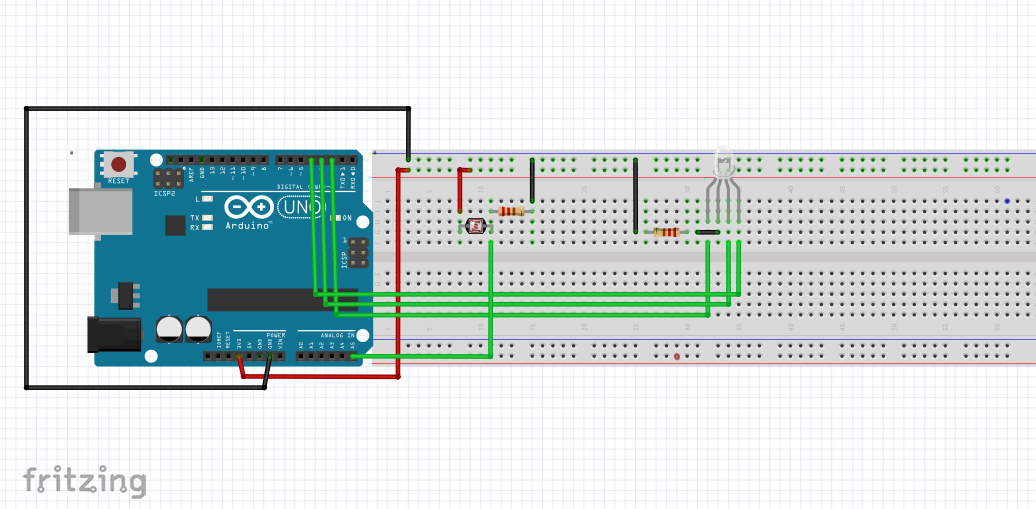
This project can be simply made with an Arduino, an LDR and an LED. To make it more interesting, we have used an RGB LED and coded it so that it will change colour depending on the intensity of available light. We have used blue when there is more light and green for lesser light. You can change it depending on your taste, by changing which pin is set to high at each level of intensity. You can also add more levels with different colours and also change the values for each level according to what works in your setup. Messing with the setup is the way to learn!
Connect the circuit as shown, copy the code to your Arduino IDE, upload it and test out the device!!





_ztBMuBhMHo.jpg?auto=compress%2Cformat&w=48&h=48&fit=fill&bg=ffffff)




Comments