STEMpedia
Published © CC BY

DIY Accelerometer Based Controller

This project will show you how to make a DIY joystick using an accelerometer.

IntermediateFull instructions provided3 hours1,417
DIY Accelerometer Based Controller

Things used in this project

Hardware components

evive
STEMpedia evive
×1
Jumper wires (generic)
×1
GY521 MPU6050 Module
×1

Software apps and online services

Arduino IDE
Arduino IDE
Processing
The Processing Foundation Processing

Story

Read more

Schematics

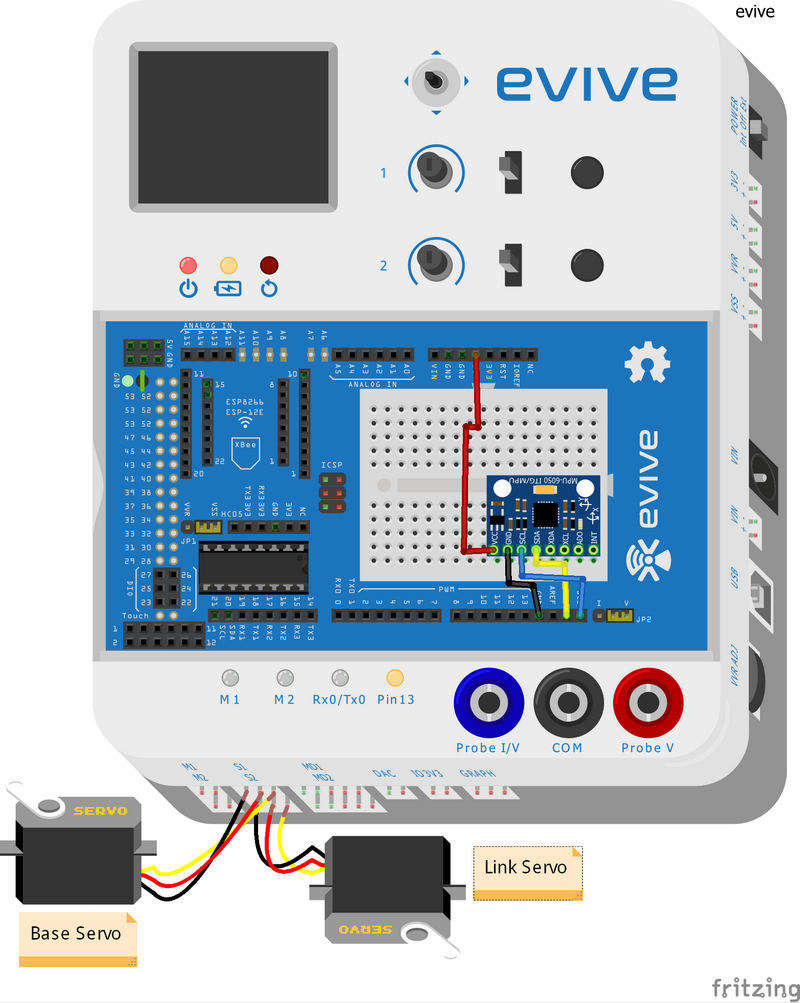
Fritzing Diagram for Robotic Arm

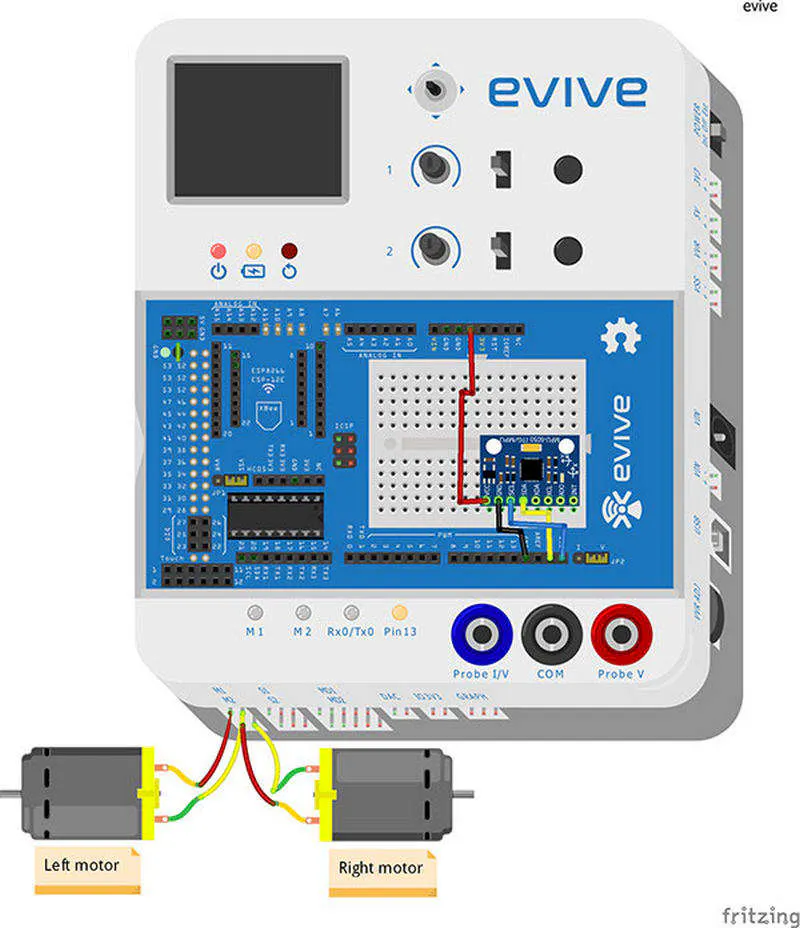
Fritzing Diagram for Mobile Robot

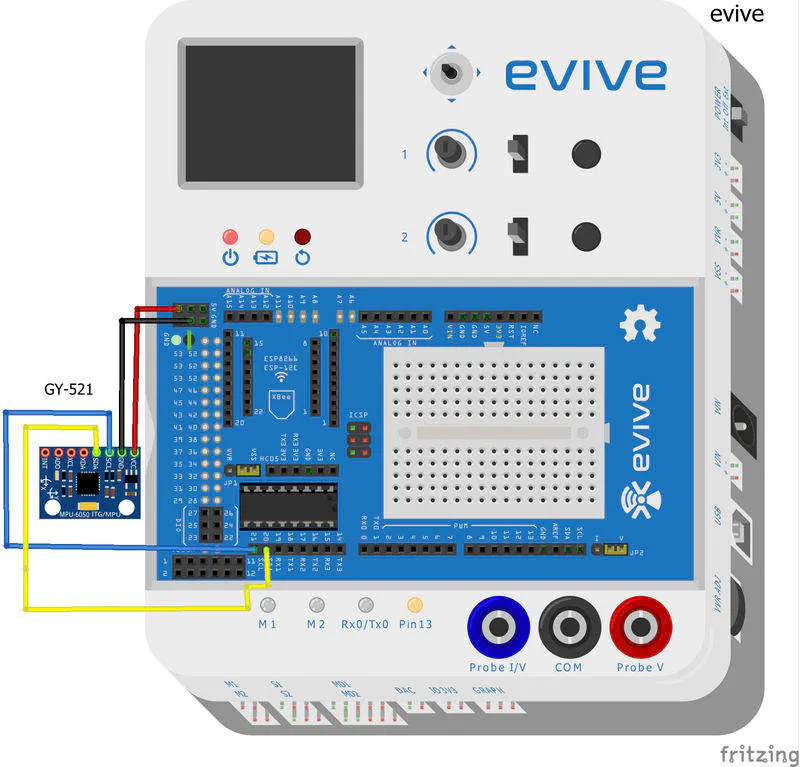
Fritzing Diagram for Game Controller

Code

Arduino Code for Mobile Robot

Arduino
#include<evive.h>
#include <Wire.h> 

const int MPU_ADDR = 0x68;                              // I2C address of the MPU-6050. If AD0 pin is set to HIGH, the I2C address will be 0x69.
int accelerometer_x, accelerometer_y, accelerometer_z; // variables for accelerometer raw data
int gyro_x, gyro_y, gyro_z;                           // variables for gyro raw data
int temperature;                                     // variables for temperature data


unsigned int  motor1_en  =  44;
unsigned int motor2_en  =  45;
unsigned int  motor1_dir1 = 28;
unsigned int  motor1_dir2 = 29;
unsigned int  motor2_dir1 = 30;
unsigned int  motor2_dir2 = 31;


void setup() {
  // put your setup code here, to run once:

   Serial.begin(9600);

    tft_init(INITR_BLACKTAB);
    tft.setRotation(1);
    tft.fillScreen(ST7735_BLACK);
  
    tft.setCursor(25,5);
    tft.setTextSize(2);
    tft.setTextColor(ST7735_WHITE,ST7735_BLACK);
    tft.print("STEMpedia");
  
    tft.setCursor(10,50);
    tft.setTextSize(1);
    tft.setTextColor(ST7735_GREEN,ST7735_BLACK);
    tft.print("ACCELEROMETER CONTROLLED ");
    tft.setCursor(55,60);
    tft.print(" ROBOT ");
    

    tft.setTextColor(ST7735_GREEN,ST7735_BLACK);
  tft.setCursor(0,95);
  tft.setTextSize(1.8);
  tft.print("FOR MORE INFORMATION VISIT");
  tft.setCursor(30,110);
  tft.setTextColor(ST7735_WHITE,ST7735_BLACK);
  tft.print("thestempedia.com");


  Wire.begin();
  Wire.beginTransmission(MPU_ADDR);       // Begins a transmission to the I2C slave (GY-521 board)
  Wire.write(0x6B);                      // PWR_MGMT_1 register
  Wire.write(0);                        // set to zero (wakes up the MPU-6050)
  Wire.endTransmission(true);

   pinMode(28,OUTPUT);
   pinMode(29,OUTPUT);
   pinMode(30,OUTPUT);
   pinMode(31,OUTPUT);
   pinMode(44,OUTPUT);
   pinMode(45,OUTPUT);

}

void loop() {
  // put your main code here, to run repeatedly:

  Wire.beginTransmission(MPU_ADDR);
  Wire.write(0x3B);                        // starting with register 0x3B (ACCEL_XOUT_H) [MPU-6000 and MPU-6050 Register Map and Descriptions Revision 4.2, p.40]
  Wire.endTransmission(false);            // the parameter indicates that the Arduino will send a restart. As a result, the connection is kept active.
  Wire.requestFrom(MPU_ADDR, 7*2, true); // request a total of 7*2=14 registers

  // "Wire.read()<<8 | Wire.read();" means two registers are read and stored in the same variable
  accelerometer_x = Wire.read()<<8 | Wire.read();                  // reading registers: 0x3B (ACCEL_XOUT_H) and 0x3C (ACCEL_XOUT_L)
  accelerometer_y = Wire.read()<<8 | Wire.read();                 // reading registers: 0x3D (ACCEL_YOUT_H) and 0x3E (ACCEL_YOUT_L)
  accelerometer_z = Wire.read()<<8 | Wire.read();                // reading registers: 0x3F (ACCEL_ZOUT_H) and 0x40 (ACCEL_ZOUT_L)
  temperature = Wire.read()<<8 | Wire.read();                   // reading registers: 0x41 (TEMP_OUT_H) and 0x42 (TEMP_OUT_L)
  gyro_x = Wire.read()<<8 | Wire.read();                       // reading registers: 0x43 (GYRO_XOUT_H) and 0x44 (GYRO_XOUT_L)
  gyro_y = Wire.read()<<8 | Wire.read();                      // reading registers: 0x45 (GYRO_YOUT_H) and 0x46 (GYRO_YOUT_L)
  gyro_z = Wire.read()<<8 | Wire.read();                     // reading registers: 0x47 (GYRO_ZOUT_H) and 0x48 (GYRO_ZOUT_L)
  
Serial.print(accelerometer_x);
Serial.print("         ");
Serial.print(accelerometer_y);
Serial.print("         ");
Serial.print(accelerometer_z);
Serial.print("         ");

         if(accelerometer_x > 13000)
           {
             forward();
            Serial.println("forward");
             
           }
        else if(accelerometer_y > 13000)
           {
              left();
             Serial.println("right");     
           }
         else 
            {
              
              accelerometer_y = -(accelerometer_y);
              accelerometer_x = -(accelerometer_x);
              
              if(accelerometer_x >13000)
              {
               backward();
               Serial.println("backward");
              }
              else if(accelerometer_y > 13000)
              {
               right();
               Serial.println("left");
              }
              else if(accelerometer_z >13000)
              {
                stop_motor();
              }
              
            }
            delay(10);


}

void forward()
{
  analogWrite(motor1_en,255);
  analogWrite(motor2_en,255);
  digitalWrite(motor1_dir1,HIGH);
  digitalWrite(motor1_dir2,LOW);
  digitalWrite(motor2_dir1,HIGH);
  digitalWrite(motor2_dir2,LOW);
   delay(50);
}
void backward()
{
  analogWrite(motor1_en,255);
  analogWrite(motor2_en,255);
  digitalWrite(motor1_dir1,LOW);
  digitalWrite(motor1_dir2,HIGH);
  digitalWrite(motor2_dir1,LOW);
  digitalWrite(motor2_dir2,HIGH); 
   delay(50);
}
void left()
{
  analogWrite(motor1_en,255);
  analogWrite(motor2_en,255);
  digitalWrite(motor1_dir1,HIGH);
  digitalWrite(motor1_dir2,LOW);
  digitalWrite(motor2_dir1,LOW);
  digitalWrite(motor2_dir2,HIGH); 
   delay(50);
}
void right()
{
  analogWrite(motor1_en,255);
  analogWrite(motor2_en,255);
  digitalWrite(motor1_dir1,LOW);
  digitalWrite(motor1_dir2,HIGH);
  digitalWrite(motor2_dir1,HIGH);
  digitalWrite(motor2_dir2,LOW); 
  delay(50);
}
void stop_motor()
{
  analogWrite(motor1_en,0);
  analogWrite(motor2_en,0);
  digitalWrite(motor1_dir1,LOW);
  digitalWrite(motor1_dir2,LOW);
  digitalWrite(motor2_dir1,LOW);
  digitalWrite(motor2_dir2,LOW); 
  delay(50); 
}

Arduino Code for Robotic Arm

Arduino
#include<evive.h>
#include <Wire.h> 

const int MPU_ADDR = 0x68;                              // I2C address of the MPU-6050. If AD0 pin is set to HIGH, the I2C address will be 0x69.
int accelerometer_x, accelerometer_y, accelerometer_z; // variables for accelerometer raw data
int gyro_x, gyro_y, gyro_z;                           // variables for gyro raw data
int temperature;                                     // variables for temperature data

Servo servo1motor;
Servo servo2motor;

int last_base;
int last_link;

const int servo1pin = 44 ;   // base servo
const int servo2pin = 45 ;  // Servo for link 

int servo1_init = 75;  
int servo2_init = 75;

void setup() {
  // put your setup code here, to run once:

   Serial.begin(9600);
   
   // mpu6050 setup 
  Wire.begin();
  Wire.beginTransmission(MPU_ADDR);       // Begins a transmission to the I2C slave (GY-521 board)
  Wire.write(0x6B);                      // PWR_MGMT_1 register
  Wire.write(0);                        // set to zero (wakes up the MPU-6050)
  Wire.endTransmission(true);

   
    // Servo motor setup 

    servo1motor.attach(servo1pin);
    servo2motor.attach(servo2pin);
 
    servo1motor.write(servo1_init);
    servo2motor.write(servo2_init);

    // tft setup 

    tft_init(INITR_BLACKTAB);
    tft.setRotation(1);
    tft.fillScreen(ST7735_BLACK);
  
    tft.setCursor(25,5);
    tft.setTextSize(2);
    tft.setTextColor(ST7735_WHITE,ST7735_BLACK);
    tft.print("STEMpedia");
  
    tft.setCursor(10,50);
    tft.setTextSize(1);
    tft.setTextColor(ST7735_GREEN,ST7735_BLACK);
    tft.print("ACCELEROMETER CONTROLLED ");
    tft.setCursor(45,60);
    tft.print(" ROBOTIC ARM ");
    

    tft.setTextColor(ST7735_GREEN,ST7735_BLACK);
    tft.setCursor(0,95);
    tft.setTextSize(1.8);
    tft.print("FOR MORE INFORMATION VISIT");
    tft.setCursor(30,110);
    tft.setTextColor(ST7735_WHITE,ST7735_BLACK);
    tft.print("thestempedia.com");

}

void loop()
   {
       // put your main code here, to run repeatedly:

  Wire.beginTransmission(MPU_ADDR);
  Wire.write(0x3B);                        // starting with register 0x3B (ACCEL_XOUT_H) [MPU-6000 and MPU-6050 Register Map and Descriptions Revision 4.2, p.40]
  Wire.endTransmission(false);            // the parameter indicates that the Arduino will send a restart. As a result, the connection is kept active.
  Wire.requestFrom(MPU_ADDR, 7*2, true); // request a total of 7*2=14 registers

  // "Wire.read()<<8 | Wire.read();" means two registers are read and stored in the same variable
  accelerometer_x = Wire.read()<<8 | Wire.read();                  // reading registers: 0x3B (ACCEL_XOUT_H) and 0x3C (ACCEL_XOUT_L)
  accelerometer_y = Wire.read()<<8 | Wire.read();                 // reading registers: 0x3D (ACCEL_YOUT_H) and 0x3E (ACCEL_YOUT_L)
  accelerometer_z = Wire.read()<<8 | Wire.read();                // reading registers: 0x3F (ACCEL_ZOUT_H) and 0x40 (ACCEL_ZOUT_L)
  temperature = Wire.read()<<8 | Wire.read();                   // reading registers: 0x41 (TEMP_OUT_H) and 0x42 (TEMP_OUT_L)
  gyro_x = Wire.read()<<8 | Wire.read();                       // reading registers: 0x43 (GYRO_XOUT_H) and 0x44 (GYRO_XOUT_L)
  gyro_y = Wire.read()<<8 | Wire.read();                      // reading registers: 0x45 (GYRO_YOUT_H) and 0x46 (GYRO_YOUT_L)
  gyro_z = Wire.read()<<8 | Wire.read();                     // reading registers: 0x47 (GYRO_ZOUT_H) and 0x48 (GYRO_ZOUT_L)
  
        
        if(accelerometer_x > 13000)
           {
              if(last_base<161)
                {
                   move_up(last_base);
                }
           }
       accelerometer_x  = -(accelerometer_x);
        
         if(accelerometer_x >13000)
            {
               if(last_base>0)
                 {
                    move_down(last_base);
                 }
            }
         if(accelerometer_y > 13000)
             {
                if(last_link<161)
                   {
                      move_left(last_link);
                   }
             }
        accelerometer_y = -(accelerometer_y);
        
        if(accelerometer_y >13000)
             {
                if(last_link>0)
                   {
                       move_right(last_link);
                   }
             }
         else 
         {
          
         }
 

}

void move_left(unsigned int Position)
    {
      Position++;
      servo2motor.write(Position);
      delay(15);
      Serial.println(last_link);
      last_link = Position;
    }
void move_right(unsigned int Position)
   {
      Position--;
      servo2motor.write(Position);
      delay(15);
      Serial.println(last_link);
      last_link = Position; 
   }
void move_up(unsigned int Position)
   {
      Position++;
      servo1motor.write(Position);
      delay(15);
      Serial.println(last_base);
      last_base = Position;
   }
void move_down(unsigned int Position)
   { 
      Position--;
      servo1motor.write(Position);
      delay(15);
      Serial.println(last_base);
      last_base = Position;
   }

Arduino Code for Game Controller

Arduino
#include<evive.h>
#include <Wire.h>

const int MPU_ADDR = 0x68;                              // I2C address of the MPU-6050. If AD0 pin is set to HIGH, the I2C address will be 0x69.
int accelerometer_x, accelerometer_y, accelerometer_z; // variables for accelerometer raw data
int gyro_x, gyro_y, gyro_z;                           // variables for gyro raw data
int temperature;
int var =0;
unsigned int wait = 100;

void setup() 
    {
      Serial.begin(9600);
      
      tft_init(INITR_GREENTAB);              // initialize a ST7735S chip, black tab
      tft.setRotation(1);
      tft.fillScreen(ST7735_BLACK);

      Wire.begin();
      Wire.beginTransmission(MPU_ADDR);       // Begins a transmission to the I2C slave (GY-521 board)
      Wire.write(0x6B);                      // PWR_MGMT_1 register
      Wire.write(0);                        // set to zero (wakes up the MPU-6050)
      Wire.endTransmission(true);
   
   
    }

void loop() 
    {

        Wire.beginTransmission(MPU_ADDR);
        Wire.write(0x3B);                        // starting with register 0x3B (ACCEL_XOUT_H) [MPU-6000 and MPU-6050 Register Map and Descriptions Revision 4.2, p.40]
        Wire.endTransmission(false);            // the parameter indicates that the Arduino will send a restart. As a result, the connection is kept active.
        Wire.requestFrom(MPU_ADDR, 7*2, true); // request a total of 7*2=14 registers
        
        accelerometer_x = Wire.read()<<8 | Wire.read();                  // reading registers: 0x3B (ACCEL_XOUT_H) and 0x3C (ACCEL_XOUT_L)
        accelerometer_y = Wire.read()<<8 | Wire.read();                 // reading registers: 0x3D (ACCEL_YOUT_H) and 0x3E (ACCEL_YOUT_L)
        accelerometer_z = Wire.read()<<8 | Wire.read();                // reading registers: 0x3F (ACCEL_ZOUT_H) and 0x40 (ACCEL_ZOUT_L)
        temperature = Wire.read()<<8 | Wire.read();                   // reading registers: 0x41 (TEMP_OUT_H) and 0x42 (TEMP_OUT_L)
        gyro_x = Wire.read()<<8 | Wire.read();                       // reading registers: 0x43 (GYRO_XOUT_H) and 0x44 (GYRO_XOUT_L)
        gyro_y = Wire.read()<<8 | Wire.read();                      // reading registers: 0x45 (GYRO_YOUT_H) and 0x46 (GYRO_YOUT_L)
        gyro_z = Wire.read()<<8 | Wire.read();                     // reading registers: 0x47 (GYRO_ZOUT_H) and 0x48 (GYRO_ZOUT_L)
        
        var =0;
    if(accelerometer_x > 13000)
       {
          var =1;
          Serial.print(var); // UP
          Serial.print(".");
          delay(wait);
       }
    else if (accelerometer_y > 13000)
       {
          var =3;
          Serial.print(var); // right
          Serial.print(".");
          delay(wait);
       }
    else
        {
              accelerometer_y = -(accelerometer_y);
              accelerometer_x = -(accelerometer_x);

                if(accelerometer_x >13000)
                    {
                       var =2;
                       Serial.print(var); // DOWN
                       Serial.print(".");
                       delay(wait);
                    }
                else if(accelerometer_y > 13000)
                    {
                       var =4;
                       Serial.print(var); // LEFT
                       Serial.print(".");
                       delay(wait);
                    }
               else if(accelerometer_z > 13000)
                     {
                        Serial.print(var); // stop
                        Serial.print(".");
                     }
      
       } 
    delay(10);
}

Processing Code for Game Controller

Processing
import processing.serial.*; // imports library for serial communication
import java.awt.Robot; // imports library for key press or release simulation
import java.awt.event.KeyEvent; // imports library for reading the data from the serial port
import java.io.IOException;

Serial port; // defines Object Serial
Robot robot; // defines Object Robot

String data;
int iv=0;

// creates new robot object

void setup()
{

try 
{
robot = new Robot();
}
catch (Exception e) {
e.printStackTrace();
exit();
}

delay(2000);
size (800, 800);
port = new Serial(this,"COM51", 9600); // starts the serial communication
port.bufferUntil('.'); // reads the data from the serial port up to the character '.'. So actually it reads this: 215,214/141;315:314<316!314?315.
background(0,0,0);
}

void draw()
{
print("data:");
print(data);

print(" v= ");
println(iv);

if(iv == 1)
   {
      robot.keyPress(KeyEvent.VK_SPACE);
      print(" UP ");
   }

else if(iv == 2)
   {
      robot.keyPress(KeyEvent.VK_SHIFT);
      print(" DOWN ");
   }
else if(iv == 4)
   {
      robot.keyPress(KeyEvent.VK_LEFT);
      print(" LEFT "); 
   }
else if(iv == 3)
  {
     robot.keyPress(KeyEvent.VK_RIGHT);
     print(" RIGHT "); 
  }
else if(iv==0)
 {
   robot.keyRelease(KeyEvent.VK_UP);
   robot.keyRelease(KeyEvent.VK_DOWN);
   robot.keyRelease(KeyEvent.VK_LEFT);
   robot.keyRelease(KeyEvent.VK_RIGHT);
   robot.keyRelease(KeyEvent.VK_A);
   robot.keyRelease(KeyEvent.VK_S);
   robot.keyRelease(KeyEvent.VK_W);
   robot.keyRelease(KeyEvent.VK_D);
   robot.keyRelease(KeyEvent.VK_SPACE);
   robot.keyRelease(KeyEvent.VK_ENTER);
   robot.keyRelease(KeyEvent.VK_SHIFT);
   
 } 
 
}

void serialEvent (Serial port) // starts reading data from the Serial Port
    {

      data = port.readStringUntil('.'); // reads the data from the serial port up to the character '.' and it sets that into the String variable "data". So actually it reads this: 215,214/141;315:314<316!314?315.
      data = data.substring(0,data.length()-1); // it removes the '.' from the previous read. So this will be the String "data" variable: 215,214/141;315:314<316!314?315

// Finding the indexes in the data and setting the variables from the sensors by taking from the String "data" the appropriate values that are between the characters in the "data" String


      iv= int(data); 
     }

evive Library

C/C++
No preview (download only).

Credits

STEMpedia
44 projects • 172 followers
STEMpedia blends theory with experiential learning by offering state-of-the-art technology, projects, tutorials, courses, and much more.

Comments