


Hardware components | ||||||
 |
| × | 1 | |||
 |
| × | 1 | |||
 |
| × | 1 | |||
 |
| × | 1 | |||
 |
| × | 1 | |||
 |
| × | 1 | |||
Software apps and online services | ||||||
 |
| |||||
| ||||||
| ||||||
Hand tools and fabrication machines | ||||||
 |
| |||||
 |
| |||||
The Problem
Every student has experienced it — sitting in an exam, knowing the answer, and suddenly the mind goes blank. Stress peaks, panic sets in, and performance drops. The worst part? By the time you consciously feel anxious, your body has already been in a stress response for several minutes.
There is no affordable, real-time device built specifically for students that detects rising stress early and alerts them before panic sets in.
Why We Built StressGuard
We are 2nd semester engineering students who have faced exam stress firsthand. We wanted to build something that actually solves a real problem — not just another LED blinking project.
StressGuard monitors stress levels in real time and gives a silent alert the moment stress starts rising — giving the student time to breathe and recover before it peaks.
How It Works
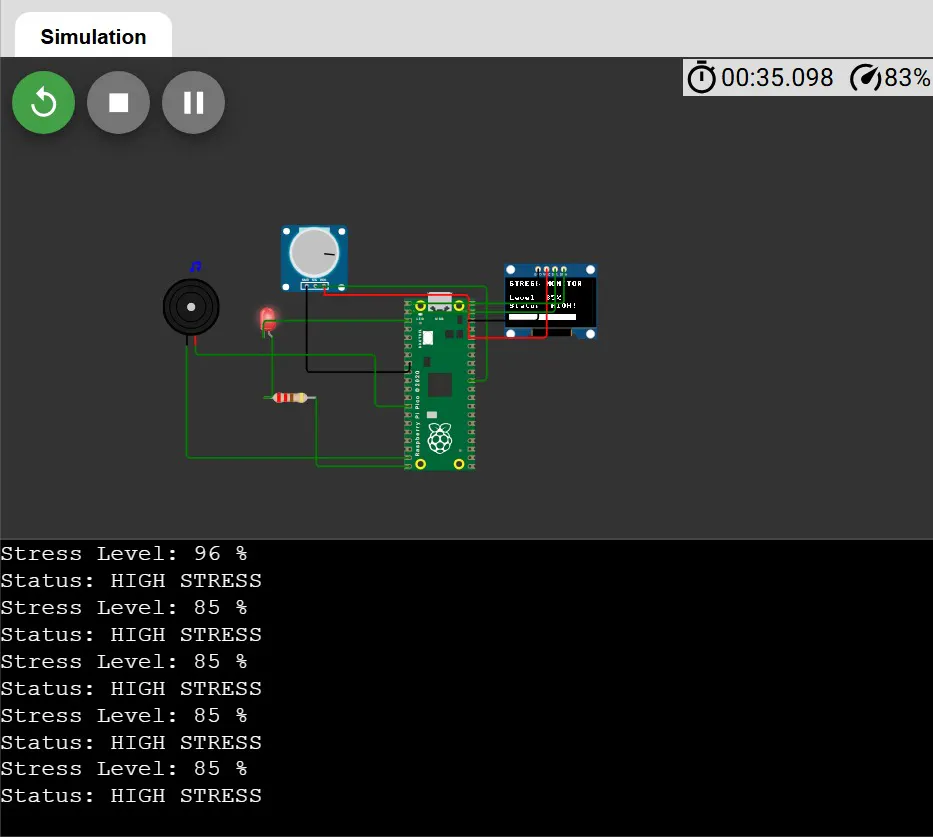
StressGuard reads a variable resistance signal that represents skin conductance — the same principle used in medical-grade stress detection. In this prototype, a 10kΩ potentiometer simulates the variable signal that a GSR sensor would produce in the final version.
The Raspberry Pi Pico reads this signal through its ADC pin (GP26) at 20 samples per second. The value is converted to a stress percentage and compared against three levels:
Calm — below 40% — no alert
Moderate — 40% to 70% — LED blinks, buzzer beeps softly
High Stress — above 70% — LED blinks rapidly, buzzer beeps loudly
The current stress level and status is displayed live on a 0.96 inch SSD1306 OLED screen along with a visual progress bar.
What Makes It Different
Unlike smartwatches and fitness bands, StressGuard is:
Distraction free — no notifications, no apps, does only one job
Exam friendly — no WiFi, no Bluetooth, allowed where smartwatches are banned
Fully offline — all data stays on the device, nothing goes to any server
Student budget — built for under ₹3000, not ₹35, 000
Personalizable — code is fully open and customizable
Prototype Note
This prototype uses a potentiometer to simulate the variable resistance signal of a GSR sensor. The circuit and code are fully compatible with a real GSR module — replacing the potentiometer requires absolutely no code changes.
Tech Stack
Microcontroller — Raspberry Pi Pico (RP2040)
Language — MicroPython
Display — SSD1306 0.96" OLED via I2C
Alert — Passive buzzer via PWM + Red LED
Simulation — Wokwi online simulator
IDE — Thonny
Future Scope
- Add MAX30102 heart rate sensor for higher accuracy
- Upgrade to Pico W for WiFi and live phone dashboard
- Data logging to find personal stress patterns over time
- Machine learning model to predict stress before it peaks
- Guided breathing exercise triggered automatically on high stress
- Classroom version — teacher sees anonymous stress heatmap of entire class


Comments