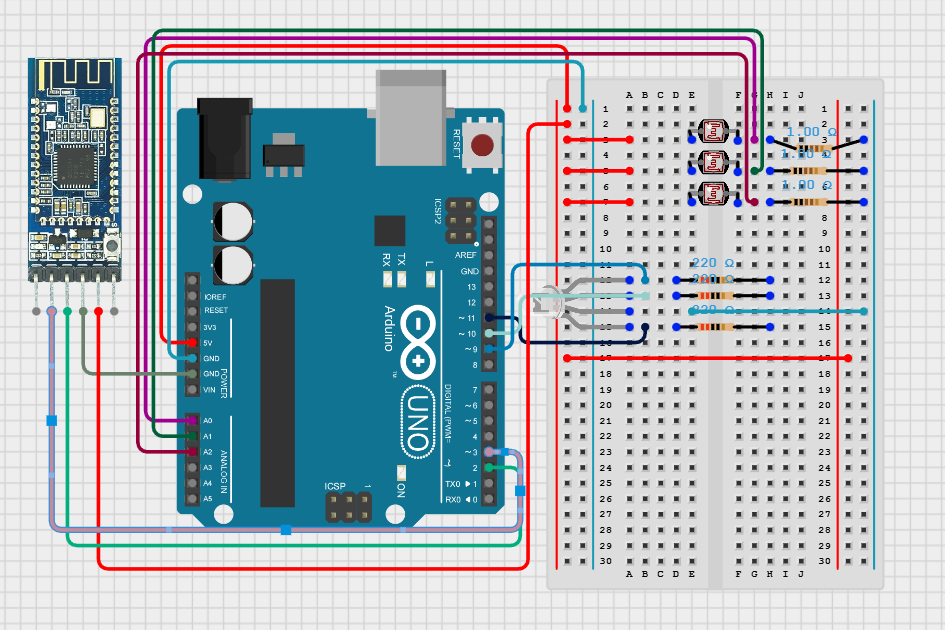
#include <SoftwareSerial.h>
SoftwareSerial mySerial(3, 2); // Bluetooth TX, RX

const int greenLEDPin = 9;
const int redLEDPin   = 10;
const int blueLEDPin  = 11;

const int redSensorPin   = A0;
const int greenSensorPin = A1;
const int blueSensorPin  = A2;

int redValue = 0;
int greenValue = 0;
int blueValue = 0;

void setup() {
  Serial.begin(9600);
  mySerial.begin(38400);

  pinMode(greenLEDPin, OUTPUT);
  pinMode(redLEDPin, OUTPUT);
  pinMode(blueLEDPin, OUTPUT);
}

void loop() {

  // ---- Read sensors ----
  int redSensorValue   = analogRead(redSensorPin);
  delay(3);
  int greenSensorValue = analogRead(greenSensorPin);
  delay(3);
  int blueSensorValue  = analogRead(blueSensorPin);


  redValue   = redSensorValue / 4;
  greenValue = greenSensorValue / 4;
  blueValue  = blueSensorValue / 4;

  int i = 0;

  if(redValue <= 150 && blueValue > 150 && greenValue > 150) // If button is pressed...
  {
    do
    {
    mySerial.write("F"); // ... Send this letter to the bot. F is being sent here.
    i++;
    } while (i < 500);


  }
    else if (redValue <= 150 && blueValue <= 150 && greenValue > 150)
  {
    do
    {
    mySerial.write("B");
      i++;
    } while (i < 500);

  }
    else if (greenValue <= 150 && redValue > 150 && blueValue > 150)
  {
    do
    {
    mySerial.write("L");
    i++;
    } while (i < 500);

  }
    else if (blueValue <= 150 && redValue > 150 && greenValue > 150)
  {
    do
    {
    mySerial.write("R");
    i++;
    } while (i < 500);

  }


  // ---- SHOW LED COLOR (after reading sensors!) ----
  // Dim LED so sensors aren't blinded
  analogWrite(redLEDPin, redValue / 3);
  analogWrite(greenLEDPin, greenValue / 3);
  analogWrite(blueLEDPin, blueValue / 3);


}




_ztBMuBhMHo.jpg?auto=compress%2Cformat&w=48&h=48&fit=fill&bg=ffffff)




Comments