Jameson DiGiovannaMichael Clark
Published

Motion Activated Coffee Machine

Reward yourself for brushing your teeth each morning with a hot cup of coffee, made automatically courtesy of the particle photon!

IntermediateFull instructions provided966
Motion Activated Coffee Machine

Things used in this project

Hardware components

Photon
Particle Photon
×2
PIR Motion Sensor (generic)
×1
Breadboard (generic)
×2
Tolako 5v Relay Module for Arduino
×1
DS18B20 Digital Temperature Sensor
×1

Story

Read more

Schematics

Photon 1: PIR Circuit

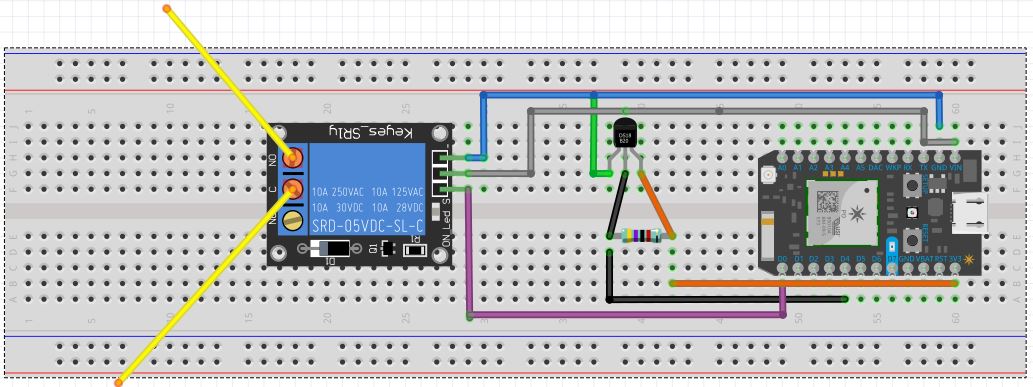
Photon 2: Relay Switch and Temperature Sensor

Temperature sensor shown here is non-waterproof version of DS18B20. Function and pins remain the same.

Code

Photon 1: Motion Sensor

C/C++
This brief segment of code controls the photon in the PIR sensor circuit, enabling it to detect signals from the motion sensor and publish the "brew-coffee" event to the cloud in response.
int sensor = D0;


void setup() {
    pinMode(sensor,INPUT);

    digitalWrite(sensor,LOW);

    delay(30000);
    //  allows the PIR sensor to calibrate to its thermal environment
}
//  this code will run only once upon startup

void loop(){
    if (digitalRead(sensor) == HIGH)   {
        delay(5000);
        //  allows the Particle.publish() function to work properly
        Particle.publish("brew-coffee","Coffee is brewing!");
        //  publishes an event to the cloud for any connected device to subscribe to
    }    
else{
}

 
}

Photon 2: Relay Switch and Temperature Sensor

C/C++
The temperature code relied heavily on the temperature logging guide code available on the particle.io website. Code for the relay switch was also modeled after and adapted from a similar project published here on hackster.
// This #include statement was automatically added by the Particle IDE.
#include <OneWire.h>

/*  This code listens for an event or a command
    from the cloud and executes the corresponding function.
*/

int relay = D0;
//  creates a variable for the relay to control the coffee maker

void setup() {
    pinMode(relay,OUTPUT);
    //  sets the relay pin as an output for the Photon
    digitalWrite(relay,LOW);
    //  sets the pin to low to start
    Particle.function("Coffee",Brew_Coffee);
    //  this allows the function Brew_Coffee to be published to the cloud
    Particle.subscribe("brew-coffee",brewCoffee,"40001e001051353338363333");
    //  this allows the Photon to subscribe to the event published by the first Photon
}
//  this block of code will run once during startup

void brewCoffee(const char *event, const char *data)    {
    digitalWrite(relay,HIGH);
    delay(runTime(0,10));
    digitalWrite(relay,LOW);
    //  turns the coffee maker on for 10 minutes, then turns it off
}
//  this block of code will run if the Particle has subscribed to the event brew-coffee

int Brew_Coffee(String command)    {
    if (command == "brew" || "on" || "Brew" || "On")  {
        digitalWrite(relay,HIGH);
        delay(runTime(0,10));
        //  turns the coffe maker on for 10 minutes
        digitalWrite(relay,LOW);
        return 1;
        //  turns the coffee maker off and returns 1 for true
    }
    //  this block of code runs if the command matches one of the above options
    else    {
        digitalWrite(relay,LOW);
        return 0;
        //  sets the relay pin low and returns 0 for false
    }
    //  this block of code runs if the command does not match
}
//  this block of code runs if it is prompted with a command
//  the command can be input via Mobicle.io

int runTime(int hours,int mins)   {
    int secs = (hours*60 + mins)*60;
    return secs*1000;
    //  converts inputs to milliseconds and returns that value
}

// This #include statement was automatically added by the Particle IDE.
#include <OneWire.h>

OneWire ds = OneWire(D4);  // 1-wire signal on pin D4

unsigned long lastUpdate = 0;

float lastTemp;


void loop(void) {
  byte i;
  byte present = 0;
  byte type_s;
  byte data[12];
  byte addr[8];
  float celsius, fahrenheit;

  if ( !ds.search(addr)) {
    Serial.println("No more addresses.");
    Serial.println();
    ds.reset_search();
    delay(250);
    return;
  }

  // The order is changed a bit in this example
  // first the returned address is printed

  Serial.print("ROM =");
  for( i = 0; i < 8; i++) {
    Serial.write(' ');
    Serial.print(addr[i], HEX);
  }

  // second the CRC is checked, on fail,
  // print error and just return to try again

  if (OneWire::crc8(addr, 7) != addr[7]) {
      Serial.println("CRC is not valid!");
      return;
  }
  Serial.println();

  // we have a good address at this point
  // what kind of chip do we have?
  // we will set a type_s value for known types or just return

  // the first ROM byte indicates which chip
  switch (addr[0]) {
    case 0x10:
      Serial.println("  Chip = DS1820/DS18S20");
      type_s = 1;
      break;
    case 0x28:
      Serial.println("  Chip = DS18B20");
      type_s = 0;
      break;
    case 0x22:
      Serial.println("  Chip = DS1822");
      type_s = 0;
      break;
    case 0x26:
      Serial.println("  Chip = DS2438");
      type_s = 2;
      break;
    default:
      Serial.println("Unknown device type.");
      return;
  }

  // this device has temp so let's read it

  ds.reset();               // first clear the 1-wire bus
  ds.select(addr);          // now select the device we just found
  // ds.write(0x44, 1);     // tell it to start a conversion, with parasite power on at the end
  ds.write(0x44, 0);        // or start conversion in powered mode (bus finishes low)

  // just wait a second while the conversion takes place

  delay(1000);     // wait 1 sec for conversion


  // first make sure current values are in the scratch pad

  present = ds.reset();
  ds.select(addr);
  ds.write(0xB8,0);         // Recall Memory 0
  ds.write(0x00,0);         // Recall Memory 0

  // now read the scratch pad

  present = ds.reset();
  ds.select(addr);
  ds.write(0xBE,0);         // Read Scratchpad
  if (type_s == 2) {
    ds.write(0x00,0);       // The DS2438 needs a page# to read
  }

  // transfer and print the values

  Serial.print("  Data = ");
  Serial.print(present, HEX);
  Serial.print(" ");
  for ( i = 0; i < 9; i++) {           // we need 9 bytes
    data[i] = ds.read();
    Serial.print(data[i], HEX);
    Serial.print(" ");
  }
  Serial.print(" CRC=");
  Serial.print(OneWire::crc8(data, 8), HEX);
  Serial.println();

  // Convert the data to actual temperature
  // because the result is a 16 bit signed integer, it should
  // be stored to an "int16_t" type, which is always 16 bits
  // even when compiled on a 32 bit processor.
  int16_t raw = (data[1] << 8) | data[0];
  if (type_s == 2) raw = (data[2] << 8) | data[1];
  byte cfg = (data[4] & 0x60);

  switch (type_s) {
    case 1:
      raw = raw << 3; // 9 bit resolution default
      if (data[7] == 0x10) {
        // "count remain" gives full 12 bit resolution
        raw = (raw & 0xFFF0) + 12 - data[6];
      }
      celsius = (float)raw * 0.0625;
      break;
    case 0:
      // at lower res, the low bits are undefined, so let's zero them
      if (cfg == 0x00) raw = raw & ~7;  // 9 bit resolution, 93.75 ms
      if (cfg == 0x20) raw = raw & ~3; // 10 bit res, 187.5 ms
      if (cfg == 0x40) raw = raw & ~1; // 11 bit res, 375 ms
      // default is 12 bit resolution, 750 ms conversion time
      celsius = (float)raw * 0.0625;
      break;

    case 2:
      data[1] = (data[1] >> 3) & 0x1f;
      if (data[2] > 127) {
        celsius = (float)data[2] - ((float)data[1] * .03125);
      }else{
        celsius = (float)data[2] + ((float)data[1] * .03125);
      }
  }

  // remove random errors
  if((((celsius <= 0 && celsius > -1) && lastTemp > 5)) || celsius > 125) {
      celsius = lastTemp;
  }

  fahrenheit = celsius * 1.8 + 32.0;
  lastTemp = celsius;
  Serial.print("  Temperature = ");
  Serial.print(celsius);
  Serial.print(" Celsius, ");
  Serial.print(fahrenheit);
  Serial.println(" Fahrenheit");

  // now that we have the readings, we can publish them to the cloud
  String temperature = String(fahrenheit); // store temp in "temperature" string
  Particle.publish("temperature", temperature, PRIVATE); // publish to cloud
  delay(300000); // 5 minute delay
}

Credits

Jameson DiGiovanna
1 project • 0 followers
Just a poor UNCC student trying to make ends meet.
Michael Clark
1 project • 0 followers

Comments