This is a project that serves as the second half of our physical computing class. The main goal of this project was to create an unconventional controller for a sumo bot (much like battle bots, but pushing rather than destroying one another).
The initial inspiration for this controller was the classic children's toy Labyrinth, in which a player will guide a marble through a wooden box, avoiding pitfalls as they go. However in our case, we want these 'pitfalls' to be each input for our controller.
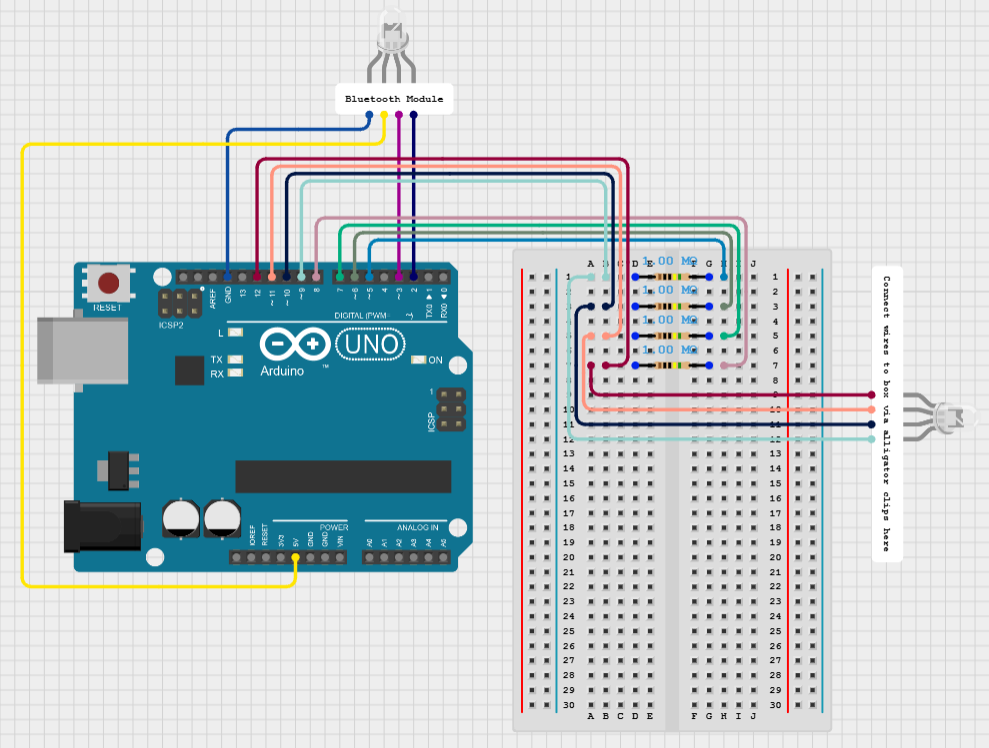
Construction began with ensuring the concept could work. We created a prototype out of cardboard first, putting aluminum foil strips on each corner to mark forward and back as well as turning left and turning right (since the robot is on treads). We also setup strips of soldering wire through holes that were placed about half an inch on both sides of each corner. We then attached the alligator clips to the solder wires, which then each connect to the breadboard, pass through a 1M ohm resistor, then into separate input channels in order to recieve power from each direction. The main idea behind this was to have the hand holding the controller to provide the ground and have the marble complete the circuit in whichever corner it is rolled into. We set up temporary LEDs to mark each corner. Sure enough, we got each of them to light up when the marble connected the floor to the wire. However, we had issues with the reliability of connections of the alligator clips and the connection of hand to foil to marble. The alligator clip connections to the wires were also faulty, sometimes falling off while testing. We took all this feedback in mind and moved on to the next stage.
After picking up some balsa wood, we constructed our final product. We started by covering our base in aluminum foil entirely in order to maximize the connection from hand to foil to marble. Then we hot-glued balsa wood strips as walls on each side of the base, creating similar holes for the solder wire pieces to pass through on each corner. After letting it sit, we began testing again, adjusting our circuitry and code to only have the inputs from each corner.
It took a few hours of troubleshooting, but after some help from some fellow students, we managed to get the code communicating with the bot and had a functional controller! Included in this project is a video of the controller running the bot, as well as some pictures of the controller itself.
Required QnA:




_ztBMuBhMHo.jpg?auto=compress%2Cformat&w=48&h=48&fit=fill&bg=ffffff)




Comments