int counter = 0;

// variables that will change:
int breadboardButtonState = 0;
int launchpadButtonState = 0;
int tiltState;


// set pin numbers:
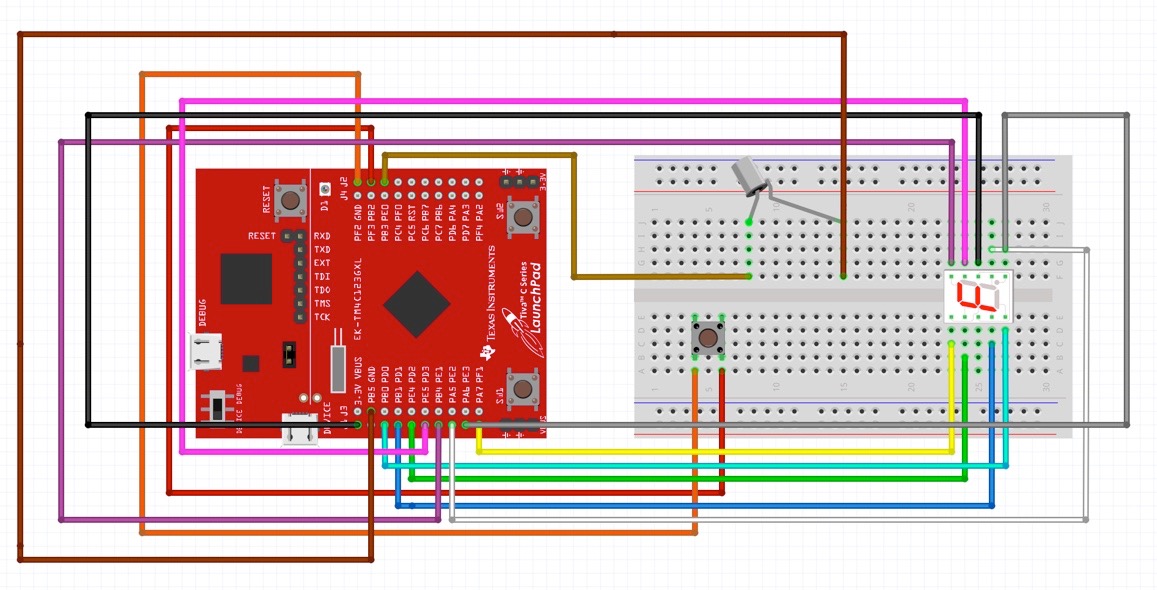
const int buttonPin = 19;
const int tiltPin = 18;

byte seven_segment_digits[10][7] = { { 0,0,0,0,0,0,1 }, // display '0'
                                     { 1,0,0,1,1,1,1 }, // display '1'
                                     { 0,0,1,0,0,1,0 }, // display '2'
                                     { 0,0,0,0,1,1,0 }, // display '3'
                                     { 1,0,0,1,1,0,0 }, // display '4'
                                     { 0,1,0,0,1,0,0 }, // display '5'
                                     { 0,1,0,0,0,0,0 }, // display '6'
                                     { 0,0,0,1,1,1,1 }, // display '7'
                                     { 0,0,0,0,0,0,0 }, // display '8'
                                     { 0,0,0,1,1,0,0 }  // display '9'
                                   };

void setup() {
  // put your setup code here, to run once:
  // initialize the breadboard push button pin as an input:
  pinMode(buttonPin, INPUT_PULLUP);
  // initialize the onboard pushbutton
  pinMode(PUSH2, INPUT_PULLUP);
  // initialize the tilt switch
  pinMode(tiltPin, INPUT);

  // initializes the seven segment digit display
  pinMode(3, OUTPUT); // set segment A as output
  pinMode(4, OUTPUT); // set segment B as output
  pinMode(5, OUTPUT); // set segment C as output
  pinMode(6, OUTPUT); // set segment D as output
  pinMode(7, OUTPUT); // set segment E as output
  pinMode(8, OUTPUT); // set segment F as output
  pinMode(9, OUTPUT); // set segment G as output
  pinMode(10, OUTPUT); // set dot as output
  for(int i = 3; i < 10; i++) { // start with segments off
    digitalWrite(i, HIGH);
  }
  digitalWrite(10, HIGH);  // start with the dot off
}


void loop() {
  // put your main code here, to run repeatedly:

  breadboardButtonState = digitalRead(buttonPin);
  launchpadButtonState = digitalRead(PUSH2);
  tiltState = digitalRead(tiltPin);

 // Checks to see if the tilt switch is tilted. If it is then it will run the counter code
  if (tiltState == 1){

    // Checks to see if either the button on the bread board or the button on the launch pad
    // has been pressed. If it has been increase the counter.
    if (breadboardButtonState == 0 or launchpadButtonState == 0){
      counter++;
    }

    // Checks if the counter has reached 10, which can not be displayed. Resets the counter to
    // zero if that's the case.
    if (counter == 10){
      counter = 0;
    }

    // Displays the number based on the digits defined in the dictionary for the display
    int pin = 3;
    for (int segCount = 0; segCount < 7; ++segCount) {
        digitalWrite(pin, seven_segment_digits[counter][segCount]);
        pin++;
      }
      // Delay so the button push isn't counted too many times.
      delay(250);
  }
}









_3u05Tpwasz.png?auto=compress%2Cformat&w=40&h=40&fit=fillmax&bg=fff&dpr=2)


Comments