



Hardware components | ||||||
 |
| × | 1 | |||
 |
| × | 1 | |||
 |
| × | 1 | |||
 |
| × | 1 | |||
Software apps and online services | ||||||
 |
| |||||
|
| |||||
Every morning for early wake up we use alarm clock or our mobile to perform the task of ring a alarm.Suppose that we don't have a alarm clock or mobile then how can we do this?
this project is our solution. In this project we are making a Internet of things(IOT) based alarm clock in which we are using bolt wifi module.
Step 1: Software connections.
#. Register your bolt wifi module on bolt cloud.
#. For using online service of integromat we have to crate account on integromat.
Step 2: Hardware connections.
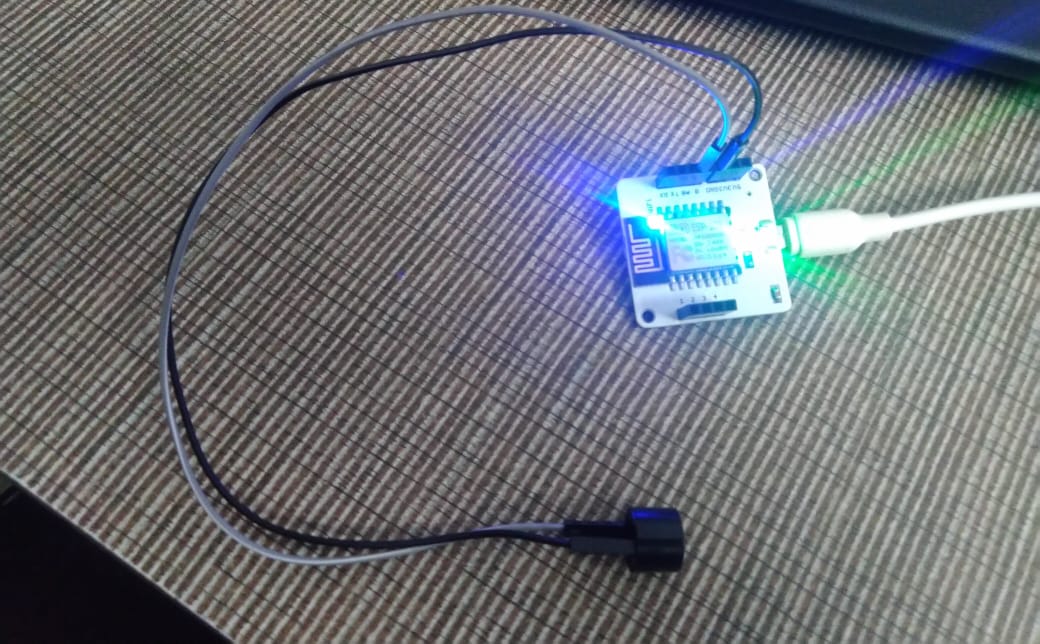
#. Identify the positive and negative pin of buzzer.For this remember that the longer pin of buzzer is the positive and shorter pin is negative.
#. Connect the positive pin of buzzer to either GPIO pin i.e. -0, 1, 2, 3, 4 with the help of male to female wires.I connect my positive terminal if buzzer to pin '0'.
#.Connect the negative pin of buzzer to pin 'GND' with the help of male to female wire.
#. For power on the bolt device, connect it to micro usb cable which is connected to suitable power adaptor.
Step 3: Setting time on integromat.
#.Create account on integromat for free on https://www.integromat.com
#. After verifying account sign in into it.
#. Click on the icon "create new scenerio".
#.Search in the search bar "boltiot" and select it.
#. Click on Add button.
#. Select My bolt in my connection,
#, Enter the api key. you can find the api key on your bolt cloud dashboard.
#. Click on continue.
#.Select command Write digital output.
#. In device name write your bolt wifi module id which you can find on your bolt cloud dashboard in the form of "BOLTXXXXXXX".
#Select pin and write '0' in it because we taking output in pin 0 so that buzzer gets turned on.
#.Write the state LOW.
#.click on ok.
#. We want that our buzzer beeps for several seconds before it gets turned off.
we requires to add a delay so that our buzzer rings for particular time.
#.For this select tool icon.
#. In this select sleep
# After clicking on sleep write number of seconds for which we want ring our buzzer i.e. set delay time. I set my delay time as 60 seconds
#. Click on adding a new module and choose Bolt IoT again. Now, in this module, we are going to switch off the Buzzer by sending a LOW to the Buzzer.
#. Select this new module and choose My bolt as connection.
#. Enter the api key.You can get your api key in bolt cloud dashboard.
#. Select command Write digital output.
#. Write your bolt device id in device name.You can fine your bolt device id on bolt cloud dashboard in the form of "BOLTXXXXXXX".
#. IN pin section write 0.
#. In state, write LOW because we want to turn off the buzzer.
#.So far, we have set up the scenario to ring the buzzer. Now, we will give it some context in the form of the time to ring.
#.Click on the little clock icon on the initial Bolt module. This is the scheduling option. Choose the time that you want the alarm to ring and click on OK.
#.That's it, you have successfully set up your alarm scenario. Don't forget to save your scenario.
#.To test if the buzzer actually works, click on the "Run Once" button. The buzzer should ring for 5 seconds and then switch off.


Comments