



Hardware components | ||||||
 |
| × | 1 | |||
 |
| × | 1 | |||
 |
| × | 1 | |||
Software apps and online services | ||||||
 |
| |||||
 |
| |||||
| ||||||
Many times cpu gets overloaded.we doesn't recognize the cpu stress and use the PC until it gets heated.It may cause damage to our system.
CPU STRESS DETECTOR is used to avoid this problem.An LED is used to indicate the cpu stress.
If the cpu gets overloaded, a red LED is turns on and gives the alert.If the cpu is cool, then a green LED is on.By these indications, we can get to know the stress levels of cpu.
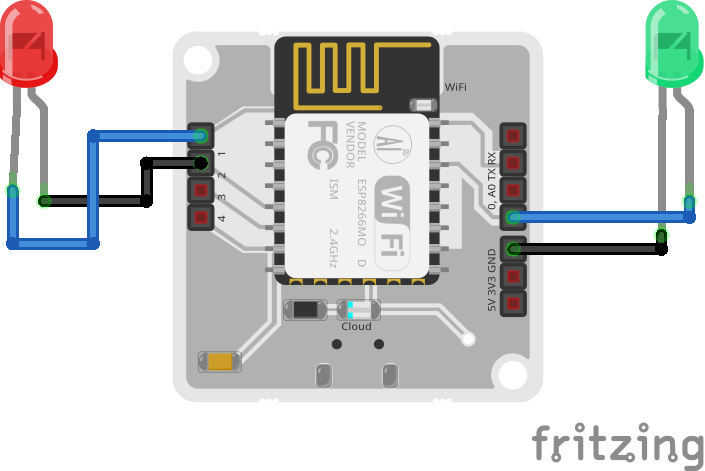
The hardware connections are quite straightforward if you've already gone through the steps in the Quickstart guide to setup the bolt device.
Bolt cloud link:www.cloud.boltiot.com
The Green LED is connected between digital pins 0 and GND. The red LED is connected between digital pins 1 and 2.
Software Setup:Install VMware software in the pc in which the stress is to to be detected.Also install ubuntu server.
VMWare Download link - https://my.vmware.com/web/vmware/free#desktop_end_user_computing/vmware_workstation_player/12_0
Ubuntu Server ISO link - http://releases.ubuntu.com/xenial/ubuntu-16.04.5-server-i386.
login to ubuntu:
create a python file as
- sudo nano filename.py
copy the API key and the Bolt Device Id after setting up your Bolt Iot Cloud account from the dashboard.
save, exit(ctrl+x) and run the file as
- sudo python3 filename. py
The LED's are turned on based on the stress levels of cpu.


Comments