As a Bioengineering student, I have always been interested in engineering projects related to health and wellness. Light therapy is a tool often used to help regulate circadian rhythms and combat seasonal depression by mimicking the natural lighting changes that occur over the course of a day. For those of us stuck working inside, having this "indoor sun" could help us feel more in line with our body's natural wakefulness/sleeping routines and can even help improve our moods!
This device tracks the time of day and adjusts the LED lights accordingly. Sunrise begins at 6 am and lasts until 7 am. A softer white light shines between 7 am to 10 am to mimic the soft morning sunlight. Between 10 am and 4 pm, the lights are the brightest to mimic the bright daylight sun. 4 pm to 7 pm is golden hour, with a rich golden hue to emulate the afternoon sunlight. A soft pink light between 7 pm and 8 pm imitates a sunset. Finally, the LEDs are dimmed to a cool blue between 8 pm to 6 pm, reminding the user that it is time to wind down and rest!
Sunrise simulated by the smart light therapy device.
Build Instructions
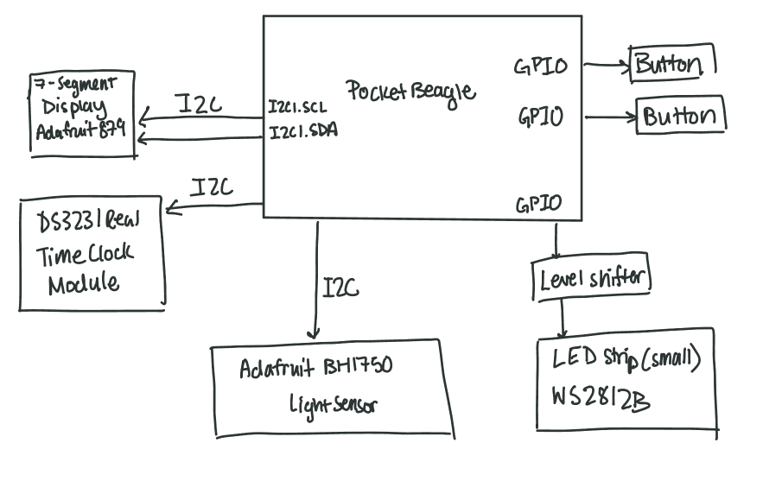
1. Connect the two leads of a button as shown below. One lead should connect to P2_02 of the PocketBeagle and a 1k pullup resistor to a 3.3V power rail. The other lead should go to ground. Repeat for another button, except connect to P2_04 of the PocketBeagle.
Pull-up button connections.
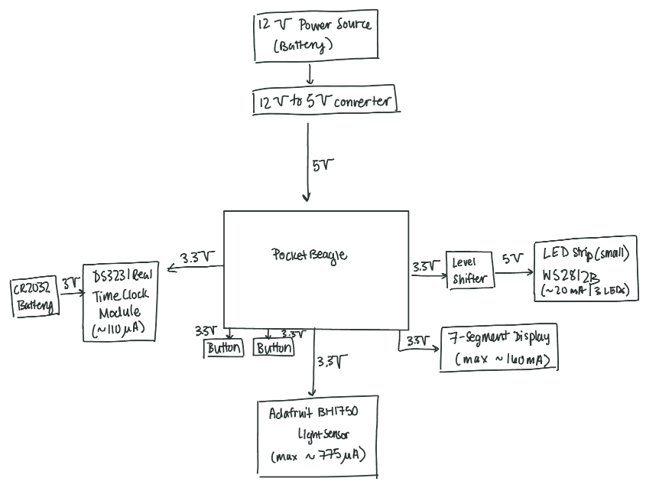
2. Connect the HT16K33 Display SDA pin to P2_11 of the PocketBeagle and to the 3.3 V power rail through a 1k resistor. Connect the SCL pin to P2_09 of the PocketBeagle and to the 3.3 V power rail through a 1k resistor. Connect the - pin to ground. Connect to + pin to the 3.3 V power rail.
HT16K33 wiring.
3. Solder header pins onto the BH1750 chip. Connect the BH1750 VCC pin to the 3.3 V power rail. Connect the ground pin to ground. Connect the SCL pin to the SCL pin of the HT16K33. Connect the SDA pin to the SDA pin of the HT16K33.
BH1750 wiring. Note that it is on the same I2C bus as the HT16K33 display.
4. Insert a CR2032 coin cell battery into the battery holder on the back of the DS3231 Real Time Clock module (RTC). Connect the DS3231 ground pin to ground. Connect the VCC pin to the 3.3 V rail. Connect the SDA pin to the SDA pin on the HT16K33. Connect the SCL pin to the SCL pin on the HT16K33.
DS3231 wiring. Note that it is on the same I2C bus as the HT16K33 display.
5. Connect pin VA of the level shifter to the 3.3 V rail. Connect pin A1 to P1_08 of the PocketBeagle. Connect pin VA to the OE pin on the level shifter. Connect pin VB to the positive terminal of the 5 V power source. Use another jumper to connect pin VB to the +5 V wire of the LED strip. Connect pin B1 to wire D0 of the LED strip. Connect the ground pin to circuit ground. Use another jumper to connect the ground pin to the negative terminal of the 5 V power source. Finally, connect the LED ground wire to circuit ground.
LED strip lights and level shifter connections.
Operation Instructions
(See video below for a demonstration of the following procedure). Upon startup, the HT16K33 display will show the real time in military time. The LEDs will shine at a brightness that mimics the sunlight at that time. If the light is too dim, press the green button to adjust brightness until the light is at your desired brightness. The HT16K33 display will show the new brightness value. On the other hand, if the light is too bright, press the yellow button to decrease the light intensity to your desired level.
Bright daylight at noon may be too bright or too dim, depending on the user's preference. The manual adjust buttons will increase/decrease the LED intensity.
Additionally, the LED brightness will automatically adjust based on the environmental lighting. In the video below, turning on and off the room lights caused the LEDs to dim and brighten, respectively, to maintain the same effect of the bright noontime sun!
To maintain the same effect of the noontime sun, the LEDs increase intensity when the lights in the room are turned off. No more feeling too sleepy in the middle of the day!






_3u05Tpwasz.png?auto=compress%2Cformat&w=40&h=40&fit=fillmax&bg=fff&dpr=2)
Comments