simoncpitt
Published © GPL3+

WiFi Electric Lock Home Protection Circuit

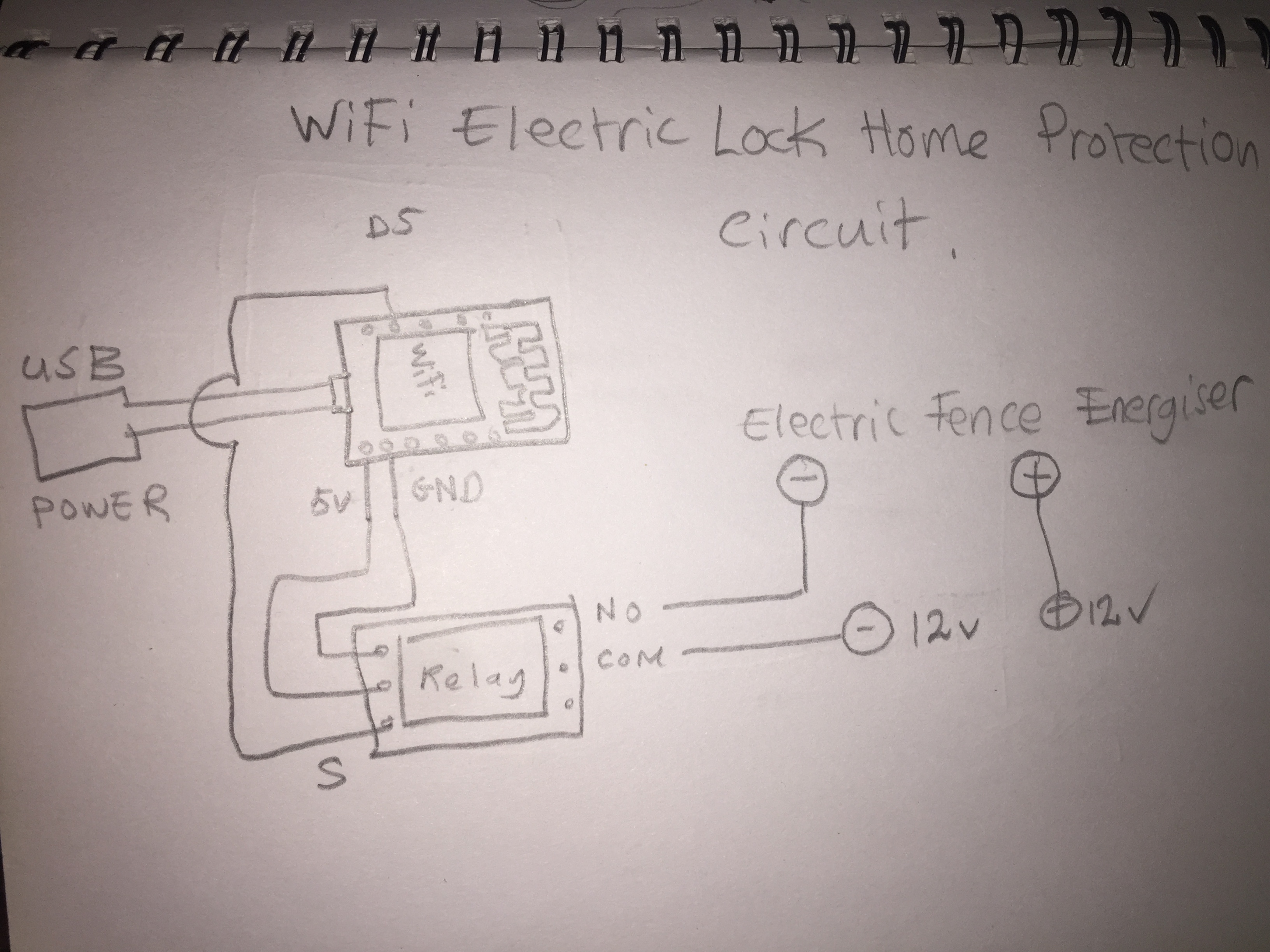
Using an ESP8266 WiFi Module which is connected to a Relay Module which controls an Electric Fence attached to a household lock.

BeginnerProtip96
WiFi Electric Lock Home Protection Circuit

Things used in this project

Hardware components

WT8266-S1 (ESP8266) Wifi Module
Wireless-Tag WT8266-S1 (ESP8266) Wifi Module
×1
Relay Module
×1
Electric Fence Energiser
×1

Story

Read more

Schematics

WiFi Electric Lock Home Protection Circuit Schematic

Home Protection

Code

WiFi Electric Lock Home Protection Circuit Arduino Code

Arduino
Used for programming the ESP8266 Module to control a Relay.
Line 18 Put your own SSID inside of ""
Line 19 Put your own Password inside of ""
/*
 * ESP8266 (WeMosD1) WiFi Relay Control
 * 
 * learnelectronics
 * 05 JUN 2017
 * 
 * www.youtube.com/c/learnelectronics
 * arduino0169@gmail.com
*/


#include <ESP8266WiFi.h>
 
const char* ssid = "//put your ssid here";
const char* password = "//put your password here";
 
int ledPin = D5;
WiFiServer server(80);
 
void setup() {
  Serial.begin(9600);
  delay(10);
 
 
  pinMode(ledPin, OUTPUT);
  digitalWrite(ledPin, LOW);
 
  // Connect to WiFi network
  Serial.println();
  Serial.println();
  Serial.print("Connecting to ");
  Serial.println(ssid);
 
  WiFi.begin(ssid, password);
 
  while (WiFi.status() != WL_CONNECTED) {
    delay(500);
    Serial.print(".");
  }
  Serial.println("");
  Serial.println("WiFi connected");
 
  // Start the server
  server.begin();
  Serial.println("Server started");
 
  // Print the IP address
  Serial.print("Use this URL : ");
  Serial.print("http://");
  Serial.print(WiFi.localIP());
  Serial.println("/");
 
}
 
void loop() {
  // Check if a client has connected
  WiFiClient client = server.available();
  if (!client) {
    return;
  }
 
  // Wait until the client sends some data
  Serial.println("new client");
  while(!client.available()){
    delay(1);
  }
 
  // Read the first line of the request
  String request = client.readStringUntil('\r');
  Serial.println(request);
  client.flush();
 
  // Match the request
 
  int value = LOW;
  if (request.indexOf("/LED=ON") != -1) {
    digitalWrite(ledPin, HIGH);
    value = HIGH;
  } 
  if (request.indexOf("/LED=OFF") != -1){
    digitalWrite(ledPin, LOW);
    value = LOW;
  }


  // Return the response
  client.println("HTTP/1.1 200 OK");
  client.println("Content-Type: text/html");
  client.println(""); //  do not forget this one
  client.println("<!DOCTYPE HTML>");
  client.println("<html>");
 
  client.print("Led pin is now: ");
 
  if(value == HIGH) {
    client.print("On");  
  } else {
    client.print("Off");
  }
  client.println("<br><br>");
  client.println("Click <a href=\"/LED=ON\">here</a> Turn relay ON<br>");
  client.println("Click <a href=\"/LED=OFF\">here</a> Turn relay OFF<br>");
  client.println("</html>");
 
  delay(1);
  Serial.println("Client disconnected");
  Serial.println("");
 
}

Credits

simoncpitt
5 projects • 0 followers

Comments