



Hardware components | ||||||
| × | 2 | ||||
Software apps and online services | ||||||
 |
| |||||
| ||||||
| ||||||
Hand tools and fabrication machines | ||||||
 |
| |||||
| ||||||
| ||||||
| ||||||
| ||||||
| ||||||
Public spaces often guide how we move: walk straight, move efficiently, don't stop for too long. These unwritten rules shape the way our bodies behave in cities, campuses, and public environments.
Our project explores how technology can subtly challenge those habits.
We designed a wearable system that responds to walking and dancing by gradually layering musical elements. As a person moves through space, their steps trigger the addition of instruments to a track and changes the color of the lights to a warmer tone.The more they move, the richer the environment becomes through sound and light.
The goal is not to change the music and the lights themselves, but to create a feedback loop between movement, sound, and space; encouraging people to move differently, explore their surroundings, and become more aware of how their bodies occupy public environments.
The ConceptThe wearable functions like a small vest that detects steps and communicates wirelessly with a sound and light system.
Instead of generating new music, the system starts with a base rhythmic track. Every 50 steps, a new instrument layer is added and the lights change.
Example progression:
- 0 steps → no music & blu light
- 50 steps → bass & purple light
- 100 steps → vocal & orange light
- 150 steps → drums & red light
The structure remains constant; the music simply grows as movement accumulates, while the lights also gradually shift toward warmer tones.
movement → sound layering + light change → motivation to keep moving.
Participants quickly realize that the system rewards motion: walking faster, dancing, pacing in circles, or exploring different routes all influence how quickly the sound evolves and how the color of the lights becomes warmer.
Because the system responds to step accumulation rather than speed alone, it supports many forms of movement. In this way, the wearable turns public space into a kind of interactive and performative environment, where both sound and light react to people’s movement.
By linking motion with sound and light, participants become more aware of how they move through space, how their body interacts with the environment, and how small actions can transform an atmosphere.
The system aims to create moments where people pause, experiment, and play with movement, breaking the usual patterns of everyday mobility.
How It WorksThe system consists of two main parts.
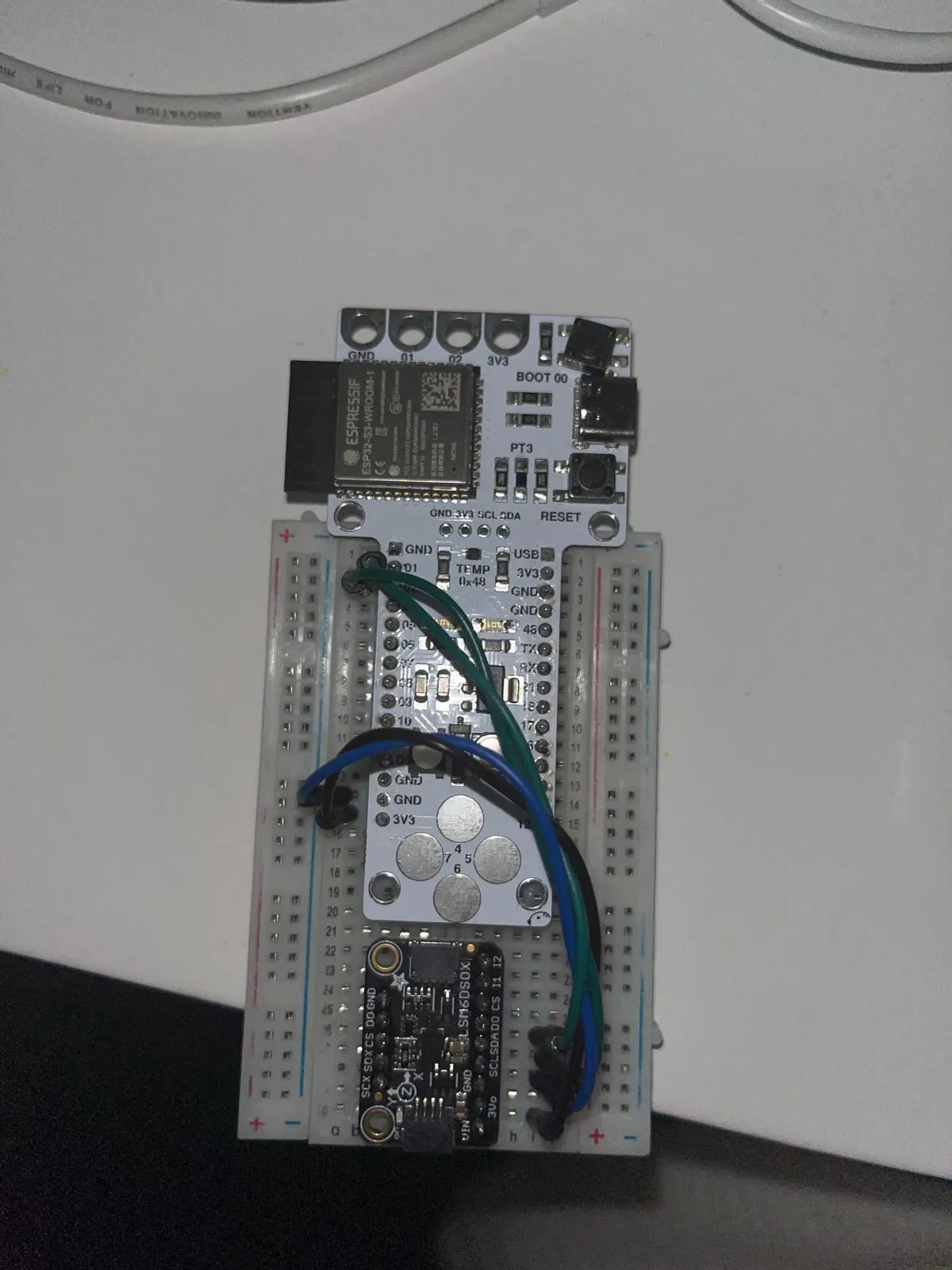
- Wearable Motion Tracker: The backpack/vest contains a microcontroller that detects and counts steps. The step data is transmitted wirelessly.
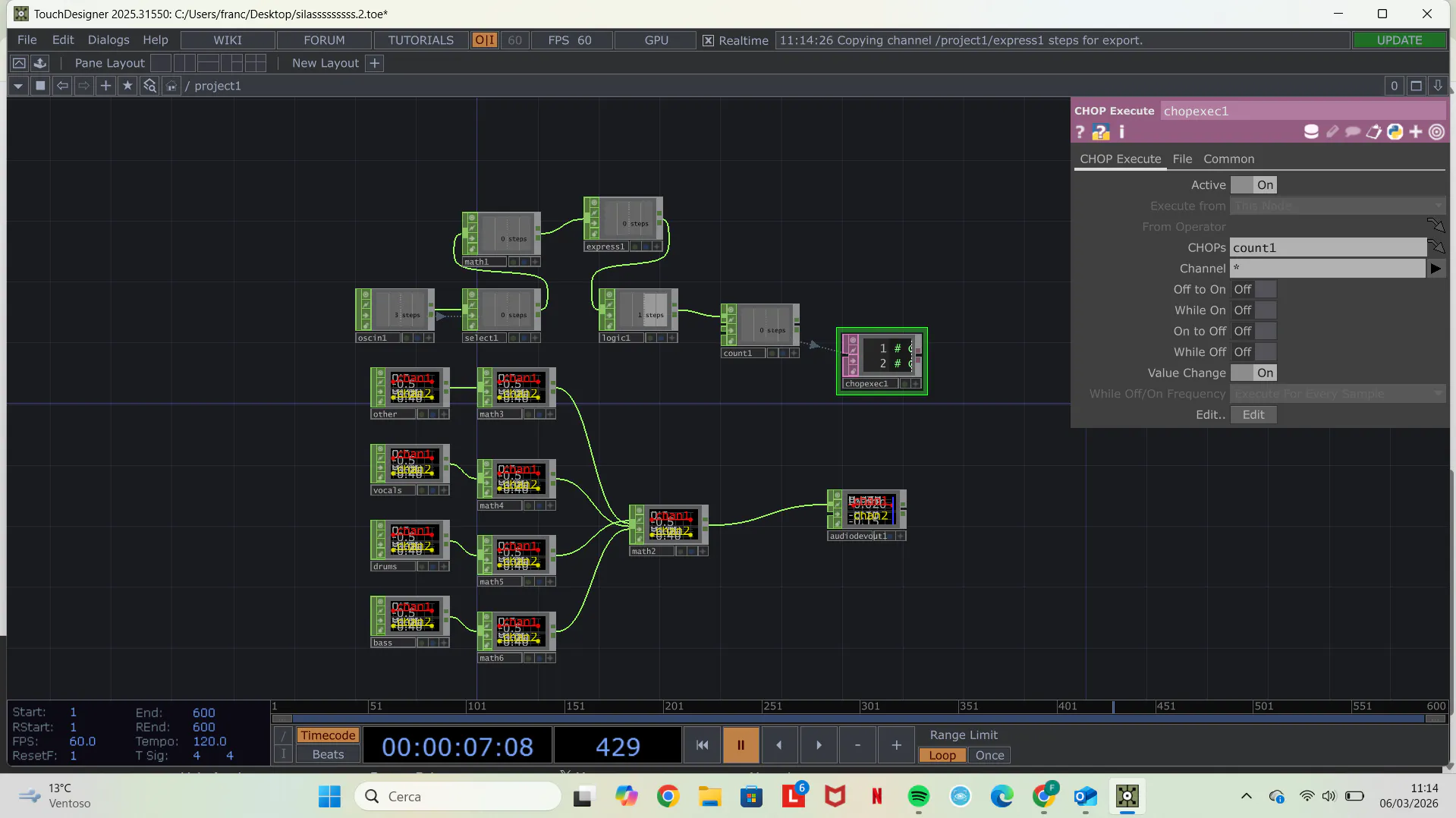
- Interaction Engine: A computer running TouchDesigner receives the step count and determines when a new musical layer should be activated and connected to a speaker.
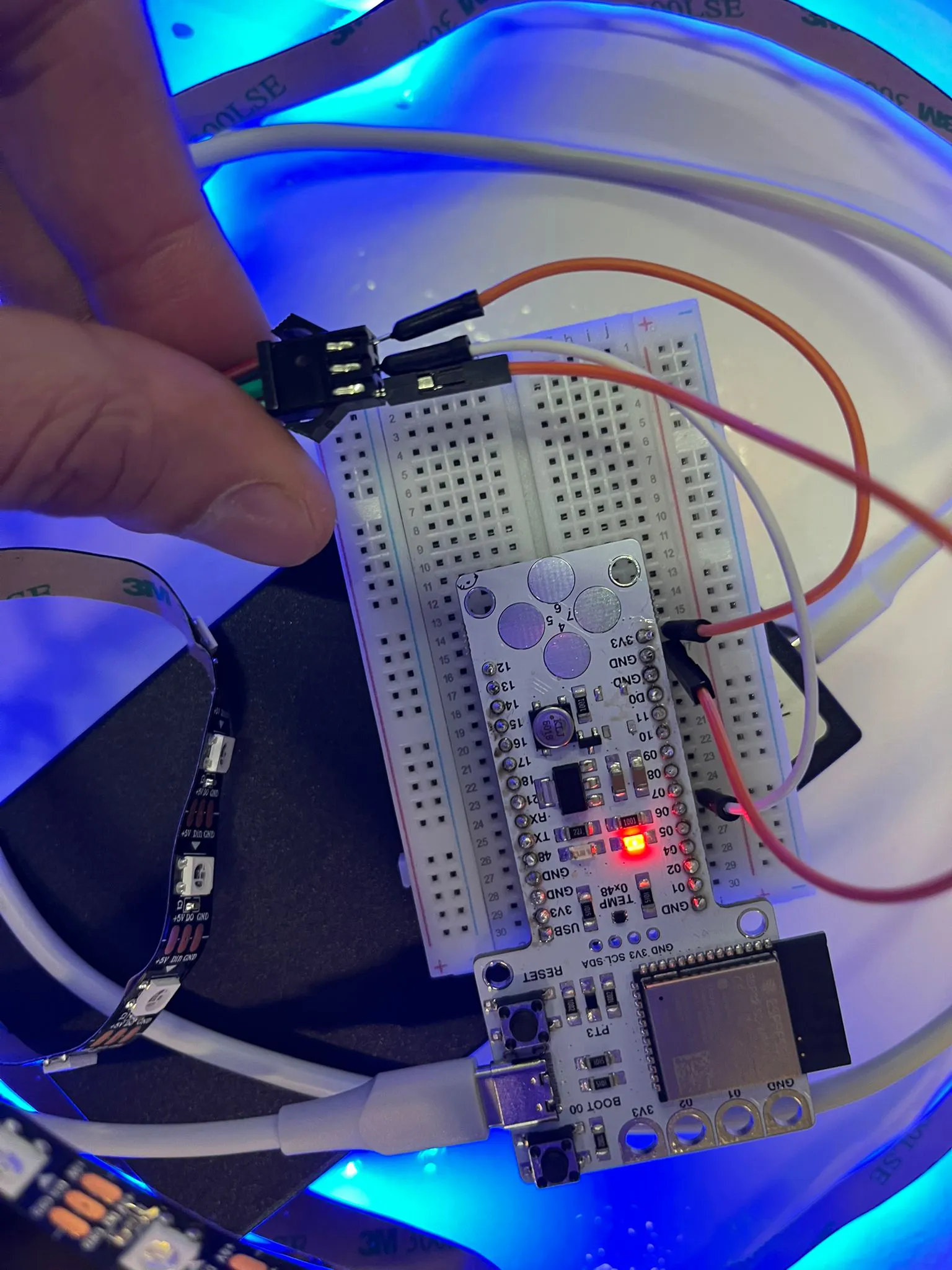
- AudiovisualDevice: It plays music and features an LED light that shifts to a progressively warmer tone each time the 50-step signal is received
Every 50 steps, the system triggers the next instrument in the sequence and chagne the colors of the led.
The Process & The Fuck-upsWe have started the project to create a feedback loop; the movement will change the music and the layered music will change the movement of people. The first one is a tangible communication, the other where music change the movement is more abstract and also our speculation. This is also something we want to test with our project.
1. The idea is to create multiple wearables where multiple people can interact and the steps will accumulate accordingly; the more the merrier. However this was a 3-4 day challenge where we had to do an MVP, and we decided to create only one wearable.
2. At this stage we wanted to gather different data sets; heartbeat, steps, route, sweat, temperature. We both are working on different projects too, so we wanted to use the one in our MVP that we can both benefit from and that was steps.
3. We already had a Barduino, however we needed a sensor where we can track the steps of the people. After doing a little research and checking the sensors in the lab, we decided to use Adafruit LSM6DSOX.
4. Wiring the Barduino, the sensor and the code was not hard to achieve.
5. The wearable will be on the body and therefore it had to be wireless. In order to achieve that we used OSC CHOP in TouchDesigner. Here the most important thing is that both the laptop and the Barduino needs to connect to the same Wifi.
6. We planned to have another artifact other than the wearable which would have a speaker. So the plan was to communicate the arduino and the sensor to the touchdesigner where we manipulate the sound and connect the touchdesigner to the other arduino with the speaker and an amplifier (MAX98357A I2S Amp BFF).
7. In order the speaker to make sense, it had to be wireless too. We tried to use MQTT, OSC and UDP in TouchDesigner to get the audio from the speaker unit. However we couldn't achieve this. The speaker unit worked, we were able to get the auido however we couldn't get the audio from the TouchDesigner.
8.The device we envision for the final product is equipped with a speaker and LED lights. Initially, the lights have a cold tone. Every time the person wearing the step counter completes 50 steps, the Arduino sends an input that changes the color of the LEDs to a progressively warmer tone, eventually reaching red, a color that expresses intimacy.
The idea is that the more a person dances, the more intimacy they develop with the environment.
9. We used the Moises platform to isolate the different parts of a song so they could be used in TouchDesigner. It is highly recommended to use WAV audio files
A transparent tool to document how much AI contributed to your project — inspired by Creative Commons.
Future Directions
- Allowing multiple participants to collectively build a soundscape
- Adapting sound layers based on location or environment
- Exploring dance workshops or urban interventions
- Using other inputs (tilt, rotation) of our sensor (LSM6DSOX) to manipulate the music
- Integrating more sensors for richer movement interaction or to track the exact route
Ultimately, the project explores how wearable technology can help people reclaim movement as a playful, expressive experience within shared spaces.
touchdesigner
For example: after the first 50 steps the bass will play; at 100 steps the piano will be added; at 150 steps the vocals will enter; and at 200 steps the drums will also start. In this way, by walking, the song is progressively assembled


Comments