



Hardware components | ||||||
 |
| × | 1 | |||
 |
| × | 1 | |||
 |
| × | 4 | |||
 |
| × | 3 | |||
Software apps and online services | ||||||
 |
| |||||
"Which is the world's largest tomb?"Many would point to the Great Pyramid of Giza. I have immense respect for the pyramids and hope to visit them one day, but in terms of surface area, there is another contender in Japan: the Daisenryo Kofun, in Sakai City, Osaka Prefecture. While it is widely believed to be the final resting place of Emperor Nintoku, it remains one of history's greatest mysteries.
Official Website: Daisenryo Kofun at Osaka Convention & Tourism Bureauhttps://osaka-info.jp/en/spot/tomb-emperor-nintoku-daisen-kofun/
Because it is a sacred site and a World Heritage monument, excavation is strictly prohibited. We may not know the truth for generations—not until non-destructive inspection technologies advance enough to see inside without disturbing its peace.
I grew up in a small town right next to this "silent giant." (Of course, I've also been to this cemetery that's like a forest.) It was a place where life moved slowly; in spring, tractors would crawl along the national highway, often creating long traffic jams. But, nobody honks their horns in frustration. Everyone in town shared a deep respect for the farmers. We’d see the tractors turning into the fields, scattering bits of mud on the asphalt, and we’d naturally think—or even call out—"Good work today!" or "Keep it up!"
Living in an environment where people naturally accepted and respected one another, alongside a massive, technologically untouchable mystery, inspired me. It led me to explore the intersection of ancient history, human warmth, and modern hardware.
There is an intriguing theory that the haniwa (terracotta clay figure) placed in Kofuns were not merely funeral offerings. The story suggests that these burial mounds, positioned along the coastline, functioned as a kind of lighthouse, with the hollow bodies of the haniwa emitting light to guide sailors home. This suggests the existence of a benevolent ruler who wished to protect people even after death.
I recently visited a cultural heritage site, the Shibayama Haniwa Museum in Chiba, Japan. This museum is located near the Shibayama Kofun clusters and serves as a vital center for preserving the history of these ancient figures.
Official Website: Shibayama Haniwa Museumhttps://www.haniwakan.com/(Note: The website is in Japanese, but you can easily translate it using your browser's translation feature.)
I brought home a Haniwa replica. It's more than a souvenir for me — it seemed the perfect vessel for the next cutting-edge project, bridging the hearts and prayers of people from 1, 500 years ago with modern IoT.
Vision: The Haniwa Guardian of the PotagerI’m transforming this ancient guardian into a hybrid of "Terracotta Irrigation" and "Active Scarecrow" for my small garden. - Terracotta Irrigation: Utilizing the porous nature of clay for automatic, low-tech irrigation. Combined with a Raspberry Pi Pico 2 W, it will monitor soil moisture and manage water levels in the body itself. It won't just water the plants; it’ll notify me via Telegram when it needs a refill. - Active Scarecrow: Based on my previous project where I repurposed security cameras for bird watching, it will be usable to trigger glowing LED on Haniwa's eyes and a buzzer to keep crows or cats away.
In Japan’s limited space, there is a distinct beauty in multipurpose design. Let’s breathe new life into an ancient form.
I faced a very grounding reality: my ancient replica had a gaping hole in its bottom (78.45mm, to be precise). If this was going to be a "Terracotta Irrigation" system, it needed to hold water.
Unglazed clay is wonderfully porous, which is perfect for slow-release irrigation (think of it as a low-tech, ancient Olla pot). However, the replica's structural integrity was questionable for long-term outdoor use, and that bottom hole was a deal-breaker.
I needed a solution that was:- Watertight: To hold the reservoir.- Structural-integrity: To provide a stable wedge to the soil.- Hackster-style: Budget-friendly and readily available.
The 100-Yen Shop MiracleEnter the Japanese 100-yen shop (our version of the dollar store). After scouring the gardening aisle with my calipers, I found the perfect candidate: a standard, unglazed terracotta pot (known as suyaki in Japan).
The dimensions were tantalizingly close. But in hardware hacking, "close" only counts in horseshoe and hand grenades. I needed a perfect, airtight fit.
Precision BondingTo unite the 1500-year-old design with the $1 modern pot, I used a silicone sealant. After some try-and-error, the haniwa could have stopped wetting himself.
I applied the resin to the rim of the 50-yen pot and carefully inserted it into the Haniwa's base. It was a friction fit that transitioned into a permanent, watertight seal. The result was a seamless, unified structure. The Haniwa now had a solid, watertight "bucket" built into its lower half. It looked just like a pre-historic "flame-style pottery" vessel. (https://www.japan.travel/japan-heritage/popular/flame-style-pottery-snow-niigata-shinano-jomon-jade)
"Have you ever watered your garden, only to have it pour rain an hour later?" We've all been there. It’s a frustrating waste of resources and effort. To prevent this, I thought it not enough even "Terracotta Irrigation" is adopted. My Haniwa needed more than just a soil moisture sensor; it needed the power of foresight.I decided to integrate weather forecast data to create a "Smart Irrigation Advisor."
Invoking "Dr. Wadachi":The brain of the Haniwa, this weather service was named "Dr. Wadachi" in honor of Kiyoo Wadachi, a pioneer in Japanese meteorology and the first Director-General of the Japan Meteorological Agency. (https://en.wikipedia.org/wiki/Kiyoo_Wadachi)
Since I remembered, I read a book in my university days. Dr. Wadachi once said he pursued this field because "great discoveries could be made with nothing but observation data and human intellect." I feel a deep sympathy for this. In my university days, I used cutting-edge equipment costing a few 100 million yen (more than 1 million dollars). Today, I am pursuing the same essence of discovery using a used $30 PC and a $5 Raspberry Pi Pico 2 W.
Setup Process:
API Passport: I used the OpenWeatherMap API (5-Day / 3-Hour Forecast, https://openweathermap.org/). One smart request a day provides enough data to anticipate Hayama's weather while remaining resource-efficient.
Obtaining the API Passport- Register: Create a free account ( 1000 requests/day available ) at OpenWeather.org.- Activation: After verifying your email, navigate to the "My API Keys" tab.- Generate: A default key is usually provided, but you can create a dedicated one named Haniwa_Project.
The Logic: A Symbiosis of Mind and ActionThe intelligence of this project is distributed across three distinct roles, creating a feedback loop between the cloud AI, the edge AI, and the physical interface.
A. Dr. Wadachi ("The Astronomer" / Cloud AI)The Python service acts as the central analyst. It doesn't just fetch data; it interprets the environment:Predictive Irrigation: It correlates real-time soil moisture data (sent from the Haniwa) with the 48-hour precipitation forecast.Safety Oversight: It monitors wind speeds to decide if it's safe for the "BirdWatcher" to operate.Directive Issuance: It writes a centralized JSON "Status Report" that dictates the behavior of the other components.
B. The BirdWatcher ("The Lamplighter" / Edge AI)This component handles the high-intensity vision processing. It identifies visitors—not just birds, but also cats, dogs, and humans.The "Lamplighter" Rest Logic: Too busy lamplighters need proper rests. When Dr. Wadachi reports winds >9m/s, the BirdWatcher enters a "Sheep-Counting" sleep. It checks the JSON status every 10 seconds, staying alert enough to wake up the moment the wind dies down, without wasting CPU cycles during the storm.
C. The Haniwa ("The Fox" / Human Interface)The Haniwa is the bridge to the physical world. It stays quiet to save energy but becomes interactive when needed:Human Presence Awareness & Security: When the BirdWatcher detects a "Person" nearby, it immediately notifies the Haniwa. This serves a dual purpose: it prepares the Haniwa for interaction and acts as a visual security deterrent.
Thank you for reading this far. As you may have noticed, I also love Antoine de Saint-Exupéry's "Le Petit Prince." In particular, I love the part where the astronomer suddenly gains attention from other scholars the moment he changes his clothes, the fact that the lamplighter is the only one the prince feels he could befriend (and as a reader, I wish he would take a break), and the important lesson the fox teaches us: the need for a regular, specific routine. I tried to incorporate all of these elements into this system, with the utmost respect for the great author.
First Report Success!The system is alive. The inaugural report indicated a wind speed of 9.32 m/s in Hayama—right at the threshold! Since I discovered that when wind speeds exceed 9m/s, my "BirdWatcher" AI goes into a frenzy, mistaking swaying branches for birds, I ask Dr. Wadachi to signaled the BirdWatcher to take a nap.
Therefore, the project has officially moved from "code on a screen" to a "living, breathing monitor" that respects the natural environment of the Miura Peninsula.
Beyond Simplicity Cult: Why I Chose Multiple Resistors for Respective ColorsMy background is not in electronics but in mechanics. In that realm, "simplicity" is often equivalent to "safety." Pruning away redundant components, reducing part counts, cutting costs, and achieving a direct, lean architecture is blindly believed as the pinnacle of engineering strength.
A bridge with fewer joints, an engine with fewer moving parts—these are the goals.So, when I first looked at a popular circuit diagram for driving an RGB LED from a microcontroller (Raspberry Pi Pico 2 W), my mechanical instincts immediately triggered. Why use three or four separate resistors? Why not combine the outputs and share a single resistor to the common ground (cathode)? At first, it seemed like an obvious optimization. One resistor is simpler than three.
But then, I looked closer at the physics of the LEDs. And that's when my worldview as a mechanical engineer began to shift. The problem was found in the intrinsic properties of light itself, or more specifically, the materials used to create different colored photons.
First, I tried to use a common anode RGB LED, but I quickly abandoned that idea. In this configuration, you have one shared input (Anode) for Red, Green, and Blue, and three separate outputs (Cathodes) that go to the ground. I was completely confused: Since my Pico 2 W has only common ground, I think it very difficult for beginner such as me to use such an element. I decided to use separately red, green, and blue LEDs.
Let's go back to the main topic, I thought if I were to use a single, shared resistor on the common ground leg, it would, theoretically, limit the total current. But a single resistor cannot account for the individual appetites of each color. This was where the surprising fact lay: The forward voltage of a Red LED is significantly lower than that of Green or Blue. Red LED: 1.8V to 2.0V, but Green & Blue LEDs are used with 3.0V to 3.2V.
My microcontroller, the Pico 2 W, outputs a steady 3.3V from its GPIO pins. If I drive a Green or Blue LED, the difference is small (3.3V - 3.1V = 0.2V). A 220Ω resistor limits the current nicely. However, if I drive the Red LED with that same 220Ω resistor, the difference is massive (3.3V - 1.9V = 1.4V). The equation I = V/R tells us that a much, much larger current will flow through the Red LED. The result? As you imagined, it might be destroyed. Even though the microcontroller pin will be damaged in the worst case.
The Necessity of Redundancy:To tame the Red LED, to bring its brightness into balance with the others, I needed a higher resistance. I calculated that adding a second 220Ω resistor in series—creating a total resistance of 440Ω for the Red channel only—would provide the perfect sentinel.
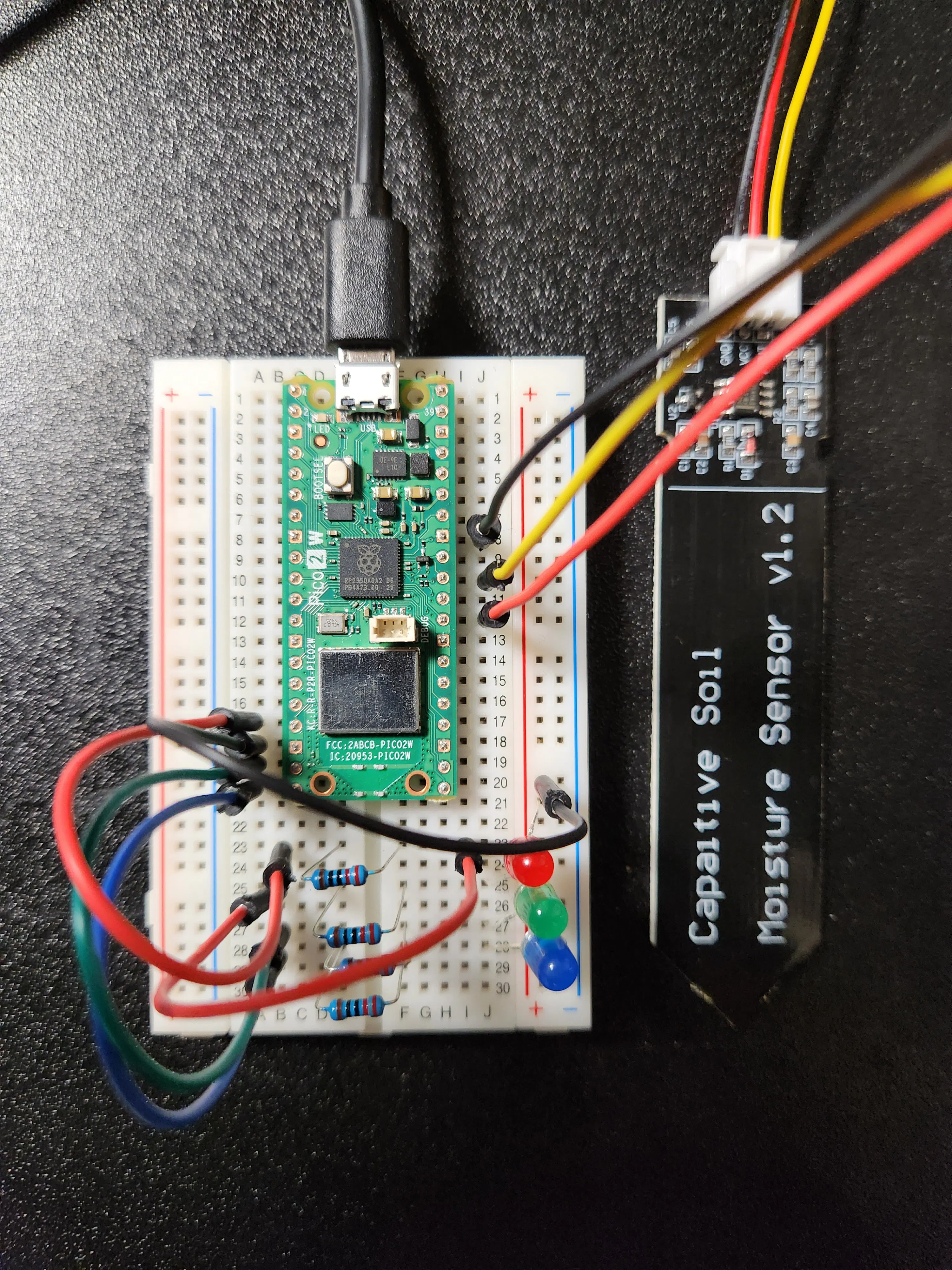
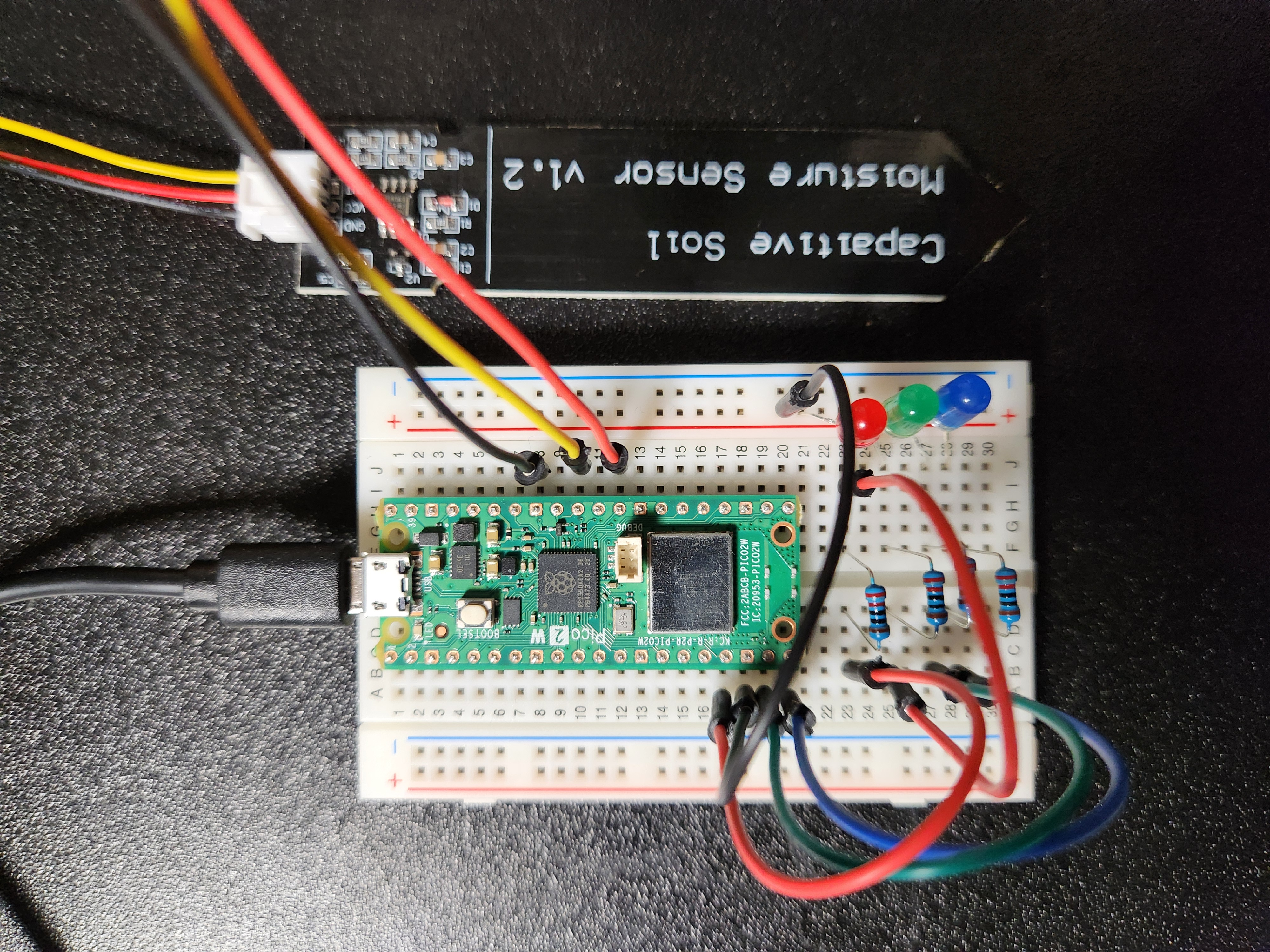
This is the design I chose using multiple resistors:- Red Channel: Pico 2 W GP13 (Pin17) -> 220Ω + 220Ω -> Red Anode- Green Channel: Pico 2 W GP14 (Pin19) -> 220Ω -> Green Anode- Blue Channel: Pico 2 W GP15 (Pin20) -> 220Ω -> Blue Anode- Common Ground: Shared Cathode -> Pico 2 W GND(jump to Pin18)
Conclusion: A Shift in PerspectiveAs a mechanical engineer, seeing two resistors where one "could" have been feels... inefficient. It feels like adding weight to an airframe.But I am learning that in the world of electrons, redundancy is not waste; it is protection. By using two separate resistors, I am not just limiting current; I am ensuring the independence of each color system. I am preventing a failure in the Red channel (like a short) from cascading and affecting the Green or Blue channels, or worse, the microcontroller itself.Pruning the design down to a single, shared resistor would have been simpler structurally. But it would have been a fragile, unbalanced, and unsafe system electrically.
My electrical beginner's design is now stable, safe, and beautifully balanced now. I am learning to appreciate this new kind of complexity—not as a failure of design, but as the essential architecture of safety and performance.In the end, engineering is not about adhering to a single philosophy. It's about understanding the unique physics of the domain you are working in.
Adding Tactile Sensing: Selecting A Soil Moisture SensorTo give Haniwa the "sense of touch", I selected a kind of soil moisture sensor. Here're reasons why this choice aligns with a sustainable and global engineering mindset:
1. Durability via Capacitive SensingWhile simple resistive sensors can be made by inserting electrodes directly into terracotta, they often corrode within weeks due to electrolysis. This capacitive type features electrodes protected from direct contact with the soil. By measuring changes in capacitance rather than resistance, we ensure a much longer life-span, an essential quality for a guardian intended to stay in the garden.
2. Low-Power Design (GPIO-Powered)Operating at approximately 5mA to 7mA (less than 10-12mA), this sensor's power draw is well within the limits of a single Raspberry Pi Pico 2 W GPIO pin. This allows for a "Power-on-Demand" strategy: the sensor is energized only for a few dozen milliseconds during measurement, drastically reducing power consumption for battery-operated deployments.
3. Cost-Effectiveness through Mass ProductionThese sensors are incredibly affordable (often less than $2 USD when bought in bulk). This low price is a result of economies of scale rather than poor quality. By utilizing mature, reliable, analog-based circuits, we leverage reliable, mass-produced technology. This makes the project accessible not just to hobbyists, but potentially to anyone seeking low-cost agricultural solutions.
Hardware Setup (Schematic)Here is the connection schematic. The setup is straightforward, requiring only three wires between the sensor and the Pico 2 W.
Wiring Details: - Sensor GND (Black) -> Pico 2 W GND (Pin33) - Sensor AOUT (Yellow) -> Pico 2 W ADC0 (Pin31) - Sensor VCC (Red) -> Pico 2 W GP22 (Pin29)
Power Saving:While you could connect the VCC (Red wire) to the 3V3 (Pin36) for a simpler setup, doing so keeps the sensor powered continuously. This leads to unnecessary energy consumption and may accelerate electrode degradation.
In this project, I connected VCC to GP22 (Pin29). This allows the Pico 2 W to toggle power to the sensor only during measurements, significantly improving energy efficiency—perfect for battery-operated or long-term monitoring setups.
Software Configuration(Pico SDK)To save power, I used GP22 as a switchable power source, the code is as follows:
// Measuring process
gpio_put(22, 1);        // Power ON the sensor
sleep_ms(50);           // Wait for the sensor to stabilize
uint16_t result = adc_read(); // Measure the moisture
gpio_put(22, 0);        // Power OFF immediately!
Note: I set the stabilization wait to 50ms. Depending on your specific sensor, you might be able to shorten this to 10ms to save even more power, but 50ms provides a very stable reading.
Verification:Once connected, you will see raw data stream into the serial terminal. To verify the sensor's functionality, simply touch the capacitive surface with your finger.
As the image shows, the reading value jumps significantly from ~10 to ~200 when moisture (from the finger) is detected, confirming the entire pipeline from sensor to terminal is operational.
The Aviator’s Box: Encapsulating the Invisible ConnectionThe final piece of this puzzle is tcp_connector.py and the establishment of an "invisible" Wi-Fi connection. It's like the drawing of the box of sheep that the pilot drew. If I may be so bold, I too gave up on drawing when I was a child. In high school, I went to career counseling intending to become an industrial designer, but the adults around me stopped me and made me a mechanical engineer instead.
But today, as an engineer, I realized that I don't need to be a "painter" to show the essence. By encapsulating the complex Wi-Fi handshakes and TCP protocols inside this tcp_connector.py, I am presenting a "Box" to the Haniwa.
The Haniwa doesn't see the code; it only sees the "Sheep" (the vital data) living inside. "This is my way of drawing, " not with a pencil, but with logic and connection.
"In the past, I followed the 'blueprints' provided by others as a mechanical engineer in a large corporation. Now, that plane has broken down, and I find myself in my own desert.
But I have my tools, my experience and a few years of moratoriam. I may not be able to draw a perfect sheep on demand, but I can build a 'Box.' I can encapsulate complex functions within a simple script like tcp_connector.py. It’s not flashy, and it’s certainly not a masterpiece in the traditional sense, but it is functional, it is resilient, and most importantly, it is mine.
"This is my way of drawing my future."
Realities and Hopes in Solo Development:
While conventional wisdom dictates that design should be finalized before coding to ensure efficiency (Front-Loading), the reality of solo development often involves a dialogue between theory and practice. I believe that revising my own sequence diagrams mid-process wasn't a sign of poor planning, but rather a reflection of the deeper understanding gained through the act of building. I feel that this agility might be a unique luxury of independent engineering.
Looking ahead, I intend to explore how this hands-on insight can be integrated back into a team environment, whether in a large organization or a small, agile collective. I am committed to finding a harmony between structured planning and the vital insights discovered during implementation, ensuring that the 'truth found at the keyboard and display' informs and strengthens the project's vision from the very start.
I made the Haniwa's eyes glow. Here's the image. 1. For those who try to understand the meaning of the color, he kindly informs them whether or not the garden plants need watering. 2. For those who don't try to understand, it seems as a shadow of fear, like an active scarecrow. I tried to make these two functions coexist in a single action. Could it have let you think so too?
The concept has been simple: By cross-referencing local soil moisture with sky weather forecasts, the Cloud-AI determines the necessity of watering. The moment a "person" is detected by its Edge-AI eye, the Haniwa statue’s gaze ignites.
Within this single movement, I have infused two distinct functions (souls):- For my family and me who understand the language of its blinking colors, it serves as a beacon of insight, guiding our hands how to nurture the garden.- For an intruder who knows nothing of its meaning, it stands just as a strange guardian, a spectral warning that drives them away.
Shared Memory: "What is essential is invisible to the eye."During initial debugging, I implemented Telegram notifications to monitor the system's behavior. However, I noticed a critical flaw: a 7-second latency between stepping into the garden and receiving the alert on my phone, and a 5-second delay even after returning indoors.
If this latency were mirrored in the Haniwa’s eyes, a fast-moving intruder could traverse the garden and enter the house before the "Active Scarecrow" even ignited. I realized the "essential" requirement of this project: The response time between detection and action must be near-instantaneous.
Originally, my three backend services (DrWadachi, BirdWatcher, and GardenGateway) were designed to communicate by reading and writing to shared JSON files. While simple, file I/O is notoriously slow and prone to race conditions, easily adding seconds of overhead. To bridge this gap, I decided to venture into Inter-Process Communication (IPC) via Shared Memory.
It required a bit of finesse to master, but by importing shared_memory into all three Python services, I created a lightning-fast data highway.
from multiprocessing import shared_memory

# The unique identifier for our inter-process communication
SHM_NAME = "memories_of_haniwa_garden"
SHM_SIZE = 8 # Enough space for our status flags

# Logic to initialize the shared memory segment
try:
  # 'DrWadachi' (Main Service) creates the memory block
  shm = shared_memory.SharedMemory(name=SHM_NAME, create=True, size=SHM_SIZE)
  print("Shared Memory created.")
  except FileExistsError:
  # If the block exists from a previous run, we simply attach to it
  shm = shared_memory.SharedMemory(name=SHM_NAME)
  print("Attached to existing Shared Memory.")

# Now, any process can access the data via shm.buf
# e.g., shm.buf[0] = 1 (Person detected!)
By mapping the system's state—weather alerts, motion flags, and soil status—directly into a raw byte buffer in RAM, the latency dropped from seconds to milliseconds. Now, the moment the BirdWatcher spots a shadow, the DrWadachi picks up the change in memory to make a decision for watering, and the GardenGateway pokes the Haniwa via TCP before the intruder can take another step.
In this system, the "Essential" (the data) is truly invisible to the eye, residing deep within the silicon, but its impact is felt the very instant the Haniwa’s eyes turn red.
The Haniwa: A Philosophical ConclusionThank you for reading this long and poorly written piece up to this point. I wish to complete this project with a single, guiding philosophy:
"Technology is a treasure to those who seek its meaning, yet a shadow of fear to those who do not."
I believe this duality can become my ultimate tribute to the ancient people who built the Kofun tumuli. Just as their monuments symbolized both a solemn mourning for the departed and a prayer for the safe seafaring of the living, I, too, strive to create systems that carry such depth and purpose.
DisclaimerPersonal Project: This project is a personal hobby and technical experiment. It is not affiliated with, sponsored by, or endorsed by any of the organizations mentioned (e.g., Shibayama Haniwa Museum).
Media Credits: All photos of the Haniwa were taken by the author of the actual product purchased at the museum.
Accuracy: While I strive for technical and historical accuracy, I assume no responsibility for any issues or damages arising from the use of the information in this article.
Reproducibility: This article has turned out to be longer than I initially intended when I started this project, so there may be some omissions or inaccuracies in the technical aspects. I am truly sorry to anyone who read this article and thought about trying to replicate it themselves, as I may have disappointed you. It may be a hassle, but I would be grateful if you could let me know in the comments if there is anything that is unclear or if you have any questions.
A Special Tribute: This project is deeply inspired by the spirit of Antoine de Saint-Exupéry. His stories have been the most cherished companions of my life. As you know, he was a cutting-edge pilot and a traditional writer. He taught us that "What is essential is invisible to the eye." In this garden in Hayama, through a clay statue and a few lines of code, I have tried to capture a small piece of that invisible essence. To the alone man who looked at the stars and had to draw sheep (but he finally drew a box), and to the ancient people who looked at the ocean and kept their hope — this "Story" is my humble gratitude. I appreciate everyone, who I saw, heard, read, and met in this world.


Comments