



Hardware components | ||||||
| × | 1 | ||||
Software apps and online services | ||||||
| ||||||
 |
| |||||
| ||||||
| ||||||
 |
| |||||
As a researcher, I have a bad habit: I can’t help but question what they call "conventional wisdom", the status quo, and the way "everyone else does it".
Not only in Japan probably but also in the other countries, "Aquaponics" is also often praised as the ultimate sustainable farming system. But is there truly a "perfect" closed loop within these systems?
While, nitrogen certainly cycles from fish waste to plant roots via bacteria, what about the rest? Potassium, phosphorus, and trace minerals like calcium or magnesium? Simply pumping water will not allow these minerals to reach the roots of vegetables.
If I were to continue buying commercial fertilizer every year, it might be many times easier to enjoy the abundance of traditional soil cultivation, but I'm not looking for an easy solution. Instead of just buying my way out, I want to thrive by harnessing what nature already provides. To me, this is more than a project; it’s a way of honoring the natural world and the wisdom of our ancestors while carving out my own path.
I found one answer in the sea. As an islander, I love seaweed—nori, kombu, wakame. These are mineral goldmines. Even my freshwater Medaka fish enjoy them when finely shredded. Through them, the ocean's minerals eventually reach my plants.
But the real mystery remained: Who supplies the phosphorus?
This led me down a rabbit hole into the tragic history of Nauru (known as "Naoero" in the native language) and its phosphate mines. It’s a solemn reminder of how resource development that is meant to bring prosperity to a nation can also lead to its downfall. In Japan, we often aren't taught these inconvenient truths in school, leading to a society where people lean on academic credentials as a survival strategy, often neglecting raw, hands-on awareness. But I'd like to say: "Ignorance is not a crime itself, but it often brings a disadvantage."
Then, it occurred to me: the precious "Gem" phosphorus, once obtained from the droppings of migratory birds like albatrosses, has now run out on Nauru, while it remains in excess within Japanese farmlands. The reason? Many farmers depend on imported commercial fertilizers year after year. Furthermore, the small birds that come to my garden every morning are collecting these nutrients from the surrounding mountains and fields.
Could these birds be the missing link in my ecosystem?
My home aquaponics setup has transformed. It’s no longer just a tank and some pipes; it’s a research station for a regional circular ecosystem, fueled by the dream of reconstructing the natural perfect closed loop that was lost.
To begin this journey, I decided to repurpose my home security camera into an RTSP server. My first goal: build a system to detect and notify me whenever my little "phosphorus messengers" arrive in my garden.
Step 1: The Gateway - Repurposing a security camera into an RTSP serverConnecting my Hiseeu W-NVR (K8216-W6) was not a walk in the park; it felt more like a desperate battle.
Initially, I fell into a trap. I tried to assign static IP addresses to each camera to "organize" the network, but this was a fatal mistake. The dedicated vendor app stopped responding, and for a moment, I felt a wave of absolute despair—as if I had destroyed my only eyes on the world before even starting. I was paralyzed by the fear that I had lost everything at the very first step.
After a long struggle with cold sweat, I found a breakthrough. In my desperation, I turned to my AI collaborator, Gemini (whom I call "Gem-san"). I reached out to her as if grasping at a straw, and she showed me the truth I had overlooked: "Don't touch the individual camera settings. The NVR itself is the only gateway you need."
This advice was my lifeline. It taught me something profound: AI isn't here to replace us or steal our roles; it’s here to support us when we are pushed to our limits. By embracing this collaboration, I was able to turn a moment of absolute despair into a step toward growth.
The reality was that the NVR acts as a central hub, and I only needed its single IP address to access all cameras. Even then, the official configuration screen was riddled with misleading information—missing colons and incorrect symbols. It was only through trial and error that I finally reached the correct URL format:
rtsp://[User_ID]:[Password]@[NVR_IP]:80/ch[Camera_Number]_[Main0_or_Sub1].264
- User_ID: "admin" in most cases.
- NVR_IP: Your static NVR IP addresses (e.g., 192.168.0.xxx)
- Camera_Number: Starts at 0 (e.g., CAM1 is "0")
- Main0_or_Sub1: 0 for high-res(slower), 1 for low-res(faster)
Note that the port is 80, not the standard 554. When the video stream finally played in VLC media player, it wasn't just a technical success; I felt like I'd regained my footing in a world I thought had been usurped by muscle-bound tech giants.
With the first spark of rebellion ignited against the tech giants, it was time to establish a reliable line of communication. My choice was Telegram—a platform renowned for its robust and developer-friendly API. Deep within this network resides the "BotFather, " the sovereign entity who oversees the creation of all bots. To give my system a voice, I had to seek an audience with him.
The journey began by installing Telegram and seeking out the official @BotFather account, identifiable by the blue verification badge. With a single command, /newbot, the ritual commenced.
After I provided a display name and a unique username, he granted me a long, cryptic string of characters: the HTTP API Token. This is more than just text; it is the master key that breathes life into my code and bridges the gap between my HomeServer and the palm of my hand.
Next, I located my newly created bot's username and initiated the first contact by tapping "Start." At this stage, the bot remained silent, but the handshake was complete.
Back on the HomeServer, I prepared the environment by installing the python-telegram-bot library. I integrated the token into a test script and, with a deep breath, executed the command:
python test_bot.py
A few seconds of silence followed. Then, a familiar "ding" echoed from my pocket.
"Shinji, can you hear me?"
That brief message had traveled from my server, through the vast expanse of the Telegram API, and directly to my device.
Connection established. I now have a way for the garden to speak to me.
Step 3: The Watchful Eye - Building an AI Bird Watcher with YOLO & OpenCVThe soul of this project lies in its ability to see. I began crafting bird_watching.py by setting up a Python virtual environment and installing ultralytics and opencv-python.
The system pulls live video streams from my security camera's base station (now functioning as an RTSP server) and feeds them into the YOLOv8 model for real-time object detection. To ensure the system was robust during testing, I configured it to recognize not just birds, but also humans and dogs. I implemented a class-specific threshold system, allowing me to fine-tune the confidence levels for each target independently.
You can find the full source code here: [Link to GitHub](https://github.com/ShinjiKameda-home/bird_monitor_python.git)
With the code deployed, all that was left was to wait for our feathered messengers to arrive. But before that, I decided to perform a quick "field test" with my loyal companion, "Toto".
Stepping into the garden with my phone in hand, a notification instantly buzzed in my palm:
"Target confirmed: Person in the garden!" Success! The system was alive.
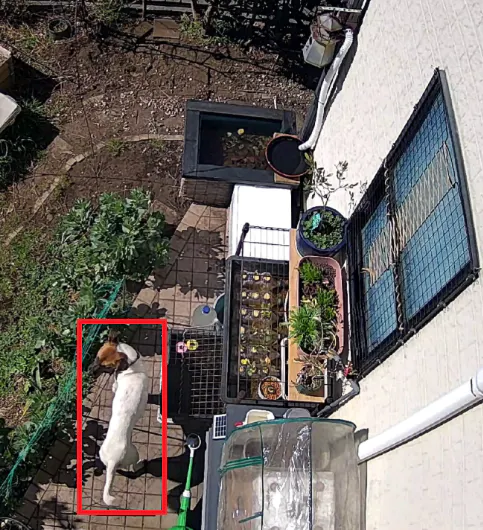
Next, I called Toto into the frame. I stepped out of the camera's view, making sure I myself wasn't being detected, and watched as he trotted into the garden.
"Target confirmed: Person in the garden!" Wait, "Person"? Not "Dog"?
For a moment, I was baffled. But as I looked at the capture, it all made sense. "Toto", he is a rescue dog, found abandoned deep in the mountains of Japan. He is a unique mix of several generations, sporting a coat that is mostly white, except for his face, which is covered in deep brown fur. He is fashionable -- even the AI seems to think so.
I'll need to tweak the confidence threshold and also want to set an ROI that only covers the area around the bird feeder or the bird bath, but that's something I'll tackle another time. That's all for now.
Thank you for reading this article, I hope you enjoyed it. If you know of any other better ways to tune AI models or so, please feel free to let me know in the comments. Thank you so much!
Update: Battling the "Kitchen Interference" and the Aesthetics of ResilienceJust as I was about to start fine-tuning the AI, the system suddenly went down. The cause? Not a sophisticated cyberattack, but a humble kitchen microwave. In the world of home security cameras, 2.4GHz Wi-Fi interference is an unavoidable fact of life, and off- course RTSP streams are no exception.
Instead of relying on external watchdogs like systemd, I decided to bake the recovery logic directly into the code. My core philosophy here was to maintain the beauty of the "Happy Path." I carefully separated the normal execution flow from the exception handling, ensuring that the main logic remains clean and free of cluttered if branches.
By isolating the reconnection strategy into a dedicated resilient loop, the code stays elegant while gaining the strength to recover autonomously. Now, even if the signal wavers during a quick lunch break, the "watchful eye" finds its way back home without a single manual restart. It’s a small but significant victory of clean architecture over household physics.
Update 2: Geometric Precision and the "Toto Verification"After the first trial, I realized that catching a "phosphorus messenger" required more than just running a model; it required a deep understanding of the camera's perspective and the physical reality of the garden.
-1. The 1:1 ROI Strategy: Aligning with the AI's Vision
In the initial setup, the AI was looking at the entire wide-angle stream. However, to capture the fine details of small birds, resolution is everything. I decided to crop a specific 1280x1280 square Region of Interest (ROI).
Why 1280x1280? YOLOv8 typically operates on square inputs (defaulting to 640 or 1280). By providing a perfect 1:1 square crop from the source, I minimize image distortion caused by interpolation. Stretching a rectangular frame to fit a square model creates "squashed" features that confuse the AI.
The Resolution Advantage: While this increases the memory footprint compared to a lower-res crop, the gain in clarity for small objects—like a sparrow’s silhouette—is undeniable. In the world of edge AI, source quality is the ultimate force multiplier for mAP (Mean Average Precision).
-2. Physical Validation: Area-Based Heuristic Filtering
From my second-floor vantage point, the camera looks down at the garden. This perspective creates a unique geometric constraint: humans, dogs, and cats appear roughly within a certain pixel range, while birds are significantly smaller.
To solve the "Is Toto a Human?" dilemma, I implemented a Bounding Box Area Filter. This acts as a secondary "sanity check" after the AI's inference:
- Large Objects (Human/Dog/Cat): Must exceed a specific pixel threshold (e.g., 42,000 pixels). If the area is too small, it's likely just background noise or a distant shadow.
- Small Objects (Birds): Must stay below a maximum threshold (e.g., 4,200 pixels). This prevents a passing cat from being misidentified as a giant, phosphorus-rich bird.
-3. The Result: Toto is Finally a "Dog"
By combining this area filtering with a highly sensitive confidence threshold (conf=0.1 at the inference level, filtered to 0.4 for dogs or cats), I achieved a major milestone: Toto was finally recognized as a "Dog"!
It might seem like a small win, but to me, it was a triumph of logic over ambiguity. The system no longer just "guesses"; it validates detections based on the physical laws of my garden's perspective. The "phosphorus messenger" detection system is now stable, resilient, and scientifically grounded.
Final Update: The Philosophy of the "Imperfect Duo"This project reached its goal not by hiring a "super-genius" AI, but by fostering a partnership between two humble, slightly flawed characters.
Not a Genius, but a Team
In modern tech, we are obsessed with "Super-Intelligence"—models that know everything and require massive hardware. But my garden monitor follows a different philosophy.
The Alarmist Gatekeeper (OpenCV): He’s a bit over-sensitive. A gust of wind or a swaying branch makes him shout "Something moved!" He isn't smart, but he is tireless.
The Honest Evaluator (YOLOv8-Nano): He’s not a genius. If you show him a weird shadow, he might get confused. But he is incredibly sincere. He takes the Gatekeeper's frantic alerts and checks them, one by one, against the physical rules I taught him.
The Wisdom of the Humble
When these two work together, something magical happens. The "Genius" AI would see a bird and simply say "Bird." But my duo tells a story. The Gatekeeper senses the vibration of life in the garden, and the Evaluator confirms the identity of the guest.
This isn't just about efficiency; it's a new philosophy of engineering. It’s about building a world where small, imperfect systems support each other to achieve something great. It feels more "natural"—just like the birds that visit my garden, each playing their small but vital role in the ecosystem.
Conclusion: A Quiet Victory
The Blue Rock Thrush didn't need a supercomputer to be seen. She just needed a gatekeeper who cared about movement and an evaluator who stuck to the rules.
I’ll take this "Collaboration of the Humble" over a cold, powerful AI any day. Because in this hobby of bird watching, the process of tuning their clumsy partnership is where the true joy—and the phosphorus "Gem"—is found.
On exceptionally windy days in Hayama, the garden became a "false positive" nightmare. Swaying branches and flying debris triggered endless Telegram notifications, turning my peaceful bird-watching bot into a source of digital noise.
To restore tranquility, I integrated a weather-aware "Permission System". By leveraging the OpenWeatherMap API, the system now monitors local wind speeds in real-time.
If the wind exceeds 8.0 m/s, the "BirdWatcher" automatically enters a "Sheep-Counting" (sleep) mode, pausing heavy AI inference and notifications until the storm passes. This not only eliminated false alerts but also optimized CPU resources, making the system truly harmonious with the natural environment of the coastal garden.
AcknowledgmentsSpecial thanks to "Gem"-san, my insightful AI collaborator, for helping me structure these thoughts and translating my vision into English.


Comments