



Hardware components | ||||||
 |
| × | 1 | |||
| × | 1 | ||||
Software apps and online services | ||||||
 |
| |||||
 |
| |||||
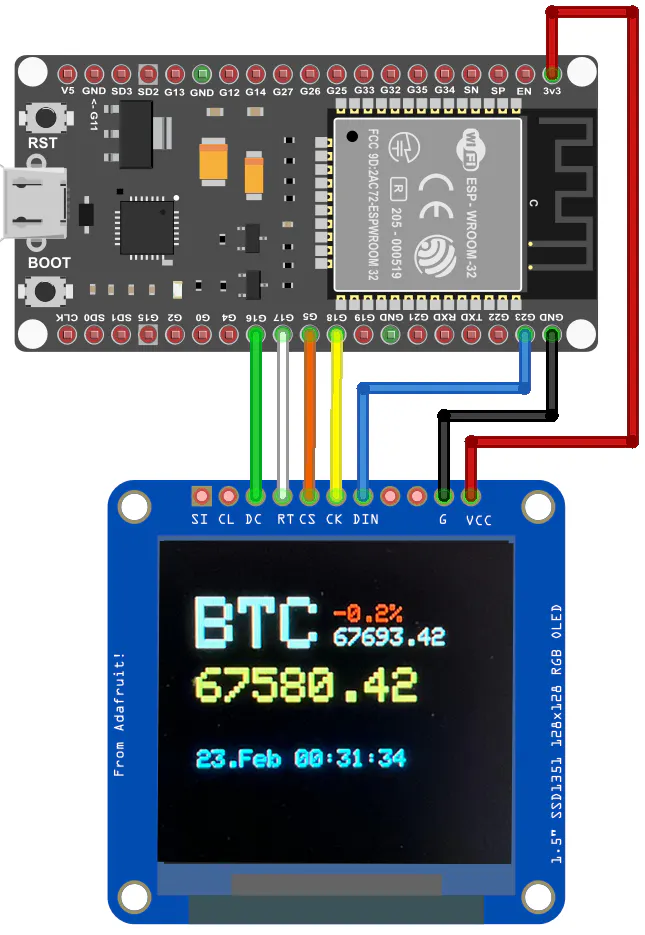
TickerView is a real-time cryptocurrency and asset price display running on an ESP32 with an SSD1351 128×128 OLED display. It fetches live prices from the Binance Futures API and shows them alongside historical percentage changes, all configurable through a browser-based web interface, no re-flashing required.
Features- Multi-Asset Support: Track up to 4 assets simultaneously (e.g. BTC, ETH, Gold, Silver)
- Live Price Updates: Automatic price fetching from the Binance Futures API at configurable intervals
- Historical Tracking: Displays percentage change over a configurable rolling time window (1-24 hours)
- Rotating Display: Cycles through assets with a vertical bounce animation to prevent OLED burn-in
- Web Configuration: Full setup and customization via a browser, no code changes needed
- WiFi Connectivity: Supports both Station (STA) and Access Point (AP) modes with AP fallback
- NTP Time Display: Synchronized clock with configurable timezone and POSIX TZ string support
How It WorksOn startup, TickerView allocates a circular ring buffer for each asset. The buffer size is automatically calculated from the configured history window and update interval for example, a 12-hour window with 1-minute updates results in 721 buffer entries per asset.
Each price update writes the latest price into the current buffer slot. Once the buffer is full, the oldest entry is overwritten and the rolling percentage change becomes active. This approach keeps RAM usage predictable and avoids dynamic memory fragmentation on the ESP32.
The display rotates through all configured assets on a configurable timer. For each asset it shows:
- Asset name (large, yellow)
- Current price
- Percentage change color-coded: green for positive, red for negative
- Historical reference price (optional)
- Current time (optional, NTP-synced)
On first boot, TickerView starts in Access Point mode and displays the configuration IP on the OLED screen. Connect to the TickerView WiFi network and open http://10.100.10.1 in your browser to configure:
- Asset symbols and display names (any Binance Futures symbol, e.g. BTCUSDT)
- Price update interval and display rotation time
- History window for percentage change calculation
- WiFi credentials, static IP, and AP fallback settings
- NTP server, timezone, and DST settings
- Web interface authentication
All settings are saved to EEPROM with checksum verification, so configuration survives power cycles.
- PlatformIO (CLI or VS Code extension)
- ESP32 development board
- Waveshare SSD1351 128×128 OLED Display
Copy the secrets template and fill in your credentials:
cp include/secrets_template.h include/secrets.hEdit include/secrets.h with your WiFi password. This file is git-ignored and must never be committed.
Data Source
Prices are fetched from the Binance Futures API.The endpoint provides real-time index prices and requires no API key for public data. Be mindful of Binance rate limits when setting short update intervals.


Comments