Manar BrirmiLcs CvtThéo Lavinay
Published

Connected hive using MKRWAN 1310

This system provides the hive with sensors and other technology that allow it to be monitored remotely.

IntermediateFull instructions provided1,212
Connected hive using MKRWAN 1310

Things used in this project

Hardware components

Arduino MKR WAN 1310
1 x Arduino MKR WAN 1310 is a development board that is part of the Arduino MKR series of boards. It is designed for Internet of Things (IoT) applications and features a low-power microcontroller and a long-range wireless communication module.
×1
DHT22 Temperature Sensor
2 x The DHT22 is a digital temperature and humidity sensor that is commonly used in IoT applications. It is a low-cost, high-precision sensor that can measure temperature and humidity over a wide range of temperatures and humidity levels.
×1
Seeed Studio HX711
1 x The HX711 is a load cell amplifier and analog-to-digital converter (ADC) that is commonly used in weight measurement applications.
×1
Accu Li-Ion 3,7 V 1050 mAh
1 x The Accu Li-Ion 3.7 V 1050 mAh is a lithium-ion (Li-Ion) rechargeable battery that is commonly used in portable electronic devices.
×1
Solar Cell SOL2W
SOL2W solar cell is a photovoltaic (PV) module that is designed for use in small solar energy systems.
×1
Seeed Studio LiPo Rider Pro 106990008
The Lipo Rider Pro is a battery management system (BMS) designed for use with lithium-ion (Li-Ion) batteries. A BMS is a device that is used to manage the charging and discharging of a battery in order to extend its lifespan and improve its performance.
×1
DS18B20
The Grove temperature sensor is a digital temperature sensor that uses a thermistor to measure temperature.
×2
Breadboard (generic)
A breadboard is a type of electronic prototyping tool that is used to build and test circuits. It consists of a grid of holes that are connected together in a predetermined pattern, and it is used to connect electronic components, such as resistors, capacitors, and transistors, together to create a functioning circuit.
×1

Software apps and online services

Arduino IDE
Arduino IDE
The Arduino Integrated Development Environment (IDE) is a software application that is used to develop and upload programs, or sketches, to Arduino boards.
The Things Stack
The Things Industries The Things Stack
The Things Network (TTN) is an open-source, global Internet of Things (IoT) network that is designed to allow devices to connect and communicate with each other using long-range wireless communication technologies, such as LoRaWAN.
Ubidots
Ubidots
Ubidots is a cloud-based Internet of Things (IoT) platform that enables organizations to build and deploy IoT applications. It is designed to be an easy-to-use platform that enables organizations to quickly and easily connect devices, collect data, and build IoT applications without the need for specialized technical skills.
BEEP Monitor
The BEEP app is a digital hive card app in which you can keep track of all your bee registrations, based on a data model with information that is important when caring for bee colonies.
KiCad
KiCad
KiCad is a free and open-source software suite for designing and manufacturing electronic circuit boards.

Hand tools and fabrication machines

Drill / Driver, Cordless
It helps to prepare the housing of the system.
Box, General Purpose
It needs to be prepared to protect the system.
Multitool, Screwdriver

Story

Read more

Custom parts and enclosures

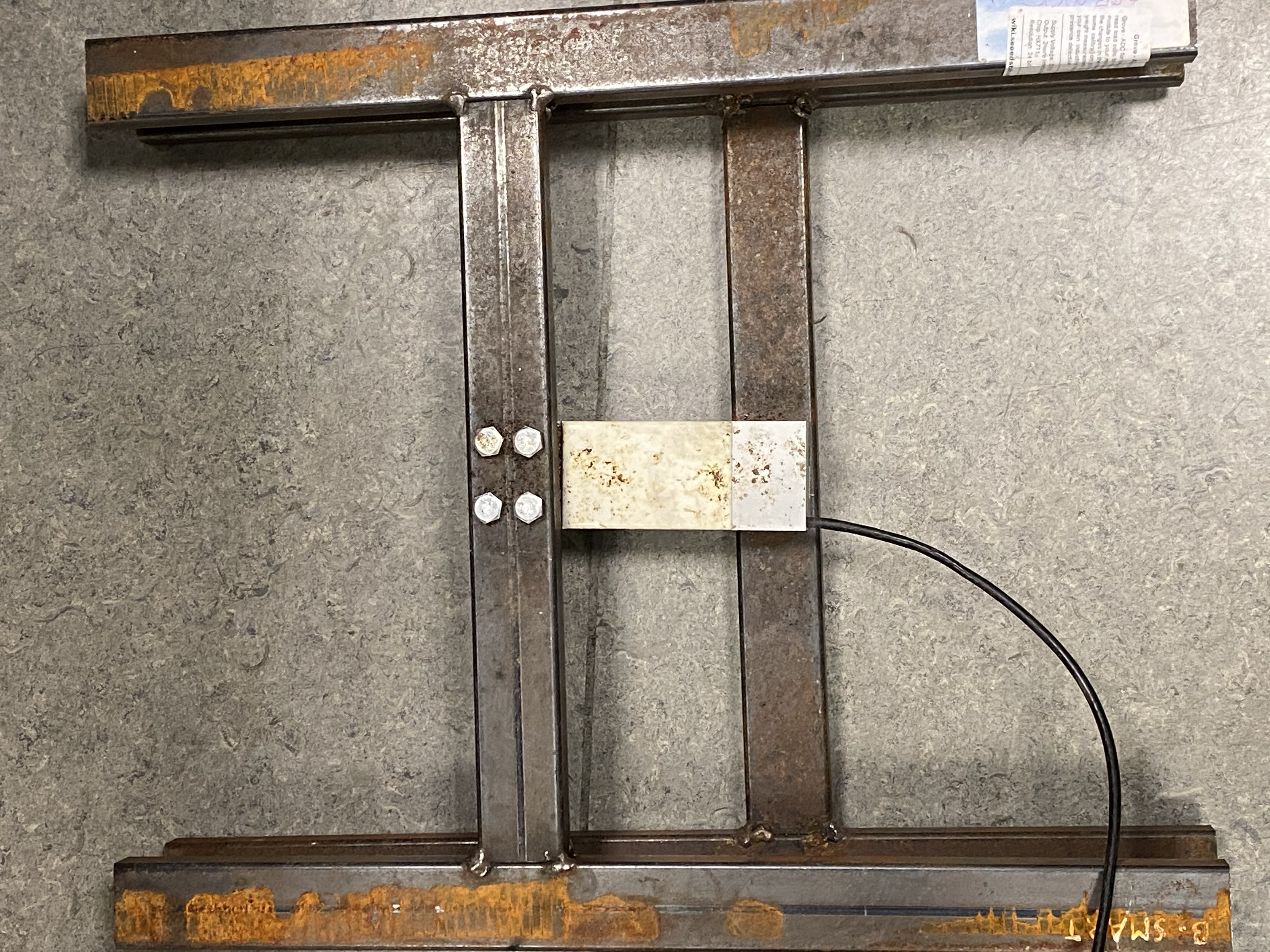
Weighing scale

We need a weighing scale to get the weight values of the hive. These values help supervise the bees and the honey production.

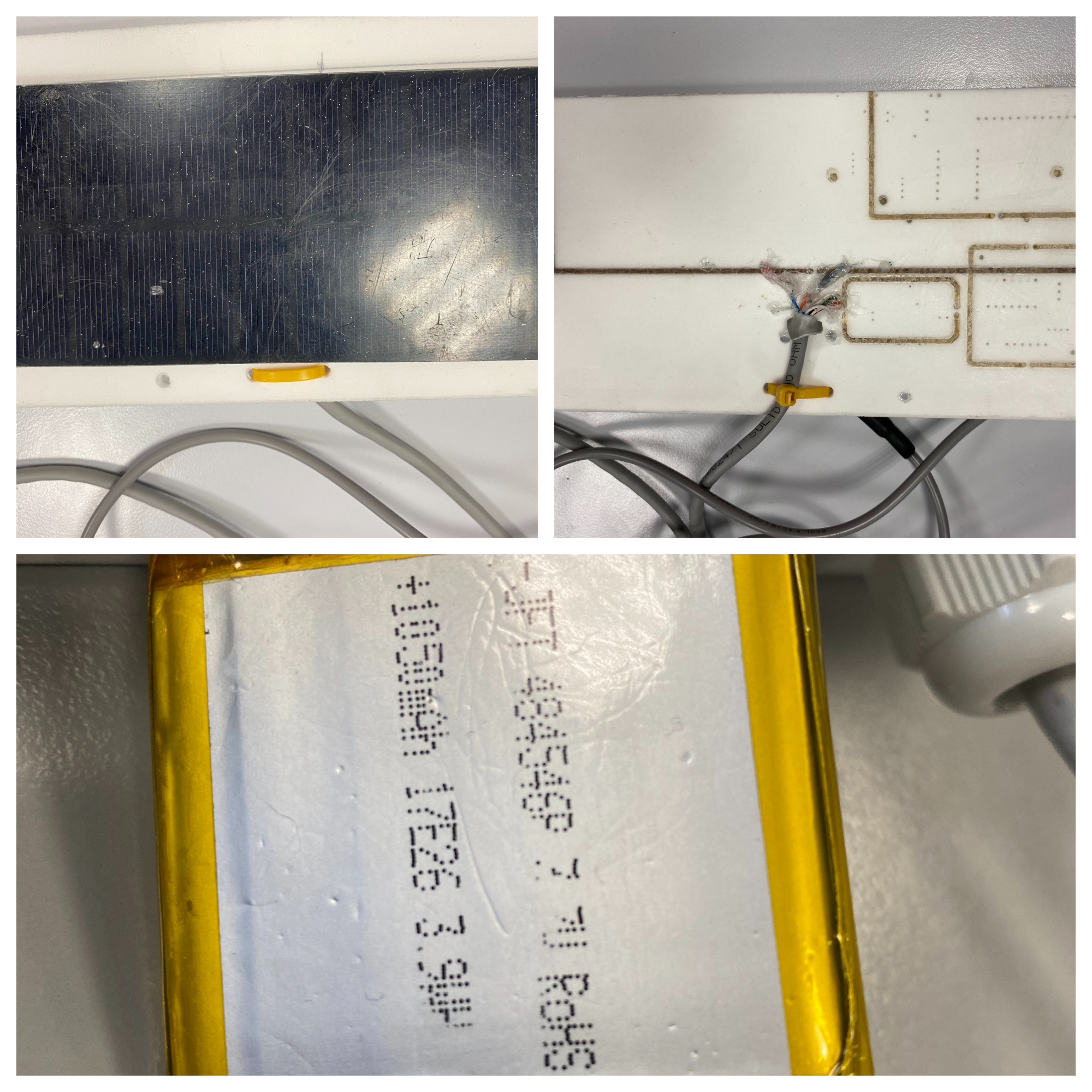
Solar Cell

The solar cell converts light energy into electrical energy through the photovoltaic effect. When light strikes the solar cell, it generates electric current in the cell. If the solar cell is connected to a battery and there is a load (such as a light bulb) connected to the battery, the current from the solar cell will flow into the battery, charging it. If there is no load connected to the battery, the current from the solar cell will simply pass through the battery and be wasted.

Housing of the external humidity sensor DHT22
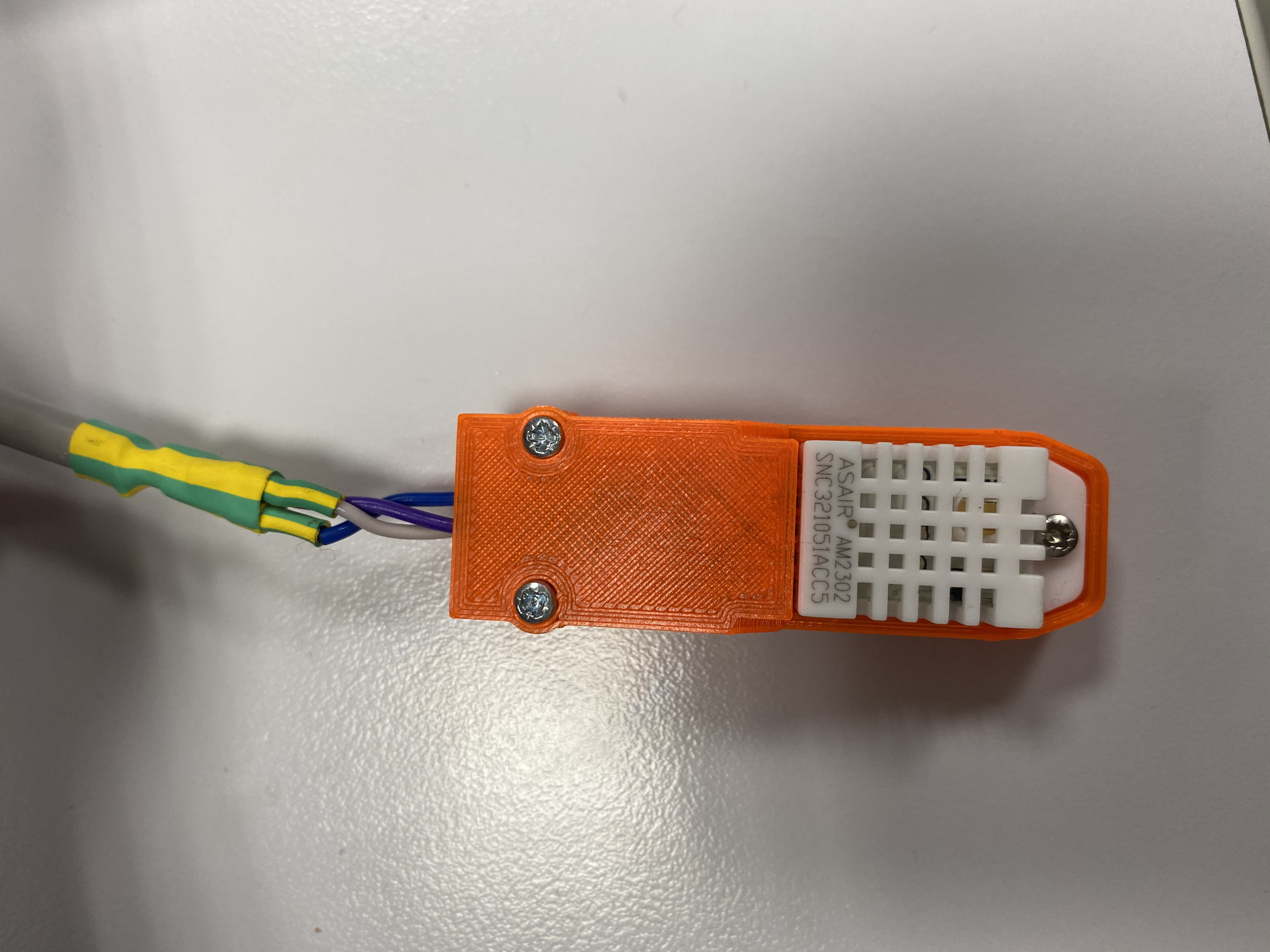
The external DHT22 needs to be protected in a plastic housing when it's outside.

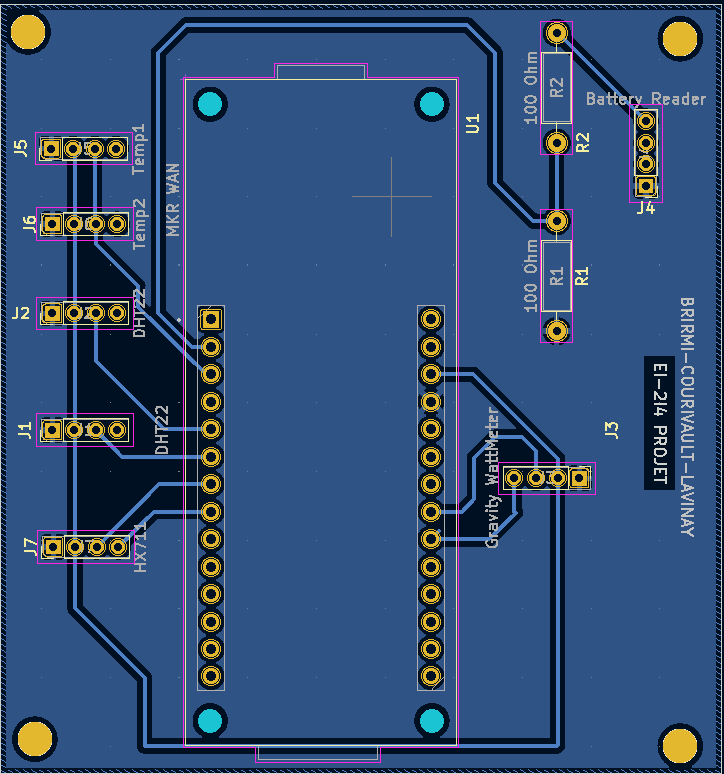
PCB

The printed board is elaborated after creating the schematic on Kicad.
After printing, we need to make sure that it functions and all of the connections are established.
For this purpose, we can use a multimeter.

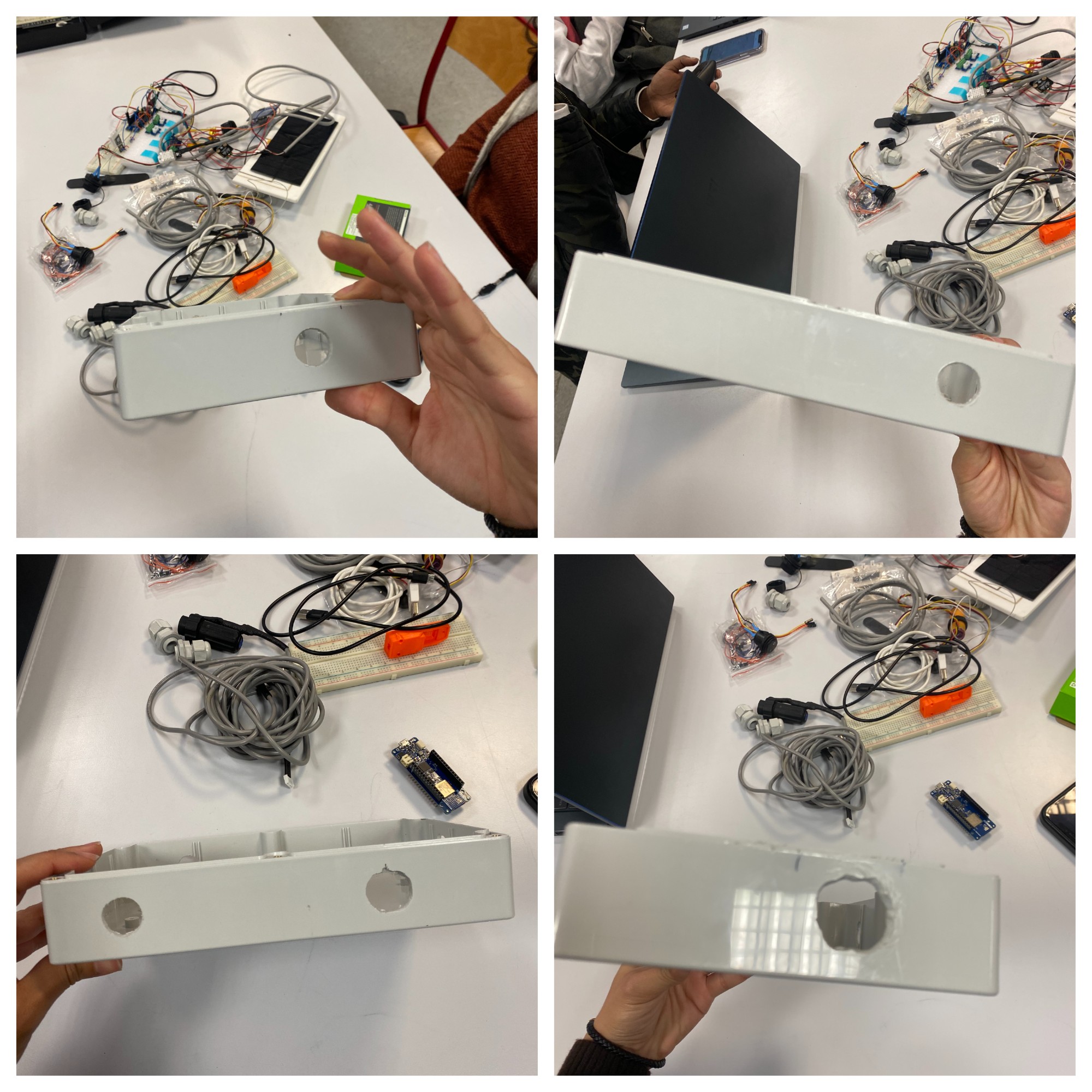
Plastic housing for the entire system

The housing is to be prepared with some specific materiel. We mainly need the drill and the screwdriver to create as much holes as needed to make rooms for the different network cables.
The housing of an electronic system refers to the physical enclosure or structure that contains and protects the electronic components of the system. The design and material of the housing will depend on the specific requirements and intended use of the system.

Here are some general considerations for designing the housing of an electronic system:

Durability: The housing should be able to withstand the environmental conditions and physical stresses that the system is likely to encounter during its intended use. For example, if the system is intended for outdoor use, the housing should be able to withstand extreme temperatures, moisture, and UV radiation.

Cooling: If the system generates a significant amount of heat, the housing should be designed to facilitate adequate cooling. This may involve the use of vents, fans, or other cooling features.

Accessibility: The housing should provide sufficient access to the system's components for maintenance and repair. This may involve the use of removable panels or other access points.

Size and shape: The size and shape of the housing should be appropriate for the intended use of the system. For example, a portable device will typically have a smaller and more compact housing than a stationary system.

Aesthetics: Depending on the intended use of the system, the housing may need to be aesthetically pleasing. This may involve considering the color, texture, and overall appearance of the housing.
Schematics

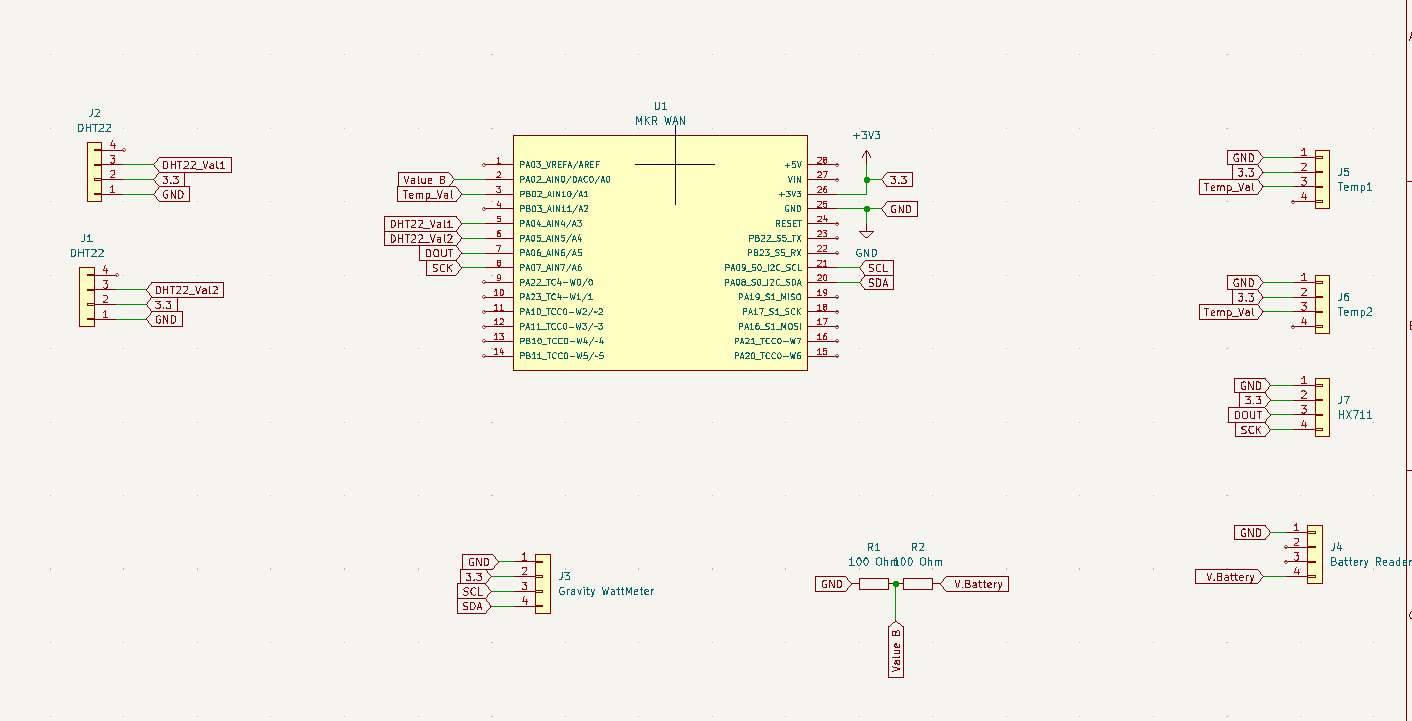
Schematic circuit using Kicad: file.kicad_sch

Under Kicad, we create a schematic according to our prototype and respecting the wiring we choose.
If needed, a tutorial on how to use this software is provided : https://www.youtube.com/watch?v=-tN14xlWWmA
We make sure to use female connector groves with 4 pins to facilitate working with the hardware provided after printing the board.

Screenshot

Schematic circuit using Kicad: file.kicad_pcb

The PCB is to be generated automatically after creating the schematic and configuring the right rooting. In order to do so, we click on "Generate the PCB".

Screenshot

Code

Arduino Code: MKRWAN 1310

Arduino
The code is rather simple. Each component comes with a library that allows us to use functions that perform data capture and conversion. Just create a microcontroller routine that calls each read function. These values are in float, we multiply this value by 100 for a precision of 2 decimal places, and finally we cast them in shorts to concatenate them on 2 bytes maximum. Then we have to concatenate these results in the payload of our message in the form of bits that we send on the TTN network. The TTN decoder payload will seperate our bytes assigning each value.
The coding part is on Arduino IDE. First of all, we need to make sure to include the libraries that are useful to our system.

- <MKRWAN.h> library : The first step to take in Arduino IDE is installing the <MKRWAN.h> library in order to use the included functions.

- <Wire.h> : A software library that provides a set of functions and constants that can be used to communicate with I2C (Inter-Integrated Circuit) devices using the Arduino platform.

-<OneWire.h> : A softwareLibrary that provides a set of functions and constants that can be used to communicate with OneWire devices using the Arduino platform.

-"DFRobot_INA219.h" : DFRobot_INA219 is a library for the Arduino platform that allows you to interface with the INA219 current and power sensor. The INA219 is a bi-directional current and power monitor sensor that is designed to be used with low-power I2C interfaces.

- "ArduinoLowPower.h": ArduinoLowPower is a library for the Arduino platform that provides functions and macros for reducing the power consumption of an Arduino board. The library allows you to put the Arduino board into different low-power modes, such as sleep mode or deep sleep mode, to conserve power and extend the battery life of your project.

-"HX711.h": HX711 is a library for the Arduino platform that allows you to interface with the HX711 load cell amplifier.

-<DS18B20.h>: DS18B20 is a library for the Arduino platform that allows you to interface with the DS18B20 temperature sensor. The DS18B20 is a digital temperature sensor that uses a 1-Wire interface to communicate with microcontrollers and other devices. It can measure temperatures in the range of -55°C to +125°C (-67°F to +257°F) with a resolution of 0.5°C (0.9°F).

-"DallasTemperature.h": DallasTemperature is a library for the Arduino platform that allows you to interface with Dallas 1-Wire temperature sensors. The Dallas 1-Wire temperature sensors are a family of digital temperature sensors that use a 1-Wire interface to communicate with microcontrollers and other devices. They can measure temperatures in the range of -55°C to +125°C (-67°F to +257°F) with a resolution of 0.5°C (0.9°F).

-<DHT.h>: DHT is a library for the Arduino platform that allows you to interface with DHT series temperature and humidity sensors. The DHT series sensors are digital temperature and humidity sensors that use a single wire to communicate with microcontrollers and other devices. They can measure temperatures in the range of -40°C to +80°C (-40°F to +176°F) and humidity in the range of 0% to 100% RH.
#include <MKRWAN.h>  // LPWAN
#include <Wire.h>
#include "DFRobot_INA219.h"  // Capteur puissance Solaire
#include "ArduinoLowPower.h"
#include "OneWire.h"            // créer un bus de donnée sur une seule entrée
#include "HX711.h"              // Poids
#include <DS18B20.h>            // Sonde de temperature
#include "DallasTemperature.h"  // capteur de temperature sonde DS18B20 + Onewire
#include <DHT.h>                // Temperature + humidité
//#include "arduino_secrets.h"

////////////////////////
////     SETUP      ////
////////////////////////

///// INITIALIZATION FOR LORAWAN AND CONNECTION WITH THE THINGS NETWORK /////
LoRaModem modem;
#define SECRET_APP_EUI "0000000000000000"
#define SECRET_APP_KEY "37C06A7C372F7CA1849F355357EF2C46"
//#define SECRET_APP_EUI "A8610A34342B6E14"
//#define SECRET_APP_KEY "15A85E08BCF4632C3CB542EF1B371BBA"
String appEui = SECRET_APP_EUI;
String appKey = SECRET_APP_KEY;

///// INITIALIZATION FOR WEIGHT MEASURING /////
//Pin definition
const int LOADCELL_DOUT_PIN = A5;
const int LOADCELL_SCK_PIN = A6;
//Weight scale variable
HX711 scale;

///// INITIALIZATION FOR TEMPERATURE AND HUMIDITY MEASURING /////
//Sonde pin definition
DS18B20 ds(A1);
//DHT22 pin definition
#define DHTPIN A3
//Definition of the type of sensor used in sonde
#define DHTTYPE DHT22      //DHT 22  (AM2302)
//DHT sensor initialization
DHT dht(A3, DHT22);  // Initialize DHT sensor for normal 16mhz Arduino
DHT dht2(A4, DHT22);
//Gravity qualibration
DFRobot_INA219_IIC ina219(&Wire, INA219_I2C_ADDRESS4);
float ina219Reading_mA = 5;
float extMeterReading_mA = 3;

///// GLOBAL VARIABLE /////
float value = 0;
float voltage, percentage;
float temp0, temp1, temp2;
float hum1, hum2;
float weight;
byte buffer[16];
int chk;
int iteration = 0;

///// Function to establish connection with The Things Network /////
void connection() {
  if (!modem.begin(EU868)) {
    Serial.println("Failed to start module");
    while (1) {}
  };
  Serial.print("Your module version is: ");
  Serial.println(modem.version());
  Serial.print("Your device EUI is: ");
  Serial.println(modem.deviceEUI());
  int connected = modem.joinOTAA(appEui, appKey);
  if (!connected) {
    Serial.println("Something went wrong; are you indoor? Move near a window and retry");
    while (1) {}
  }
 // modem.minPollInterval(60);
  Serial.println("connecté");
}

///// Function to setup parameters when booting the system /////
void setup() {
  // définition de l'ouverture du port série
  Serial.begin(115200);
  //On entame la connexion avec la gateway LoRa la plus proche
  // change this to your regional band (eg. US915, AS923, ...)
  connection();
  // Capteur de poids activé
  scale.begin(LOADCELL_DOUT_PIN, LOADCELL_SCK_PIN);
  //capteur d'humidité activé
  dht.begin();  // humidité activée
  dht2.begin();
  ina219.linearCalibrate(ina219Reading_mA, extMeterReading_mA);
  // led de démarage
  pinMode(LED_BUILTIN, OUTPUT);
}


////////////////////////
////      LOOP      ////
////////////////////////

///// Function to measure battery percentage /////
//Sends percentage
void measureBattery() {
   Serial.println("je suis dan batterie ");
  value = analogRead(A0);
  //Serial.println(value);
  voltage = value * (4.20 / 650);                         // coef volt
  percentage = ((voltage - 3.7) * 100.00) / (4.2 - 3.7);  // ((input - min) * 100) / (max - min)
  if (percentage < 0) {
    percentage = 0;
  }
  if (percentage > 100) {
    percentage = 100;
  }
  buildMessage(voltage, "voltage");
}

///// Function to measure exterior temperature /////
//Sends temp0
void measureTemperature() {
     Serial.println("je suis dans sonde ");
  int i = 1;
  while (ds.selectNext()) {
    float temp0 = ds.getTempC();
    i++;
    buildMessage(temp0, "temp0");
    if(i>3){
      break;
    }
  }
}

///// Function to measure temperature and humidity /////
//Sends temp1, temp2, hum1, hum2
void measureHumidity() {
  Serial.println("je suis dans DHT22 ");
  hum1 = dht.readHumidity();
  temp1 = dht.readTemperature();
  hum2 = dht2.readHumidity();
  temp2 = dht2.readTemperature();
  buildMessage(temp1, "temp1");
  buildMessage(temp2, "temp2");
  buildMessage(hum1, "hum1");
  buildMessage(hum2, "hum2");
}

///// Function to measure hive's weight /////
//Sends weight
void measureWeight() {
     Serial.println("je suis dans poids ");
  if (scale.is_ready()) {
    long value = scale.read();
    float weight = (value * 0.000034594) - 5.44;
    buildMessage(weight, "weight");
  } else {
    Serial.println("HX711 not found.");
  }
}

///// Function to measure solar? /////
void measureSolar() {
     Serial.println("je suis dans Solaire ");
  Serial.print("BusVoltage:   ");
  Serial.print(ina219.getBusVoltage_V(), 2);
  Serial.println("V");
  Serial.print("ShuntVoltage: ");
  Serial.print(ina219.getShuntVoltage_mV(), 3);
  Serial.println("mV");
  Serial.print("Current:      ");
  Serial.print(ina219.getCurrent_mA(), 1);
  Serial.println("mA");
  Serial.print("Power:        ");
  Serial.print(ina219.getPower_mW(), 1);
  Serial.println("mW");
  Serial.println("");
}

///// Function to convert float data to int data, then send the splitted 2 bytes int values in 2 separate bytes /////
void buildMessage(float donnee_float, char* print) {
  short donnee_short = (short)(donnee_float * 100);
  Serial.println(print);
  Serial.println(donnee_short);
  buffer[iteration] = donnee_short;
  buffer[iteration+1] = donnee_short>>8;
  iteration = iteration+2;
}

//// Function to end the message /////
void sendMessage() {
  int err;
  Serial.println();
  Serial.println("===== NOUVEAU MESSAGE =====");
  modem.beginPacket();
  modem.write(buffer, 16);
  err = modem.endPacket(true);
  if (err > 0) {
    Serial.println("Message sent correctly!");
  } else {
    Serial.println("Error sending message :(");
    Serial.println("(you may send a limited amount of messages per minute, depending on the signal strength");
    Serial.println("it may vary from 1 message every couple of seconds to 1 message every minute)");
  }
}

///// Loop of functions /////
void loop() {
  
  measureBattery();
  measureTemperature();
  measureHumidity();
  measureWeight();
  measureSolar();
  delay(5);
  sendMessage();
  delay(5);
  LowPower.deepSleep(600000);
  iteration = 0;
}

Credits

Manar Brirmi
1 project • 0 followers
Lcs Cvt
1 project • 0 followers
Théo Lavinay
1 project • 0 followers

Comments