

Hardware components | ||||||
 |
| × | 1 | |||
 |
| × | 1 | |||
 |
| × | 1 | |||
 |
| × | 1 | |||
Software apps and online services | ||||||
 |
| |||||
| ||||||
INTRODUCTION:-
With jobs, school and other responsibilities, waking up by a set time remains a must for the majority of us. So naturally, many people depend on alarm clocks to start the day. But, are they really doing us a favor, or is this reliance on alarm clocks detrimental?
Being late everytime has been a big problem for most of us. Every morning you wake up just to realise that you have overslept! Well today we are gonna solve this issue by creating an alarm that will wake you up every morning.
I think everyone of you would prefer to wake up on time in the morning!
but sometimes due to false functionality of your alarm clock you might have to face problems of reaching LATE to your required destination.
WORKING:-
Don't you wish for your alarm clock to be different from all others. The Bolt IoT alarm clock come to our rescue as we shall build it using a buzzer and a software called Integromat.
The system can set you an alarm at any desired time and can wake you up with the help Bolt IoT module and using Integromat.
The alarm works by setting up the scenario on Integromat which activates the buzzer connected to Bolt WiFi module at desired time of the day since integromat is the most advanced online automation platform which fulfills these kinds of home automation services very well!
TLDR:- The system works by setting up a scenario on the Integromat service which activates the buzzer connected to your Bolt device by using it's API Key, activating the alarm at a set time everyday.
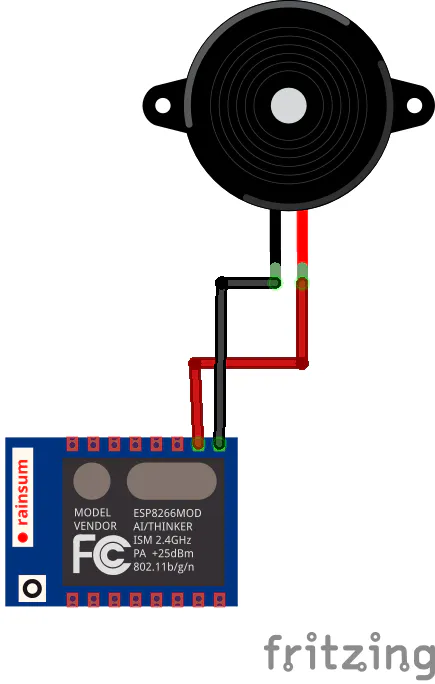
HARDWARECONNECTIONS:-
Bolt Device --> Buzzer
GND <--> -ve Pin(Shorter one)
Pin 1 <--> +ve Pin(Longer one)
Let's Link Bolt Wifi Module with the Integromat online platform!Step1:Gatherthecomponents
- Register your Bolt device to the Bolt cloud.
- Create a free account on Integromat.
- Turn ON your Bolt device and make sure it is connected to the Bolt Cloud (Green light will be visible on the device).
Step 2: Connect the components
- Connect the longer end(+ve end) of the Buzzer to pin 1 of the Bolt.
- Connect the shorter end(-ve end) of the Buzzer to the GND pin of the Bolt.
- Power on the Bolt device using a micro-USB cable.
Step 3: Create the flow
- Log in to your Integromat account.
- Click on Create a new scenario.
- Search and select "bolt iot".
- Enter your API key by clicking on the Add button as shown below. You can find your API key on your Bolt Cloud dashboard.
- Enter the Device ID and select pin 1 as the Buzzer will be connected to this pin.
- Choose the state as HIGH as we want the Buzzer to turn on.
Replace BOLTXXXX with your Bolt ID
- Next, we want the buzzer to ring for a few seconds at least. So we need to add a delay before switching off the Buzzer again.
- Click on the tools option and select sleep.
- Enter the number of seconds the buzzer should ring for in the input box. For me, 5 seconds of high intensity buzzer sound is enough to wake me up.
- Click on adding a new module and choose Bolt IoT again. Now, in this module, we are going to switch off the Buzzer by sending a LOW to the Buzzer.
Replace BOLTXXXX with your Bolt ID
- Enter the same Bolt ID and Pin, but this time, set the state as LOW.
- So far, we have set up the scenario to ring the buzzer. Now, we will give it some context in the form of the time to ring.
- Click on the little clock icon on the initial Bolt module. This is the scheduling option. Choose the time that you want the alarm to ring and click on OK.
- Thats it, you have successfully set up your alarm scenario. Don't forget to save your scenario.
- To test if the buzzer actually works, click on the "Run Once" button. The buzzer should ring for 5 seconds and then switch off.
- You can also change the scenario settings and choose the no. of cycles for the beeping sound of your alarm.
- Set appropriate schedule time for your alarm and try to test whether it is working properly or not.
- Don't forget to save the settings before running your scenario.
- In the end the whole scenario should look like this,
so through this you have created your own IoT enabled smart alarm clock which will never ever dissapoint you in waking you up on time so that you never reach late to your desired destination.
This may result in missing out an important task and lose valuable time. To overcome this problem, a smart clock based on IOT is proposed to help a person wake up on time.
Now, this should be loud enough and highly convenient to wake you up along with your family members, but make sure they just don't smash or break your Bolt IoT alarm clock alright?
SO BY THIS MY JOB IS OVER NOW IT'S UPTO YOU GUYS TO RELISH THIS INNOVATIVE IDEA AND TAKE THE ADVANTAGE OF INTERNET IN YOUR DAILY ROUTINE PRACTICES!
If you have any ideas on how this can be improved, please feel free to get in touch with me.
Credits: ( SAMARTH CHUGH)
( An ECE student of Bharati vidyapeeth college of engineering).
.


Comments