


Hardware components | ||||||
 |
| × | 1 | |||
 |
| × | 1 | |||
 |
| × | 1 | |||
 |
| × | 1 | |||
 |
| × | 1 | |||
 |
| × | 1 | |||
 |
| × | 10 | |||
Software apps and online services | ||||||
 |
| |||||
 |
| |||||
 |
| |||||
| ||||||
Imagine this: You have gone out of the house (or have a vault built), and some burglar steals the valuables stored in your house / vault.You do have CCTV cameras installed, but the footage is of little use since all the valuables are gone.
To prevent this, I have designed a usable, cheap Laser Security System using Bolt IoT, which just needs an internet connection and electric supply. (along with a server)
Many robberies happen where intruders break through the lock and steal everything. It is a alert system which will notify you not only on the displacement of your valuable but also if the valuable is intruded so its a double protection.
Introduction:This project is based on the concept of Internet of Things. This project is a system which keeps your locker secured from robbers and your valuables safe. It works in two ways:
1. If the burglar tries to lift the valuable then with the help of laser the buzzer will beep and a alert of burglary will be sent on the owner's phone.
2. If the burglar tries to intrude in the area then the IR sensor will make the buzzer beep and alert will be sent on the owner's mobile.
Alert mechanism:- The buzzer will beep which you can keep anywhere in your house.
If nobody is at home, you will get notified via telegram message if someone intrudes near your valuable.
Also you can control the security mechanism manually using the remote server in case some known person opens the locker when the system is running.
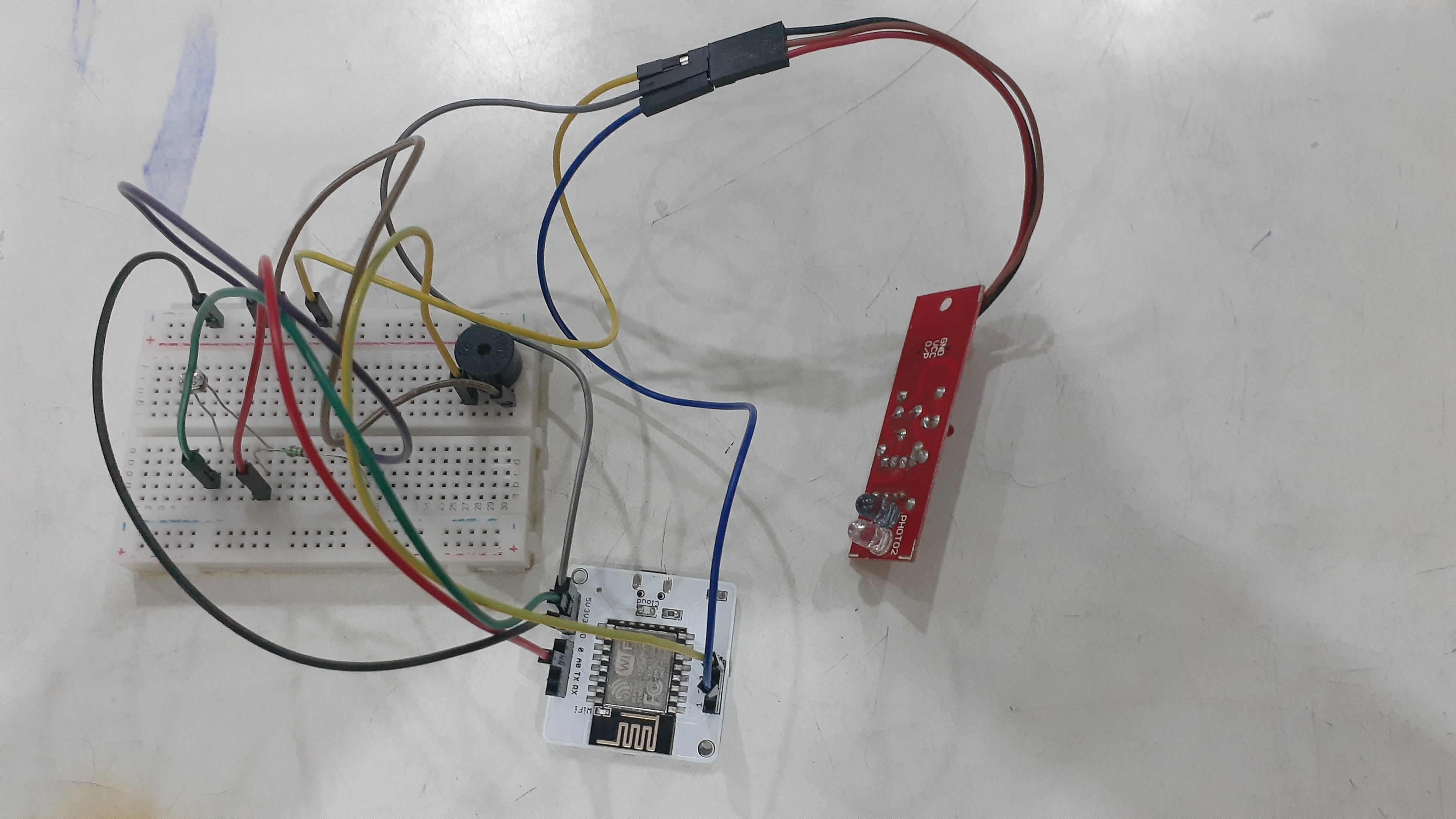
DemonstrationCircuit Connections:(use breadboard whenever required) In these we use Bolt WiFi module for connections.
- LDR : Insert one end of LDR to A0 (analog pin) and other end to 3v3 pin.
- IR Sensor: Connect VCC pin to 5V pin, GND pin to ground pin, OUT pin to any of the digital pin (0, 1, 2, 3, 4)
- Resistor: Insert one end to A0 (analog pin) where one end of LDR is connected and other pin to ground pin. Note: The resistance across LDR changes with change in light intensity falling on it. Since the Bolt Module cannot read resistance values, but it can read voltage values, hence a voltage divider circuit is made.
- Buzzer: Connect negative pin (short end) to ground pin and positive pin (long end) to any of the digital pin (0, 1, 2, 3, 4) Note: Don't connect it where you have already connected any other pin
1. If someone tries to lift the valuable: For this we use LDR, LDR is light dependent resistor which detects the intensity of light and send it to cloud. We fix the threshold intensity of light, if someone lifts the object then the laser will directly fall on LDR making its intensity cross threshold and thus making the buzzer beep and will also send a telegram alert on the owner's phone.
2. If someone blocks the path of laser but will come near the valuable then the IR sensor comes into play detecting a presence and thus making the buzzer on and will also send a telegram message to the owner's phone alerting of intruder.Infrared Sensor is a sensor that detects if any obstacle is present in front of it, it sends the infrared rays with the transmitter and receiver receives the rays if there is human presence.
As soon as the alert system is activated the buzzer will start buzzing and a alert message via telegram will be sent.
- Complete you circuit connections as given above and keep it ready for implementation.
- Connect your Bolt Device to the Bolt Cloud as per instructions given at https://trainings.boltiot.com/. and check if the status of your device is online. (if device show's offline try troubleshooting the problems as given by https://trainings.boltiot.com/.
- Note your API Key and Bolt Device Number
Create a Telegram Bot and Channel
- Download the Telegram Messaging App and create your account.
- In the Menu, tap on 'New Channel' and add a name to it.
- Make it a 'Public Channel' and write a unique link name and note it down (the part after me./ )
- Now, go back to the normal screen and in the search bar, type in BotFather. Click on the one which has the "Blue Tick symbol"
- Type in the command /newbot, then enter the name, and enter a unique link for the bot.
- The API token will be shown. Note it down and "DO NOT SHARE IT WITH ANYONE".
- Go to the channel just created and make the bot as an Admin of the channel with all the properties
Create a VPS
In my case I was already using Ubuntu 18.04 so my machine functioned as a ssh.
all my commands were in my system's terminal. If you want to know how to install VPS on Windows or IOS just go to https://trainings.boltiot.com/. access your training's VPS topic there it is explained very clearly :).
Step 1: Create the 'conf.py' using the command -
sudo nano conf.pyStep 2: Enter the code for this document and save it
Step 3: Create the 'telegram_alert_theft.py' using the command -
sudo nano telegram_alert_theft.pyStep 4: Enter the code for this document and save it.
Step 5: Connect the USB to the Bolt module and switch on the power supply.
Step 6: Connect the Bolt-IoT module to the Bolt-IoT app (either android or ios) by following the steps in the app.
Step 7: Place the laser a certain distance apart but the light should fall directly onto the LDR to work.
Step 8: Enter the following code to start the code on the server
sudo python3 telegram_alert_theft.pyThus, a successful Laser and IR sensor Security System has been created. It is after the Bolt-IoT training that I could create such a system. This is my First Own Project, I hope you like it.



Comments