


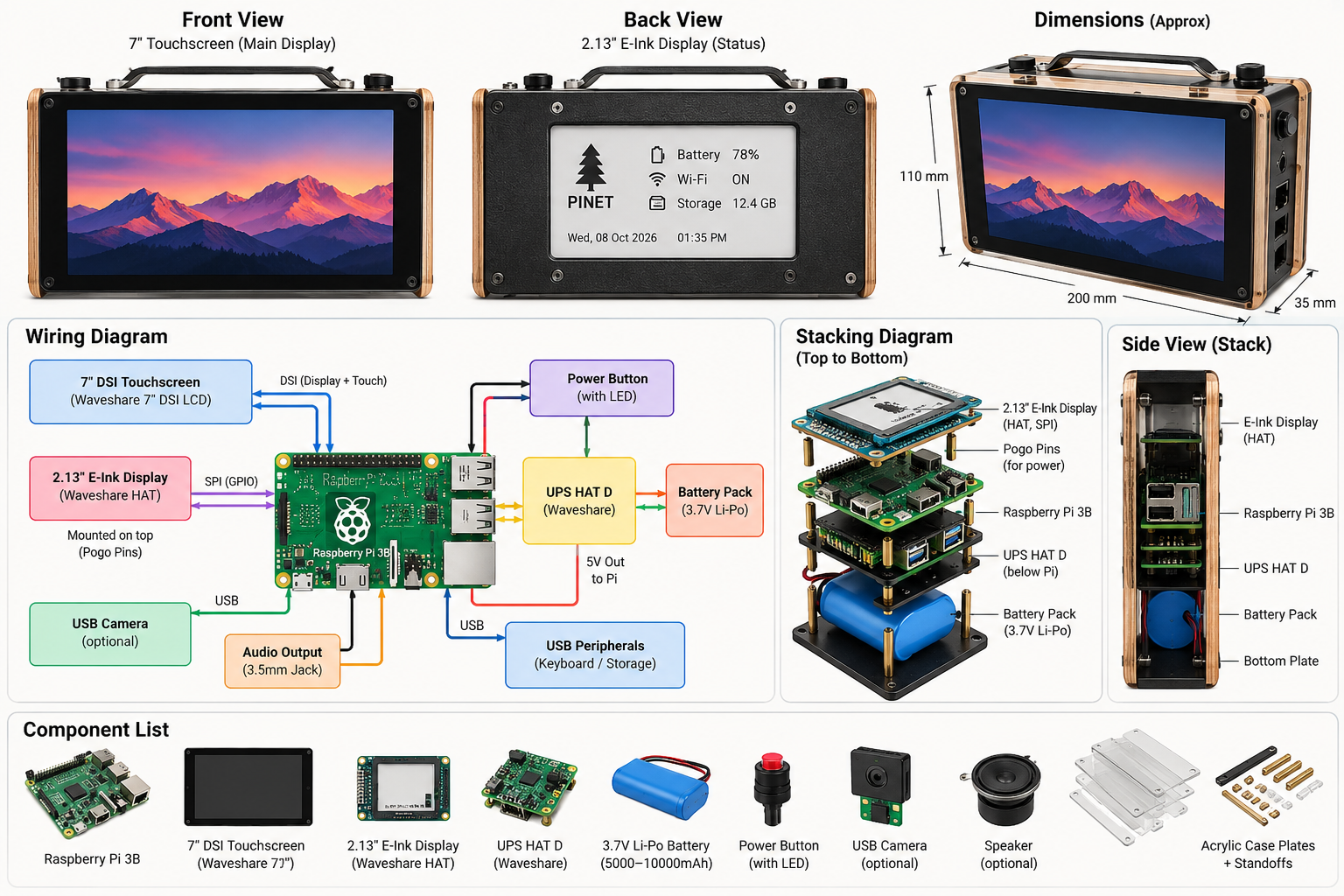
Hardware components | ||||||
 |
| × | 1 | |||
 |
| × | 1 | |||
| × | 1 | ||||
 |
| × | 1 | |||
 |
| × | 1 | |||
| × | 1 | ||||
Why I built it
It started small: a 2.13" e-ink screen on a Raspberry Pi 3B that showed the time, the weather and how hard the Pi was working. Then I wanted a guest Wi-Fi network that didn't need the internet. Then a touchscreen. Then a battery. A few months later it had become PINET, a battery-powered cyber-deck with two screens that runs five jobs on one board.
What it does
- Hosts its own Wi-Fi network with a message board and file drop. There's no internet connection, so nothing posted ever leaves the device.
- Shows status on an always-on e-ink panel on the back that keeps its image even with the power off.
- Runs Wi-Fi and network audit tools from a touch launcher, for networks you own.
- Works as a router: shares its Wi-Fi over Ethernet, with optional Pi-hole ad blocking.
- Doubles as a Spotify speaker, camera and photo frame, with a passcode lock screen.
The hardware
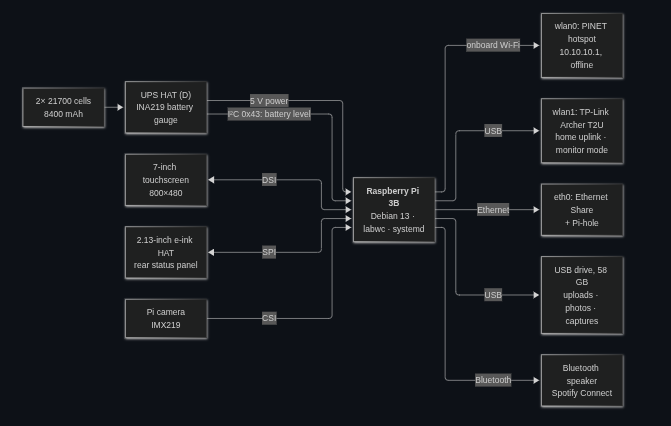
The Pi 3B sits behind the official 7" touchscreen. A Waveshare UPS HAT (D) with two 21700 cells in parallel (8, 400 mAh) powers everything, and its INA219 chip reports voltage and current over I²C. The 2.13" e-ink HAT talks over SPI, and a Pi camera (IMX219) uses the CSI ribbon. A 64 GB USB stick holds uploads, photos and captures.
Two radios keep the jobs apart:
A desktop made for a 7" touchscreen
The stock desktop isn't built for fingers, so I rebuilt it:
PINET: a network with no internet
Tap PINET and the Pi becomes a Wi-Fi access point at 10.10.10.1 with no route to the internet. Guests join, get a sign-in popup, and land on an anonymous message board and file drop (up to 1 GB per file) stored on the USB drive. The e-ink panel switches to a join card showing the number of connected devices, free storage and a scan-to-join QR code.The Wi-Fi is open so anyone can join easily, which means the portal has to protect itself:
Toolbox: audit kit and router
Kali Tools is a touch launcher for nmap, ARP scan, netdiscover, masscan, the aircrack-ng suite and wifite. Use it only on networks you own or are authorised to test. Tools that stream output write into a pane at the bottom; interactive ones open a terminal. Pentest Mode switches wlan1 into monitor mode and turns everything else off to save power.
Ethernet Share turns the Pi into a router: it shares the Wi-Fi connection out of the Ethernet port. Go Ad-Free sends the wired device's lookups through Pi-hole. It refuses to start sharing below 25% battery.
The e-ink back screen
E-paper holds its image without power, so the back panel doubles as a status display and a shutdown splash. It cycles through the date and time, CPU, RAM and temperature, local weather, network status, battery health and the PINET join card. In pentest mode it shows a pirate screen.
A battery reading you can trust
Standard lithium-ion charge tables read 10–13 points too high in the middle of this pack's range. So I logged a full discharge of the pack: about 7, 950 mAh usable. I built the percentage from that measured curve and corrected it for the pack's internal resistance, so the number doesn't jump when you plug the charger in or pull it. At 3.3 V the Pi shuts down cleanly, and the HAT boots it again when power returns.
Living on a Pi 3B's power budget
A Pi 3B on a weak 5 V supply browns out if everything starts at once. These rules keep it stable:
- Late desktop start: the desktop starts a little after boot, so it misses the boot-time power spike.
- Power manager: turns off the photo frame, VNC, Bluetooth and others while a heavy app is open, then brings them back.
- On-demand hotspot: it only runs when you start it.
- CPU cap: limited to 1 GHz for headroom.
More apps
HDMI Monitor: the Pi as a field monitor
I added a USB HDMI capture dongle so the 7" touchscreen can double as a small monitor for a laptop, a camera or another Pi. One tap on the HDMI Monitor icon and the HDMI input fills the screen.
HDMI Monitor (https://raw.githubusercontent.com/rupal2k/pinet/main/docs/images/hdmi-monitor.png)
What it does
- Shows the capture input full screen on the 800×480 DSI display, video only.
- The ✕ stays invisible so nothing covers the picture. Tap the top-right corner to show it, then tap it to close. It hides again after 4 seconds.
- The screen doesn't go to sleep while the monitor is open, and opening it wakes the screen if it was dark.
- The e-ink panel keeps cycling through its normal screens, with a "MONITOR MODE · time" strip across the top so you can see from the back that the touchscreen is busy.
- Nothing else gets switched off. Unlike the browser kiosks, PINET, Spotify and Bluetooth keep running.
How it works
The dongle is a standard UVC device, so no driver is needed; it shows up as /dev/videoN. The script finds it by its kernel driver (uvcvideo) rather than a model name or device number, because I swapped dongles mid-project and the number changes with plug order.
ffmpeg reads the MJPEG stream from the dongle and copies it, without decoding, into a FIFO. That costs about 3% CPU. ffplay decodes it, scales it to 800 px wide and shows it full screen. The Pi 3B has no hardware MJPEG decoder, so 1280×720 at 30 fps uses about 1.2 of its four cores; 20 fps brings that down to about 0.8.
The bug that shaped the design
The first version ran ffplay straight on the device, and it froze on launch most of the time. The kernel log showed why: starting the stream pulled the Pi's marginal 5 V rail down far enough to reset the whole USB bus. The USB stick timed out, the Wi-Fi dongle dropped off, and the capture driver logged Failed to resubmit video URB. ffplay never notices that frames have stopped, so it just shows the last frame forever.
A better power supply is the real fix. In software, the script now watches ffmpeg's frame counter. If it stops rising for four seconds, the script kills both processes, finds the dongle again (a reset can renumber it) and restarts the stream. I tested it by pausing ffmpeg and by detaching the dongle in software; both times the picture came back in about ten seconds without a touch. If three starts in a row produce no picture, it gives up and says so instead of retrying forever.
Small gotchas
- Under labwc (Wayland), ffplay needs SDL_VIDEODRIVER=wayland. Without it, it runs and uses CPU but never shows a window.
- The dongle's 4:3 modes (800×600 and so on) squash a 16:9 picture, so stay on a 16:9 size such as 1280×720.
- With icons opening on a single tap, a double-tap used to start two copies. The second copy would delete the first one's "monitor on" flag, so the e-ink strip vanished and the screen could sleep mid-video. A file lock now makes the second tap do nothing.
Code: scripts/bin/hdmi-monitor (https://github.com/rupal2k/pinet/blob/main/scripts/bin/hdmi-monitor) and scripts/bin/dsi-close-button.py (https://github.com/rupal2k/pinet/blob/main/scripts/bin/dsi-close-button.py).
It's written in first person to fit a builder's write-up, but since I couldn't see the article, tone and headings may not match yours. Hackster's editor generally works better if you upload the screenshot directly rather than linking the GitHub image. was dark.
How it stays reliable
- 270 automated tests, written with only Python's standard library. The shell scripts run against fake system commands, so the whole suite runs on any laptop.
- Checked deploys: every file copied to the Pi is checked by SHA-256 against the repo, with a dated backup of what it replaced.
- Drift checks: a full comparison of the 120+ files on the Pi against the repo catches anything changed by hand.
Lessons learned
Sometimes the fix is deleting the clever part. I tried to flip the screen with a kernel setting. Afterwards the mouse pointer and the shutdown splash came out upside down. Reading the graphics driver's state (/sys/kernel/debug/dri/0/state) showed the setting was rotating the display hardware underneath everything else. Removing every rotation fixed every screen at once.
Power problems look like software bugs. On a weak supply, brown-outs corrupted freshly copied files more than once. Now every file is re-checked by hash after any crash.
Try it yourself
The code is open source: https://github.com/rupal2k/pinet
To install the e-ink dashboard on a Pi with the Waveshare 2.13" HAT, run:
git clone https://github.com/rupal2k/pinet.git && cd pinet/eink-dashboard && bash scripts/install.sh


Comments