



Hardware components | ||||||
_MsQPLY30wm.png?auto=compress%2Cformat&w=48&h=48&fit=fill&bg=ffffff) |
| × | 1 | |||
| × | 1 | ||||
 |
| × | 1 | |||
| × | 1 | ||||
Software apps and online services | ||||||
 |
| |||||
 |
| |||||
Turning a Kindle into a typewriter may not make much practical sense—but it is definitely possible (as long as your Kindle is jailbroken). Along the way, the project forces you to work under constraints, for example programming in a limited Linux BusyBox environment using Bash.
The Kindle docks into an enclosure that integrates a thermal printer. Both the Kindle and the Raspberry Pi connect to the same WiFi network.
Text is typed on a custom Kindle application. When two line breaks are entered, the buffered text is sent over HTTP and printed. The system handles line width to avoid breaking words, and also stores previously printed texts.
This project requires a jailbroken Kindle. There are many guides available; I followed the instructions published here:https://kindlemodding.org/jailbreaking/index.html
Required parts- 1 × Raspberry Pi Zero 2W
- 1 × Adafruit thermal printer
- 1 × 5V 3A power supply
- 1 × 3D printed enclosure
- Power supply → 5V and GND on Raspberry Pi
- Raspberry Pi → printer: GND → GND, Pin 8 (TX) → Printer RX, Pin 10 (RX) → Printer TX
On the Raspberry Pi Zero W:
pip install pyserial flask --break-system-packages
pip install python-escpos --break-system-packages
Enable serial:
raspi-configUpload the Python script (e.g., via FTP) and run it. The console will display the IP address, which is required for configuring the endpoint in the Kindle Bash script.
The Kindle must have KUAL and kterm installed.
- Edit the
.shscript to include the Raspberry Pi IP - Copy the script to the Kindle.
- Make it executable:
chmod +x typewriter.shRun:
bash typewriter.shRecommended path:
/mnt/us/extensions/kterm/If the file was copied from Windows:
sed -i 's/\r//' kindletypewriter.shAlternative: use Start Telnet and connect via PuTTY. Copy and paste using vi (nano is not available). Remember to use ESC + : wq to write and exit
The enclosure was designed with Fusion 360. Print the 2 pieces with PLA and using support.
Autostart with crontabTo automatically start the server on boot:
crontab -e
@reboot sleep 10 && /usr/bin/python3 /home/roni/kindletypewriter.py >> /home/roni/kindletypewriter.log 2>&1A Kindle was designed to consume text. Here, it becomes a tool to produce it—and immediately materialize it. There is no efficiency gain, no clear productivity boost. But there is something else: a deeper awareness of how systems connect, how data moves, and how software meets the physical world.
Sometimes the value of a project is not in what it does, but in how far it pushes the boundaries of what a device was supposed to be.
https://github.com/ronibandini/Kindle-Typewriter
https://cults3d.com/en/3d-model/gadget/kindle-typewriter
See also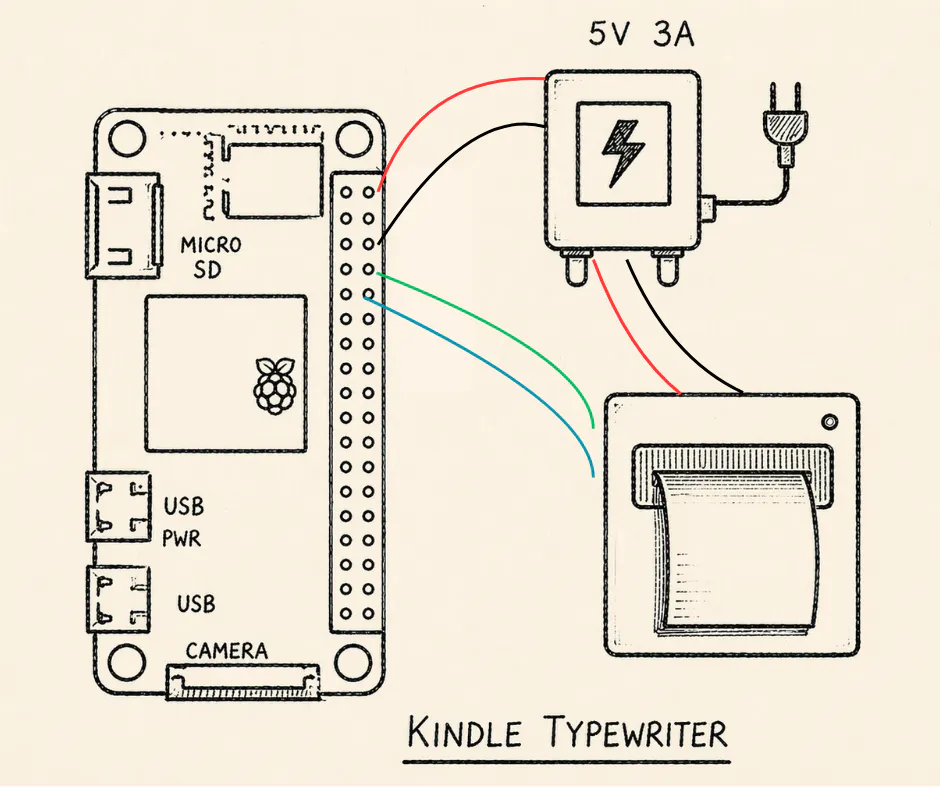


_t9PF3orMPd.png?auto=compress%2Cformat&w=40&h=40&fit=fillmax&bg=fff&dpr=2)


Comments