



Hardware components | ||||||
 |
| × | 1 | |||
 |
| × | 1 | |||
Software apps and online services | ||||||
 |
| |||||
Hand tools and fabrication machines | ||||||
 |
| |||||
Ultrasonic sensors are one of the most efficient methods of measuring distance. They through ultrasonic waves and when the wave come back after striking from any medium and received by ultrasonic sensor. The time between the transmission and reception is noted to calculate the distance between sensor and the object using a microcontroller like an Arduino Board.
Ultrasonic sensors work on ultrasonic sound waves. Any ultrasonic sound within its range will interfere with the sensor and will disturb the required results with unwanted distance values. Now talking about a drone. Propellers in a drone rotates at high speeds, ranging from few thousands to few ten-thousands rpm. They create lots of noise around them. Noise coming out of propellers consist of vibrational noises, sound noises and electrical noises. All three can disturb the ultrasonic sensors if deployed on a drone.
But!!! Is that so??? We gonna find it out today.
This Project is sponsored by jlcpcb.com, which are one of the biggest PCBmanufacturers of china. JLCPCB gets more than 10, 000 orders per day. So, go tojlcpcb.com to order your PCBs now.
For this experiment we will need an ultrasonic sensor, an Arduino board, a power supply and an LCD.
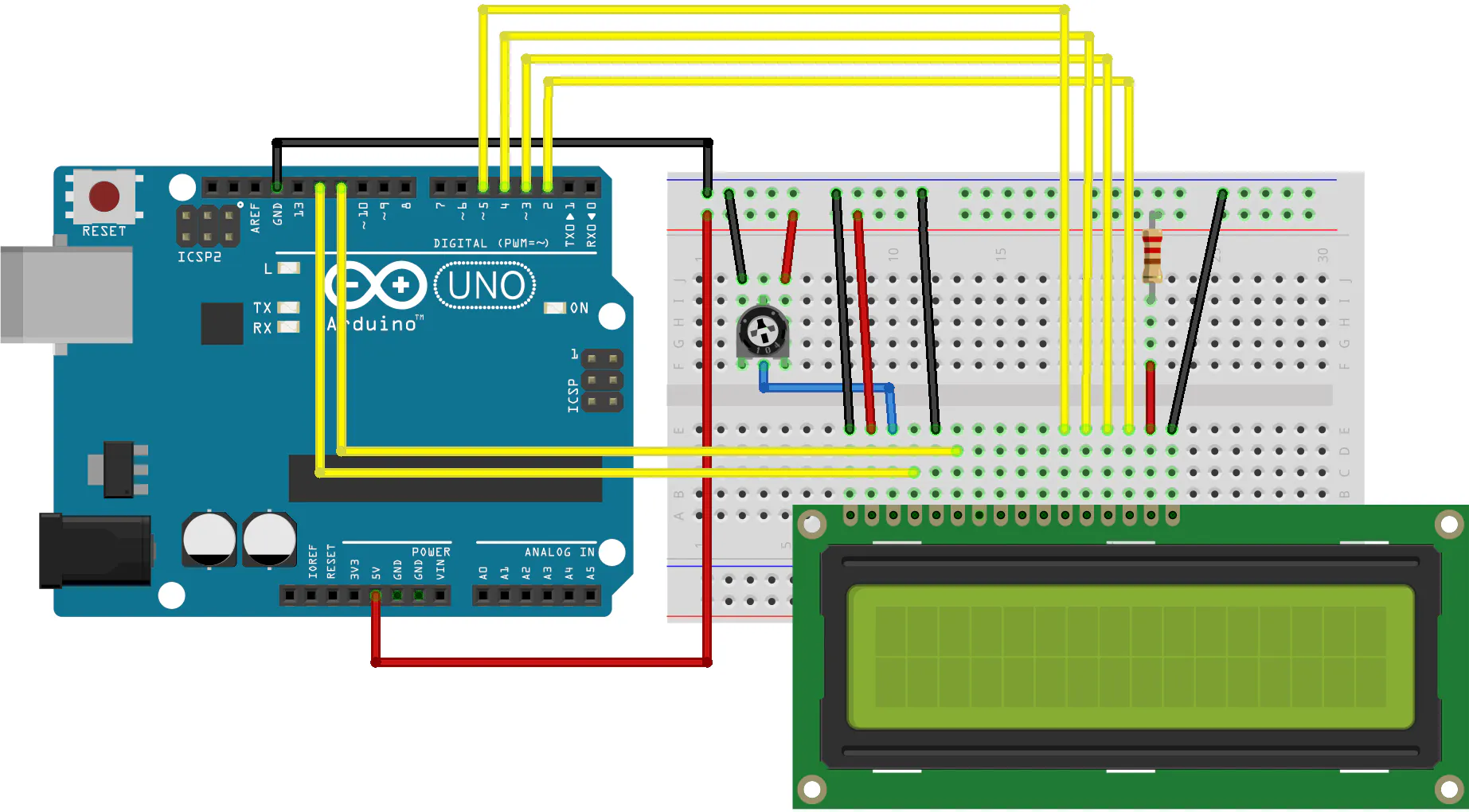
First of all, lets wire up our ultrasonic sensor and display with Arduino. If you don’t know how to connect an LCD with Arduino you can check out my tutorial, link is in description. Now I am only giving you a circuit diagram for it.
I used my DIY power supply which I made using a transformer, diodes, a 7805-voltage regulator and a custom-made PCB from jlcpcb.com. I made the PCB using easyeda.com and uploaded my files on JLCPCB order page. I selected the matte black color. I got my order in 6 days and the PCB were awesome. Quality was as expected, nearly perfect. I soldered everything and I got a pretty lookingpower supply.
I used this power supply to power the components.
The link to circuit diagram is also given in video description.
Now let’s connect our Arduino to computer and take a look at the coding part. I am using NewPing.h library because I found it easy to use and it give precise values.
#include<NewPing.h> // first of all we have to include newping library.
#defineTRIGGER_PIN 12 // Arduino pin tied to trigger pin on theultrasonic sensor.
#defineECHO_PIN 11 // Arduino pin tied to echo pin on theultrasonic sensor.
#defineMAX_DISTANCE 200 // Maximum distance we want to ping for (in centimeters).Maximum sensor distance is rated at 400-500cm.
NewPingsonar(TRIGGER_PIN, ECHO_PIN, MAX_DISTANCE); // NewPing setup of pins andmaximum distance.
voidsetup() {
Serial.begin(115200); // Open serial monitorat 115200 baud to see ping results.
// if youwant to know about how to use serial monitor you can check out my tutorial, link is given in description.
}
void loop(){
delay(50); // Wait 50ms between pings(about 20 pings/sec). 29ms should be the shortest delay between pings.
Serial.print("Ping: ");
Serial.print(sonar.ping_cm()); // Send ping, get distance in cm and print result (0 = outside set distance range)
Serial.println("cm");
}
Then in the same way I printed the distance on Liquid Crystal Display.
The results were as expected.
Then I takeout my drone and place everything on top of it. Getting the power supply on it is a little impractical. So, I does everything as I did in collision avoidance system. I powered the board with on board power supply from Flight Controller.And when everything was set up, I started my drone using my transmitter. And take a look at the values. But those were stable. Then I increased the motor speed but yet values were not getting any bounce. They were quite stable as seen with drone turned off.
But when I made a collision avoidance system for drones using these ultrasonic sensors, I found out unwanted virtual obstacles from one side of drone. It was falling from one side every time I take off.
That means the sensor from its opposite side is getting some unwanted values. Which we don’t want. I am still in a little confusion. What else reason can be there???
If you want to study a complete analysis of this problem, I have given an article for this on my website. Link in description. Give me your suggestions on it.
Thank you for watching, if you dislike this video hit the dislike button. But if you like it then smash the like button.
Have a nice day.



Comments