rkapteyn
Published © GPL3+

Telemetry 2.4 Mhz radio connection between 2 Arduino's

Radio connection between two Arduino BLE 33 Sense boards using nRF24L01 to send telemetry data from a RC boat over 2.4MHz radio connection.

IntermediateWork in progress1,471
Telemetry 2.4 Mhz radio connection between 2 Arduino's

Things used in this project

Hardware components

Nano 33 BLE Sense
Arduino Nano 33 BLE Sense
×2
nRF24L01 tranceiver
https://www.amazon.com/HiLetgo%C2%AE-NRF24L01-Wireless-Transceiver-Compatible/dp/B00WG9HO6Q/ref=sr_1_1_sspa?dchild=1&keywords=nrf24l01+2.4ghz+wireless+transceiver&qid=1610383182&sr=8-1-spons&psc=1&spLa=ZW5jcnlwdGVkUXVhbGlmaWVyPUEzSkNSSzNHVDU0WjlQJmVuY3J5cHRlZElkPUEwMTE3MjQxM1QwNEFCUkVNWUw0WCZlbmNyeXB0ZWRBZElkPUEwMDU1MzIxSzhVNE0wUTJETFM4JndpZGdldE5hbWU9c3BfYXRmJmFjdGlvbj1jbGlja1JlZGlyZWN0JmRvTm90TG9nQ2xpY2s9dHJ1ZQ==
×2

Story

Read more

Schematics

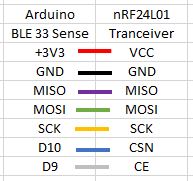
Connection schema

Connections between Arduino and tranciever

Code

transmitter

C/C++
Code for the transmitter configuration
#include <SPI.h>
#include <nRF24L01.h>
#include <RF24.h>

RF24 radio(9, 10); // CE, CSN
const byte address[6] = "00001";     //Byte of array representing the address. This is the address where we will send the data. This should be same on the receiving side.

void setup() {
  radio.begin();                  //Starting the Wireless communication
  radio.openWritingPipe(address); //Setting the address where we will send the data
  radio.setPALevel(RF24_PA_MIN);  //You can set it as minimum or maximum depending on the distance between the transmitter and receiver.
  radio.stopListening();          //This sets the module as transmitter
}

void loop()
{
  const char text[] = "Test text to send";
  radio.write(&text, sizeof(text));                  //Sending the message to receiver
  delay(1000);
}

receiver

C/C++
Receiver configuration
#include <SPI.h>
#include <nRF24L01.h>
#include <RF24.h>

RF24 radio(9, 10); // CE, CSN
const byte address[6] = "00001";

void setup() {
  Serial.begin(9600);
  while(!Serial);                      // wait until monitor is on

  radio.begin();
  radio.openReadingPipe(0, address);   //Setting the address at which we will receive the data
  radio.setPALevel(RF24_PA_MIN);       //You can set this as minimum or maximum depending on the distance between the transmitter and receiver.
  radio.startListening();              //This sets the module as receiver

  Serial.println("Receiver active");
}

void loop()
{
  if (radio.available())               //Looking for the data.
  {
    char text[32] = "";                //Saving the incoming data
    radio.read(&text, sizeof(text));   //Reading the data
    if (text[0] != 0) {
      Serial.println(text);
    }
  }
  delay(5);
}

Credits

rkapteyn
2 projects • 2 followers

Comments