


Hardware components | ||||||
| × | 1 | ||||
| × | 1 | ||||
Software apps and online services | ||||||
 |
| |||||
The libraries we need are:
https://github.com/ambiot/amb1_arduino/raw/master/Arduino_libraries/AmebaLedStrip.zip
Refer to the Arduino official website to install the library and add the.zip library to Ameba:
https://www.arduino.cc/en/Guide/Libraries#toc4
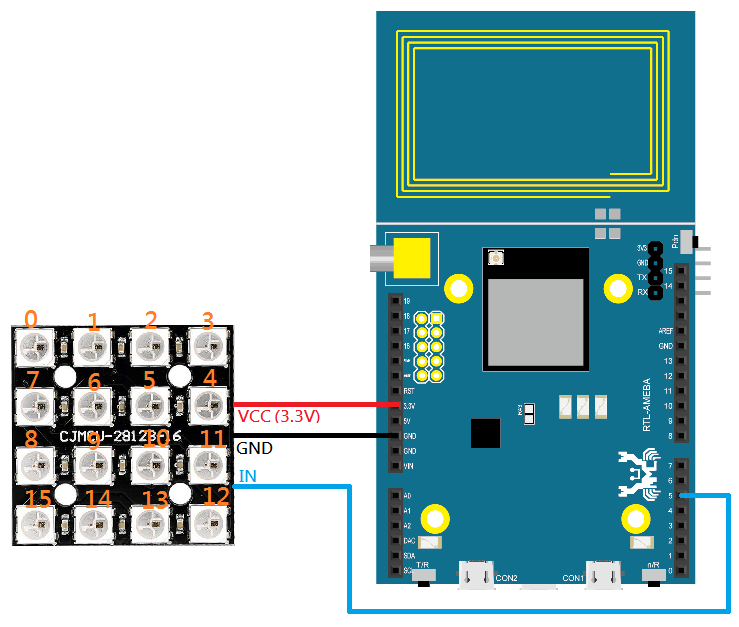
The RTL8195 wiring diagram is shown below:
In the Arduino IDE, open example “File” -> “Examples” -> “AmebaLedStrip” -> “WS2812Bdemo”, push “Reset” button after compiling and uploading to Ameba. Then you can find the effect of 5 lit LED on WS2812B.
Code Reference#define DIGITALPINNUMBER 5Define Ameba signals output pin which is connected to WS2812B DATA IN. We define to D5 in this example.
#define NUM_LEDS 16This example uses WS2812B 4*4 embedded 16 LED, and the parameter is defined to the number of LED on the module.
ws2812b ledstrip = ws2812b(DIGITALPINNUMBER , NUM_LEDS);Initialize ws2812b. Construct Ameba signals output pin and the number of ws2812b LED.
ledstrip.begin();ws2812b starts to operate.
ledstrip.setPixelColor(5,0,10,0); light up No.5 LED as green
ledstrip.setPixelColor(2,0,0,10); light up No.2 LED as blue
ledstrip.setPixelColor(1,10,10,10); light up No.1 LED as white
ledstrip.setPixelColor(3,10,0,0); light up No.3 LED as red
ledstrip.setPixelColor(8,10,0,0); light up No.8 LED as red
Use setPixelColor(index, Red, Green, Blue) to lit ws2812b LED. The LED number starts from No.0 and the LED numbers of the module are shown below.
ledstrip.show();Start to light up the specified LED.
More resources:For more information on the example: https://www.amebaiot.com/en/ws2812b-4x4-rgb-led/
If you are interested to know more about Ameba, do visit the Ameba official website or join the Facebook page or Forum for more discussion!
- Ameba Official Website: https://www.amebaiot.com/en/
- Ameba Facebook Group: https://www.facebook.com/groups/amebaioten
- Ameba Forum: https://forum.amebaiot.com/
Realtek AmebaIoT
 Pammy Leong

Comments