


Hardware components | ||||||
 |
| × | 1 | |||
Software apps and online services | ||||||
 |
| |||||
| ||||||
Hand tools and fabrication machines | ||||||
 |
| |||||
This project turns a Raspberry Pi Zero W into a standalone VT100-style terminal without Linux userspace, using the Circle bare-metal framework.
The screen below gives an overview of the results of an intensive internal testing framework that could selected as an option at startup.
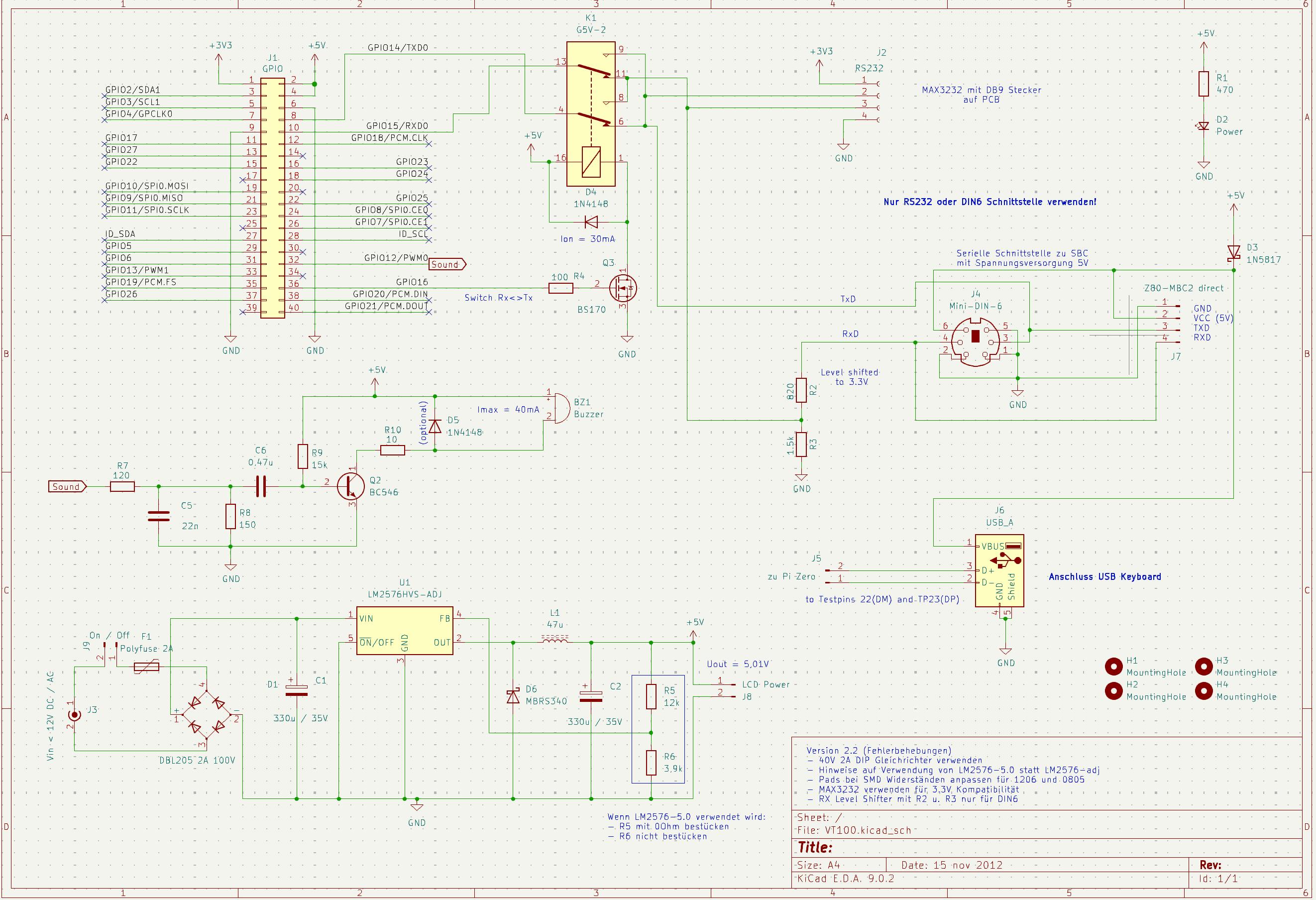
To realize these software capabilities in a practical end-to-end system, dedicated matching hardware was also designed and built. A pcb including the power supply, support for RS232 connector, custom Mini DIN6 connector to my MBC2-Z80 with CP/M, usb type A keyboard and power connector. The board supports characteristic 800 Hz buzzer and key clicks and allows to switch Rx/Tx lines if required to simulate a hard to find null modem cable.
It is also a perfect fit for Michael Gardi’s 60% VT100 replica concept described in https://www.hackster.io/Megardi/2-3-scale-vt100-terminal-reproduction-696b89. To be honest, the 60% replica was the starting point for this project. I designed a custom backplate that fits the VT100 replica and supports the pub and provides access to all connectors at the back of the replica.
The main goal was to create a VT100 terminal emulation that starts within seconds, uses original "CRT-like" VT100 fonts and supports most of the VT100 features. The following pictures show the CRT like DEC VT100 font when used with my MBC2-Z80 and CP/M.
The focus is not only “terminal output on screen, ” but a robust and documented implementation with reproducible build/release artifacts and practical runtime operation.
Key Highlights:- Wide VT100/ANSI/DEC behavior coverage in parser/renderer paths
- ROM-derived VT100 font families with matching graphics/charset support
- Dedicated custom hardware platform built to support the terminal software features in real use
- Practical compatibility target: perfect for Michael Gardi’s 60% VT100 replica project
- Strict WLAN mode separation on TCP :2323 implements Log Mode for diagnostics/commands for debugging and a Host Mode for raw host bridge traffic to connect any host via tcp/ip
- Configurable runtime behavior via VT100.txt and setup dialogs which resemble the original VT100 Set-Up A and B dialogs as well as an custom configuration dialog to change the VT100.txt config file.
- Published release workflow with extensive documentation and deployment guidance
1. Download release v1.0.0 artifacts.
2. Copy the complete VT100/bin directory contents to the SD card boot partition.
3. Edit wpa_supplicant.conf with your local Wi-Fi credentials.
4. Boot the device and connect.
Links:- GitHub Repository: PiZero_VT100
- Release: v1.0.0
- Michael Gardi article: 60% VT100 replica
- Rene Stange: Circle Bare Metal Framework
Active development with a stable, documented baseline in v0.9.0.


Comments