



Hardware components | ||||||
 |
| × | 1 | |||
 |
| × | 1 | |||
 |
| × | 1 | |||
 |
| × | 1 | |||
 |
| × | 1 | |||
 |
| × | 1 | |||
 |
| × | 1 | |||
Software apps and online services | ||||||
 |
| |||||
it is an automatic light intensity control based on the brightness of the surroundings read through the ldr, the intensity of the light will be adjusted itself automatically which can save power consumption and the automatic lights on and off by itself which is more useful at street lights.
Video Link For This Project:Steps To Build This Project:
STEP_1:Set up the Bolt IOT cloud account
1.Open www.cloud.boltiot.com on your web browser and "SignUp” with your credentials.
2. Install BoltIOT app on your mobile and login with your credentials.
3. since no devices linked to your cloud account click on add device to link the bolt iot wifi module to cloud account
4.First, power on your Bolt Module provided in the kit, using a micro USB type android charging cable. Next, once the Device is powered ON the Blue LED on the ESP8266 Chip will start blinking steadily. When this happens click "READY" button shown in the right most Image below. You can swipe left to get there.
5. Turn on your location and turn off your mobile data
6. Next you have to connect the Bolt device to a local Wi-Fi Network which will be displayed by the app for you to select from. Make sure that the Wi-Fi does not have further verification code requirements except the password
7. after adding network click on connect button to add your bolt iot wifi moodule to your bolt cloud account then your module is connected to the cloud.
8. you can see the active of your device in mobile view as well as desktop view in below figures.
1. Boltiot wifi module
2. ldr
3. led
4. 330k ohm resistor
5. 10k ohm resistor
6. bread board
7. jumper wires
8. usb cable
9. power source
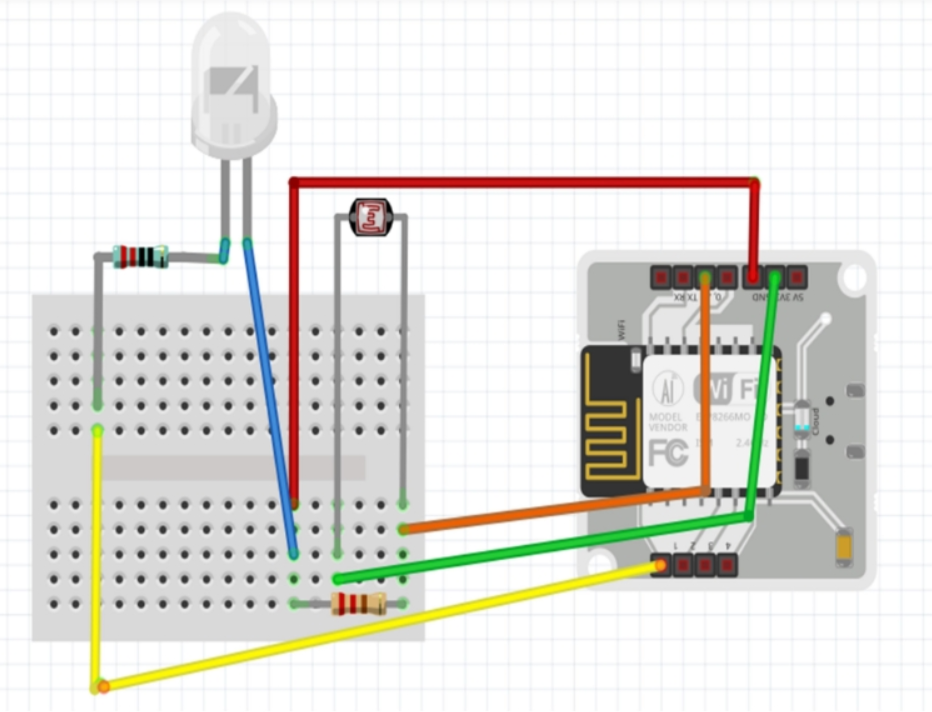
1. Connect negative terminal of LED to GND pin of WiFi Module.
2. Take a 330k ohm resistor and wrap any terminal of resistor around positive
terminal of led.
3. Connect the other terminal of LED to GPIO pin of WiFi Module.
4. Connect any terminal of LDR to A0 pin of WiFi Module.
5. Connect other terminal of LDR to A0 pin of WiFi Module.
6. Take a 10k ohm resistor connect any terminal to GND pin.
7. Connect other terminals of resistor to A0 pin.
8.Connect Bolt iot wifi module to some power supply using the USB cable
Total configuration:Step-3:code explanation
ALGORITHM:step-1: read the LDR sensor value
step-2: Set the intensity of the led according to the read sensor value
step-3: wait for 5 seconds
step-4:repeat from step-1
PROCEDURE:
The main concept of this project is the range of intensity values of light is between 0-255 .The light of the surroundings read by the LDR is subtracted from the maximum values 255 to know the intesity to be required by the surroundings which is set as the intensity of the led.
1. create a new file named conf.py in python programming language
sudo nano conf.py2. write the code inside the file as,
""" BoltIot Configuration """
API_KEY = 'This is your Bolt Cloud account API key'
DEVICE_ID = 'This is the ID of your Bolt device'
Note: You have to replace all the above value with your credentials.
3. create another file . import the file conf.py and modules json and time and boltiot
- json module is used inthis project to convert string to a dictionary
- time module is used in this project to convert string to a dictionarynds and continue again
- bolt module is used to access bolt iot wifi module
import conf,json,time
from boltiot import Bolt
4. call the function Bolt to access the bolt iot wifi module to read values from the wifi module.
mybolt = Bolt(conf.API_KEY, conf.DEVICE_ID)5. convert function is used to calculate the amount of intensity that the led should produce according to the surroundings brightness.
def convert(sensor_value):
	led_intensity= 255-(sensor_value*255/1024)
	return led_intensity
6. In the below code first
read the value from the LDR
store it in response variable
convert the string value into dictionary using json module
call the function convert to know the amount of intensity the LED should produce according to the brightness of the surroundings
convert the float value into integer
set the intensity of the LED by calling the analogWrite function.
wait for 5 seconds and repeat the process again.
while True:
    print ("Reading Sensor Value")
    response= mybolt.analogRead('A0')
    data = json.loads(response)
    print("Sensor value is: " + str(data['value']))
    try:
        sensor_value = int(data['value'])
        print("Calculating required Light Intensity for LED")
        led_value_float=convert(sensor_value)
        led_value= int(led_value_float)
        print(led_value)
        mybolt.analogWrite('1', led_value)
    except Exception as e:
        print ("Error occured: Below are the details")
        print (e)
    time.sleep(5)
Final Readings:

Comments