


Hardware components | ||||||
 |
| × | 1 | |||
 |
| × | 1 | |||
 |
| × | 1 | |||
 |
| × | 1 | |||
 |
| × | 1 | |||
| × | 1 | ||||
Software apps and online services | ||||||
| ||||||
1. Steps for building the project
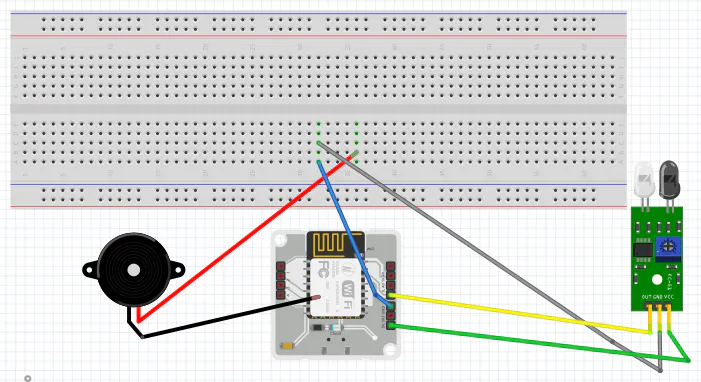
Given below are the circuit connections.
The input from Ir sensor is taken at digital pin 0 and output for buzzer is written at digital pin
1. The power supply to Ir sensor is given using 5V pin of the bolt module. The longer terminal
of buzzer is connected to pin 1 of wifi module and shorter pin is connected to ground of bolt module.
2.Configuration File
The python coding for this project has been done in Termux, you can do in Digital Ocean/Ubuntu also.
Step-1
Download Termux on any android device from Open it
1. Enter pkg update -Y and then pkg upgrade -Y
2. Now you have to install python for that type pkg install python
3. Now type pip3 install boltiot 4.Now type pkg install nano
4. Create a config file to hold the configuration variables for Boltiot and
Telegram. Type the command ` nano conf.py` to create a new file and edit it.
3.Paste the following lines of code into the conf file and press CTRL + X followed by ENTER key to save it.
5. After ready with telegram and all setup type python3 ” your file name.py”
6. It will make the program run
7. After your order will be placed in the box you will get message on telegram.
8. After 6 hours you will get a message that you can remove your parcel
9. It will make the program run
10. After your order will be placed in the box you will get message on telegram.
11. After 6 hours you will get a message that you can remove your parcel



Comments