


Hardware components | ||||||
 |
| × | 1 | |||
 |
| × | 1 | |||
Software apps and online services | ||||||
 |
| |||||
 |
| |||||
Build my own smart hydration tracking bottle using an ESP32-C3 Super Mini. The VL53L0X laser sensor measures water level in real time and streams data wirelessly over Bluetooth Low Energy to a companion Android app. The system supports live distance measurement, BLE notifications, and real-time UI updates. The project demonstrates practical implementation of I2C sensor interfacing, BLE communication, foreground background services, and modern reactive Android app development.
- ESP32-C3 Super Mini Development Board
- VL53L0X Laser Distance Sensor
- Li-ion Battery (3.7V)
- USB Cable
- Connecting wires
- Water Bottle with Screw Cap
- Android Smartphone
The ESP32-C3 is a low-power RISC-V microcontroller with integrated Wi-Fi and Bluetooth 5 LE support. It is widely used for IoT prototyping, wearables, and wireless sensor nodes. The compact Super Mini form factor makes it ideal for embedding inside a bottle cap with minimal space requirements.
- RISC-V 32-bit single-core processor at 160 MHz
- Integrated Bluetooth 5 LE and Wi-Fi 802.11 b/g/n
- 22 programmable GPIO pins
- Ultra-low deep-sleep current (5 µA)
- 3.3V operating voltage
- Supports SPI, I2C, UART, and ADC interfaces
- Compatible with Arduino IDE and ESP-IDF
In this project, the ESP32-C3 acts as the central controller. It reads raw distance measurements from the VL53L0X over I2C and broadcasts the values to the Android smartphone via BLE notifications every 200ms.
VL53L0X Laser Distance SensorThe VL53L0X is a Time-of-Flight laser ranging sensor from STMicroelectronics capable of measuring distances up to 2 meters with millimeter-level accuracy. It communicates over I2C and operates at 3.3V, making it directly compatible with the ESP32-C3 without any level shifting.
- Time-of-Flight (ToF) laser ranging technology
- Measurement range: 50 mm to 2000 mm
- 940 nm invisible laser emitter (Class 1, eye-safe)
- I2C interface (default address 0x29)
- Operating voltage: 2.6V to 3.5V
- Up to 50 readings per second
- Compact 2.4 x 4.4 mm sensor footprint
- Compatible with 3.3V and 5V logic
In this project, the VL53L0X sensor is mounted inside the bottle cap pointing downward. It continuously measures the distance from the cap to the water surface and sends the raw millimeter value directly to the Android app over BLE.
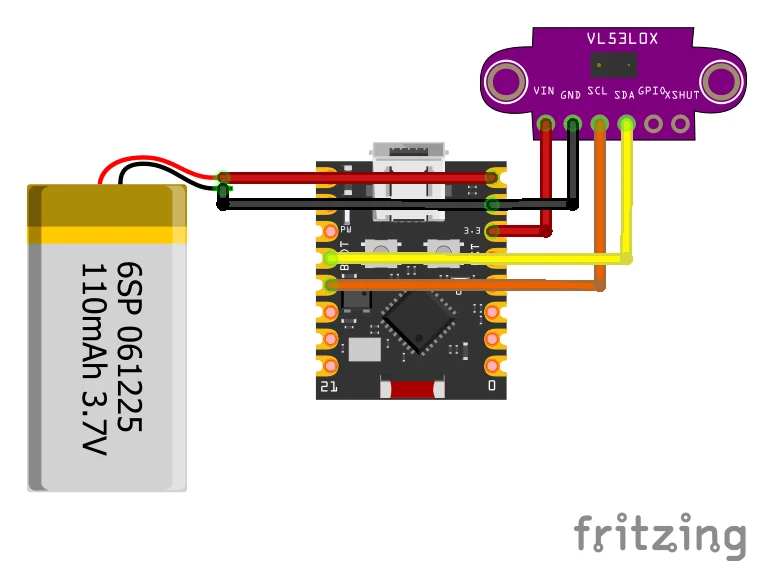
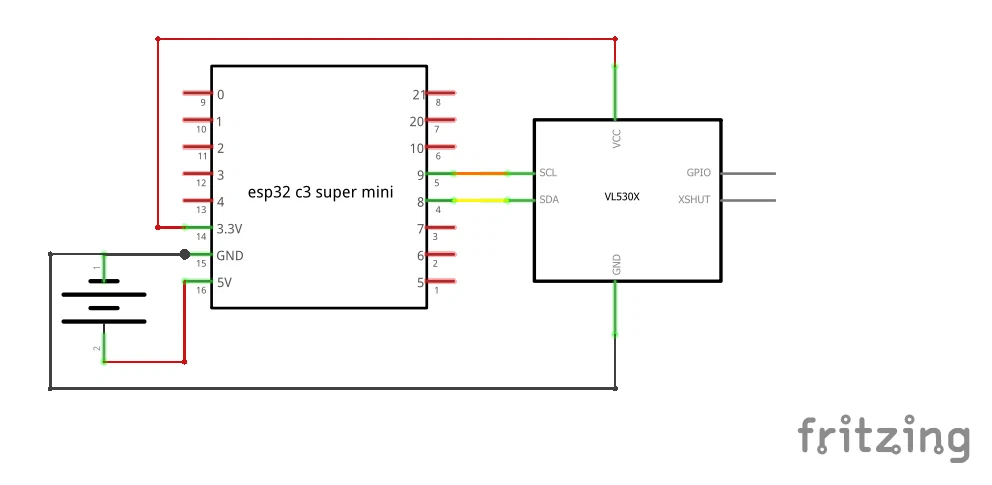
Circuit DiagramThe VL53L0X sensor communicates with the ESP32-C3 using the I2C interface. Only four connections are required: VCC, GND, SDA, and SCL. The sensor operates directly at 3.3V, making it fully compatible with the ESP32-C3 without any level shifter.
Fig. ESP32-C3 and VL53L0X Circuit Connections
VL53L0X Pin ESP32-C3 Super Mini Pin Description
VIN 3.3V Main Power Supply
GND GND Common Ground
SDA GPIO8 I2C Data Line
SCL GPIO9 I2C Clock Line
The ESP32-C3 reads distance measurements from the VL53L0X sensor over I2C and transmits the values wirelessly to the Android application using Bluetooth Low Energy notifications.
AssemblyDrill a small hole in the center of the bottle cap and mount the VL53L0X sensor flush with the underside, pointing directly down. Secure the ESP32-C3 and Li-ion battery on top of the cap using epoxy or hot glue. Connect the sensor to the ESP32-C3 using four short jumper wires for VCC, GND, SDA, and SCL according to the circuit connections table. Define the SDA and SCL pins explicitly in the firmware code using Wire.begin(8, 9) to ensure proper hardware I2C mapping on the compact Super Mini board. No external breadboard or additional wiring is needed.
Soldering and final assembly of ESP32-C3, VL53L0X sensor, and battery on the bottle cap
Downloading and Running the Android ApplicationThe complete Android application source code is available in the GitHub repository. Open Android Studio and select File → New → Project from Version Control. Paste the repository URL and clone the project.After Gradle sync completes, connect your Android phone or start an emulator. Press the Run button to build and install the application.Grant Bluetooth and notification permissions when prompted. The app will automatically scan for the Smart Bottle device and connect over BLE.



Comments