


Hardware components | ||||||
| × | 1 | ||||
 |
| × | 1 | |||
 |
| × | 1 | |||
 |
| × | 1 | |||
 |
| × | 1 | |||
 |
| × | 1 | |||
Software apps and online services | ||||||
 |
| |||||
Turn simple hand gestures into seamless control with this DIY Wireless Air Mouse using MPU6050 & ESP32-C3. In this project, you’ll build a compact motion-controlled mouse that translates real-time orientation and movement data from the MPU6050 gyroscope and accelerometer into cursor actions via ESP32-C3 Development Board built-in Bluetooth Low Energy (BLE). Ideal for presentations, media control, and interactive setups, this air mouse offers a fun and practical way to explore motion sensing, wireless communication, and embedded programming. Whether you're a beginner or an electronics enthusiast, this project combines hardware and software to create an intuitive, gesture-based interface without the need for traditional peripherals.
Ultra-compact WiFi + BLE microcontroller used as the brain of the system.
- ESP32-C3 (RISC-V, up to 160 MHz)
- WiFi + Bluetooth 5 LE
- 4MB Flash
- USB-C programming
- 3.3V logic
- Supports I2C, SPI, UART, PWM, ADC
Handles sensor data and sends BLE mouse signals.
MPU6050 IMU SensorThe MPU6050 is a low-cost motion sensor combining a 3-axis accelerometer and 3-axis gyroscope on a single chip. It measures movement, orientation, and rotation, making it suitable for motion-based control systems.
- 3-axis accelerometer + 3-axis gyroscope
- Communication: I2C
- Power Supply: 3V–5V
- 16-bit ADC for high accuracy
- Built-in Digital Motion Processor (DMP)
- Configurable I2C address
- Auxiliary I2C pins for additional sensors (e.g., magnetometer)
- Integrated temperature sensor
In this project, it tracks hand motion and provides real-time data used to control the cursor movement.
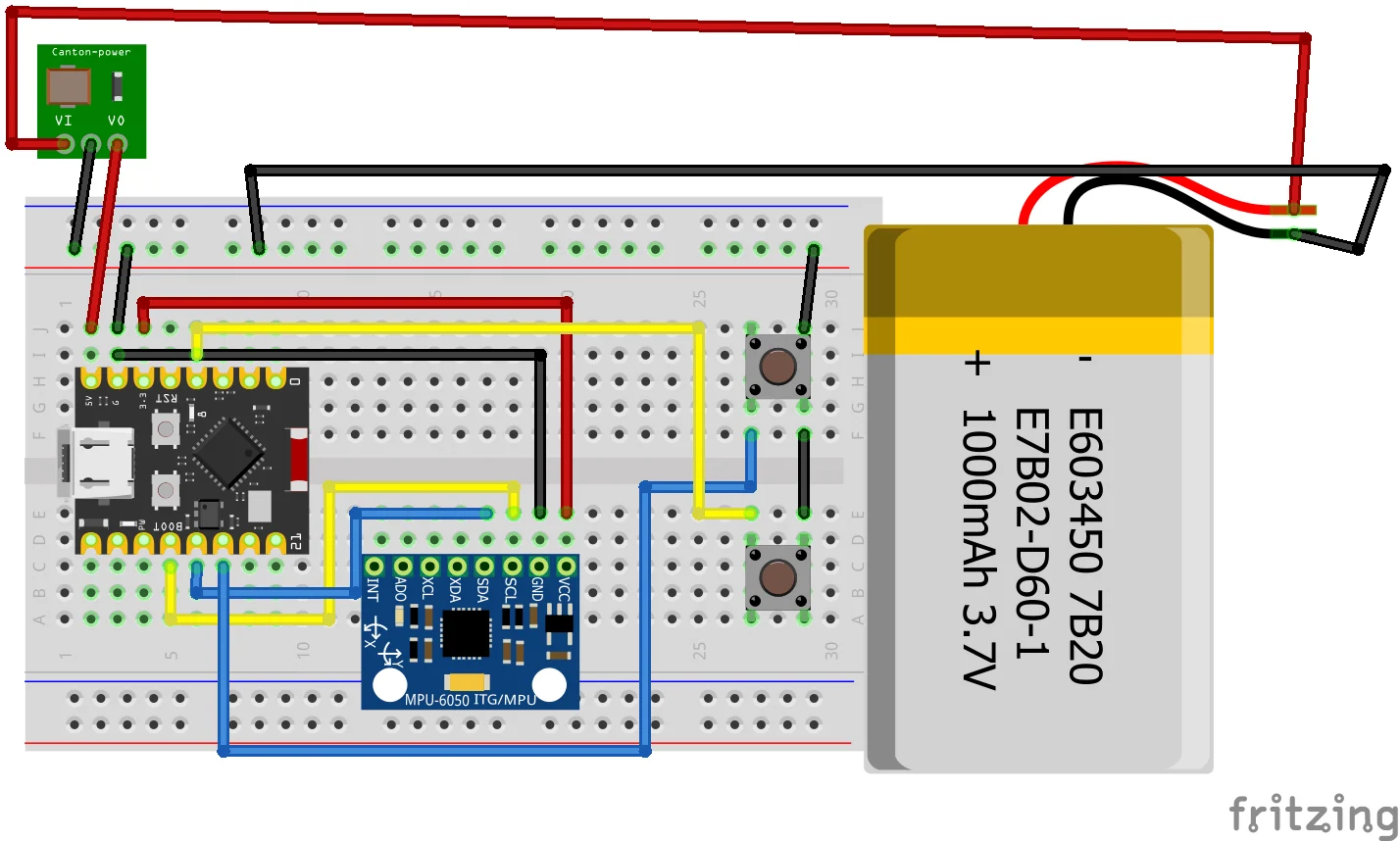
Circuit ConnectionFig. Circuit Diagram
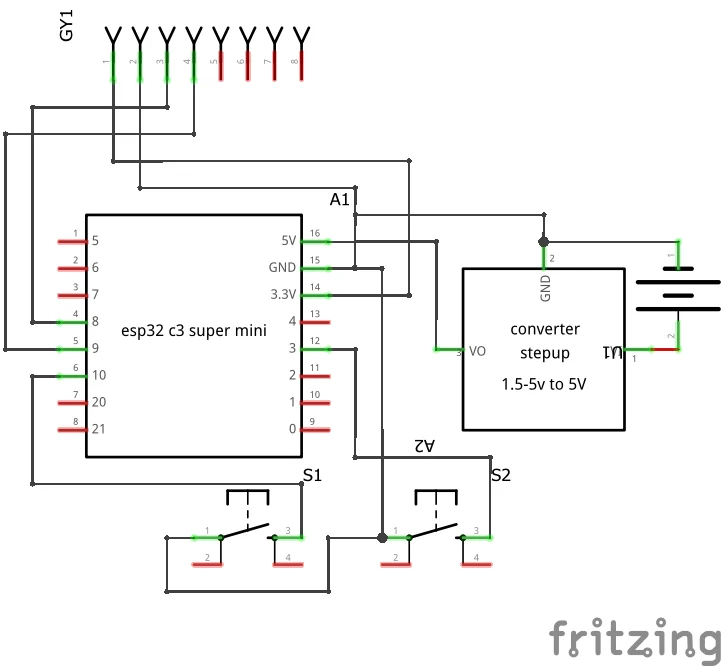
Fig. Schematic Diagram
MPU6050 to ESP32-C3- VCC → 3.3V
- GND → GND
- SDA → GPIO 4
- SCL → GPIO 5
- GPIO 2 → Button → GND
- GPIO 4 → Button → GND
(INPUT_PULLUP configuration)
Code ExplanationLibraries UsedArduino · C++
#include <Wire.h>
#include <HijelHID_BLEMouse.h>#include <Wire.h> → Handles I2C communication with MPU6050.#include <HijelHID_BLEMouse.h> → Enables ESP32 to act as a BLE mouse.
Arduino · C++
#define MPU_ADDR 0x68
#define LEFT_BTN 3
#define RIGHT_BTN 10

#define MOUSE_LEFT MouseButton::Left
#define MOUSE_RIGHT MouseButton::Right- MPU_ADDR → I2C address of MPU6050
- LEFT_BTN / RIGHT_BTN → Button inputs
- MOUSE_LEFT / MOUSE_RIGHT → BLE mouse button mapping
Arduino · C++
Wire.begin(8, 9);Initializes I2C using GPIO 8 (SDA) and GPIO 9 (SCL).
BLE Connection HandlingThe system checks if BLE is paired before sending data. If not paired, it pauses execution and prints status messages for debugging.
Sensor Data ReadingArduino · C++
Wire.beginTransmission(MPU_ADDR);
Wire.write(0x43);
Wire.endTransmission(false);
Wire.requestFrom(MPU_ADDR, 6);
Reads gyroscope values (gx, gy, gz). Includes error handling if data is not received.
Motion ConversionArduino · C++
float dx = -gy * sensitivity;
float dy = -gx * sensitivity;
Maps rotational motion to cursor movement axes.
Noise FilteringArduino · C++
if (abs(dx) < 0.5) dx = 0;
if (abs(dy) < 0.5) dy = 0;

smoothed_dx = smoothed_dx * 0.7 + dx * 0.3;
smoothed_dy = smoothed_dy * 0.7 + dy * 0.3;- Deadzone removes small unintended movements
- Smoothing stabilizes cursor motion
Arduino · C++
bool leftPressed = (digitalRead(LEFT_BTN) == LOW);
bool rightPressed = (digitalRead(RIGHT_BTN) == LOW);
Button states are read and mapped to BLE mouse click events.
Cursor OutputArduino · C++
mouse.move(move_x, move_y);Sends processed cursor movement to the connected device via BLE.
Debug OutputSerial output prints sensor values, computed movement, and button states at controlled intervals. Also reports BLE connection status and MPU read errors.
Sends cursor movement to the connected device via BLE.
Working of Loop- Reads gyroscope data continuously from MPU6050.
- Converts motion into cursor movement.
- Applies deadzone and smoothing for stability.
- Checks button states for clicks.
- Sends movement and click data over BLE.
The ESP32-C3 continuously reads motion data from the MPU6050 sensor using I2C. This data is processed into smooth cursor movement and transmitted via Bluetooth Low Energy as a HID mouse. Button inputs allow full mouse interaction including left and right clicks.
Why this Architecture Works- Direct sensor → ESP32-C3 → BLE pipeline eliminates intermediate latency.
- Gyroscope enables continuous motion tracking without external reference.
- BLE HID allows plug-and-play usage without additional drivers.
- Compact ESP32-C3 design enables handheld implementation.
- Minimal hardware reduces complexity and improves reliability.
- Presentation Control: Navigate slides using hand gestures.
- Smart TV Control: Replace traditional remotes with motion input.
- Gaming: Use motion for aiming and interaction.
- Assistive Technology: Enable touchless computer control.
- Interactive Systems: Gesture-based control for installations.
The system successfully converts hand motion into cursor movement using the MPU6050 sensor. The ESP32-C3 processes this motion data and transmits it wirelessly via Bluetooth as a HID mouse. Cursor movement is smooth, and both left and right click functions operate reliably. The device works without any surface, demonstrating a fully functional wireless air mouse system.




Comments