



Hardware components | ||||||
 |
| × | 1 | |||
| × | 1 | ||||
Software apps and online services | ||||||
| ||||||
 |
| |||||
Hand tools and fabrication machines | ||||||
 |
| |||||
 |
| |||||
QSense is an AI assistant that protecs both machines and people on a factory floor. It monitors machines for early signs of faults using vibration sensing, and watches workers for PPE compliance using a camera, all running entirely offline.
When it detects a problem, QSense doesn't just alert; it closes the loop: logging the issue on a dasd, assigning the repair to the right technician, and giving them AI-powered repair guidance on their phone. It brings predictive maintenance and safety insight to MSME factories that usually can't afford it.It is built as three devices working together as one closed loop:QSense-Node: On-device vibration anomaly detection
QSense-Web: Copilot+ PC, MQTT hub, dashboard, alerting, PPE detection
QSense-App: Phone device repair diagnosis assistant
1.Detect, Arduino UNO Q (QSense-Node)
- Continuous IMU vibration sampling
- On-device TinyML anomaly detection, trained with Edge Impulse: Keras for classification, K-means for anomaly detection
- Network architecture: 1 input layer, 2 dense hidden layers, 1 output layer
- Model performance: 100% F1 score (validation), 1.7K peak RAM, 20.0K flash usage, 1 ms inference time
- Deployed to the Arduino UNO Q via App Lab's
vibration_anomaly_detectionbrick, plus aweb_uibrick that shows per-device details - Publishes anomaly events to MQTT
- Output: machine ID, affected component, anomaly score, timestamp
2. Manage, Snapdragon Copilot+ PC (QSense-Web)
- MQTT broker receives anomaly events from all QSense Nodes
- Stores machine history and event logs
- Generates severity-based alerts
- Runs NPU-accelerated PPE detection on the live camera feed
- Displays a real-time factory dashboard
- Automatically assigns the repair task to the appropriate technician
- Publishes the assigned task to the technician's mobile device
- Acts as the central orchestration hub for the factory
3. Repair, Snapdragon phone (QSense-App)
- Technician receives the assigned task
- Views machine and fault details
- On-device LLM (RAG-grounded) generates ranked causes and fixes, no cloud round-trip, works even with poor network coverage
- Technician marks the job resolved once fixed
4. Resolve, the loop closes
- Resolution is published back over MQTT
- Dashboard alert clears
- Node's baseline resets and monitoring resumes
Small and medium manufacturing enterprises (MSMEs) run legacy machinery that cannot easily be replaced or retrofitted with expensive proprietary industrial IoT systems. Two problems compound on the factory floor:
- Machines fail without warning. Bearings, motors, and moving parts degrade gradually, and by the time a fault is audible or visible, the machine has often already gone down, causing unplanned downtime that MSMEs can least afford.
- Worker safety compliance is manually policed. PPE compliance (hard hats, safety vests) is typically checked by a human walking the floor, which does not scale and misses violations.
On top of this, most available predictive-maintenance and vision-AI products assume cloud connectivity and recurring subscription costs, both of which are hard sells for MSMEs that cannot afford to send proprietary production data off-site or pay ongoing SaaS fees, and which may not have reliable internet on the shop floor at all.
QSense addresses this by being a privacy-first, on-premises system: no cloud, no subscription, no video or vibration data ever leaves the floor. Everything runs on hardware already sitting in the plant (or affordable add-ons), and detection, alerting, and repair guidance all happen locally, right down to the diagnosis step on the technician's phone.
This matters because it makes predictive maintenance and safety monitoring accessible to the MSMEs who need it most but can least afford typical industrial IoT deployments, without asking them to give up control of their data.
DemoDemo flow, as walked through in the QSense-Web repo:
- Cross the severity threshold on a machine (by shaking the Modulino Movement or tapping the motor casing, or injecting a reading over MQTT). Its card escalates live on the dashboard.
- Stand in front of the camera without a hard hat. Live Monitor flags missing helmet, about 3 seconds later a PPE alert appears with an evidence snapshot.
- Open the machine page for the live severity chart, anomaly log, and downtime table.
- Acknowledge/resolve from a phone and watch the downtime record close, the dashboard alert clear, and the Node's baseline reset.
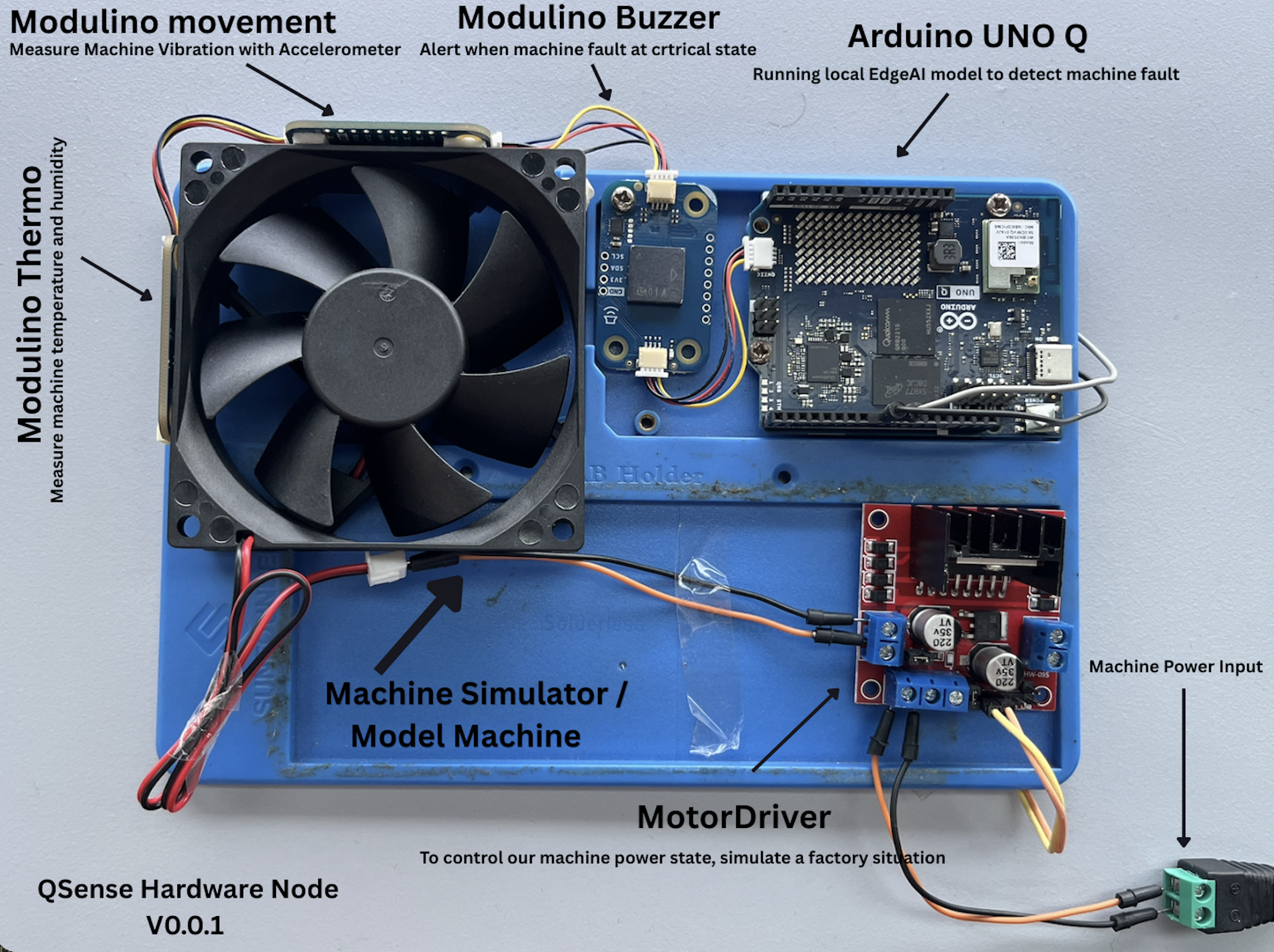
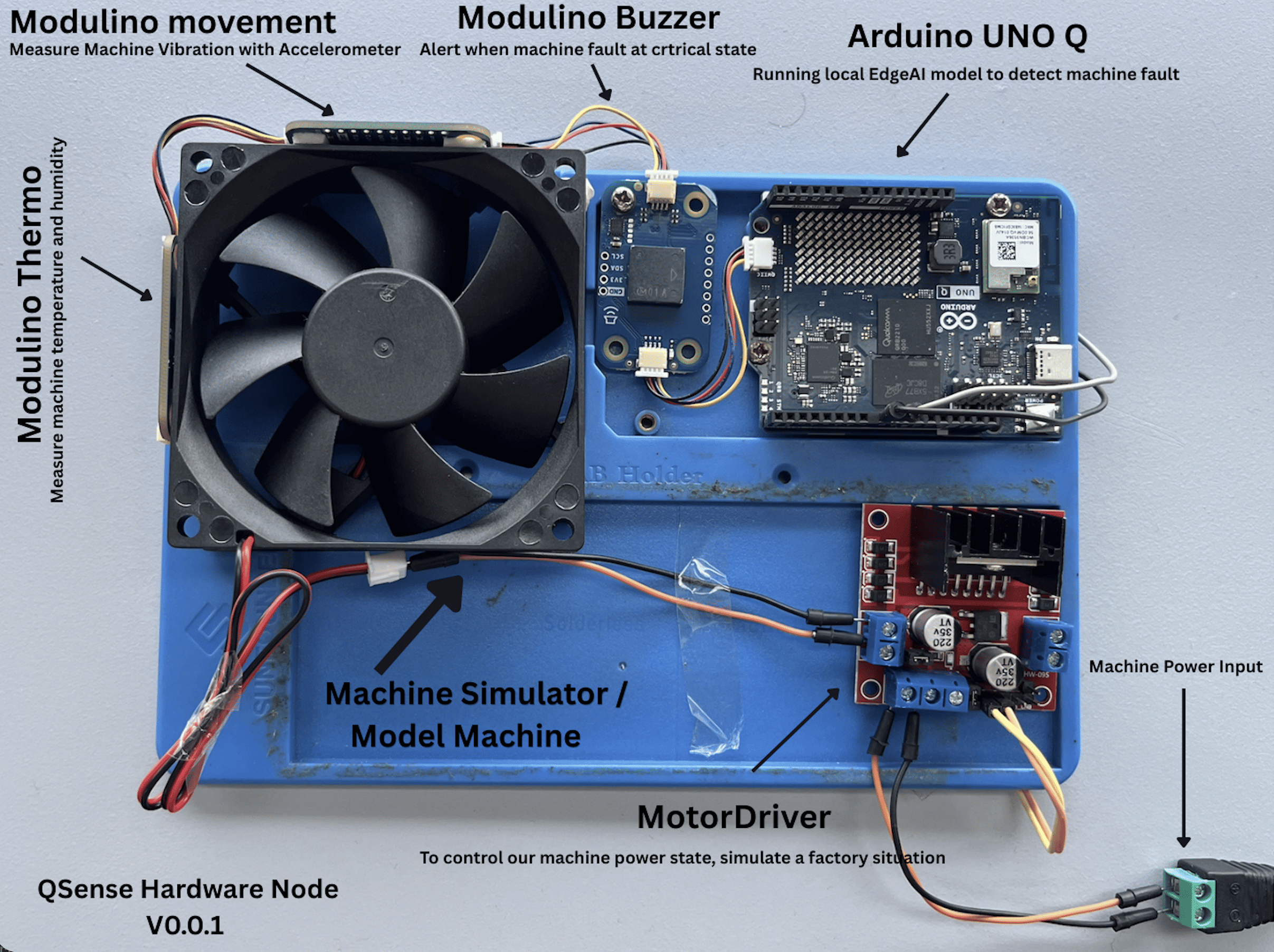
The three Modulino sensors are wired in a Qwiic daisy-chain (no soldering needed):
Arduino UNO Q -> Modulino Buzzer -> Modulino Movement -> Modulino ThermoThe motor driver (L298N) is wired to GPIO pins D9/D10 as an emergency-stop actuator for the demo motor.
Software / firmware behavior:
- Reads raw accelerometer data (X, Y, Z axes) from the Modulino Movement sensor at 62.5 Hz
- Reads temperature and humidity from the Modulino Thermo sensor at 1 Hz
- Runs the vibration anomaly detection model locally on the board
- Streams live vibration and environment data to a real-time web dashboard (served on the board itself, port 7000)
- Fires an alert (anomaly score + timestamp) when vibration deviates from the learned baseline
- Publishes a structured MQTT alert (
machine/anomaly/qsense/machine/monitoring) on every anomaly event - Triggers a 3-second buzzer alarm via Modulino Buzzer when the anomaly score exceeds the critical threshold (>= 5.0)
- Accepts dynamic threshold adjustments from the dashboard without restarting
- Exposes a reset endpoint so the Copilot+ PC can reset the baseline once a repair is confirmed
- Sends a health heartbeat every 30 seconds (
qsense/machine/health) - On critical anomaly, the machine is automatically stopped via two GPIO pins (D9/D10) wired to the motor driver, and restarts only when the alert is ackno
Deployment: the trained model was exported from Edge Impulse and deployed to the Arduino UNO Q via Arduino App Lab as the vibration_anomaly_detection brick, alongside a web_ui brick that serves the dashboard and handles WebSocket messages between the Python backend and browser.
Tools used: Arduino App Lab, Arduino App CLI (arduino-app-cli), Edge Impulse Studio, an MQTT client (mosquitto_pub/sub or MQTTX) for testing.
The PC side is a FastAPI hub + React dashboard, with all computer vision running on the Hexagon NPU via onnxruntime-qnn (Windows ARM64, no OpenCV, no torch, no CUDA).
What it does:
- PPE compliance detection on a live camera feed: per-person hard-hat / safety-vest status, annotated MJPEG stream, evidence snapshots on violation
- MQTT alert brain: bridges
qsense/machine/monitoringseverity into warning/critical alerts with debounce, cooldown, hold-down auto-clear, and an ack/resolve lifecycle audited to SQLite - Downtime records: every machine alert becomes a downtime row (detection to acknowledgement), summarized as a candle chart and a per-machine table
- Live dashboard: Overview / Live Monitor / Alerts / Settings / per-machine detail (live severity chart, anomaly log, downtime table), streamed over MQTT-WebSockets to PCs and phones alike
- Runtime-tunable detection: score threshold, PPE requirements, severity thresholds, and alert timing all hot-reload from the Settings page, no restart
AI models, PPE compliance on the NPU:
Two ONNX models run per frame on the Hexagon NPU (QNN execution provider, HTP backend):
USB camera --ffmpeg--> PPE pipeline (Hexagon NPU) --> /stream/camera (MJPEG)
                                   |
                                   v qsense/ppe/snapshot (2 Hz)
QSense-Node --qsense/machine/monitoring-->  Mosquitto (:1883 TCP / :9001 WS)
                                   |                        ^
                                   v                        | live (mqtt.js)
                        FastAPI hub (:8000) --alerts--> Dashboard / phone
                                   +- SQLite (history via REST /api/*)
AI models for PPE compliance on the NPU: two ONNX models run per frame on the Hexagon NPU (QNN execution provider, HTP backend). YOLOv8-PPE (Hexmon/vyra-yolo-ppe-detection, a YOLOv8m fine-tune, CC-BY-4.0 licensed) handles PPE item detection across 14 classes, takes a 640x640 RGB input, and runs at full float precision. face_det_lite (from Qualcomm AI Hub Models) handles person anchoring by face, takes a 640x480 grayscale input, and runs at w8a8 precision.
Why YOLOv8-PPE instead of GearGuardNet: the team started with Qualcomm AI Hub's purpose-built PPE model, GearGuardNet (w8a8 / w8a16 exports still kept in ppe-detection/), and hit its limits fast. It only had 2 classes, helmet and vest, with no explicit absence signal, so "no helmet detected" was indistinguishable from "helmet missed by the detector, " which required per-class threshold overrides and a second zoomed inference pass for distant workers. Its quantized weights also cost accuracy at range. The YOLOv8m PPE fine-tune fixed this structurally with explicit NO-Hardhat and NO-Safety Vest classes, 14 total classes leaving headroom for more safety rules, and full-precision (float) inference on the NPU while still getting roughly a 5 to 6x NPU speedup.
One caveat found in the model's own training data (confusion_matrix.png): the Person class is severely under-represented, with 251 validation instances versus 8254 for Hardhat, making it unreliable. So the team ignores Person entirely and anchors people with face_det_lite instead; every detected face becomes a person, and PPE items are matched geometrically to head and torso regions derived from the face box.
Source code for the Web hub: entry point in server/run.py, vision pipeline in server/pipeline.py, MQTT bridge in server/mqtt_client.py, alert manager in server/alerts.py, tracking and overlay drawing in server/tracking.py, camera capture in server/camera.py, hot-reloaded runtime config in server/config.py, SQLite persistence in server/db.py, broker listener config in server/mosquitto/qsense.conf, YOLOv8-PPE pre/post-processing in ppe-detection/yolo_ppe.py, face detector decode in ppe-detection/face_detector.py, compliance logic in ppe-detection/compliance.py, ONNX session factory in ppe-detection/ppe_detector.py, React dashboard pages in dashboard/src/pages, and the build/launch script in start_all.ps1
App, Snapdragon phone (Repair / Diagnose stage)The App is a Kotlin Multiplatform and Compose Android app that turns an MQTT fault alert into ranked, on-device-generated repair guidance. A fault alert arrives over MQTT, relevant failure modes are retrieved from an on-device knowledge base, an on-device LLM turns them into ranked causes and fixes, and the operator picks one and resolves it, all on the phone, with no cloud round-trip. It is built with Kotlin Multiplatform and Compose (Android target), the Qualcomm GenieX on-device LLM, the HiveMQ MQTT 5 client, and RAG (retrieval-augmented generation) grounding
Source code for the App stage is : QSense — Maintenance Assistant.
MQTT alert -> RAG lookup (known issues for that part) -> GenieX on-device LLM
           -> ~5 ranked causes & fixes -> operator picks one -> Resolution + ack over MQTT
Future upgrade already scoped: camera-based part inspection, phone photographs a part, a PC vision service (RTMDet/ONNX) returns an annotated diagnosis; prototyped in server/ but not shipped in v1.
Source: shared/commonMain · shared/androidMain · docs/SETUP.md · docs/MQTT-CONTRACT.md
Dataset DetailsVibration model (Node): Modulino Movement (LSM6DSOX IMU), accX/Y/Z at 100Hz. Labels: nominal and off. Total: 182 samples, 9m 6s. Public Edge Impulse project: https://studio.edgeimpulse.com/public/1056545/live
Raw accX/Y/Z (100Hz) -> Spectral Analysis (DSP) -+-> NN Classifier (Keras) -> nominal/off
                                                  +-> K-means anomaly score
Performance: F1 100% (validation), F1 76.2% (test), 1ms inference, 1.7KB RAM, 20.0KB flash.
PPE model (Web): no dataset trained from scratch. Uses Hexmon/vyra-yolo-ppe-detection (YOLOv8m fine-tune, CC-BY-4.0) and face_det_lite (Qualcomm AI Hub). The team's own reading of that model's confusion matrix found Person under-represented (251 vs. 8254 instances), driving the face-anchoring workaround.
Repair model (App): no dataset trained from scratch either. Qwen3-0.6B (4-bit GGUF) used as-is; the team-built asset is the RAG known-issues dataset itself, retrieved by keyword match per part.
Source: ppe-detection/yolo_ppe.py · shared/commonMain (KnowledgeBase)
- Vibration model gap: 100% validation F1 vs. 76.2% test F1, on a small 182-sample dataset. More labelled data across machines/faults would close this gap.
- PPE person-class imbalance: the base model's
Personclass is under-trained; a better-balanced PPE model could drop the face-anchoring workaround. - Closed-loop automation: the
qsense/machine/<id>/cmdtopic for the hub to auto-stop a node is reserved but off by default. - Scale: current demo is one machine, one Node; more concurrent nodes and real machinery is the next test.
- App LLM scope: team notes a larger (~1B) instruct model would let the LLM lead ranking, not just select and adapt.
- App vision upgrade: camera-based part inspection is prototyped but not shipped in v1.
Prerequisites: Arduino UNO Q + Modulino Movement/Thermo/Buzzer + Qwiic cables; L298N driver + 5-12V DC motor + jumpers + external PSU; a Snapdragon/ARM64 Windows 11 PC with a camera; an Android phone (Snapdragon 8 Elite class) with Android Studio/Gradle + adb; Arduino App Lab + CLI; Python 3.11 ARM64, Node.js LTS ARM64, Mosquitto 2.x, ffmpeg (ARM64) on the PC.
1. Clone
git clone --recurse-submodules [email protected]:VibeCheck-Q/QSense.git
git clone [email protected]:VibeCheck-Q/QSense-Node.git
git clone [email protected]:VibeCheck-Q/QSense-Web.git
git clone [email protected]:VibeCheck-Q/QSense-App.git
2. Wire the Node
UNO Q Qwiic port -> Movement -> Thermo -> Buzzer   (plug-and-play)
D9 -> L298N IN1, D10 -> L298N IN2, GND -> GND, external PSU -> 12V/GND
Mount Movement magnetically on the motor.
3. Configure and start the NodeEdit constants in python/main.py(MQTT_BROKER, MACHINE_NO, PART_NAME, PART_NO), then:
arduino-app-cli app start user:qsense-machine-monitoring
arduino-app-cli app logs user:qsense-machine-monitoring
Open http://<UNO-Q-IP>:7000 to see the on-board dashboard.
4. Set up the Web hubCopy the TCP 1883 + WS 9001 listeners from server/mosquitto/qsense.confinto Mosquitto's config, restart it, then:
.\start_all.ps1Open http://localhost:8000/; check the MQTT LIVE badge. Allow phones through the firewall:
netsh advfirewall firewall add rule name="QSense" dir=in action=allow protocol=TCP localport=8000Point the Node at the hub's IP (e.g. 192.168.8.153:1883).
5. Set up the AppSet MqttConfig.host in AndroidConfig.kt to the hub's IP, then:
./gradlew :androidApp:assembleDebug
./gradlew :androidApp:installDebug
adb push Qwen3-0.6B-Q4_0.gguf /sdcard/Android/data/com.example.qsense/files/models/qsense-llm/
Full detail: docs/SETUP.md
6. Run the demo, per Section 3.
7. Optional, test over MQTT directly
mosquitto_pub -h 127.0.0.1 -t qsense/machine/monitoring \
  -m '{"alertId":"t1","machineNo":"M-01","partName":"Fan Motor","partNo":"PN-001","severity":45,"timestamp":"2026-07-12T00:00:00"}'
mosquitto_pub -h "{AI PC IP}" -t "qsense/machine/ack" -m '{"alertId": "M-01", "resolved": 1}'
Troubleshooting: blank anomaly list after refresh is normal on first run. No MQTT messages: check broker address and network. Board not detected: check USB, arduino-app-cli app list. Buzzer fires often: raise the threshold slider. Motor won't stop: check D9/D10 wiring. App shows no AI guidance: confirm the GGUF model path (it still works via plain RAG without it).
- Node: Edge Impulse (Keras + K-means), Arduino UNO Q. QSense-Node
- Web: Python, FastAPI, Mosquitto MQTT, NPU YOLOv8m PPE detection, SQLite, React. QSense-Web
- App: Kotlin Multiplatform + Compose, Qualcomm GenieX (Qwen3-0.6B), HiveMQ MQTT 5, CameraX. QSense-App
QSense (umbrella): MIT, see each repo for its own LICENSE. QSense-Web: hackathon project; bundled weights keep their own licenses (Hexmon/vyra-yolo-ppe-detection CC-BY-4.0, face_det_lite/GearGuardNet BSD-3-Clause). QSense-Node: Copyright Arduino s.r.l., MPL-2.0. QSense-App: no separate license file in the repo; its model/runtime (Qwen3-0.6B, GenieX) come from Qualcomm AI Hub, used as-is.


Comments