



Hardware components | ||||||
_ztBMuBhMHo.jpg?auto=compress%2Cformat&w=48&h=48&fit=fill&bg=ffffff) |
| × | 1 | |||
 |
| × | 1 | |||
 |
| × | 1 | |||
 |
| × | 1 | |||
 |
| × | 1 | |||
Software apps and online services | ||||||
| ||||||
Hello fellow engineer/hobbiest if you were finding getting started with arduino you are at the right place..
Now all you need to do is follow instruction and you'll be good to go
1 - Download and install Arduino IDE to your Desktop/Laptop
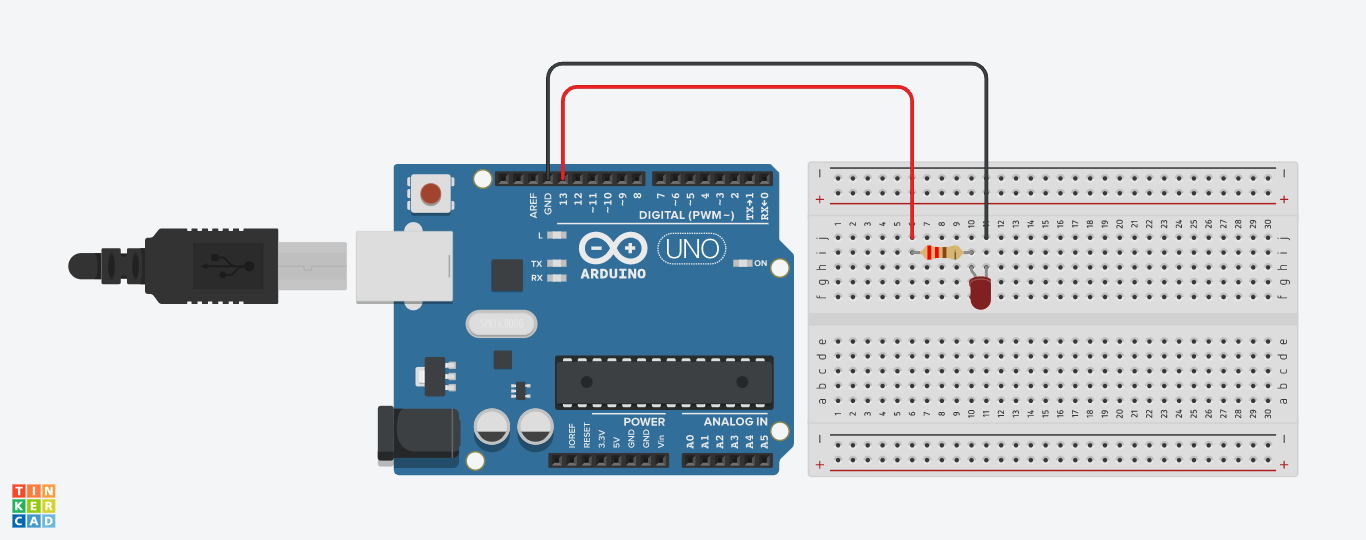
2 - Take the breadboard and connect LED according to the schematic
3 - Connect LED which is on Breadboard to the Arduino using jumper cables
4 - Now connect Arduino to your Desktop/Laptop using Arduino's USB A to USB B cable
5 - Now download the code that i've attached here and open it in arduino
6 - Before uploading the code you need to go to Tools > Boards and select the board you have in this case we have Arduino UNO so we'll select Arduino UNO
7 - Now next we have to select the port where arduino is connected to your Desktop/Laptop by going again to Tools > Port and select the appropriate port
8 - Now save and upload the code and you're done, You can also modify the code to blink the LED fast and slow by changing delay amount

Comments