



Hardware components | ||||||
 |
| × | 1 | |||
 |
| × | 1 | |||
 |
| × | 2 | |||
 |
| × | 1 | |||
Every single day we go to sleep setting our alarm on our phones or the clock beside our beds. But that's no fun right?!...... Don't you wish for your alarm clock to be different from all others? The Bolt IoT alarm clock comes to our rescue as we shall build it using a buzzer and software called Integromat.
Working :
The system works by setting up the scenario on the software integromat which activates the buzzer connected to the bolt WiFi module at the desired time of the day. Here you can log in to Integromat https://www.integromat.com/en/ and create your /scenario...
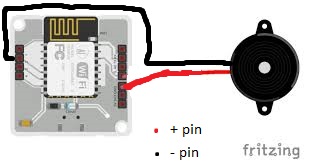
Connections :
Buzzer -->Bolt Wifi Module
+ ve pin (longer) ---> GND
- ve pin (shorter) ---> pin 1
Building
Step 1 :Be Ready with the circuit connections.
Connect the Bolt WiFi module to the computer/adapter using the USB cable.
Then power on the Bolt IoT module.
Step 2 :Create the account on the Integromat software.https://www.integromat.com/en/
Sign in to your account.
Click on a new scenario, Then.
Search and select Bolt IoT and enter your API key to connect the WiFi module.
To get your API KEY Click The Link To get it. https://cloud.boltiot.com/api_credentials
Enter your Device ID and select pin 1 as the buzzer is connected to this.
Choose state as HIGH to turn the buzzer on.
Next, we want to ring the buzzer for a few seconds. For this click on the tools icon (purple) and select sleep option.
Enter the amount of delay in seconds for the buzzer to remain on.
Click on add new module and again select Bolt IoT.
Select Write Digital Write Option in the command section.
Enter the Device ID and API key and select the 'LOW' state.
Now we have three modules in total which will look like this:
It's time to set up some conditions for our IoT alarm clock to go off...
Click on the little clock icon on the initial Bolt module.
As per the convenience, time can be set.
That's it. You have successfully completed all the procedures.
Now save your scenario by clicking on the save button.
To test the alarm. Click on the run once button.


Comments