



Hardware components | ||||||
 |
| × | 1 | |||
 |
| × | 1 | |||
 |
| × | 1 | |||
 |
| × | 1 | |||
 |
| × | 1 | |||
 |
| × | 1 | |||
 |
| × | 1 | |||
 |
| × | 1 | |||
Software apps and online services | ||||||
 |
| |||||
 |
| |||||
Have you wonder what if you have the power or technology to control all home appliances just by the touch of your phone. Well, it's not just a dream we can make it happen using IoT. I got the inspiration for this project from my summer days I was coming home from the hot and tiring day all I wanted was a cold breeze of air and I was wishing for AC to be turned on when I come back But of course, it was not and it kept me thinking that what if we make an app to control lights, fan, ac over the internet and turned it on or off from your phone. So this project is just a start where we will control light over the internet using a phone app hope you'll enjoy it.
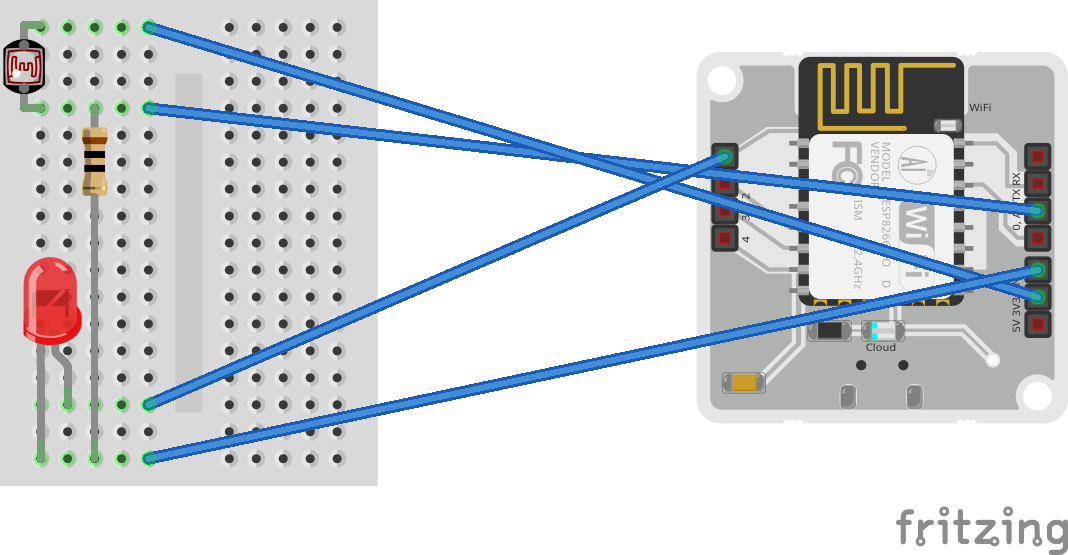
INSTRUCTIONwe are going to use LDR, LED, Resistor, and some jumping wires on the breadboard
STEP 1: Attached LDR and LED on the breadboard then using jumping wires connect one leg of LDR to the"3v" port on the bolt module.
STEP 2: Then Attached legs of the resistor to another leg of LDR and to the larger leg of the led
STEP 3: Then connect the leg of LDR to the "A0" port on the bolt module so that the analog signals could convert into the digital signals.
STEP 4: Connect the larger leg of LED to port "1" on the bolt module and shorter leg to "GND" port.
STEP 5: Write down the code(given below) in the ubuntu server installed in a virtual box. if you don't have a virtual box you can download it from here.
STEP 6: Now go to an ubuntu server and create two files namely config.py and ldr_alert.py in my case. In the config.py file, you have to mention all the details as given below.
SID = 'You can find SID in your Twilio Dashboard'
AUTH_TOKEN = 'You can find  on your Twilio Dashboard'
FROM_NUMBER = 'This is the no. generated by Twilio. You can find this on your Twilio Dashboard'
TO_NUMBER = 'This is your number. Make sure you are adding +91 in beginning'
API_KEY = 'This is your Bolt Cloud accout API key'
DEVICE_ID = 'This is the ID of your Bolt device'
and copy the code given below into ldr_alert.py (you can give any name you like to the file).
SCHEMATICSOnce the whole setup is done power on the bolt module and run the code. according to the code, LDR will capture the intensity of lights every 15 sec and if the LDR crosses the max_limit then it will turn off the lights and if LDR falls below the min_limit then the lights will be turned on automatically. Not only that but you will get a notification when any of the above happens and then you can control the lights from your mobile phone according to your liking.
Video


Comments