



Hardware components | ||||||
_ztBMuBhMHo.jpg?auto=compress%2Cformat&w=48&h=48&fit=fill&bg=ffffff) |
| × | 1 | |||
 |
| × | 1 | |||
 |
| × | 1 | |||
Software apps and online services | ||||||
 |
| |||||
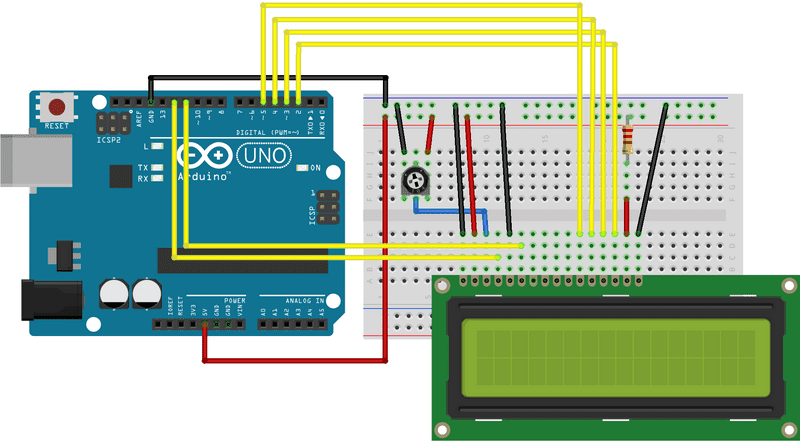
- FIrst make the circuit as per the schematics. This circuit is the basic interface of LCD display with Arduino Uno
- Go To Arduino IDE install "Liquid Crystal Libary"
- Now open examples -> LiquidCrystal -> SerialDisplay
- Select Port Number and Board Type upload the code
- After Uploading Open the python File
- Before Executing Install the packages and Enter the Arduino Port No
- Make Sure "INTERNET IS TURNED ON"
- Now run the python file
- Now you can see output in the LCD display


Comments