



Modern HVAC control is no longer limited to changing the temperature from a thermostat mounted on the wall. A connected thermostat can combine HVAC equipment control, room sensing, scheduling, remote access, and energy information in one system.
For this project, I wanted to build a practical smart HVAC control setup for North American 24VAC systems using the OWON PCT5231 WiFi Thermostat.
The goal is to demonstrate how a thermostat can work with a heat pump or conventional HVAC system while also using wireless room sensors to improve temperature control in different areas of a home.
Rather than treating the thermostat as a standalone smart-home device, this project focuses on how the thermostat actually fits into the HVAC system.
What Are We Building?The basic architecture is straightforward:
Remote Room Sensors → PCT5231 Thermostat → 24VAC HVAC System
At the same time:
PCT5231 → WiFi → Mobile App
The thermostat acts as the control point between the user, room conditions, and HVAC equipment.
In this project, the PCT5231 is used as a 24VAC WiFi thermostat capable of controlling conventional heating and cooling equipment or a heat pump system.
One limitation of a traditional thermostat is that it normally measures temperature only where the thermostat is installed.
For example, a thermostat may be mounted in a hallway while the bedroom upstairs becomes warmer or colder than the measured hallway temperature.
The PCT5231 can work with up to 10 remote sensors, allowing temperature information from different rooms to be incorporated into HVAC control.
The sensors can also be prioritized through the thermostat's programmable schedule. This makes it possible to focus temperature control on different areas at different times of the day.
For example, the living area may be prioritized during the day, while a bedroom sensor can become more important at night.
The thermostat connects directly to compatible low-voltage HVAC control wiring.
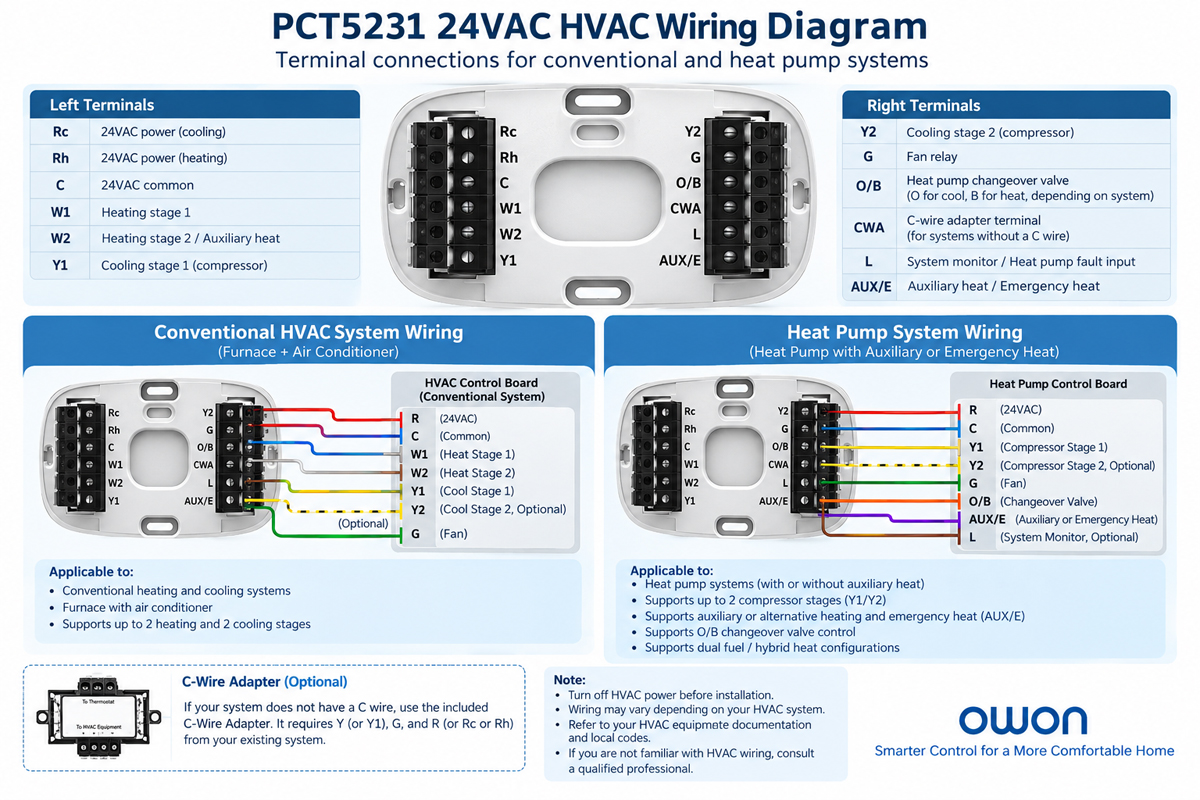
The PCT5231 provides terminals including:
- Rc / Rh — 24VAC power
- C — 24VAC common
- W1 / W2 — heating or auxiliary/alternative heating stages depending on system configuration
- Y1 / Y2 — compressor stages
- G — fan relay
- O/B — heat pump changeover valve
- CWA — C-wire adapter terminal
For a conventional HVAC system, the PCT5231 supports up to two heating and two cooling stages.
For a heat pump configuration, it supports two heating stages, two cooling stages, two stages of auxiliary or alternative heating, as well as emergency heat.
This makes the same thermostat architecture useful for several common North American HVAC configurations.
Heat pump systems require additional thermostat logic compared with basic furnace and air-conditioning systems.
For example, the O/B terminal controls the heat pump changeover valve, while Y1 and Y2 can be used for compressor stages.
The thermostat also supports auxiliary or alternative heating and emergency heat configurations.
Another useful application is a dual fuel or hybrid heat system, where a heat pump operates alongside an alternative heating source such as a furnace.
For a closer look at the hardware used in this project, see the
specifications for the OWON PCT5231.
Connecting the Thermostat to WiFiThe PCT5231 supports 2.4GHz WiFi (802.11 b/g/n) and uses Bluetooth during WiFi pairing.
Once connected, the thermostat can be accessed remotely through the associated mobile application.
This adds another layer to the HVAC control system:
HVAC Equipment
↓
PCT5231
↓
WiFi Network
↓
Mobile Application
Instead of requiring every temperature adjustment to be made at the wall, users can remotely interact with the thermostat through the connected system.
Scheduling Temperature and Sensor PrioritiesA connected thermostat becomes more useful when control is automated around the occupants' daily routine.
The PCT5231 supports a 7-day customizable Fan / Temperature / Sensor schedule.
This means a schedule can control more than the target temperature. Different remote sensors can also be prioritized during different periods.
A simple example might look like this:
Time
Priority Area
HVAC Goal
Morning
Bedroom / Living Area
Morning comfort
Daytime
Living Area
Normal daytime control
Evening
Living Area
Evening comfort
Night
Bedroom
Sleeping comfort
The thermostat also provides Permanent Hold, Temporary Hold, and Follow Schedule modes when manual changes are needed.
Preheating, Fan Circulation and Energy InformationAnother useful part of connected HVAC control is moving beyond simple ON/OFF temperature commands.
The PCT5231 includes preheat and precool functionality designed to help the system reach the scheduled temperature by the desired time.
A fan circulation mode can periodically operate the HVAC fan, while adjustable temperature swing provides another parameter for controlling HVAC cycling behavior.
The thermostat also provides daily, weekly, and monthly energy usage information, along with maintenance reminders and a lock function.
These functions illustrate how a modern thermostat can combine HVAC equipment control with additional monitoring and automation features.
Basic Installation WorkflowImportant: HVAC power should be turned off before thermostat wiring is changed. Wiring and configuration should follow the HVAC equipment documentation and thermostat instructions. If the system configuration is uncertain, installation should be handled or verified by a qualified HVAC professional.
Important: HVAC power should be turned off before thermostat wiring is changed. Wiring and configuration should follow the HVAC equipment documentation and thermostat instructions. If the system configuration is uncertain, installation should be handled or verified by a qualified HVAC professional.
A typical project workflow is:
1. Identify the HVAC system
Determine whether the equipment is conventional HVAC, a heat pump, or a dual-fuel configuration.
2. Identify the existing thermostat wiring
Check the existing terminals before disconnecting the old thermostat.
3. Mount and wire the PCT5231
Connect the appropriate 24VAC control wires according to the HVAC configuration.
4. Configure the HVAC type
Set the thermostat according to the actual heating and cooling equipment.
5. Connect WiFi
Pair the thermostat with the network and associated application.
6. Add remote sensors
Pair compatible sensors and determine which rooms should be prioritized.
7. Test HVAC operation
Verify heating, cooling, fan operation, and relevant heat pump stages before normal use.
What This Project DemonstratesThis setup demonstrates that a modern smart thermostat is really the intersection of several technologies:
HVAC control + sensing + wireless communication + scheduling + software
For homeowners, these technologies can provide more flexible comfort control.
For HVAC developers, smart-home companies, property technology providers, and system integrators, the same architecture also demonstrates how connected thermostat hardware can become part of a larger HVAC or building-control system.
About the HardwareThe thermostat used in this project is the OWON PCT5231, developed for North American 24VAC heating and cooling systems.
OWON develops IoT hardware including HVAC controls, sensors, gateways, and energy-management devices, and provides OEM/ODM development for connected-device applications.
More information about OWON's development and customization capabilities is available from the WiFi thermostat manufacturer
ConclusionThis project shows how a connected thermostat can bring together 24VAC HVAC control, heat pump operation, remote room sensing, scheduling, and WiFi connectivity.
The most important part of a smart thermostat installation is not simply getting the device online. The thermostat must first match the actual HVAC equipment, wiring, stages, and heating configuration.
Once that foundation is correct, connected features such as remote access, room sensors, schedules, energy information, and maintenance reminders can make the HVAC system easier to monitor and control.
For the PCT5231 setup shown here, the next step is to test different HVAC configurations and explore how remote sensor priorities can be used in multi-room applications.


Comments