/*

   This source code of graphical user interface
   has been generated automatically by RemoteXY editor.
   To compile this code using RemoteXY library 2.3.3 or later version
   download by link http://remotexy.com/en/library/
   To connect using RemoteXY mobile app by link http://remotexy.com/en/downloadr/
     - for ANDROID 4.1.1 or later version;
     - for iOS 1.2.1 or later version;
   This source code is free software; you can redistribute it and/or
   modify it under the terms of the GNU Lesser General Public
   License as published by the Free Software Foundation; either
   version 2.1 of the License, or (at your option) any later version.
*/

//////////////////////////////////////////////
//        RemoteXY include library          //
//////////////////////////////////////////////

// RemoteXY select connection mode and include library
#define REMOTEXY_MODE__SOFTSERIAL
#include <SoftwareSerial.h>

#include <RemoteXY.h>

// RemoteXY connection settings
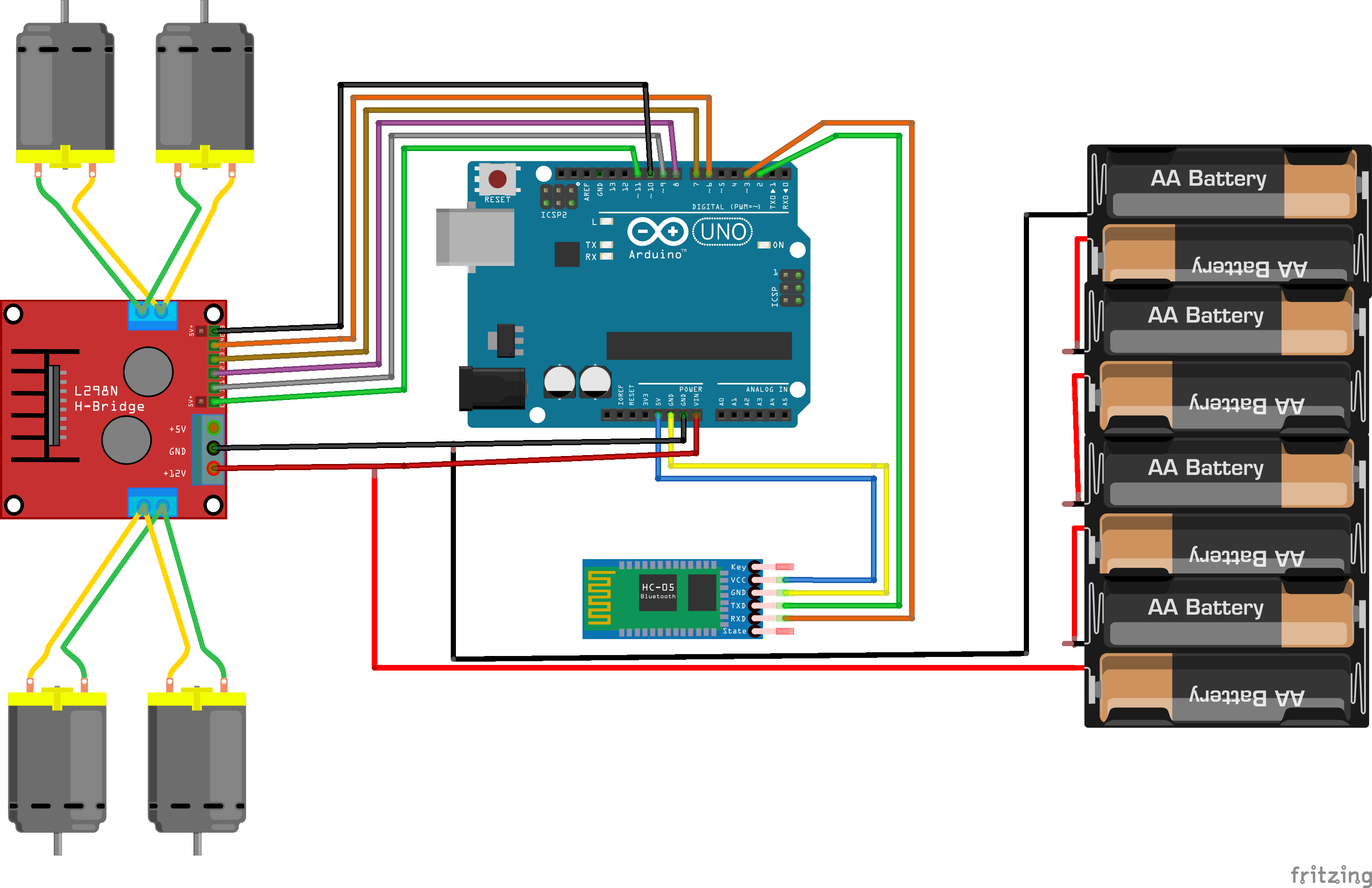
#define REMOTEXY_SERIAL_RX 2
#define REMOTEXY_SERIAL_TX 3
#define REMOTEXY_SERIAL_SPEED 9600


// RemoteXY configurate
#pragma pack(push, 1)
uint8_t RemoteXY_CONF[] =
  { 255,3,0,0,0,67,0,8,13,4,
  5,48,60,14,30,30,0,2,26,31,
  2,0,9,6,22,11,0,2,26,31,
  31,79,78,0,79,70,70,0,131,1,
  7,23,23,8,1,2,31,73,110,100,
  105,97,110,0,131,0,14,31,33,8,
  2,2,31,76,105,102,101,104,97,99,
  107,101,114,0 };

// this structure defines all the variables of your control interface
struct {

    // input variable
  int8_t joystick_1_x; // =-100..100 x-coordinate joystick position
  int8_t joystick_1_y; // =-100..100 y-coordinate joystick position
  uint8_t switch_1; // =1 if switch ON and =0 if OFF

    // other variable
  uint8_t connect_flag;  // =1 if wire connected, else =0

} RemoteXY;
#pragma pack(pop)

/////////////////////////////////////////////
//           END RemoteXY include          //
/////////////////////////////////////////////

#define PIN_SWITCH_1 13

//define right motor control pins
#define right_motor_A 8
#define right_motor_B 9
#define right_motor_speed 11 //enable pin

//define left motor control pins
#define left_motor_A 6
#define left_motor_B 7
#define left_motor_speed 10 //enable pin

//define two arrays with a list of pins for each motor
uint8_t RightMotor[3] = {right_motor_A, right_motor_B, right_motor_speed};
uint8_t LeftMotor[3] = {left_motor_A, left_motor_B, left_motor_speed};

//speed control of motors
void Wheel (uint8_t * motor, int v) // v = motor speed, motor = pointer to an array of pins
{
  if (v > 100) v=100;
  if (v < -100) v=-100;
  if (v > 0){

    digitalWrite (motor [0], HIGH);
    digitalWrite (motor [1], LOW);
    analogWrite (motor [2], v * 2.55);
  }
  else if ( v<0 ){

    digitalWrite (motor [0], LOW);
    digitalWrite (motor [1], HIGH);
    analogWrite (motor [2], (-v) * 2.55);
  }
  else{
    digitalWrite (motor [0], LOW);
    digitalWrite (motor [1], LOW);
    analogWrite (motor [2], 0);
  }
}


void setup()
{
  RemoteXY_Init ();

  pinMode (PIN_SWITCH_1, OUTPUT);

  //initialization pins
  pinMode (right_motor_A, OUTPUT);
  pinMode (right_motor_B, OUTPUT);
  pinMode (left_motor_A, OUTPUT);
  pinMode (left_motor_B, OUTPUT);

}

void loop()
{
  RemoteXY_Handler ();

  digitalWrite(PIN_SWITCH_1, (RemoteXY.switch_1==0)?LOW:HIGH);

  //manage the right motor
  Wheel (RightMotor, RemoteXY.joystick_1_y - RemoteXY.joystick_1_x);
  Wheel (LeftMotor, RemoteXY.joystick_1_y + RemoteXY.joystick_1_x);


}




_ztBMuBhMHo.jpg?auto=compress%2Cformat&w=48&h=48&fit=fill&bg=ffffff)



_3u05Tpwasz.png?auto=compress%2Cformat&w=40&h=40&fit=fillmax&bg=fff&dpr=2)
Comments